 |
VOOZH | about |
|
VOOZH | about |
We use cookies to improve your experience on our site. By using our site, you are agreeing to the collection and use of data as described in our Privacy Policy.
Cookie Settings×Table of contents
As you make API calls to different API providers, you’ll likely receive a wide range of response codes.
These can vary based on how providers implement HTTP status codes and the nature of the issues associated with the requests. So, theoretically, you can end up receiving countless response codes.
However, you’ll likely only run into a certain set of codes consistently.
We’ll help you understand and respond to each of the most common ones so that you can manage your API calls effectively over time.
But first, let’s align on the definition of an API response code.
It’s an HTTP status code that a server returns to a client for a given API request. The code reveals whether the request was successful or not, and, if not, provides additional context on the issue—enabling the client to debug the issue if it’s on their end.
{{this-blog-only-cta}}
Here are the top response codes to be aware of.
You’ll hopefully see this response code in the majority of your API calls. It simply means that the request was successful.
If you used a GET request, you should see the requested resource below the code, allowing you to easily pull the data. While if you used a method like PATCH, you might get a message that the data was updated on the server successfully and see the specific data that was updated.
This means that request was successful and a resource was created on the server.
Here’s a simplified look at how the HTTP header can look for a successful response:
The body can include details on the resource that was created.
This is associated with either POST requests, where a new resource is created on the server, or PUT requests, where a resource is either created or replaced on the server.
API providers may end up changing their resources’ locations over time, leading you to receive this error.
Fortunately, the API provider typically shares the resource's new URL within the response’s location header, which allows you to automatically redirect current and future requests for that resource.
You likely won’t need to debug this error, as most HTTP libraries handle redirects automatically.
This status code means that the requested resource is located in a different URL temporarily.
Similar to the 301 status code, the response includes the temporary URL within the location header.
Also like the 301 status code, there’s likely little you need to do. Your request will automatically redirect to the temporary URL, and all future requests will—and should—continue to use the original URL, as the redirect is temporary.
This means that the requested resource either doesn’t exist or isn’t available.
You can debug this in a few ways:
Related: Top integration issues to look out for
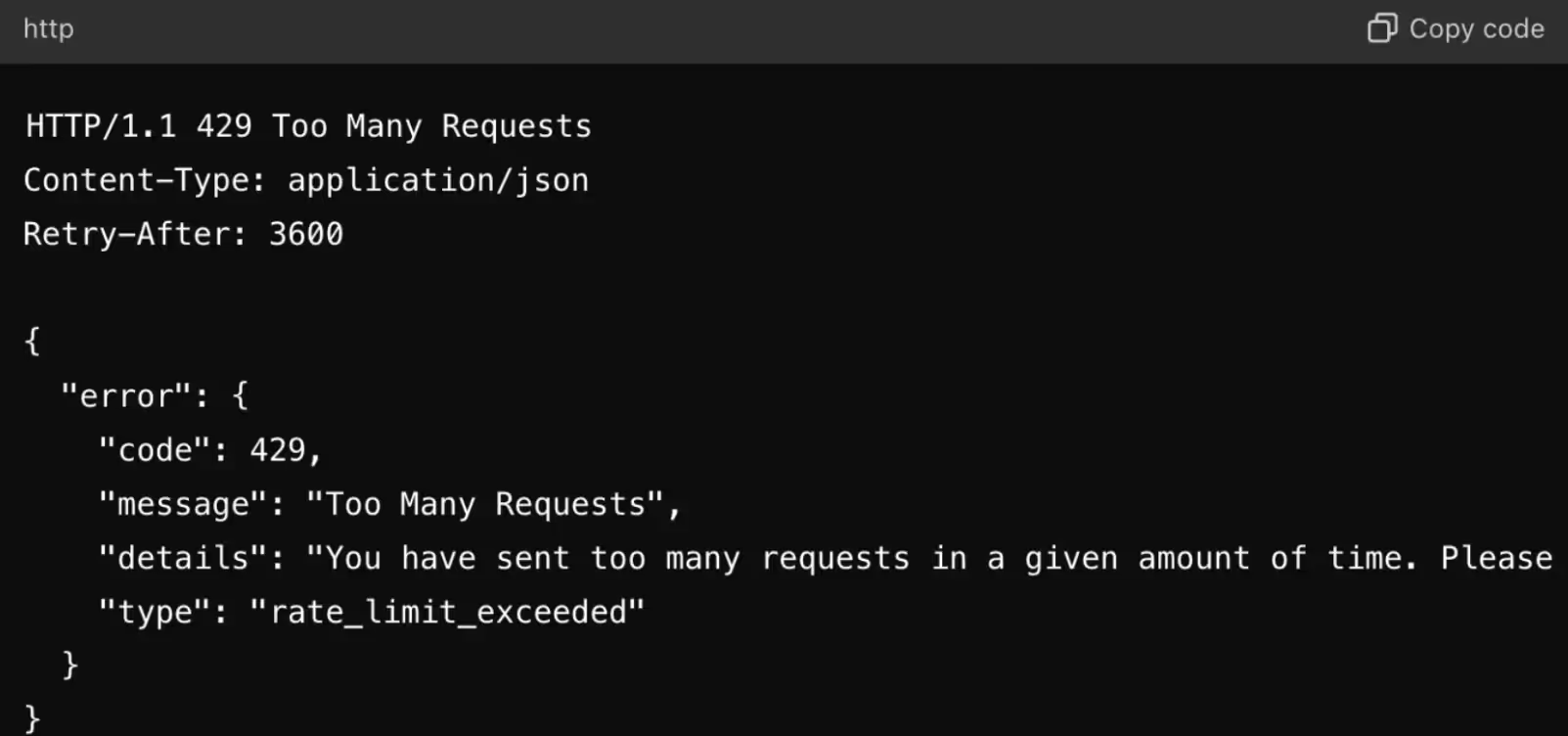
This indicates that you’ve reached your rate limit for calling a certain endpoint in the current rate limit window.
To troubleshoot this response code, you can:
This means that the request either doesn’t have authentication credentials or the credentials don’t have sufficient privileges to perform the desired action on the resource.
To manage this type of error, you can try any of the following:
Related: How to decide between building and buying integrations
The request couldn’t be completed successfully because of an issue on the server’s end.
To address this status code effectively, you can:
This generally means that a server is unavailable—whether that’s because it’s overloaded with traffic, undergoing maintenance, etc.
The API provider might include details on when you should retry the request in the header field “Retry-After”, where the timeframe for retrying can be presented in seconds or through a specific timestamp.
To address this status code effectively, you can:
Analyzing and responding to individual status code errors can be overwhelming if left to your engineers. This is especially true for customer-facing integrations, as you might be supporting dozens of integrations that are used by countless end-users (your customer’s customers).
To offload this work to your customer-facing employees and to help these employees identify, diagnose, and resolve integration issues effectively and easily, your team can use Merge’s Integration Observability tooling.
Learn more about this tooling and how our unified API lets you add hundreds of integrations to your product through a single build by scheduling a demo with one of our integration experts.
In case you have any more questions on API response codes, we’ve addressed several more below.
Use 400 when the request’s structure is invalid, missing required fields, or can’t be parsed; and use 422 when the request is well-formed but fails domain or business-rule validation (e.g. date range conflict).
As a general best practice, you should not only implement 400 and 422 error codes but also any other potential 4xx response codes. This enables the client to understand the source of an error, decide whether to retry the request, and—if the request should be retried—resend the request quickly and successfully.
A 202 response code means the server accepted the request but hasn’t finished processing it.
To see when the server finishes handling a request, you’ll have two options to choose from:
1. You’ll often see a status endpoint in the response that you can poll at a reasonable interval (and a max number of attempts) until the operation reaches a terminal state (success, failure, or timeout).
2. You might see a <code class="blog_inline-code">Retry-After</code> field in the response header that tells you when it’s safe to poll the endpoint. You can follow this value to time your follow-up status check.
The first option is most common. But if the endpoint also displays the <code class="blog_inline-code">Retry-After</code> value, you should prioritize the second option, as it provides more helpful instructions on when you should poll the endpoint.
A 401 Unauthorized response indicates that the client is unauthenticated or has provided invalid credentials, while a 403 Forbidden response means the client is authenticated but not authorized for the resource or action.
For a 401 response, the server provides a <code class="blog_inline-code">WWW-Authenticate</code> header. This header tells the client the type of authentication that’s needed and any required parameters so the client can retry the request with appropriate credentials.
For example:
WWW-Authenticate: Basic realm="admin"This tells the client that Basic authentication is required and that the credentials should correspond to the “admin” realm.
A 403 Forbidden response typically doesn’t include a <code class="blog_inline-code">WWW-Authenticate</code> header because the issue isn’t authentication. The client is recognized but still not allowed to perform the action, either due to insufficient permissions or because the server forbids the operation entirely.
Many APIs include rate-limit–related response headers to help clients pace their requests and avoid hitting rate limits.
Here are a few examples:
Merge lets you add hundreds of integrations to your product by simply building to its Unified API.





.avif)




.png)



