 |
VOOZH | about |
|
VOOZH | about |
We use cookies to improve your experience on our site. By using our site, you are agreeing to the collection and use of data as described in our Privacy Policy.
Cookie Settings×Table of contents
As you look to increase product adoption and mitigate security risks for customers, you’ll likely need to automate both the process of adding users to your product and removing them.
We’ll help you tackle both areas by breaking down how real-world companies have gone about automating these processes in their products. We’ll also share specific tools you can use to implement these automations.
But to start, let’s align on the definitions of automated provisioning and automated deprovisioning.
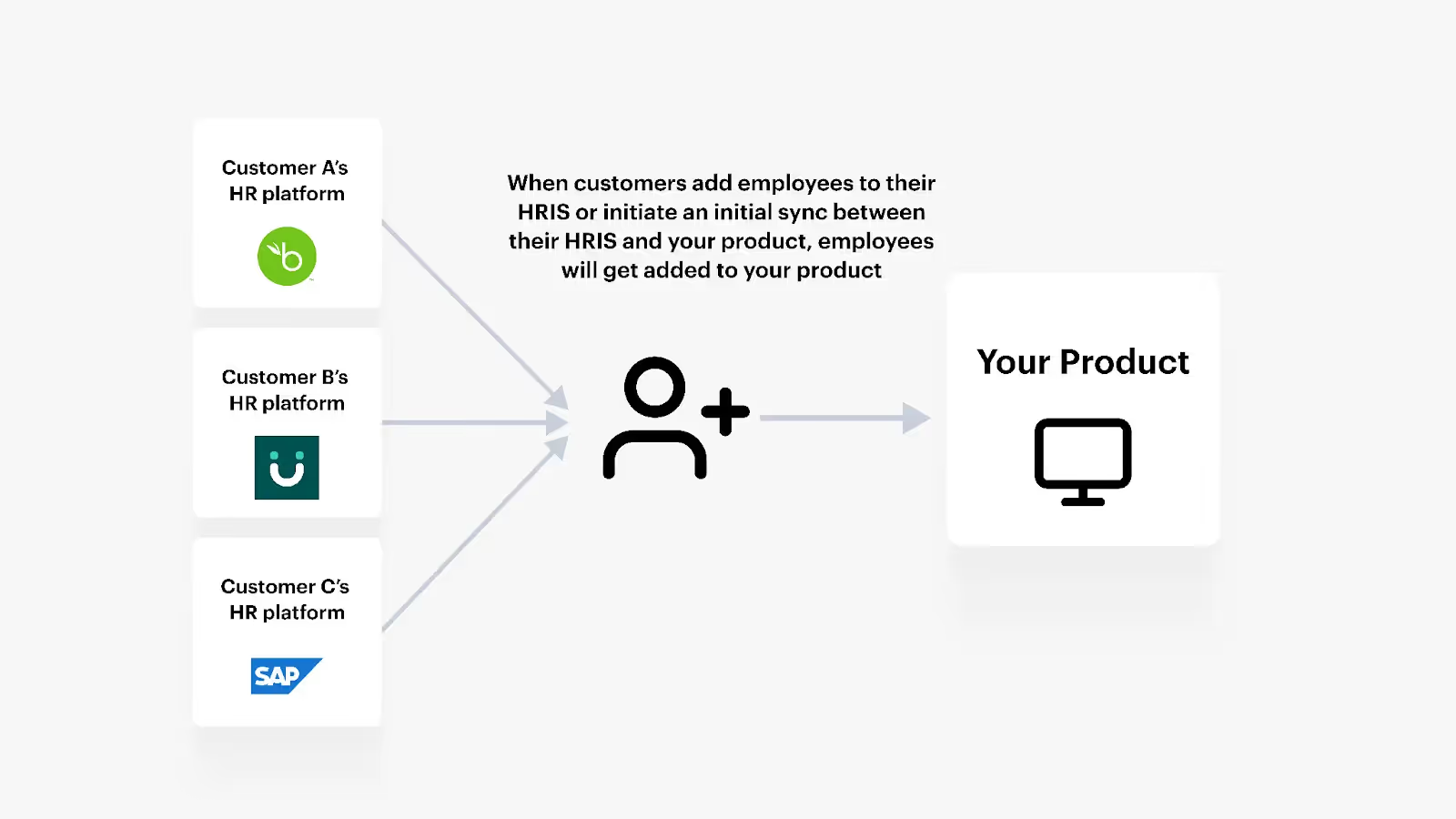
Automated provisioning refers to the process of adding users to your platform automatically. Certain fields associated with these users will also get populated, and they'll receive the right set of permissions by default.
This process is typically initiated when a customer adds an employee to an HRIS solution that's connected to your product or establishes an initial connection between your product and their HRIS solution.
Automated deprovisioning is simply the process of removing users from your platform automatically. This normally happens when a customer marks an employee as terminated in or removes them from the integrated HRIS.
Note: Automated provisioning can sometimes refer to both adding users to and removing users from your platform. We’ll restrict its definition to the former in this article.
Related: A guide to automated provisioning
To bring this definition to life, let’s walk through how a few companies provision and deprovision users seamlessly.
Ramp, a financial operations platform, needed to automate user provisioning and deprovisioning to ensure new hires could access the appropriate corporate cards as early as possible and departing employees lose access to theirs from the moment they leave.
To help facilitate this, Ramp integrates with customers’ HRIS solutions, which allows admin users to implement and use the following flows:
The admin could then add this user within Ramp in just a few clicks. And, based on the user’s information and the rules a customer sets for issuing corporate cards, the user would automatically get assigned the appropriate card(s) with the right spending limit(s).
Related: Examples of automating the user onboarding process
AngelList Equity, which offers modern cap table management for companies, needed to automate provisioning and deprovisioning so that new hires can receive their equity awards on time and employees stop receiving theirs once they leave.
To enable this, AngelList Equity can integrate with customers’ HRIS solutions and build flows where once a customer is added to an HRIS solution and they receive equity compensation, their profile gets created in AngelList Equity.
Similarly, once an employee is removed from or marked as terminated in the integrated HRIS, they are also marked as terminated in AngelList Equity automatically.
Similar to Ramp, BILL wanted to automate the provisioning and deprovisioning flows for their product—BILL Spend & Expense—to help new hires get a corporate card on day 1 with the appropriate spend limits. In addition, they wanted to help customers deactivate corporate cards for users that leave as soon as possible to prevent them from spending more money.
To help customers on both fronts, they built HRIS integrations and set up automated provisioning and deprovisioning flows:
In the case that several employees join the company in a short period of time, the admin in BILL Spend & Expense can also create specific groups to find and add the right set of users more easily and quickly.
Here are some of the top benefits to keep in mind:
In both cases, you’re better positioned to comply with data protection measures and regulations (e.g., GDPR) and avoid having bad actors harm your customers.
We’ve seen the latter benefit play out in the wild. For example, Paul Durocher, a Senior Sales Manager at Ramp, says that “One of the first questions a prospect asks is if we integrate with their HRIS application (to automate user provisioning). Being able to say we do has consistently helped us close more deals.”
Related: The benefits of HR integrations
As our examples highlighted, automating your provisioning and deprovisioning flows requires your customers to connect their HRIS solutions with your product.
To help you build these integrations, you can either use an embedded iPaaS or unified API solution.
An embedded iPaaS lets you build HRIS integrations through pre-built connectors, which likely accelerates your team’s development cycle. However, these tools can be complex and difficult to learn, often taking your technical personnel (e.g., engineers) weeks, if not months, to get comfortable using. In addition, the platform forces you to build one HRIS integration at a time, making it even more difficult to scale your integration builds.
A unified API solution, on the other hand, lets you build to a unified API once to access dozens of HRIS integrations, allowing the platform to be more scalable and offer a faster time to value.
In addition, Merge, the leading unified API solution, lets you access additional categories of integrations (accounting, ticketing, ATS, file storage, CRM), sync custom fields, monitor integrations effectively and easily, and more.
Learn more about how Merge can help you automate your platform’s provisioning and deprovisioning flows by scheduling a demo with one of our integration experts.






.png)



