 |
VOOZH | about |
|
VOOZH | about |
We use cookies to improve your experience on our site. By using our site, you are agreeing to the collection and use of data as described in our Privacy Policy.
Cookie Settings×Table of contents
As you look to optimize your API requests, you’ll likely consider different types of pagination, or methods of returning data from API calls.
One of your options is cursor-based pagination, or, put more simply, cursor pagination.
We’ll break down how this method works and its pros and cons so that you can better decide whether to use it for your API-based integrations.
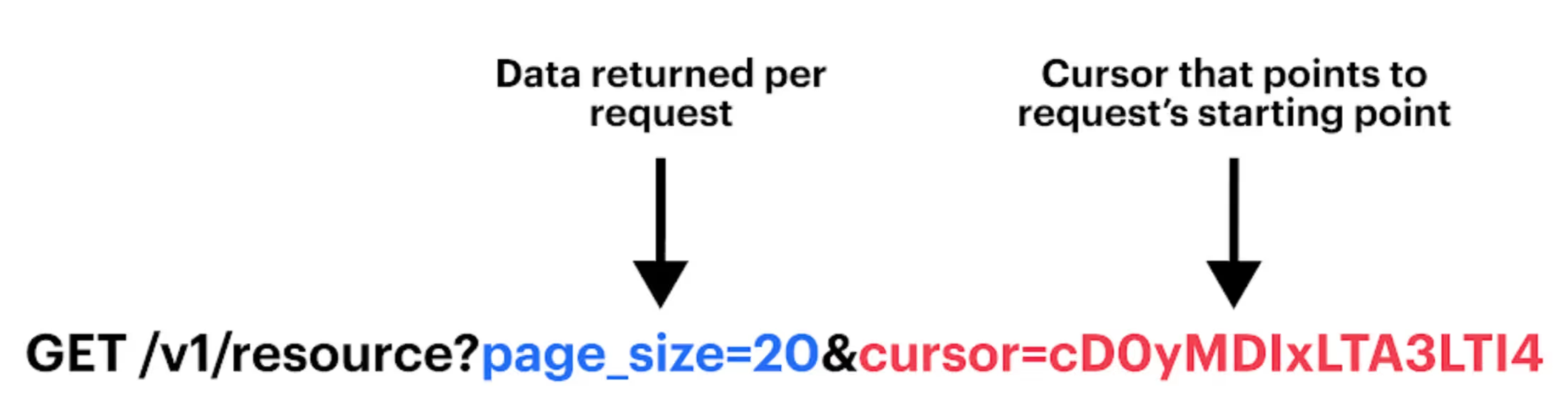
It’s a pagination method that lets you fetch data from a resource incrementally. The method involves a cursor that uses a unique identifier (e.g., timestamp) to fetch data in a specific order.
The cursor is typically included as a parameter in an API request, as is the amount of data that should be returned.
The response payload will include the next and previous cursors, which inform what the cursor should be for the following request (assuming there’s data left to be fetched).
Related: What is REST API pagination?
It’s easy to confuse cursor pagination with other approaches, particularly offset pagination.
However, offset pagination presents an entirely different way to fetch data; it lets you determine the starting point for returning records and the number of records to retrieve from a given request.
You’ll likely need to evaluate their respective pros and cons before choosing between them. But in some cases, you may not have an option; the API provider may force you to use a specific approach.
{{this-blog-only-cta}}
To help bring our definition of cursor pagination to life, let’s break down a few examples.
Say you want to fetch support tickets and want the cursor to be based on the time a ticket gets created. That way, you can collect all the tickets that get created over time. You’ll also want each request to fetch a certain amount of ticket data.
Here’s an example of a follow-up API request:
GET /api/tickets?page_size=15&cursor=eyJjcmVhdGVkX2F0Ij
Let’s also imagine that you want to gather all the employees at your organization via cursor pagination.
You can use hire date as the cursor to ensure every employee gets accounted for, and you can limit the employee data that gets collected for each response by a certain figure.
Here’s how a noninitial request can look:
GET /api/employees?page_size=10&cursor=eyJoaXJlX2RhdGUiO
Related: Best practices for performing API pagination
Finally, if you want to collect your business’ sales orders, you can use cursor pagination to prevent any transaction from slipping through the cracks.
The cursor can be set as the order date and, like our other examples, the number of orders retrieved per request can be limited by a predefined number.
Here’s how you can structure a request that comes after the first one:
GET /api/sales_orders?page_size=5&cursor=eyJvcmRlcl9kYXRlIjoiMj
To help you decide whether you should implement cursor pagination, it’s worth understanding and weighing the approach’s pros and cons.
Related: Benefits and drawbacks of keyset pagination
Merge, the leading unified API solution, lets you connect your product with hundreds of 3rd-party SaaS applications through the platform’s unified API.
This means you only have to consider how Merge’s Unified API handles pagination (among other items, like rate limits and authentication), helping you scale your integration builds more quickly and maintain them more easily.
You can learn more about Merge’s Unified API, among the platform’s other features, by scheduling a demo with one of our integration experts.
Simply build to Merge's Unified API to add hundreds of API-based integrations to your product.




.png)



