 |
VOOZH | about |
|
VOOZH | about |
We use cookies to improve your experience on our site. By using our site, you are agreeing to the collection and use of data as described in our Privacy Policy.
Cookie Settings×Table of contents
As you look to delight clients and attract new business, you likely have a variety of levers to pull from; this includes anything from pricing changes to product enhancements.
Based on buyer’s purchasing criteria, product integrations—otherwise referred to as external system integrations—should also be top of mind.
We’ll walk through everything you need to know about external system integrations; this includes the use cases they can support, the benefits they provide, and a way to build them. But first, let’s align on its definition.
It’s any integration that’s built between your product and a 3rd-party API. These integrations can be built in-house or through a 3rd-party solution.
Related: A guide to native integrations
Here are just a few powerful external integration use cases:
Asking clients to provision and deprovision users in your product manually can quickly turn into a nightmare.
These activities are extremely time intensive to perform at scale, and they’re bound to cause issues for clients. For example, your clients may forget to provision certain users and/or fail to deprovision former employees.
To save your clients time and to ensure employees are provisioned and deprovisioned correctly, you can integrate your product with clients’ HRIS solutions and build the following auto-provisioning workflow: Once an employee in an HRIS is added or removed from the HRIS, they are also added or removed from your product. Similarly, if certain employee fields in the HRIS change, these changes can get reflected in their corresponding profile in your product (which can potentially alter their level of permissions in your product).
Related: Integration stats you need to know about in 2024
Let’s say you offer an event management platform that—in addition to hosting events—helps you promote any event and collect registrants.
To help your clients nurture event registrant leads effectively, you can integrate your product with their marketing automation solution.
As part of the integration, you can sync specific information that the prospect provides, like their full name, company name, why they’re interested in the event, etc. Your marketing team can then use these insights to nurture the leads even more effectively (e.g. segmenting them by the topics they’re interested in and adding them to nurture campaigns that are tailored to their areas of interest).
Related: Cloud integration examples worth adopting
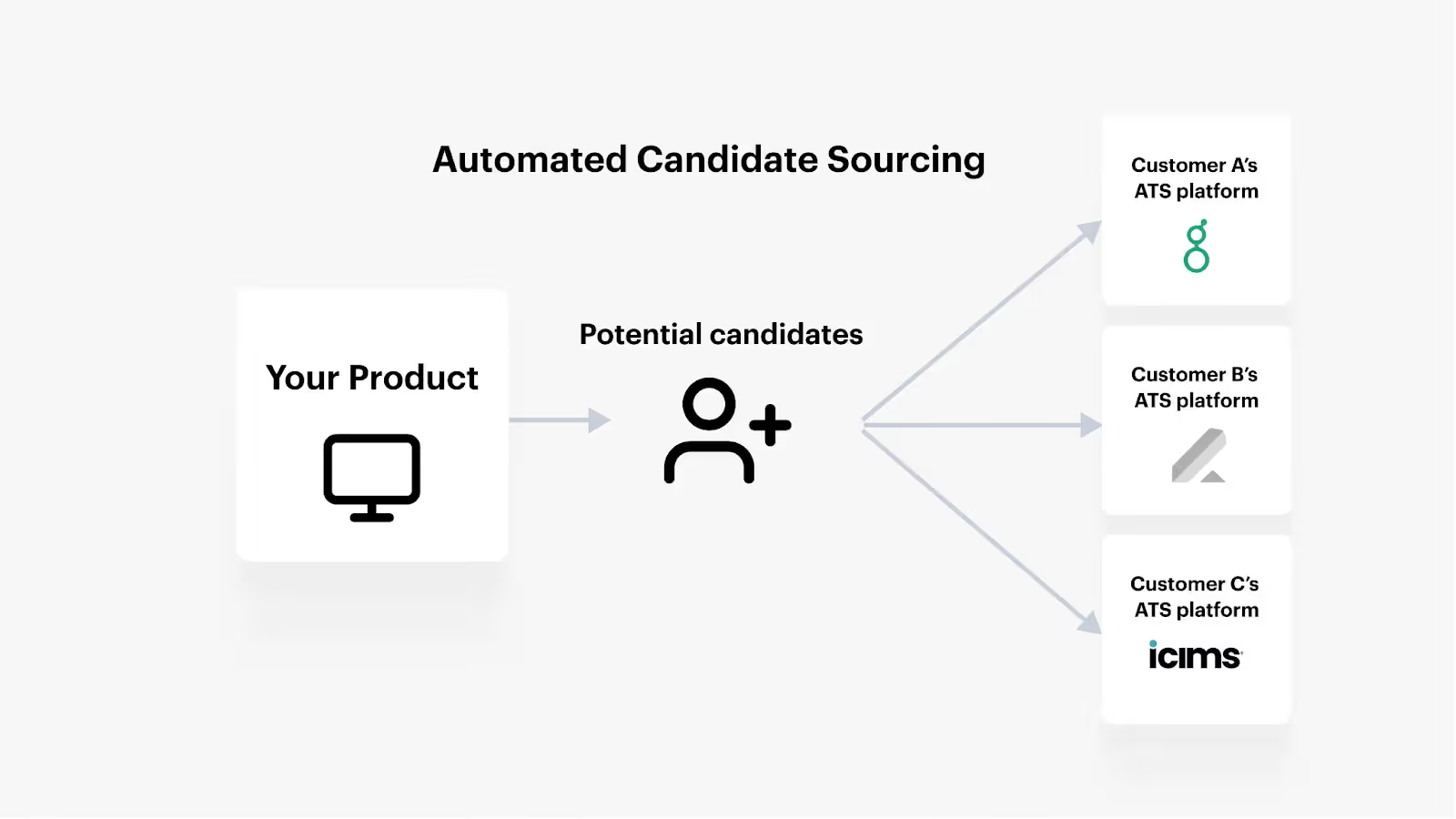
Now, let’s imagine you offer a solution that helps recruiters identify strong candidates for open roles.
Instead of forcing recruiters to add these candidates to their ATS solutions manually, you can integrate your product with clients’ ATS solutions and implement the following sync: Once a candidate is recommended in your product and the recruiter approves it (e.g. they click an “Approved” button in your product's UI), the candidate gets added to the ATS solution.
Specific fields, like the candidate’s full name, job title, and employer, can also get added to their ATS profile instantly, all but ensuring that your recruiters have all the context they need to reach out.
Here are some of the benefits of external system integration:
As you can tell from our examples, external system integrations can help clients avoid tedious, time-consuming, and error-prone tasks. This allows them to focus on more high value ways to leverage your product instead, which not only benefits them but also your chances of retaining their business.
As mentioned earlier, buyers are often looking for solutions that provide seamless integrations with their other SaaS applications. If your product stands out in its integration offerings, you, therefore, have a higher chance of winning their business.
Organizations across specific regions, industries, and sizes often rely on a specific set of applications in a given software category. For instance, a small business might use Gusto as their HRIS while an enterprise organization might use Workday.
If you can offer integrations that cater to the markets you’d like to expand into, you’re likely to gain traction more easily.
Building powerful and personalized AI features in your product ultimately requires feeding your AI engine a high volume of data from clients’ applications over time.
External system integrations can help support exactly that, whether it’s getting data from clients’ CRM systems, HRIS solutions, ticketing tools, file storage applications, etc.
Related: How integration data can fuel a product’s AI features (3 examples)
Merge lets you build hundreds of integrations across popular software categories—from CRM to HRIS to ATS to file storage—through a single unified API.
Merge also provides integration maintenance support and management tooling to ensure that your integrations are reliable and perform at a high level over time.
You can learn more about Merge by scheduling a demo with one of our integration experts.







.png)



