 |
VOOZH | about |
|
VOOZH | about |
We use cookies to improve your experience on our site. By using our site, you are agreeing to the collection and use of data as described in our Privacy Policy.
Cookie Settings×Table of contents
Traditionally, development teams that needed to build customer-facing integrations had only one choice: building it themselves. While some integrations might take a matter of days, others took weeks or months. And then each new integration required a similar amount of effort and time.
Related: What, exactly, are product integrations?
Today, there are several options that development teams have when they want to offer integrations to their customers. We'll cover the five most common approaches:
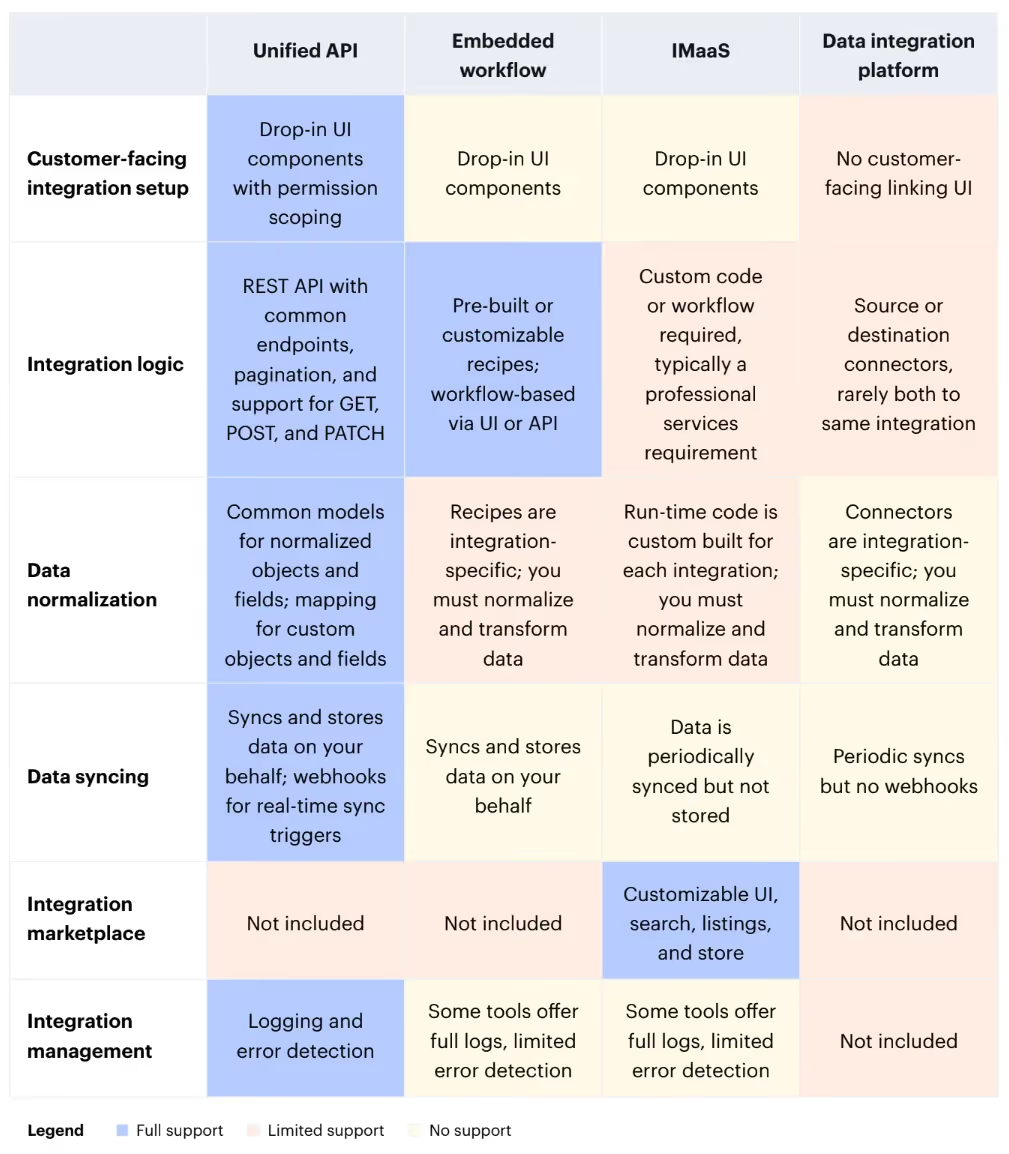
Each approach is optimized for solving different problems, so it is useful to compare the overall functionality of each approach to get a sense for which matches with your needs. The following table includes modules of functionality, for an at a glance view. Read on below for the details of each approach.
In comparison to other approaches, Unified APIs prioritize an API-first, developer friendly approach. You'll interact with an API rather than recipes (workflow tools) or connectors (data integration tools). Most importantly, Unified APIs normalize data across integrations, to allow for easy support for multiple integrations, that no other approach provides.
Embedded workflow tools like Workato, Tray, and Paragon grew out of workflow builders originally built for internal integrations. By adding in embeddable components, these tools have adapted their products to serve development teams, rather than their typical operation team users (the focus of tools such as Boomi, Celigo, Mulesoft, and Zapier). The embeddable components include integration linking (authentication flows), customizable workflow UI, and audit logging.
Embeddable workflows can be very helpful where each customer's integration needs to be bespoke and can have their own workflow. They fall short, however, when trying to build multiple integrations with similar functionality, as they don't normalize or transform data for you. You're responsible for understanding the differences across platforms and adapting the workflow recipes yourself.
Integration marketplaces such as Pandium and APIHub are focused on distribution of integrations, including an embedded integration marketplace, customizable marketplace listings, discoverability, and monetization options. Integration marketplaces require custom code or custom workflows to populate their run time that powers the integration, written either by a developer or as part of a service engagement with the IMaaS vendor.
Related: How to decide between a Unified API platform and an integration marketplace as a service
Data integration platforms—including Airbyte, Census, Fivetran, Hightouch—move data between applications, databases, and data warehouses via data connectors. They tend to focus on loading data to databases, a process called ETL, from a variety of sources. Reverse ETL tools focus on the opposite data flow, from databases to various SaaS tools.
Data integration platforms focus on popular data sources but may have limited coverage of long-tail data connectors. They are built for one-to-one, source-to-destination connections and do not normalize data across multiple sources (i.e. SaaS tools) into a specific destination (i.e. your product).
Building integrations one-by-one is always an option. For each integration, you'll want to consider how much development time it will take to release it in production and then how much engineering support you'll need to expend over time to keep the integration functional and updated.
Building integrations can vary widely, though in most cases it takes weeks to months. You'll need to budget for adding an authentication UI, the data sync via API, polling, error handling, and logging. In addition, if you plan to build multiple customer-facing integrations, you'll need to budget for data normalization and transformation. In most cases, building and maintaining integrations yourself is a significant constraint on the number of valuable integrations you can offer to your customers.
Related: Best practices for polling API endpoints
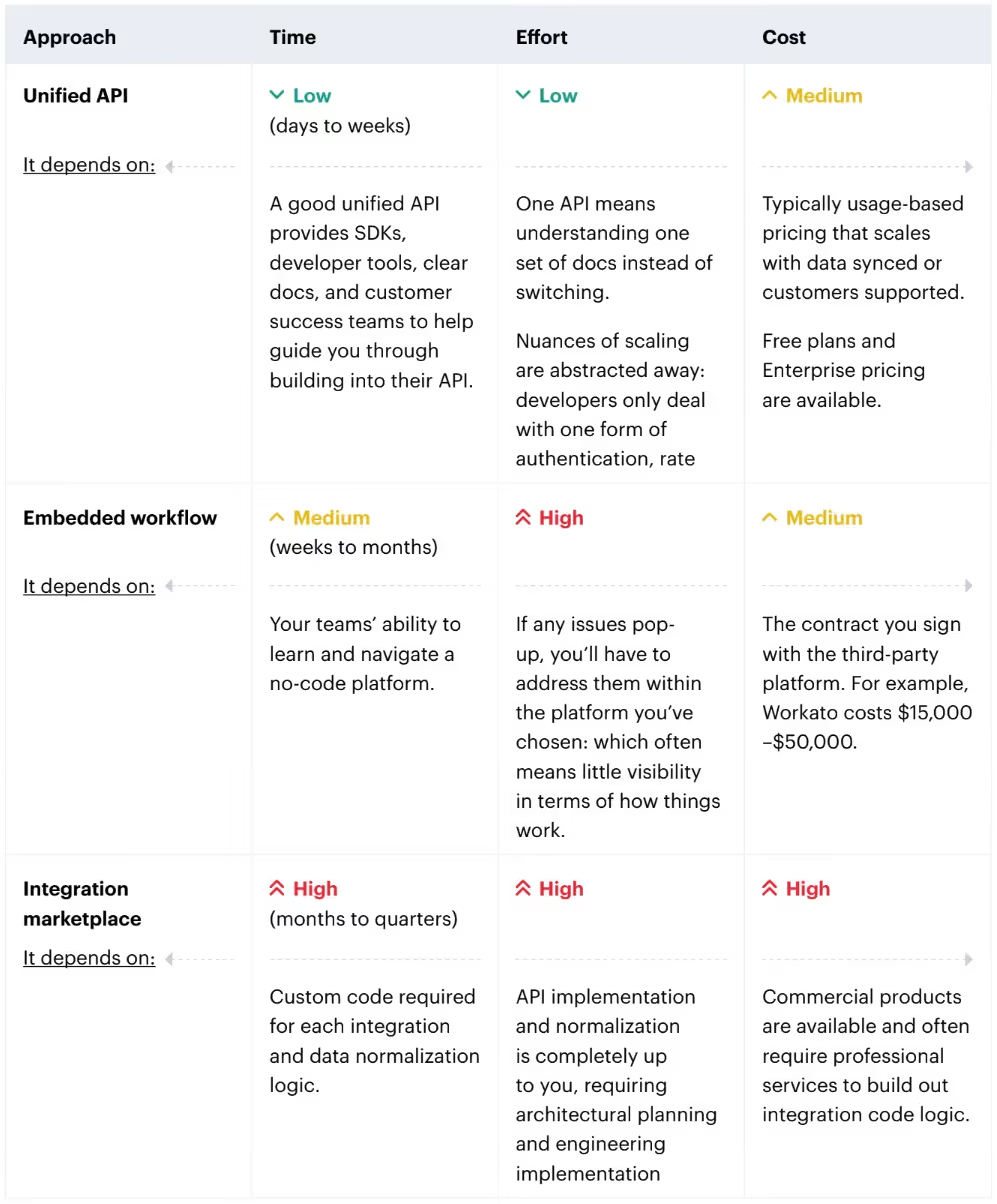
Given these multiple approaches, which is best for you? It all breaks down to the time it takes to build and maintain integrations, the effort for your team to manage these integrations over time, and the costs of software, infrastructure and people involved. Here's a quick comparison of relative tradeoffs between approaches:
Related: A guide to integration partnerships
If you're looking to go deeper on Unified APIs, check out these essential articles:
For all of this info in one comprehensive place, download the Guide to Unified APIs.





.png)



