|
VOOZH | about |
|
VOOZH | about |
Scaling up Kubernetes clusters can be complex, involving multiple components like networking, storage, worker nodes, and control planes. Maintaining high throughput, low latency, and optimal performance when scaling Kubernetes clusters requires efficient network configurations, load balancing, and the right resource allocation.
More importantly, inefficient scaling can lead to suboptimal resource utilization and unnecessary overhead costs.
Enter Amazon Elastic Kubernetes Services (EKS), an AWS-managed service that allows you to scale Kubernetes clusters without having to manage them.
Let’s dive in to better understand what EKS is and how it works.
Amazon Elastic Kubernetes Services or Amazon EKS is a managed service that allows users to run Kubernetes clusters on AWS without the need to install or maintain their own Kubernetes nodes or control plane. With EKS, AWS manages the complete scaling, deployment, and operations of your Kubernetes clusters so that you can focus on more important tasks—like running your applications.
Essentially, you get all the benefits of AWS infrastructure like scale, reliability, and performance with less operational overhead. Integrations with AWS networking and security services like Application Load Balancers (ALBs) and AWS Identity and Access Management (IAM) are also possible
EKS is designed to be highly secure, scalable, and available. It allows you to run Kubernetes applications on both AWS EC2 and AWS Fargate
It’s also important to note that applications that run on Amazon EKS are compatible with other applications that run on a standard Kubernetes environment. It’s also possible to migrate standard Kubernetes apps directly to Amazon EKS without changing any code.
EKS can be considered as the AWS solution for Kubernetes as a service. The solution aims to simplify the management of Kubernetes clusters present in AWS.
Amazon EKS integrates natively with a wide range of AWS services, making it easier to build, secure, and scale Kubernetes workloads. Key integrations include:
Elastic Load Balancing (ELB) – for distributing traffic to Kubernetes services
Amazon EC2 and AWS Fargate – for running worker nodes, either on managed instances or serverless
Amazon VPC – for secure, isolated networking and fine-grained traffic control
IAM (AWS Identity and Access Management) – for fine-grained access policies and Kubernetes RBAC
Amazon CloudWatch – for centralized logging, metrics, and observability
There are two main components of EKS:
Master Nodes/ Control Plane
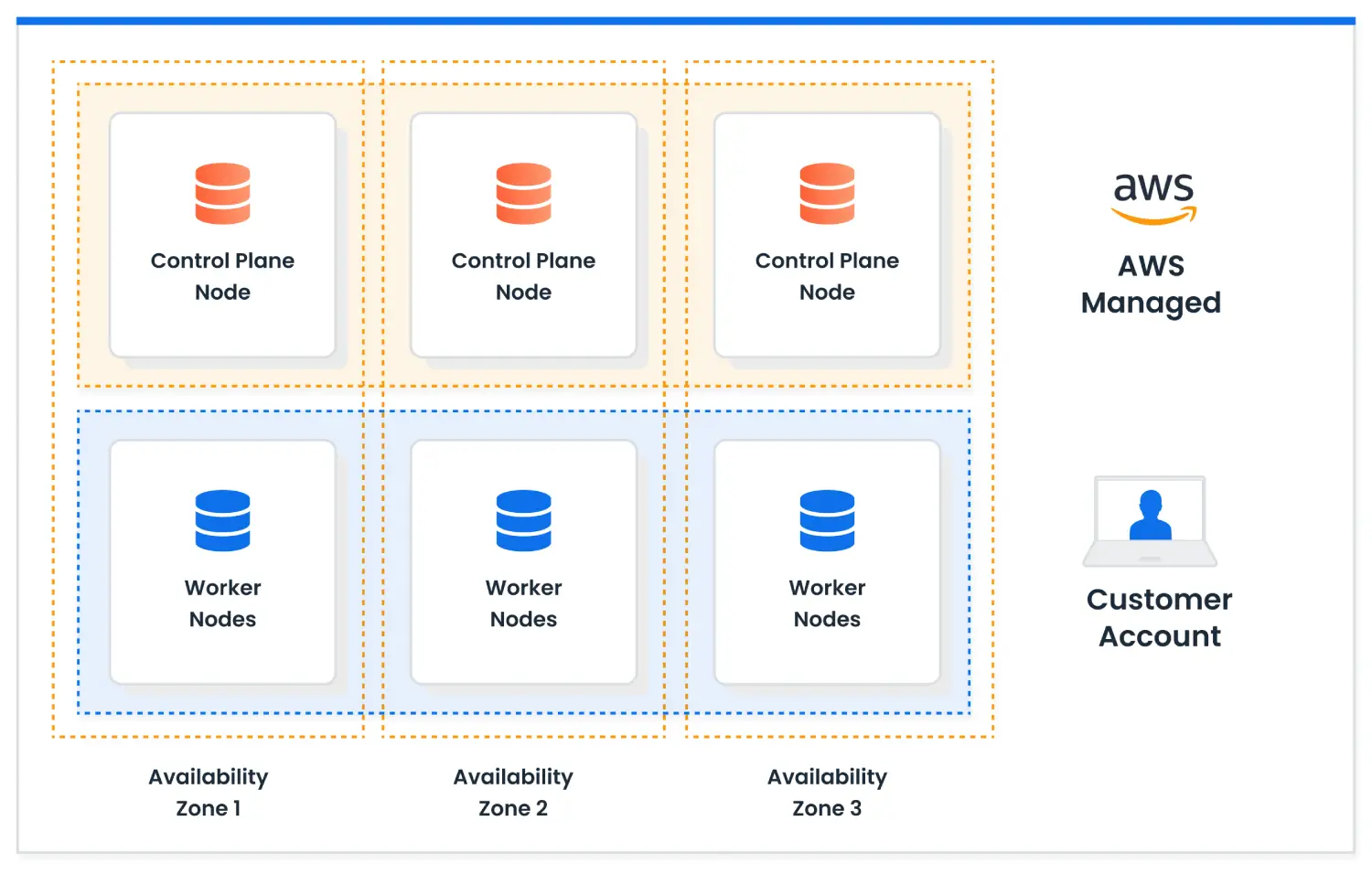
The control plane includes three Kubernetes Master nodes which run in three different types of availability zones. All the incoming traffic comes through a network load balancer to the control plane. It’s also important to note that AWS manages the control plane and it cannot be managed by the organization.
Worker Nodes/ Data Plane
Worker nodes are controlled and managed by the organization and they run on AWS EC2 instances in the virtual private cloud.
While the control plane is responsible for managing and monitoring where and when containers get started, worker nodes run on the organization’s containers and are responsible for running your applications.
With Amazon EKS, it becomes possible to:
When choosing a container orchestration service on AWS, many teams compare Amazon ECS and Amazon EKS. Amazon ECS is simpler to manage and tightly integrated with AWS, while Amazon EKS offers more flexibility and portability through Kubernetes — but requires more expertise and operational effort. Let’s summarize the key differences:
| Factor | ECS | EKS |
| Application Complexity | Suited for more simple applications, tightly integrated with AWS | Suited for more complex, microservices-oriented architectures |
| Team Expertise | Familiarity with AWS services | Knowledge of Kubernetes is required |
| Operational Overhead | Lower | Higher |
| Cost | Potentially lower with Fargate, depending on usage patterns | Includes the cost of the control plane, potentially higher |
| Portability | Less portable outside AWS | High portability, thanks to Kubernetes’ open standards |
| Community Support and Ecosystem | Benefits from strong support within the AWS ecosystem | Has a vast and active community, with a rich ecosystem of tools and integrations |
Amazon EKS makes it easy to run Kubernetes at scale, but without active management, costs can grow quickly. Here are five proven ways to keep your EKS costs under control:
Right-size your worker nodes — Match instance types and sizes to your actual workload demands. Overprovisioned nodes waste money, and underprovisioned nodes cause performance issues. Tools like Cluster Autoscaler or Karpenter can help automate right-sizing over time.
Use EC2 Spot Instances for fault-tolerant workloads — For stateless or batch jobs, running on Spot Instances can cut compute costs by up to 90%. Make sure your workloads can tolerate interruptions, and diversify instance types for better Spot availability.
Leverage AWS Graviton processors — Graviton-based EC2 instances offer significantly better price-performance than x86 instances for many workloads. Kubernetes supports mixed architectures, so you can gradually migrate to Graviton to save without major rewrites.
Optimize pod density — Schedule pods more efficiently to maximize CPU and memory usage across nodes. Poor pod packing leads to underutilized instances. Use tools like the Kubernetes Scheduler, Karpenter, and resource requests/limits tuning to pack more workloads per node.
Turn off unused clusters or scale down during off-hours — Development, testing, and staging clusters often sit idle at night or on weekends. Implement automation to shut down or scale down environments during low-usage periods to eliminate wasted spend.
nOps Compute Copilot constantly manages the scheduling and scaling of your EKS workloads for the best price and stability. Here are a few of the benefits:
Optimize your RI, SP and Spot automatically for 50%+ savings — Copilot analyzes your organizational usage and market pricing to ensure you’re always on the best options.
Reliably run business-critical workloads on Spot. Our ML model predicts Spot terminations 60 minutes in advance.
All-in-one solution — get all the essential cloud cost optimization features (cost allocation, reporting, scheduling, rightsizing, & more)
Discover how much you can save in just 10 minutes!
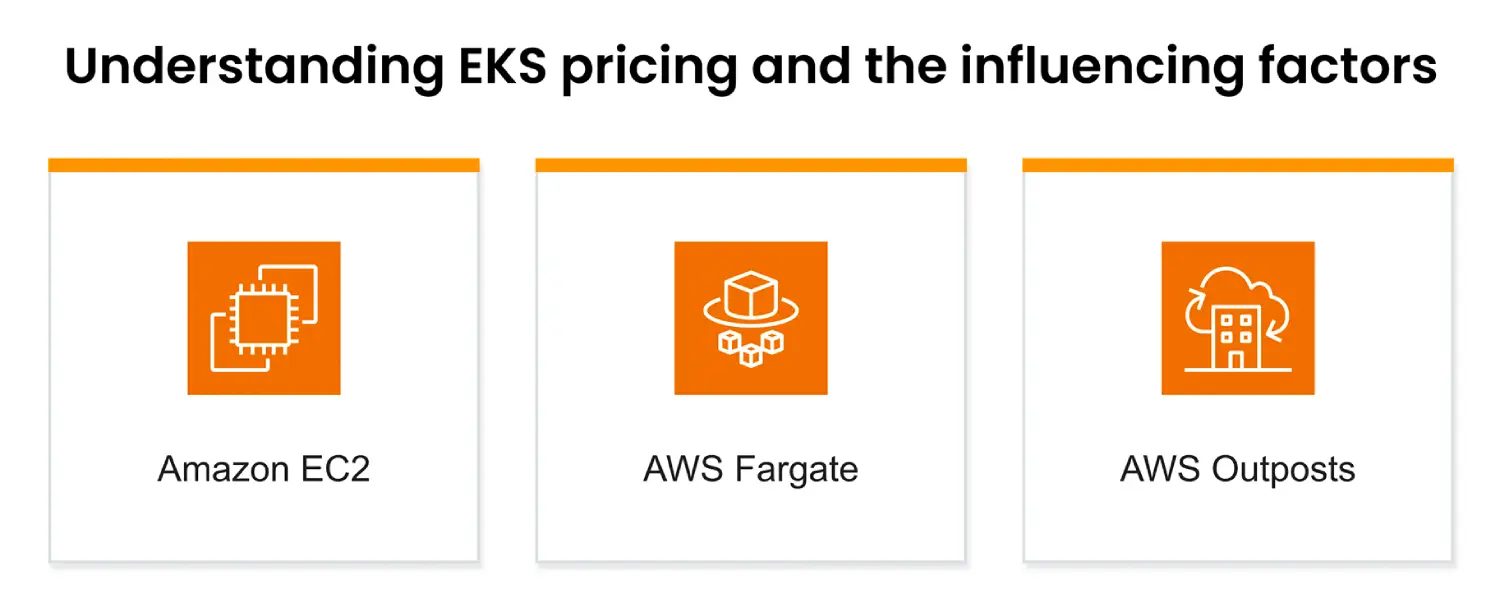
Amazon EKS cluster pricing is $0.10 per hour for each EKS cluster you run, in addition to the cost of underlying AWS resources such as EC2 instances, Fargate compute, EBS volumes, and load balancers. There are no upfront fees, and you only pay for what you use. If you run EKS Anywhere (on your own hardware), there’s no per-cluster fee. Additional charges may apply for optional services like EKS add-ons, data transfer, and PrivateLink. To optimize EKS costs, it’s common to use Spot Instances, Savings Plans, or Fargate Spot for workloads with flexible scheduling needs.
Generally, yes — AWS EKS pricing tends to be more expensive than ECS for most use cases. EKS incurs a per-cluster management fee ($0.10/hour) and typically requires more infrastructure and operational effort, including maintaining worker nodes and Kubernetes control plane resources. ECS, by contrast, does not charge a control plane fee and integrates more tightly with AWS services with less overhead.
What potentially makes EKS better than running Kubernetes yourself is that AWS handles the operational burden of running the Kubernetes control plane, including patching, upgrades, and high availability across multiple Availability Zones. EKS provides secure defaults, integrates deeply with IAM for authentication, and connects natively to AWS networking, storage, and compute services. It allows teams to focus more on workloads rather than infrastructure management, and enables scaling Kubernetes clusters in a production-grade environment without manually operating etcd, API servers, etc.
Amazon EKS can be more expensive and more complex to set up compared to simpler container services like ECS. You still manage worker nodes yourself (unless you use managed node groups or Fargate), and upgrades can be tricky if you have complex add-ons or customizations. Vendor lock-in can also be a concern if your EKS setup heavily relies on AWS-specific services like Load Balancer Controller, IAM roles for service accounts (IRSA), or PrivateLink networking. Additionally, EKS lags slightly behind upstream Kubernetes versions, meaning you might have to wait before accessing the latest Kubernetes features.
Kubernetes is an open-source container orchestration platform; Amazon EKS is a managed service that runs upstream Kubernetes on AWS infrastructure. With Kubernetes, you must install, configure, secure, and operate the control plane yourself — including API servers, etcd, and scheduler — plus provision compute resources. With EKS, AWS manages the Kubernetes control plane, offering automatic scaling, patching, and availability across multiple AZs. You still control your worker nodes (or use managed nodes or Fargate).
Last Updated: February 9, 2026, AWS Pricing and Services
Last Updated: February 9, 2026, AWS Pricing and Services