|
VOOZH | about |
|
VOOZH | about |
AWS offers multiple tools to help teams track, analyze, and control their cloud spend. Among the most widely used are AWS Budgets and AWS Cost Explorer, both part of the AWS Cloud Financial Management suite. At first glance, they seem to overlap, but their roles are quite different: Budgets is about setting and enforcing spend limits, while Cost Explorer is about analyzing and understanding spend patterns.
For engineering and finance teams, knowing when to use each tool — and where their limitations are — is critical for cost governance and forecasting. In this guide, we’ll break down the features, use cases, pros and cons, and key differences between AWS Budgets and Cost Explorer, before showing how more advanced platforms can fill the gaps they leave behind.
AWS Budgets is an AWS cost management service that lets you create spending and usage plans for specific periods. It helps you compare your planned budget with actual spend and forecasted costs, giving you early warnings before overspending occurs.
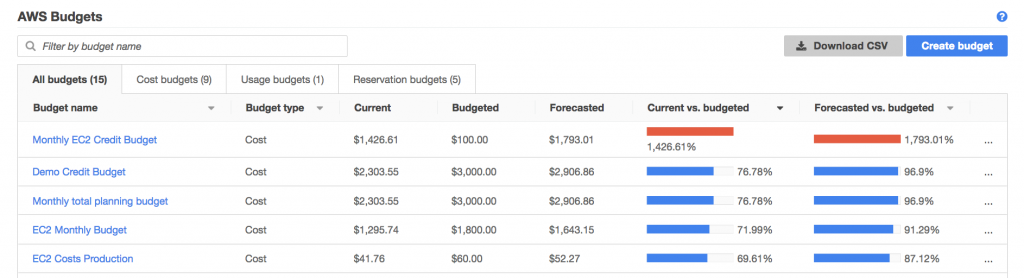
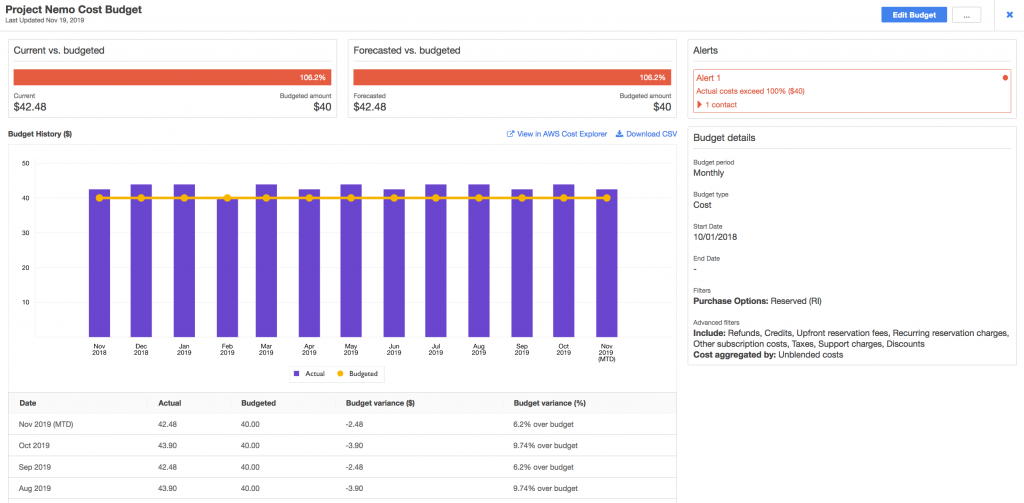
In the Budgets console, you can set up different types of budgets and see three views side-by-side: current spend, your budgeted amount, and AWS’s forecasted spend based on historical usage. This gives you a clear picture of how costs are trending against your plan.
AWS Budgets provides visibility into:
Types of budgets: Cost, usage, Reserved Instance (RI) utilization and coverage, Savings Plans utilization and coverage.
Data comparisons: Current usage and cost vs. budgeted spend vs. forecasted spend.
Forecasting: Projections based on your past 5 months of usage data.
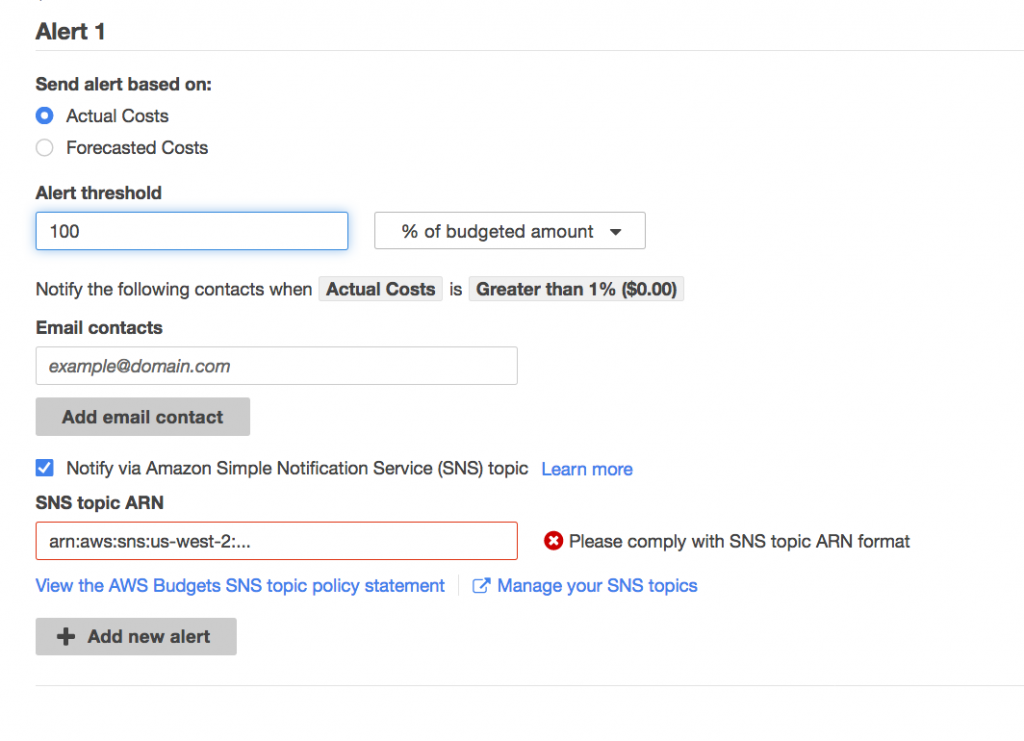
Alerts: Notifications when costs are forecasted to exceed, or have already exceeded, your budget thresholds.
Budgets emphasize cost governance by letting you configure proactive alerts and even automated actions:
Notifications can be sent by email, Amazon SNS, or AWS Chatbot (to Slack or Chime).
Automated actions can stop, start, or resize resources when spend crosses a threshold, such as pausing resources at 105% of budget.
This combination of monitoring, alerts, and automation makes AWS Budgets a tool for controlling costs before they spiral, rather than reacting afterward.
AWS Budgets is best for proactive cost governance and enforcement. It helps teams plan, monitor, and control spend before it gets out of hand.
| Use Case | How AWS Budgets Helps |
|---|---|
| Prevent overspending | Set thresholds (e.g., 80% of budget) and get notified when actual or forecasted spend approaches or exceeds them. |
| Monitor commitments | Track Reserved Instance and Savings Plans utilization/coverage to make sure prepaid commitments don’t go to waste. |
| Project costs | Forecast future spend using historical usage (requires at least 5 weeks of data). |
| Automate enforcement | Trigger automated actions (stop, start, resize resources) when budgets cross defined thresholds. |
| Service-specific control | Apply budgets to individual services (e.g., EC2, S3) for tighter cost guardrails. |
| Team-level governance | Use budgets alongside tagging to monitor spend by account, team, or project and enforce accountability. |
Pros
Proactive cost control: Lets you set budgets and get notified before overspending occurs.
Commitment tracking: Monitors utilization and coverage for RIs and Savings Plans.
Automation support: Can stop, start, or resize resources when thresholds are crossed.
Multiple budget types: Supports cost, usage, RI, and Savings Plans budgets.
Forecasting ability: Uses historical data to project costs for upcoming billing cycles.
Flexible notifications: Delivers alerts via email, SNS, or Chatbot to Slack/Chime.
Cons
Shallow granularity: Can’t easily allocate spend to products, features, or customers.
Forecasting limitations: Projections are based on only 5 months of data, which may be inaccurate for volatile workloads.
Manual upkeep: Managing dozens of budgets across services and accounts is time-consuming.
Data delays: Cost and usage data often lags by several hours, limiting real-time response.
Limited context: Provides cost numbers but not always the “why” behind spend.
No optimization guidance: Doesn’t suggest how to reduce costs — only tracks and enforces thresholds.
Difficult scaling: Becomes unwieldy for large orgs with complex multi-account setups.
Separate from Cost Explorer: Budgets can’t be created directly from Cost Explorer insights, requiring tool switching.
Let’s dive into each separate use case.
Use AWS Budgets when you need guardrails and enforcement, not just visibility. It’s best for organizations that want proactive alerts, commitment monitoring, or automated actions to prevent overspending before it happens.
Budget enforcement: When finance or leadership requires strict limits on spend per service, team, or account.
Commitment utilization: When you need alerts on RI or Savings Plan coverage/utilization dropping below thresholds.
Forecasted risk: When projected spend suggests you’ll exceed your budget and you want early warnings.
Governance-first environments: Ideal for organizations with compliance or budget accountability requirements.
Use Cost Explorer when you need analysis and insight, not strict enforcement. It’s best for digging into usage trends, understanding who or what is driving costs, and identifying opportunities to optimize.
Historical analysis: When you want to review spend over the past 13 months to find cost drivers.
Granular visibility: When you need to slice costs by account, service, region, or tags.
Optimization guidance: When you want AWS recommendations to reduce waste (e.g., RI/Savings Plans).
Trend identification: When engineering teams want to understand usage patterns over time.
Reporting needs: When stakeholders need custom reports or cost breakdowns for teams or products.
Let’s summarize the differences between Budgets and Cost Explorer with a side-by-side comparison:
| Category | AWS Budgets | AWS Cost Explorer |
|---|---|---|
| Primary Purpose | Set and enforce cost/usage limits with alerts and actions. | Analyze historical and current spend to understand cost drivers. |
| Time Orientation | Forward-looking (budgets + forecasts). | Backward-looking (historical analysis, up to 13 months). |
| Data View | Current, budgeted, and forecasted costs. | Historical and real-time cost/usage trends. |
| Alerts | Threshold-based (e.g., 80% of budget). | Cost anomaly detection and trend alerts. |
| Automation | Can stop, start, or resize resources when thresholds are crossed. | No direct enforcement — insights only. |
| Optimization | No built-in recommendations. | Provides AWS optimization recommendations (e.g., RIs, Savings Plans). |
| Granularity | Service/account-level guardrails. | Detailed drill-down by account, service, region, or tags. |
| Best For | Governance, guardrails, and proactive cost control. | Analysis, reporting, and identifying cost drivers. |
AWS Budgets and Cost Explorer each address part of the cost management challenge — Budgets helps enforce limits, while Cost Explorer helps analyze trends. But gaps remain in granularity, automation, and business-level context. nOps closes those gaps by combining visibility, governance, and optimization in one platform.
| Feature | nOps | AWS Budgets | AWS Cost Explorer |
|---|---|---|---|
| Visibility & Cloud Management | |||
| Cost Allocation | ✅ Business units, features, customers | 🚫 Basic service/account scope only | ✅ Tags, accounts, services |
| Budget Management | ✅ Advanced, flexible, real-time | ✅ Threshold-based budgets | 🚫 No direct budgets |
| Automated Reports & Dashboards | ✅ Customizable, continuous | ⚠️ Limited scheduled alerts/reports | ✅ Pre-built and custom reports |
| Break down costs by any finance concept (e.g., COGS, product, customer) | ✅ | 🚫 | 🚫 |
| Multi-Cloud Services | ✅ AWS, Azure, GCP, SaaS | 🚫 AWS only | 🚫 AWS only |
| Commitment Management | |||
| RI & Savings Plans Recommendations | ✅ Advanced & automated | 🚫 | ⚠️ Basic guidance |
| Automated RI & SP Management | ✅ | 🚫 | 🚫 |
| Forecasting & Optimization | |||
| Forecasting Accuracy | ✅ Real-time, AI-enhanced | ⚠️ Limited to 5 months of history | ⚠️ Based on historical trends |
| Optimization Guidance | ✅ Rightsizing, idle resource cleanup, storage optimization | 🚫 | ⚠️ RI/SP purchase suggestions |
| Collaboration & Governance | |||
| Role-Based Access Control | ✅ | 🚫 | 🚫 |
| Alerts & Notifications | ✅ Slack, Teams, email | ⚠️ Email, SNS, Chatbot | ⚠️ Anomaly alerts & scheduled reports |
| Business Context Mapping | ✅ Direct link to teams, features, products | 🚫 | 🚫 |
nOps was recently ranked #1 with five stars in G2’s cloud cost management category, and we optimize $2+ billion in cloud spend for our customers.
Connect your AWS account for free and try it out for yourself by booking a demo with one of our AWS experts.
The four primary cost drivers in AWS are compute, storage, data transfer, and managed services. These pillars make up the majority of cloud spend, so understanding them is essential for FinOps practices. Teams often use cost management tools to track, allocate, and optimize across these categories.
AWS Budgets is free for up to 62 usage or cost budget checks each month, with additional budgets billed per check. While useful for setting alerts, many organizations adopt platforms like nOps to gain real-time visibility, advanced forecasting, and budget tracking across multiple accounts and cloud providers.
AWS Cost Explorer provides default reports at no cost, but custom reports and advanced queries may incur API call charges. It offers visibility into past spend and short-term forecasts. For richer dashboards, longer retention, and commitment-aware recommendations, nOps is often used alongside or instead of Cost Explorer.
To create an AWS Budget, open the Budgets console, choose a budget type (cost, usage, or savings plan), define thresholds, and configure alerts. This allows teams to track spend against expectations. It’s most effective when paired with broader FinOps practices for governance and financial accountability.
AWS Budgets is proactive, helping teams set thresholds and receive alerts when costs exceed expectations. AWS Cost Explorer is more analytical, providing historical reports and forecasts. nOps bridges the two by combining forecasting, allocation, and real-time monitoring in one place, giving both engineers and finance teams actionable insights.
Last Updated: February 4, 2026,
Last Updated: February 4, 2026,
AI-powered rate optimization with risk-free guarantee