|
VOOZH | about |
|
VOOZH | about |
If you’ve used AWS, you’ve likely incurred data transfer expenses. They are easily overlooked amidst the many other line items on your Cost and Usage Report — but if left unchecked, these costs can accumulate and can be a major hidden cause of high AWS bills.
Many companies unwittingly incur hefty data transfer charges, spending millions of dollars every year. To effectively manage and potentially reduce these AWS costs, it’s crucial to gain a deeper understanding of your data transfer costs and see which resources are generating them.
However, data transfer pricing structures can be complex. That’s why we wrote this guide with best practices and actionable steps for tracking and reducing your data transfer costs.
AWS data transfer costs are fees for moving data into, out of, or between AWS services and regions. While inbound data is usually free, outbound and inter-region transfers often drive unexpected charges.
AWS data transfer is the movement of data between AWS resources and the internet. AWS charges for data transfer based on the following factors:
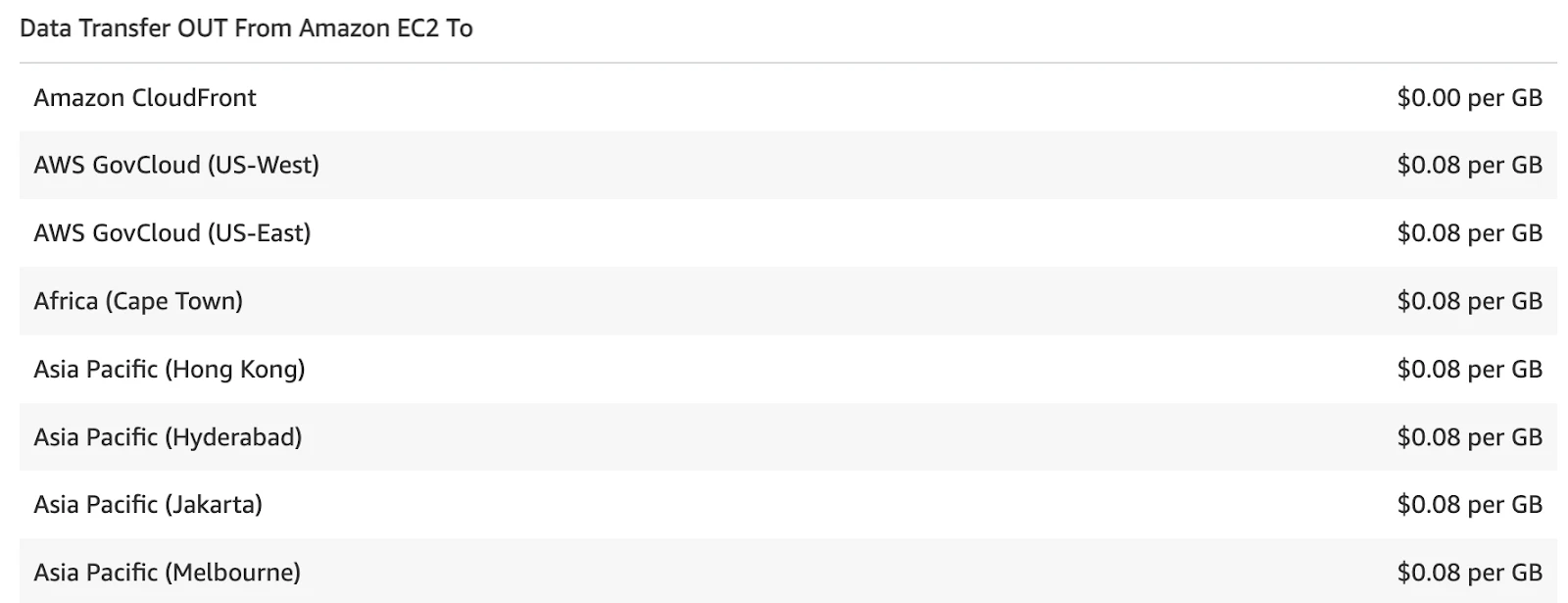
Transfers of incoming data within AWS services in the same region are typically free of charge. However, data transfers from AWS to the internet depend on the originating region and are assessed per service.
AWS Data Transfer Costs: How Different Types Are Charged?
Let’s look at more detail when it comes to how different types of data transfer are charged.
There are no data transfer fees when using the internet gateway to reach the public endpoint of an AWS service in the same region. However, when the same services are accessed through a NAT gateway, there is a processing fee (per gigabyte (GB)) for the data that flows through the gateway.
Calculating pricing can be complicated, as you also have to factor in the type of action performed and service-specific pricing.
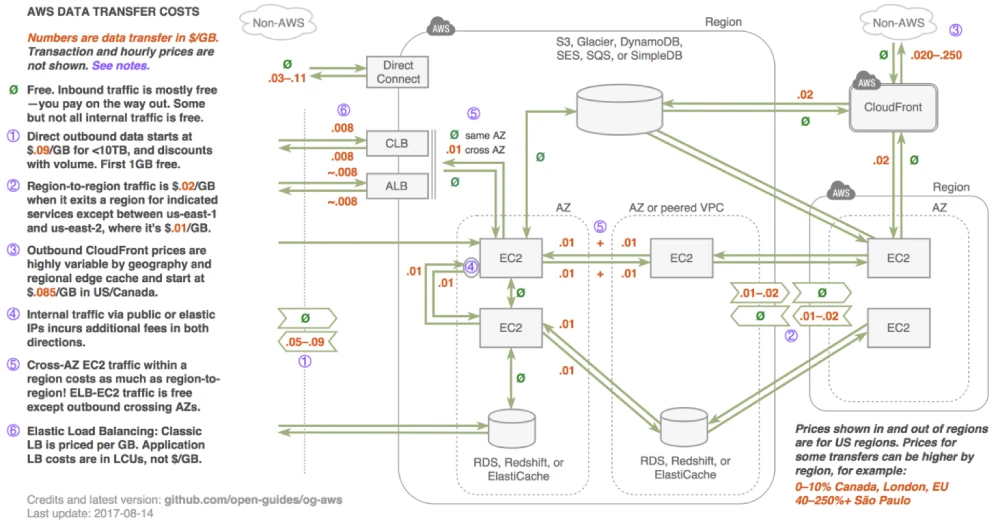
Data transferred “into” and “out of” the following services across Availability Zones or Amazon Virtual Private Cloud (Amazon VPC) peering connections in the same AWS Region are charged at $0.01/GB in each direction.
For example, if you have an Amazon EC2 instance in one AZ and you transfer a file to an Amazon S3 bucket in a different AZ, you will be charged for the InterZone-Out operation.
Tip: To reduce InterZone data transfer expenses, you can try to co-locate your resources in the same AZ. For example, if you have multiple Amazon EC2 instances that need to access the same Amazon S3 bucket, placing them all in the same AZ will prevent transfer fees.
AWS data transfers can add up fast, sometimes contributing to as much as 20% of your overall AWS bill. Here are some tips for reducing data transfer charges to achieve lower AWS costs.
The easiest way to tame transfer costs on AWS is to cut down on the need for sending outbound data. Data transfer fees on AWS are higher for outbound data then for inbound data.
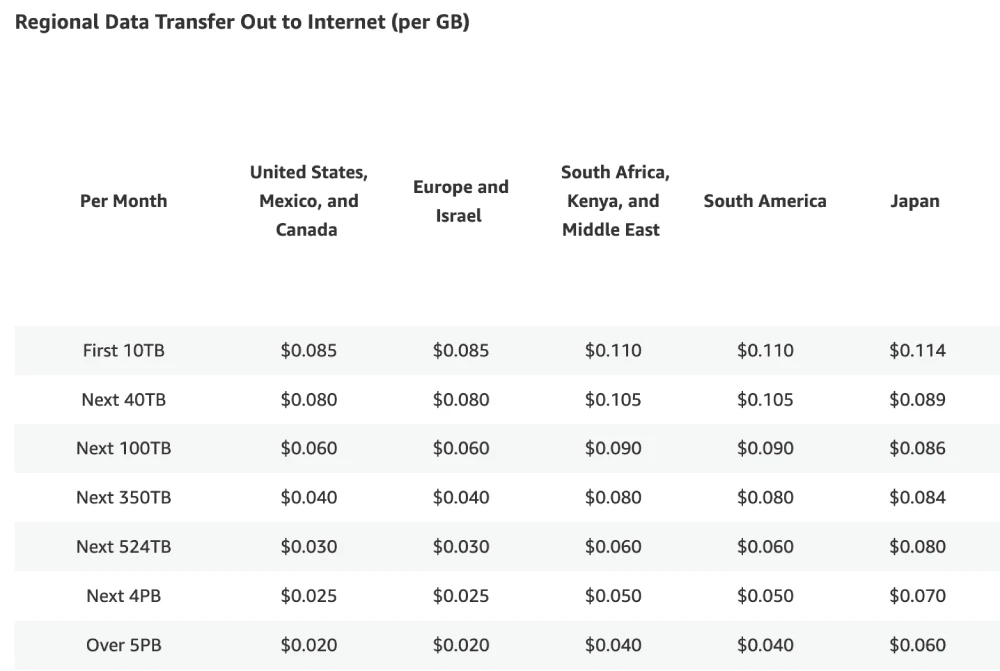
It’s not possible to restrict outbound data for some applications, such as if you’re serving media content over the Internet. In these cases, you want to take advantage of discounts offered by AWS as cost-per-gigabyte decreases as you transfer more data.c
Customers willing to make minimum traffic commits of typically 10 TB/month or higher are eligible for discounted pricing and can contact AWS for more info.
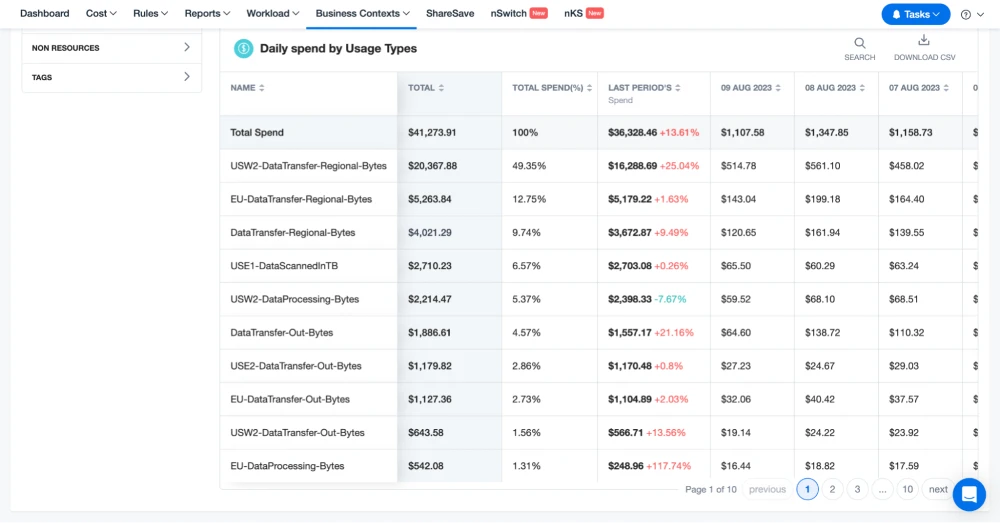
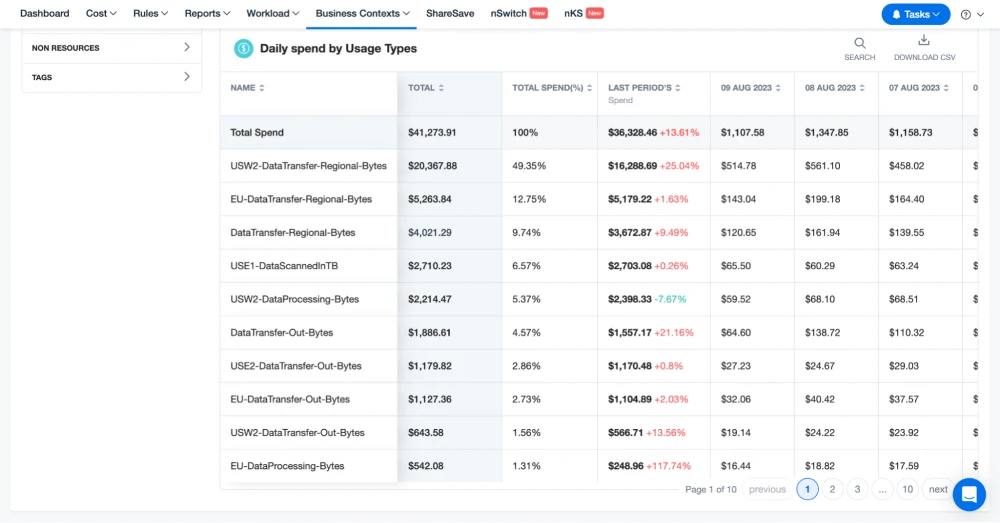
Start by obtaining insights into where your applications are incurring the steepest usage fees. To do this, you can use a handy AWS feature referred to as a cost location tag. Used with nOps Business Contexts, this tag analyzes the instances and services that transfer fees stem from.
Business Contexts makes it easy to identify and manage EC2 costs and other transfer costs driving your AWS bill higher. Applying tags to your instances and load balances lets you quickly narrow in on those incurring the highest data transfer charges, so you can lower AWS costs.
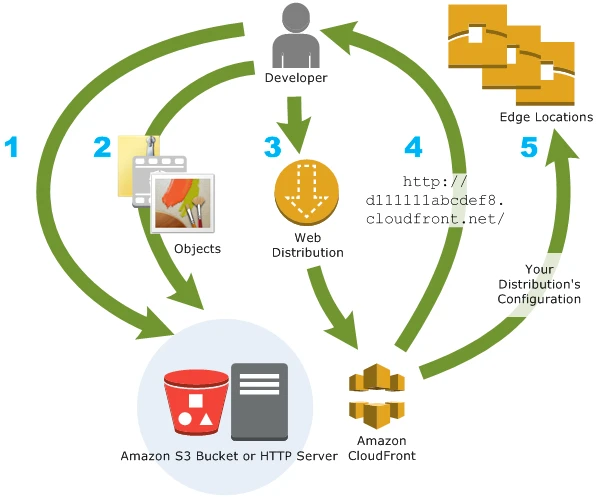
Content Delivery Networks (CDNs) such as CloudFront can help reduce EC2 to public Internet transfer costs. This includes the charges you might incur from hosting a website that serves content to the public.
Caching your content in CloudFront allows you to reduce the data transfer charges incurred by your organization. CloudFront has a free tier with up to 1 TB of outbound data transfer and 10 million HTTP requests per month.
Do you have to transfer data between different AWS services, such as Amazon S3 and Amazon EC2? You need to architect your applications in a way that ensures transfers are happening within a single AWS region.
Also, make sure you’re transferring data through private IPS and not public or elastic IPv4/IPv6 addresses. If you adhere to these caveats, then your data transfer costs will be nil.
Are you transferring data in and out of Amazon Relational Database Service (RDS), Amazon Elastic Compute Cloud (EC2), Amazon Redshift, and other services? Keeping your data transfers within a single region and within the same availability zone rather than different availability zones will reduce your costs.
Data transfer charges on AWS can vary widely. Because of regional pricing, certain regions incur higher fees than others. AWS Regions within Canada and the United States are usually the most inexpensive. India, Singapore, and South America are among the costliest. Always go for the cheaper AWS regions whenever you can.
To control your AWS data transfer expenses, you need to identify the resources that incur unnecessary data transfer charges. By identifying these resources, you’re able to make the right infrastructure decisions so you can avoid these costs later.
Third-party tools such as nOps allow you to easily identify unforeseen spikes in data transfer costs, get alerts when they occur, and address them to save on AWS.
The problem is that the default daily breakdown of your AWS spend available through tools like Cost Explorer isn’t granular enough to identify data transfer costs.
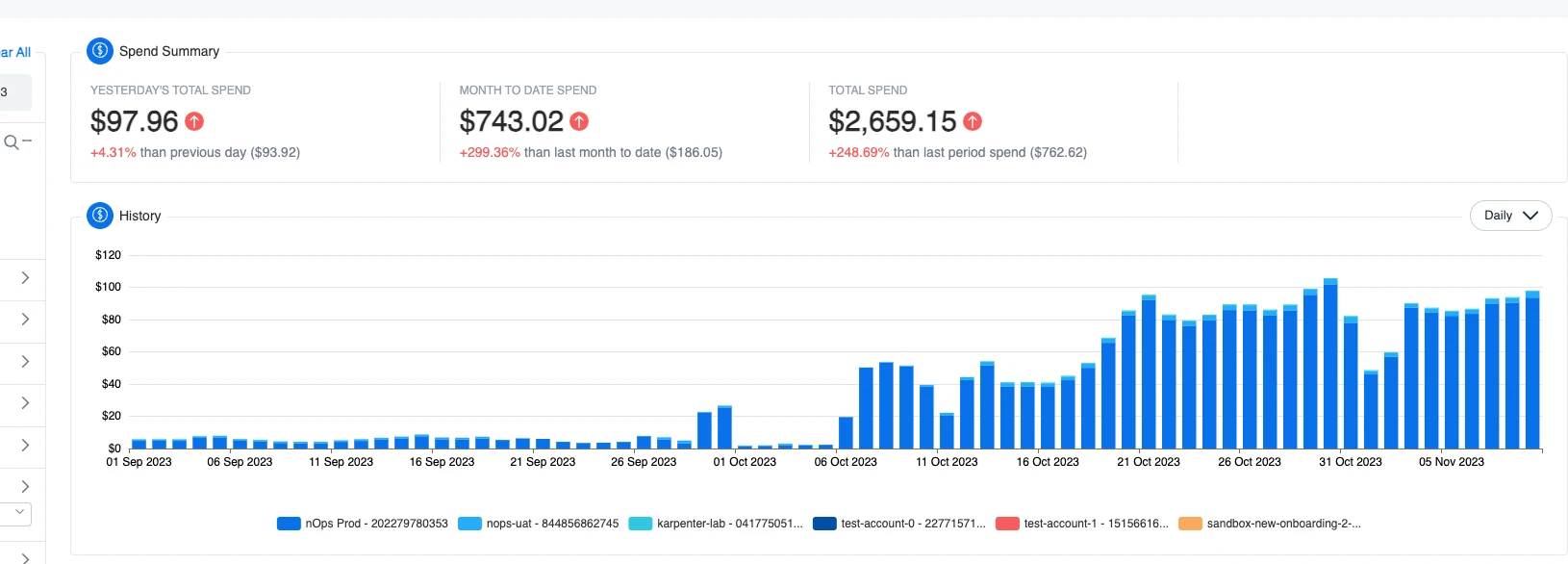
For example, say that your networking costs have substantially increased (illustrated below).
With daily visibility, you can see the spike — but the reason why is a mystery.
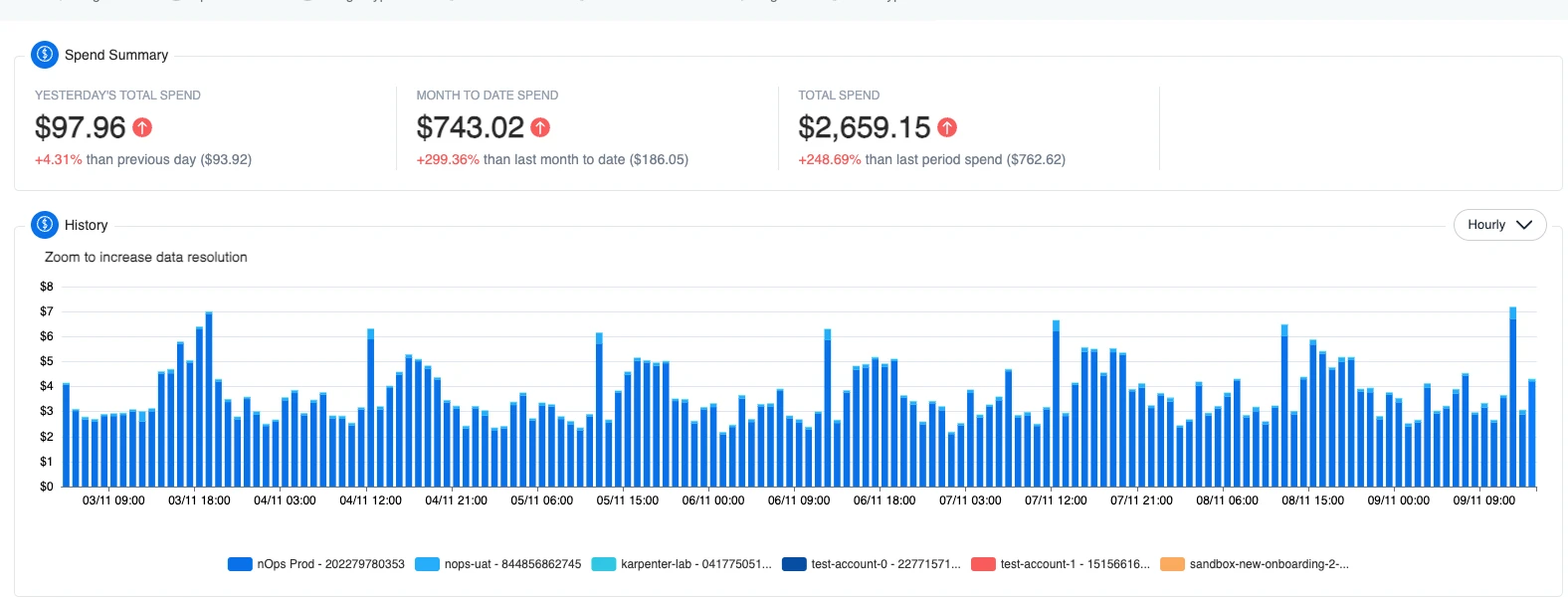
With hourly visibility, the spikes in traffic are clear — making it easy to identify the culprit. A particular process or job is triggering at these specific times to drive unnecessary costs (in this example, by misrouting internal traffic through an external interface).
Without this granular visibility, you’re driving blind — making it difficult and time-consuming to of investigate and track costs.
That’s why nOps created a centralized platform for managing your AWS infrastructure and monitoring all AWS resources. It’s easy to see historical cloud billing data in interactive and visual dashboards instead of reviewing thousands of rows of data.
The tool’s intuitive filters allow you to group resources into meaningful categories so you can more easily identify patterns, unnecessary expenses, and act on reducing cloud costs.
For in-depth insights, users can analyze costs on an hourly basis across all dimensions that contribute to spending, whether at the account, service, or resource level.
Having this granular data at hand makes it easy to investigate, understand, predict and lower AWS costs.
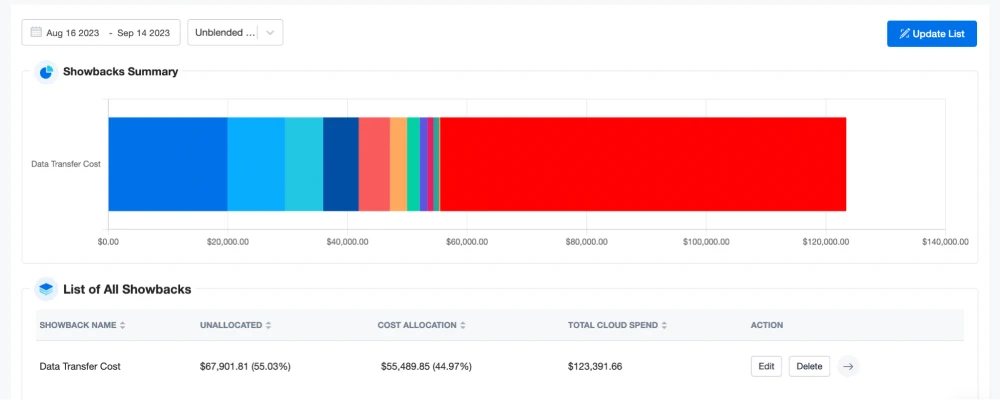
You can also create in-depth and easy-to-understand data transfer showback dashboards and reports with nOps.
Easily allocate costs across multiple teams, projects, environments, workload types, and more. The feature also offers the flexibility to allocate costs across tags using fixed percentages, weighted percentages, or other methods.
nOps is on a mission to empower engineers to more easily take action on cost optimization.
The platform is entrusted with over 2 billion dollars of AWS spend, and was recently ranked #1 in G2’s cloud cost management category.
Learn more about the nOps cloud optimization platform by booking a demo today!
Discover how much you can save in just 10 minutes!
Here are some common questions relating to how to reduce data transfer cost in AWS:
Data transfer costs in AWS vary based on direction, source and destination, method, service, and amount of data. Inbound transfers are usually free. Outbound transfers to the internet typically start around $0.09/GB and decrease with volume. Inter-region and inter-AZ transfers also add costs depending on the service and network path.
AWS data transfer costs are fees for moving data into, out of, or between AWS services and regions. You can minimize AWS data transfer charges by using private connections, choosing services with lower transfer fees, keeping traffic within the same Availability Zone, using CloudFront for caching, and designing architectures that reduce inter-region movement.
AWS reduces prices mainly through economies of scale and technical efficiency. As AWS grows and infrastructure becomes more efficient, it lowers costs for customers across services—for example, with new chip designs like Graviton, which become more and more cost-efficient with each generation. Spot Instances and Savings Plans are also used to offer cheaper options.
Exporting data from AWS—moving it out to the internet—typically costs about $0.09/GB for the first 10 TB each month, with lower rates as usage increases. Inter-region transfers are usually around $0.02–$0.05/GB. Some services, like S3 Glacier, charge additional retrieval fees. Pricing depends on the service, destination, and total volume of data.
Last Updated: September 11, 2025, Cost Optimization
Last Updated: September 11, 2025, Cost Optimization
AI-powered rate optimization with risk-free guarantee