|
VOOZH | about |
|
VOOZH | about |
AI workloads are devouring cloud budgets — and many organizations don’t know where the money actually goes. The Flexera 2026 State of the Cloud Report puts wasted cloud spend at 29% this year, up after five straight years of decline, and AI cost complexity is a big reason why. Meanwhile, CloudZero’s billing data pegs AI spending at just 2.5% of total cloud spend across their customer base in late 2025 — even though those same organizations plan to grow their AI budgets by 36%.
Here is the crux of it: traditional cloud tagging was never built for workloads that share GPUs across teams, bill by the token instead of the hour, and chain six different services together to answer a single user query. If your FinOps practice still relies on resource-level tags to track AI costs, you are flying blind on a growing chunk of your bill.
This guide walks through what it actually takes to tag AI cloud spend and get the visibility you need — from the definitional groundwork to a step-by-step framework you can implement this quarter.
Tagging AI cloud spend means attaching metadata — key-value pairs — to the cloud resources, API calls, and pipeline stages powering your AI workloads so you can trace every dollar back to a team, product, feature, or customer.
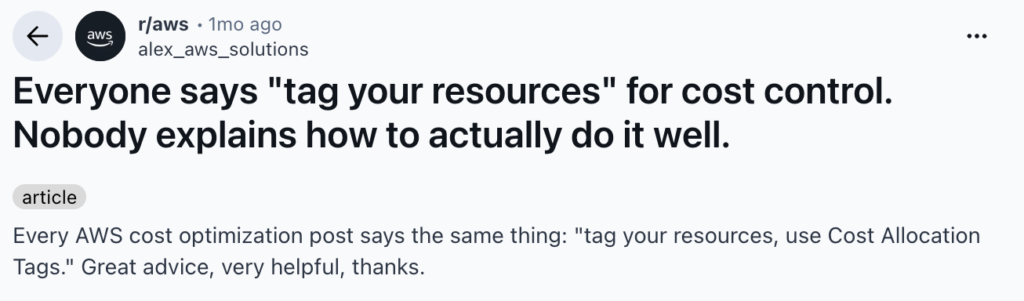
Tags are the foundation of cost attribution. Without them, your cloud bill is a wall of line items with no business context. As one r/aws user put it in a thread with 118 upvotes: “Every AWS cost optimization post says the same thing: tag your resources, use Cost Allocation Tags. Great advice, very helpful.” The sarcasm captured a real frustration — everyone knows tagging matters, but few organizations explain how to do it well, especially for AI.
Tags enable three things that finance and engineering both need:
The FinOps Foundation’s 2026 guidance on AI for FinOps highlights that proactive, autonomous agents are transforming how practitioners manage cost efficiency — but those agents need clean, consistent tag data to operate on. Garbage in, garbage out.
Traditional cloud tagging assigns metadata to discrete resources: an EC2 instance gets a `team:data-engineering` tag, an S3 bucket gets a `project:customer-analytics` tag. The resource is the unit of cost.
AI workloads break this model in several ways:
When a SageMaker endpoint processes requests from your customer support bot and your search ranking model on the same GPU, tagging that instance with a single `product` tag tells you nothing useful.
Before jumping into solutions, it is worth sitting with the specific reasons AI cost attribution is so much harder than regular cloud cost management.
Nobody runs one model per instance anymore. Teams batch inference requests, share GPU clusters, and use multi-tenant endpoints because the hardware is too expensive to leave idle. Your cloud bill shows you what the instance cost. It does not tell you that 60% of the GPU cycles went to product recommendations while 40% served fraud detection.
We hear this constantly in customer calls. It usually comes down to a visibility and ownership bottleneck. One director-level prospect put it bluntly: “We are the bottleneck. The thing is that we have to get involved from [the platform team]… they go into the cost explorer… try to figure out that way.” The platform team becomes the only people who can answer cost questions.
When you call the Amazon Bedrock API or any third-party LLM, you pay per token. Not per compute hour. A single API call might cost $0.002 or $0.20 depending on the model, how long the context window is, and whether you are counting input or output tokens.
OpsLyft nails this in their FinOps for AI guide: “the unit of charge can be tokens rather than compute time. Token measurement can vary depending on whether you track user input tokens or the transformed prompt sent to the API.” When how you pay and how you tag operate on completely different units, attribution breaks down fast.
A real AI feature in your product might touch:
Five different services. Potentially different accounts. Different billing units. Your traditional resource tags cover maybe step one. The rest needs a whole different approach.
If your team calls GPT-4, Claude, or any external model via API, those costs never show up in your AWS, Azure, or GCP bill. They land on a completely separate invoice. CloudZero reports that these off-cloud AI costs are among the hardest to track because they sidestep the provider’s native cost allocation tools entirely.
You cannot tag what your cloud provider cannot see. Full stop.
This is where most teams hit a wall. They try to use their existing tagging playbook — the one that works fine for EC2 and S3 — on AI workloads. And the numbers never add up.
| Dimension | Traditional Cloud Tagging | Ai Cost Attribution |
|---|---|---|
| Unit of Cost | Resource (instance, bucket, function) | Token, request, GPU-second, API call |
| Billing source | Single cloud provider | Cloud provider + third-party APIs |
| Resource mapping | 1 resource = 1 workload (usually) | 1 resource = multiple workloads (shared GPUs) |
| Tagging mechanism | Native cloud tags (key-value pairs) | Cloud tags + application-level logging + API metering |
| Cost predictability | Relatively stable per resource | Highly variable (model choice, context length, traffic spikes) |
| Pipeline complexity | Simple: compute → storage | Complex: preprocess → embed → query → infer → post-process |
| Ownership clarity | Clear: tagged by team/project | Ambiguous: shared infrastructure, cross-team pipelines |
The big shift here: for traditional workloads, tagging the resource is enough. For AI workloads, you need to tag the *request* — and then roll those requests up to resources, features, products, and teams.
This is the first layer and the most similar to traditional cloud tagging. Every AI-related resource gets tagged with:
Workload-level tags go on the infrastructure itself — the SageMaker endpoint, the EC2 GPU instance, the EKS namespace, the Bedrock invocation logs. These tags answer: “What kind of AI work is this resource doing?”
For Kubernetes-based AI workloads, tools like Kubecost can allocate shared cluster costs based on namespace and label metadata, giving you workload-level attribution even when multiple models share the same nodes.
The second layer connects AI workloads to business outcomes:
Business-level tags answer: “Who should this cost be allocated to?” They are what make showback reports meaningful.
One Gong call surfaced exactly this ask from a director: “We are looking for that visibility angle… we want to hand it over to individual groups or organizations responsible for their services, visibility into the cost aspect.” Without business-level tags, that handoff cannot happen.
The third layer is unique to AI and is the hardest to implement:
Unit-level tagging requires app-level instrumentation. You need logging middleware that captures token counts, model IDs, and request metadata, then joins that telemetry with billing data.
This is where AI cost attribution fundamentally diverges from cloud tagging. You are no longer tagging resources — you are tagging business transactions.
Enough theory. Here is the sequence that actually works when you are implementing AI cost tagging from scratch (or fixing a broken setup).
Before adding new tags, find out what you are working with. Run a tagging coverage report across all AI-related resources:
AWS provides Tag Editor and Cost Allocation Tags to identify untagged resources. The r/FinOps community recommends starting with a resource sweep to map current state, then enforcing tagging policies moving forward with automated compliance checks. “Manual mapping is painful but necessary for the big spenders first.”
A practical target: aim for 90%+ tagging coverage on resources that represent your top 80% of AI spend — a common FinOps prioritization heuristic.
Catalog every AI workload in your environment by type:
For each workload, document: which team owns it, which product it serves, how it scales, and approximate monthly cost.
This mapping exercise often reveals surprises. In Gong calls, we frequently hear about teams discovering costs “we are not aware of until a few months later” — one IC described a $2K unexpected charge from a previous optimization tool’s hidden API calls.
Based on your workload map, define the dimensions you will use to allocate AI costs. The four most common:
By team: Which engineering team is responsible for the workload? This is the simplest dimension and enables showback reporting.
By product: Which product does the AI workload power? This connects AI spend to revenue and enables margin analysis.
By feature: Within a product, which specific AI feature drives the cost? (e.g., “search ranking” vs. “recommendation engine” vs. “chatbot”)
By customer: For multi-tenant platforms, how much AI cost does each customer generate? This is critical for usage-based pricing models.
This is the implementation phase, and it requires different approaches at different layers:
Infrastructure tagging: Apply standard cloud tags to all AI-related resources using Infrastructure as Code (Terraform, CloudFormation, Pulumi). Enforce required tags through AWS Tag Policies, Azure Policy, or GCP Organization Policy. TagOps reports that AWS now supports wildcard tag policies and IaC validation — use these to prevent untagged AI resources from launching.
API-level tagging: For third-party AI APIs, use a proxy or gateway layer that logs every request with metadata. Amazon Bedrock supports cost allocation tags natively — you can tag model invocations and track spend by business dimension directly in Cost Explorer.
Logging-level tagging: Instrument your app code to log token counts, model IDs, latency, and request metadata for every AI call. This telemetry feeds the unit economics in Step 5. Without it, cost attribution stays approximate forever.
With tagging in place, calculate the metrics that actually matter for AI cost management:
Cost per inference: Total cost of GPU time + storage + networking for a single inference request. Track by model and endpoint.
Cost per token: Break down input and output token costs by model and compare across providers. CloudZero’s inference cost analysis shows per-token pricing is falling — but total token consumption rises faster as models use chain-of-thought reasoning and multi-step workflows.
Cost per feature: Aggregate all AI costs for a single product feature. Compare against the revenue that feature generates.
Cost per customer: For SaaS platforms, calculate AI spend per customer or tier. Critical for usage-based pricing to prevent high-usage customers from destroying your margins.
Here are the obstacles that trip up teams:
GPU instances, SageMaker notebooks, and Bedrock model invocations frequently launch without tags because they come from experimentation workflows, not production pipelines. Flexera’s 2026 report found wasted cloud spend at 29% — and untagged resources are a big contributor.
Fix: Implement tag-on-launch policies that prevent untagged resources from provisioning. For experimentation environments, apply default tags (e.g., `environment:experiment`, `team:ml-research`) and require refinement before promotion to production.
The ML team uses `project:recommendation-engine`. The product team calls it `product:recs`. Finance has it as `cost-center:CC-4421`. Same workload, three different labels, no way to reconcile.
Fix: Publish a tagging taxonomy and enforce it through automation. Use AWS Service Control Policies or CI/CD checks to validate tag values. The Holori 2026 cloud tagging guide found that when engineers see showback reports with their team’s spend, adoption improves dramatically — more than any policy doc ever could.
AI workloads increasingly span multiple clouds. Training might happen on GCP with TPUs, inference runs on AWS with SageMaker, and a vector database sits on a managed service on Azure. Each cloud has different tagging syntax, limits, and cost allocation mechanisms.
In Gong calls, we hear this directly. One director described managing costs across AWS, Azure, and Google Cloud: “[The company] has acquired so many brands and with that… there are a lot of accounts, whether it’s AWS, Azure, or Google.”
Fix: Use a FinOps platform that normalizes tags across providers. nOps handles multi-cloud cost allocation with unified dashboards.
Here’s a quick comparison of some tools that can help automate this process:
| Tool | Best For | AI-Specific Capabilities | Pricing |
|---|---|---|---|
| nOps | FinOps Visibility & Automation | AI cost visibility dashboards, automated tagging policies, multi-cloud support, commitment management | Risk-free savings model |
| CloudZero | Cost intelligence per feature/customer | AI cost allocation by product, inference cost tracking, unit economics | Percentage of spend |
| Finout | Multi-source cost allocation | Virtual tagging for untagged AI resources, API cost aggregation | Flat fee based on tiers |
| Kubecost | Kubernetes-native AI workloads | Namespace-level cost allocation for GPU workloads, cluster cost sharing | Open source + enterprise |
nOps tackles AI cost attribution through automated tagging enforcement and real-time visibility. The platform catches untagged resources and blocks provisioning without required metadata. For AI workloads, it breaks down GPU instance costs, SageMaker spend, and Bedrock invocations by business dimension.
The real differentiator is how nOps combines cost visibility with automated optimization.
For GPU reserved capacity and savings plans, nOps’s commitment management automatically rightsizes commitments — increasingly important as AI infrastructure costs grow.
nOps watches your actual compute usage — EC2, EKS, Fargate, Lambda, SageMaker, GPU instances, all of it — and purchases, adjusts, and swaps commitments as your workload mix changes. Team migrates from P4d to P5? The portfolio rebalances. No manual effort needed.
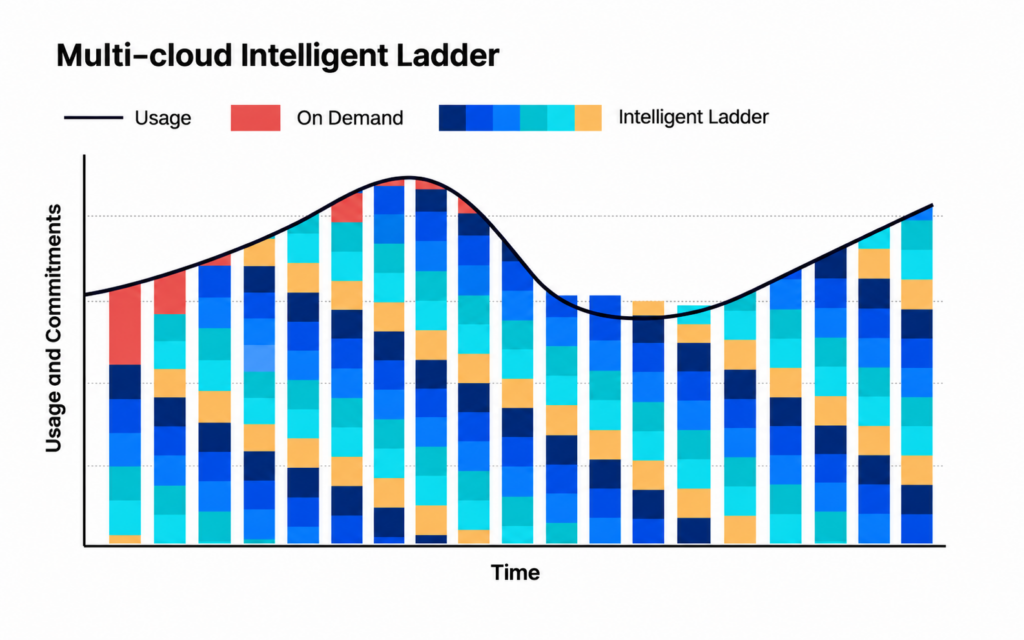
Instead of one big batch of 3-year Compute Savings Plans, nOps builds a mix, committing in small increments each hour and adjusting as needed. The result: teams slash their risk and commitment windows.
nOps only gets paid if we save you money — meaning there’s no upfront cost or financial risk. Customers have described it as being like “picking $20 bills off the ground” — there’s no downside to seeing if you can reduce costs on AI with a free savings analysis.
nOps is entrusted with $3 billion in cloud spending and was recently rated #1 in G2’s Cloud Cost Management category.
Discover how much you can save in just 10 minutes!
It is the practice of attaching metadata to the cloud resources, API calls, and pipeline stages powering AI workloads. Unlike traditional tagging, it must span infrastructure, application, and logging layers because AI costs are driven by tokens, shared GPUs, and multi-step pipelines.
Regular tags work at the resource level. AI workloads share infrastructure across teams, bill by tokens not compute hours, and involve third-party APIs outside your cloud provider’s billing. You need app-level instrumentation on top of resource tags.
According to CloudZero, AI averaged 2.5% of total cloud spend in late 2025, with organizations planning 36% growth. The actual number varies wildly — AI-native startups can exceed 50%, while traditional enterprises sit in single digits.
Use a proxy or gateway layer that logs every API call with business metadata. Aggregate those logs into your FinOps platform alongside cloud billing. Bedrock natively supports cost allocation tags for first-party model invocations.
Showback displays AI costs by team without financial transfers. Chargeback actually bills teams for usage. Most orgs start with showback to build awareness, then graduate to chargeback once tag data is trusted.
Last Updated: June 7, 2026,
Last Updated: June 7, 2026,
AI-powered rate optimization with risk-free guarantee