|
VOOZH | about |
|
VOOZH | about |
dotnet add package AKSoftware.Localization.MultiLanguages --version 6.1.0
NuGet\Install-Package AKSoftware.Localization.MultiLanguages -Version 6.1.0
<PackageReference Include="AKSoftware.Localization.MultiLanguages" Version="6.1.0" />
<PackageVersion Include="AKSoftware.Localization.MultiLanguages" Version="6.1.0" />Directory.Packages.props
<PackageReference Include="AKSoftware.Localization.MultiLanguages" />Project file
paket add AKSoftware.Localization.MultiLanguages --version 6.1.0
#r "nuget: AKSoftware.Localization.MultiLanguages, 6.1.0"
#:package AKSoftware.Localization.MultiLanguages@6.1.0
#addin nuget:?package=AKSoftware.Localization.MultiLanguages&version=6.1.0Install as a Cake Addin
#tool nuget:?package=AKSoftware.Localization.MultiLanguages&version=6.1.0Install as a Cake Tool
Build awesome .NET applications that supports more than 69+ languages with just a few lines of code, in addition to an easy translation tool that helps you translate all your content to any language you want with just one click
Could be used for all type of .NET Apps (Blazor, UWP, Xamarin, Windows, ASP.NET Core MVC, Razor Pages ....)
https://akmultilanguages.azurewebsites.net
Build with Love by Ahmad Mozaffar
Version 5.9.0 with two big achievements:
If you are using dependency injection you can use the newly used method:
// For .NET projects consider the following method
services.AddLanguageContainerFromFolder("Resouces", CultureInfo.GetCultureInfo("en-US"));

// For Blazor Server
services.AddLanguageContainerFromFolderForBlazorServer("Resouces", CultureInfo.GetCultureInfo("en-US"));
Keep in mind, the folder of the resources has to be shipped with your project
Finally Blazor Server is here you can get started now. The only change that you need to do that is different from others is in your program.cs file make sure to use the following function to register the Language Container
...
// Register the language container for Blazor Server
builder.Services.AddLanguageContainerForBlazorServer<EmbeddedResourceKeysProvider>(Assembly.GetExecutingAssembly(), "Resources");
...
Check out the following Blazor Server Sample
Special thanks for the contributor Michael Gerfen for updating the library to add support to the UWP.
This version contains a major update that adds support for a new package under the name AKSoftware.Localization.MultiLangauges.UWP you can install it from Nuget with the following command
Install-Package AKSoftware.Localization.MultiLangauges.UWP
In the latest version of the library because right it started to support UWP and not only Blazor a new interface and abstract type has been introduced that allows you to easily create a keys provider to fetch your keys not only from the embedded resources, also from any source you would like (External folder, FTP, Azure Blob Storage ...etc)
By default there is the EmbeddedResourceKeysProvider to fetch the files from the resources and you can create your own by inhereting from the interface IKeysProvider
More about the implementation in the Wiki soon
For Nuget Package Manager install the package
(Nuget Package Manager Console)
Install-Package AKSoftware.Localization.MultiLanguages
(Using dotNet CLI)
dotnet add package AKSoftware.Localization.MultiLanuages
For Blazor additional package is required that helps managing the state of the component when changing the language
(Nuget Package Manager Console)
Install-Package AKSoftware.Localization.MultiLanguages.Blazor
(Using dotNet CLI)
dotnet add package AKSoftware.Localization.MultiLanuages.Blazor
Inside your project create a folder called "Resources"
and inside it create a file called "en-US.yml" which is a YAML file
then set your keywords inside the file like this
HelloWorld: Hello World

Welcome: Welcome

...
We chose YAML files because it's very light comparing it to XML or JSON and make the output dll very small, in addition to that it's much way faster in serialization and deserialization
Select the file in the Solution Explorer window and from the properties window set the build action property to "Embeded Resources"
Visit the online translation tool on the following link
https://akmultilanguages.azurewebsites.net
Go to translate app page
Upload your YAML file and click submit
All the languages will be available with just one click - install all the languages you want to support in your application
Import the files to the resources folder you have just created and set the build action property for them as Embedded Resources also
Go to program.cs and register the Language Container Service in the Dependency Injection container
Import the library
using AKSoftware.Localization.MultiLanguages
Register the service
// Specify the assembly that has the langauges files, in this situation it's the current assembly

builder.Services.AddLanguageContainer<EmbeddedResourceKeysProvider>(Assembly.GetExecutingAssembly());

// You can specify the default culture of the project like this

// builder.Services.AddLanguageContainer(Assembly.GetExecutingAssembly(), CultureInfo.GetCultureInfo("fr-Fr"));
Note:
If you don't specify a default culture the library will try to find the file that matches the culture of the current user, if it's not existing it will try to find any file that matches the same language, then if it's not there it will try to find the English file then the first file in the folder, otherwise it will throw an exception
In the _imports.razor file make sure to add the following namespaces
using AKSoftware.Localization.MultiLanguages

using AKSoftware.Localization.MultiLanguages.Blazor
With in your components that you want to localize inject the service
@inject ILanguageContainerService languageContainer
And start getting the values from your files just like this
<h1>@languageContainer.Keys["HelloWorld"]</h1>
And to be able to get the state updated for each component that contains localized text call the extension method in the OnInitialized or OnInitializedAsync overriden methods for each component as following
protected override void OnInitialized()

{

// This will make the current component gets updated whenever you change the language of the application

languageContainer.InitLocalizedComponent(this);

}
You are able to change the language and choose any language you have added from the UI like this
Inject the service in the component
@inject ILanguageContainerService languageContainer
Add a button and set the @onclick method
<button @onclick="SetFrench">French</button>

@code

{

void SetFrench()

{

languageContainer.SetLanguage(System.Globalization.CultureInfo.GetCultureInfo("fr-FR"));

}

}
Starting from version 4.0 now there is the ability to create dynamic values to replace their values at runtime using Interpolation feature:
Following you can see how to use this feature
Language File en-US:
Welcome: Welcome {username} to our system {version}
In C# to replace the value of username and version parameters at runtime you can use the new indexer that allows to pass an object for with these values as following:
_language["Welcome", new

{

Username = "aksoftware98",

Version = "v4.0"

}]
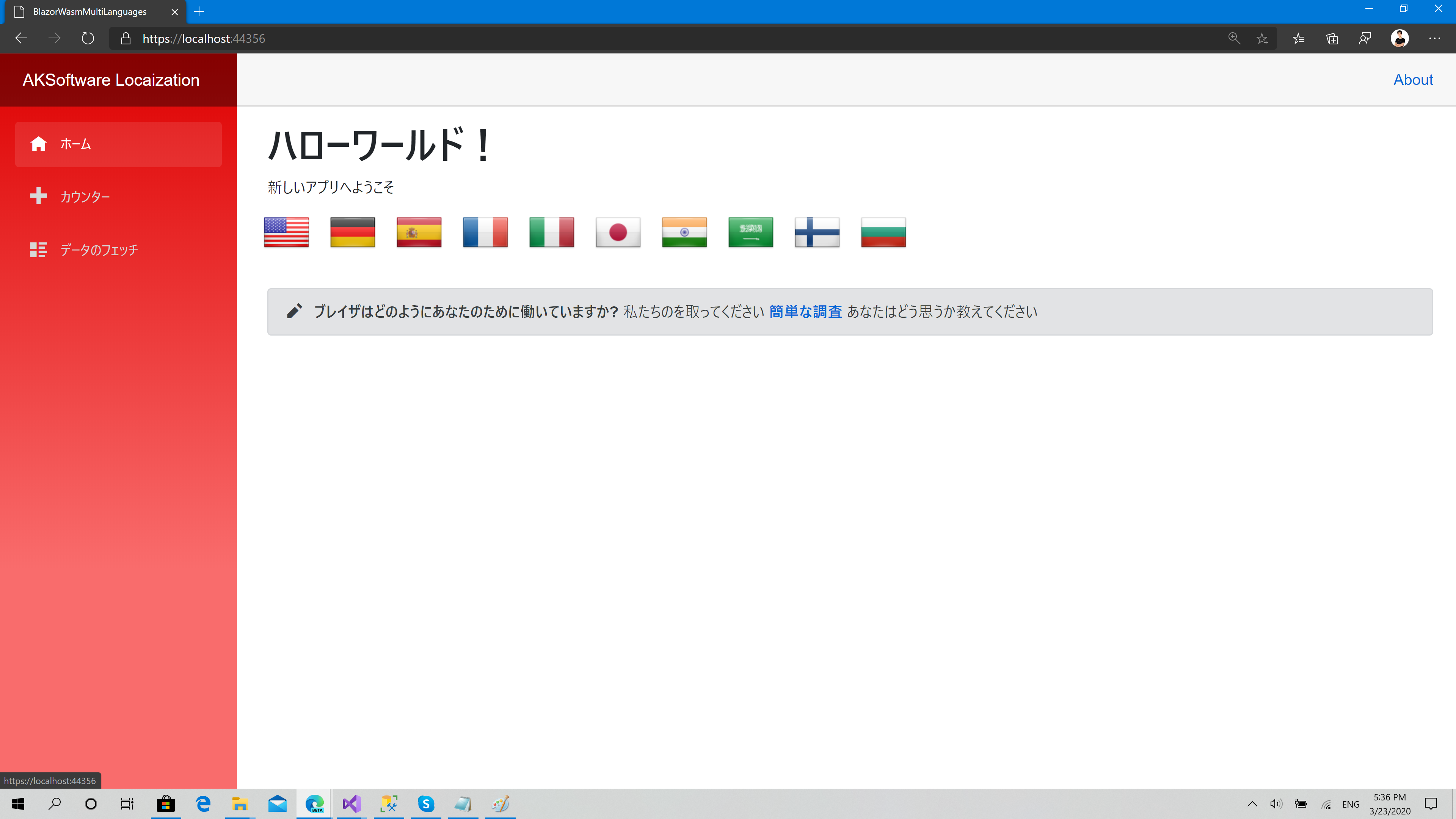
Check the sample project here to see how to develop a full Blazor WebAssembly project with storing the last selected language with more than 8 languages available for one UI:
Thanks for the awesome contributors
<a href="https://github.com/aksoftware98/multilanguages/graphs/contributors">
<img src="https://contrib.rocks/image?repo=aksoftware98/multilanguages" />
</a>
| Product | Versions Compatible and additional computed target framework versions. |
|---|---|
| .NET | net5.0 net5.0 was computed. net5.0-windows net5.0-windows was computed. net6.0 net6.0 was computed. net6.0-android net6.0-android was computed. net6.0-ios net6.0-ios was computed. net6.0-maccatalyst net6.0-maccatalyst was computed. net6.0-macos net6.0-macos was computed. net6.0-tvos net6.0-tvos was computed. net6.0-windows net6.0-windows was computed. net7.0 net7.0 was computed. net7.0-android net7.0-android was computed. net7.0-ios net7.0-ios was computed. net7.0-maccatalyst net7.0-maccatalyst was computed. net7.0-macos net7.0-macos was computed. net7.0-tvos net7.0-tvos was computed. net7.0-windows net7.0-windows was computed. net8.0 net8.0 is compatible. net8.0-android net8.0-android was computed. net8.0-browser net8.0-browser was computed. net8.0-ios net8.0-ios was computed. net8.0-maccatalyst net8.0-maccatalyst was computed. net8.0-macos net8.0-macos was computed. net8.0-tvos net8.0-tvos was computed. net8.0-windows net8.0-windows was computed. net9.0 net9.0 is compatible. net9.0-android net9.0-android was computed. net9.0-browser net9.0-browser was computed. net9.0-ios net9.0-ios was computed. net9.0-maccatalyst net9.0-maccatalyst was computed. net9.0-macos net9.0-macos was computed. net9.0-tvos net9.0-tvos was computed. net9.0-windows net9.0-windows was computed. net10.0 net10.0 is compatible. net10.0-android net10.0-android was computed. net10.0-browser net10.0-browser was computed. net10.0-ios net10.0-ios was computed. net10.0-maccatalyst net10.0-maccatalyst was computed. net10.0-macos net10.0-macos was computed. net10.0-tvos net10.0-tvos was computed. net10.0-windows net10.0-windows was computed. |
| .NET Core | netcoreapp2.0 netcoreapp2.0 was computed. netcoreapp2.1 netcoreapp2.1 was computed. netcoreapp2.2 netcoreapp2.2 was computed. netcoreapp3.0 netcoreapp3.0 was computed. netcoreapp3.1 netcoreapp3.1 was computed. |
| .NET Standard | netstandard2.0 netstandard2.0 is compatible. netstandard2.1 netstandard2.1 was computed. |
| .NET Framework | net461 net461 was computed. net462 net462 was computed. net463 net463 was computed. net47 net47 was computed. net471 net471 was computed. net472 net472 was computed. net48 net48 was computed. net481 net481 was computed. |
| MonoAndroid | monoandroid monoandroid was computed. |
| MonoMac | monomac monomac was computed. |
| MonoTouch | monotouch monotouch was computed. |
| Tizen | tizen40 tizen40 was computed. tizen60 tizen60 was computed. |
| Xamarin.iOS | xamarinios xamarinios was computed. |
| Xamarin.Mac | xamarinmac xamarinmac was computed. |
| Xamarin.TVOS | xamarintvos xamarintvos was computed. |
| Xamarin.WatchOS | xamarinwatchos xamarinwatchos was computed. |
Showing the top 5 NuGet packages that depend on AKSoftware.Localization.MultiLanguages:
| Package | Downloads |
|---|---|
|
AKSoftware.Localization.MultiLanguages.Blazor
AKSoftware.Localization.MultiLanguages is a .NET library that allows .NET developers to build applications that targets multiple languages very easy just with few lines of code, Blazor extensions helps the library to track the status of the components and update them whenever the SetLanguage function being called |
|
|
Forms.Wpf.Mls.Tools
This library will help your Win Forms and WPF apps with usefull tools (services and controls) |
|
|
AKSoftware.Localization.MultiLangauges.UWP
AKSoftware.Localization.MultiLanguages is a .NET library that allows .NET developers to build applications that targets multiple languages very easy just with few lines of code |
|
|
NBlaze.UIComponents
UI Blazor components |
|
|
AKSoftware.Localization.MultiLanguages.WinUI
WinUI 3 integration components for AKSoftware.Localization.MultiLanguages — adds XAML extensions, behaviors, and converters that make multi-language UIs in WinUI 3 apps trivial to build. |
This package is not used by any popular GitHub repositories.
| Version | Downloads | Last Updated |
|---|---|---|
| 6.1.0 | 982 | 5/10/2026 |
| 6.0.1 | 9,239 | 7/8/2025 |
| 6.0.0-alpha | 1,501 | 10/18/2024 |
| 5.9.12 | 26,605 | 12/30/2023 |
| 5.9.11 | 16,428 | 4/15/2023 |
| 5.9.1 | 1,583 | 3/18/2023 |
| 5.9.0 | 433 | 3/18/2023 |
| 5.8.0 | 50,230 | 9/17/2022 |
| 5.3.0 | 22,864 | 2/10/2022 |
| 5.2.0 | 8,968 | 8/7/2021 |
| 5.1.0 | 5,399 | 5/15/2021 |
| 5.0.0 | 6,439 | 2/10/2021 |
| 4.2.0 | 7,221 | 12/3/2020 |
| 4.1.0 | 921 | 11/25/2020 |
| 4.0.0 | 728 | 11/24/2020 |
| 3.2.0 | 3,867 | 10/27/2020 |
| 3.1.0 | 5,495 | 10/3/2020 |
| 3.0.5 | 730 | 10/27/2020 |
| 3.0.1 | 5,911 | 7/2/2020 |
| 3.0.0 | 816 | 7/2/2020 |
Migrate to .NET 10 and add support for WinUI 3 on Windows