|
VOOZH | about |
|
VOOZH | about |
dotnet add package AuralizeBlazor --version 3.0.5
NuGet\Install-Package AuralizeBlazor -Version 3.0.5
<PackageReference Include="AuralizeBlazor" Version="3.0.5" />
<PackageVersion Include="AuralizeBlazor" Version="3.0.5" />Directory.Packages.props
<PackageReference Include="AuralizeBlazor" />Project file
paket add AuralizeBlazor --version 3.0.5
#r "nuget: AuralizeBlazor, 3.0.5"
#:package AuralizeBlazor@3.0.5
#addin nuget:?package=AuralizeBlazor&version=3.0.5Install as a Cake Addin
#tool nuget:?package=AuralizeBlazor&version=3.0.5Install as a Cake Tool
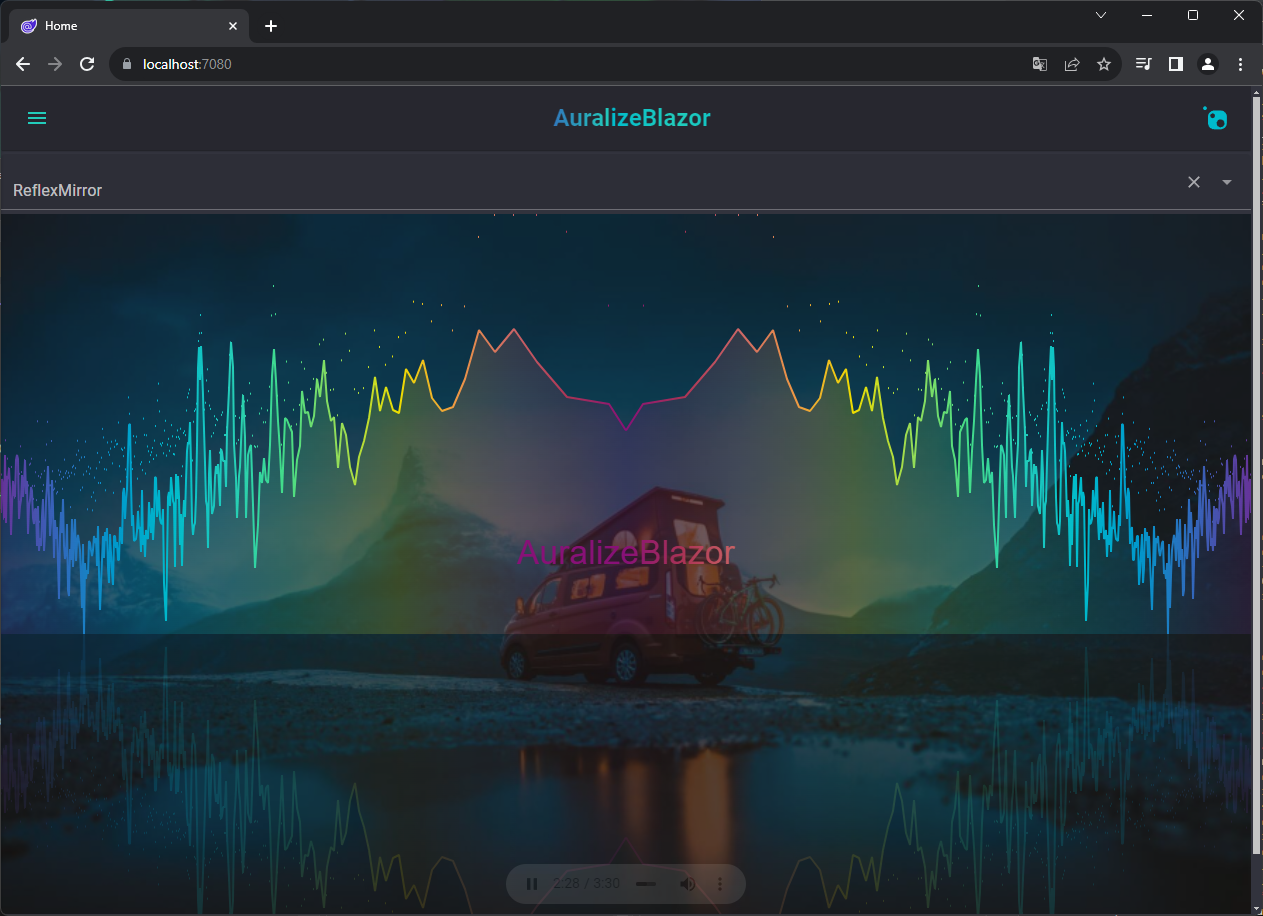
AuralizeBlazor provides a audio visualizer component named Auralizer.
This a Blazor component that integrates the powerful features of audioMotion, enabling developers to incorporate real-time audio visualization into Blazor applications with ease. This document provides an overview of how to use the component, including its properties and methods.
To use Auralizer in your Blazor application, first ensure the component library is added to your project. Then, you can incorporate the visualizer into your pages or components.
Make sure you have installed the AuralizeBlazor package in your project. If it's not installed, add it via NuGet package manager, CLI or PackageReference.
dotnet add package AuralizeBlazor
<PackageReference Include="AuralizeBlazor" Version="*" />
Add the namespace to your _Imports.razor:
@using AuralizeBlazor
After adding the namespace, you can use the Auralizer component in your pages or components. Here's an example of how to use the component:
<Auralizer
 Radial="true"
 Height="400px"
 Width="100%">
 <audio src="path/to/audio1.mp3" controls></audio>
</Auralizer>
| Product | Versions Compatible and additional computed target framework versions. |
|---|---|
| .NET | net8.0 net8.0 is compatible. net8.0-android net8.0-android was computed. net8.0-browser net8.0-browser was computed. net8.0-ios net8.0-ios was computed. net8.0-maccatalyst net8.0-maccatalyst was computed. net8.0-macos net8.0-macos was computed. net8.0-tvos net8.0-tvos was computed. net8.0-windows net8.0-windows was computed. net9.0 net9.0 is compatible. net9.0-android net9.0-android was computed. net9.0-browser net9.0-browser was computed. net9.0-ios net9.0-ios was computed. net9.0-maccatalyst net9.0-maccatalyst was computed. net9.0-macos net9.0-macos was computed. net9.0-tvos net9.0-tvos was computed. net9.0-windows net9.0-windows was computed. net10.0 net10.0 is compatible. net10.0-android net10.0-android was computed. net10.0-browser net10.0-browser was computed. net10.0-ios net10.0-ios was computed. net10.0-maccatalyst net10.0-maccatalyst was computed. net10.0-macos net10.0-macos was computed. net10.0-tvos net10.0-tvos was computed. net10.0-windows net10.0-windows was computed. |
Showing the top 1 NuGet packages that depend on AuralizeBlazor:
| Package | Downloads |
|---|---|
|
MudBlazor.Extensions
MudBlazor.Extensions is a small extension library for MudBlazor from https://mudblazor.com/ |
Showing the top 1 popular GitHub repositories that depend on AuralizeBlazor:
| Repository | Stars |
|---|---|
|
fgilde/MudBlazor.Extensions
MudBlazor.Extensions from https://www.mudex.org is a small extension for MudBlazor from https://mudblazor.com
|
| Version | Downloads | Last Updated |
|---|---|---|
| 3.0.5 | 97 | 6/17/2026 |
| 3.0.4 | 51,735 | 12/12/2025 |
| 3.0.3 | 12,758 | 11/22/2025 |
| 3.0.0 | 676 | 11/13/2025 |
| 2.0.8 | 26,938 | 10/24/2025 |
| 2.0.6 | 253 | 10/23/2025 |
| 2.0.5 | 122,038 | 3/13/2025 |
| 2.0.4 | 984 | 2/7/2025 |
| 2.0.3 | 227 | 2/3/2025 |
| 2.0.2 | 212 | 1/31/2025 |
| 2.0.1 | 214 | 1/30/2025 |
| 2.0.0 | 31,867 | 1/7/2025 |
| 1.1.4 | 27,835 | 10/21/2024 |
| 1.1.3 | 15,137 | 8/30/2024 |
| 1.1.1 | 250 | 8/30/2024 |
| 1.1.0 | 253 | 8/29/2024 |
| 1.0.7 | 237 | 8/28/2024 |