|
VOOZH | about |
|
VOOZH | about |
dotnet add package BarCode.Slim --version 2026.6.2
NuGet\Install-Package BarCode.Slim -Version 2026.6.2
<PackageReference Include="BarCode.Slim" Version="2026.6.2" />
<PackageVersion Include="BarCode.Slim" Version="2026.6.2" />Directory.Packages.props
<PackageReference Include="BarCode.Slim" />Project file
paket add BarCode.Slim --version 2026.6.2
#r "nuget: BarCode.Slim, 2026.6.2"
#:package BarCode.Slim@2026.6.2
#addin nuget:?package=BarCode.Slim&version=2026.6.2Install as a Cake Addin
#tool nuget:?package=BarCode.Slim&version=2026.6.2Install as a Cake Tool
👁 Nuget
👁 Installs
👁 Passed
👁 windows
👁 macOS
👁 linux
👁 docker
👁 aws
👁 microsoftazure
👁 livechat
👁 IronBarcode NuGet Trial Banner Image
PM> Install-Package BarCode
using IronBarCode;

// Creating a barcode is as simple as:
var myBarcode = BarcodeWriter.CreateBarcode("1234567", BarcodeWriterEncoding.EAN8);

// After creating a barcode, we may choose to resize and save which is easily done with:
myBarcode.ResizeTo(400, 100);
myBarcode.SaveAsImage("myBarcodeResized.jpeg");

// Reading a barcode is easy with IronBarcode:
var resultFromFile = BarcodeReader.Read("myBarcodeResized.jpeg");
Dive deeper with our extensive documentation and examples:
Tutorials: Step-by-step guides to help you build your first Barcode application.
Code Examples: Practical examples of executable code for common tasks.
How-To Guides: Practical, goal-oriented instructions to solve specific problems.
Demo: Demonstrating guides that showcase how IronBarcode works the way it does.
API Reference: Detailed technical descriptions of the API and its components.
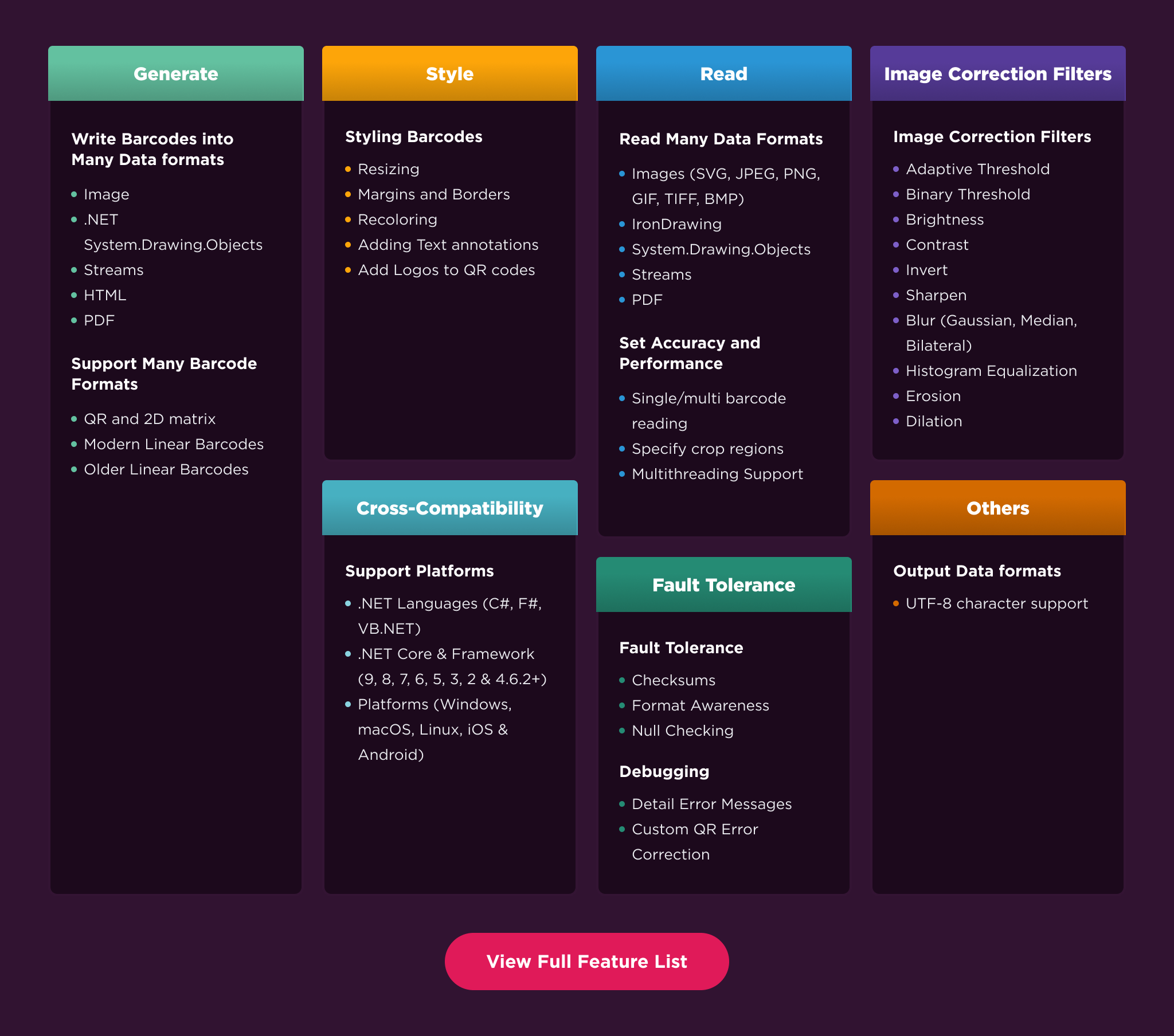
Read Barcode: Reliably scan and decode barcode from from images and PDFs, including those of poor quality.
Generate Barcode: Create and customize barcode with full control over size, color, and text. Export your generated barcode to multiple formats, including images and PDF.
Barcode Types: Comprehensive support for dozens of standard barcode formats including Code 39/128, QR Code, etc., for both reading and writing.
Preprocessing: Improve barcode reading accuracy with a suite of image preprocessing filters including color correction and noise reduction.
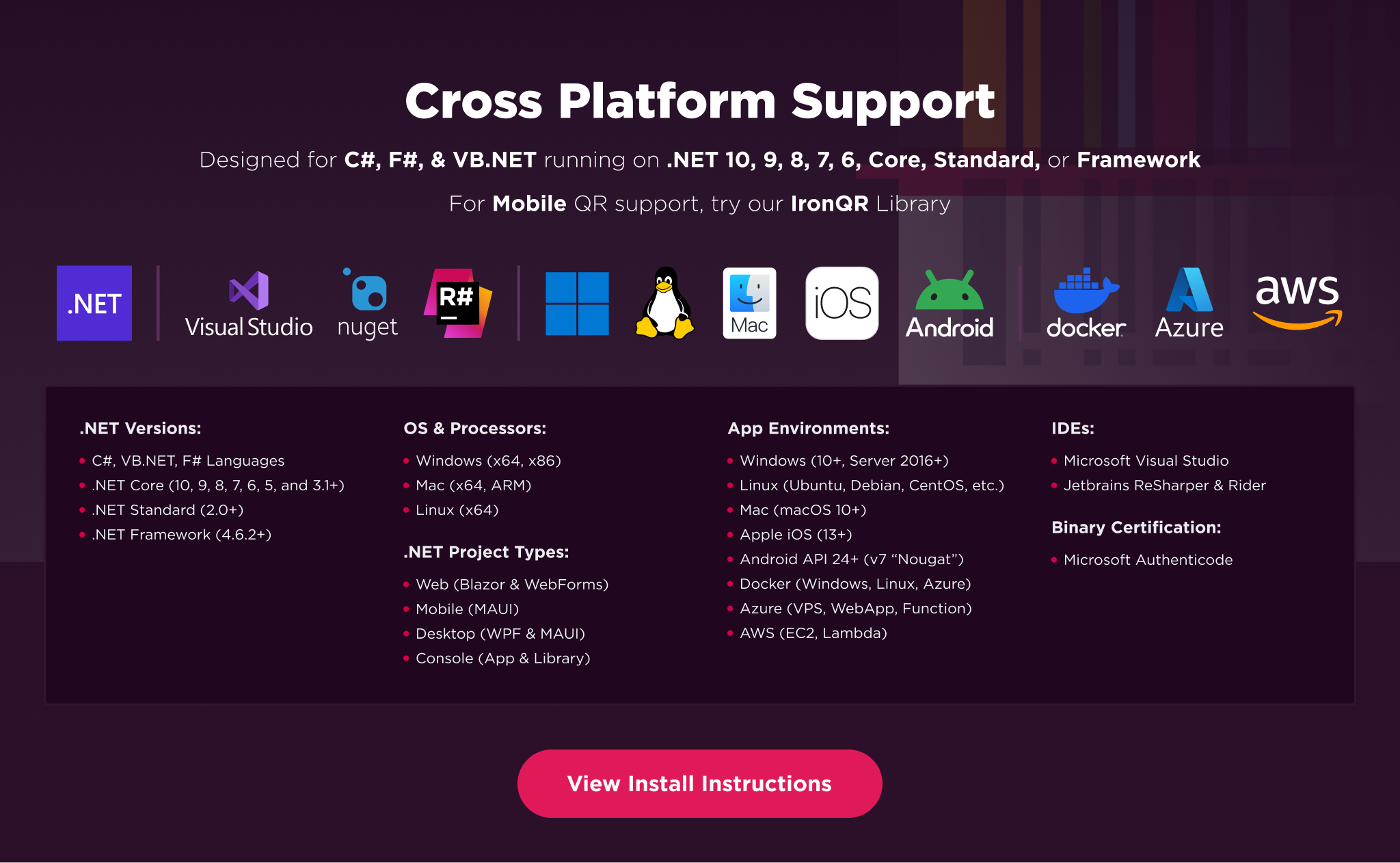
Supported Applications: Perfect for a wide range of applications including web apps and mobile apps.
Platforms: .NET 10, .NET 9, .NET 8, .NET 7, .NET 6, .NET 5, Core 2x & 3x, Standard 2
Framework: .NET Framework 4.6.2 (and above)
App Models: Console, Web, and Desktop Apps
Operating Systems: Windows, macOS, Linux (Debian, CentOS, Ubuntu), iOS, Android
IDEs: Microsoft Visual Studio or Jetbrains ReSharper & Rider
👁 IronBarcode Cross Platform Compatibility Support Image
IronBarcode is a commercially licensed product.
Trial License: Get a free developer key to evaluate the full library with no commitment. Ideal for development and testing purposes. Start your trial HERE.
Purchase a License: Unlock the library for use in commercial projects and get access to our full technical support. Purchase your license HERE.
Have a question or running into an issue?
Email Support: Reach out to our team directly at support@ironsoftware.com.
Live Chat Support: https://ironsoftware.com/csharp/barcode/#helpscout-support
Report a Bug: https://ironsoftware.com/ticket-submission/
Community: https://ironsoftware.com/company/iron-slack-community/
| Product | Versions Compatible and additional computed target framework versions. |
|---|---|
| .NET | net5.0 net5.0 was computed. net5.0-windows net5.0-windows was computed. net6.0 net6.0 was computed. net6.0-android net6.0-android was computed. net6.0-ios net6.0-ios was computed. net6.0-maccatalyst net6.0-maccatalyst was computed. net6.0-macos net6.0-macos was computed. net6.0-tvos net6.0-tvos was computed. net6.0-windows net6.0-windows was computed. net7.0 net7.0 was computed. net7.0-android net7.0-android was computed. net7.0-ios net7.0-ios was computed. net7.0-maccatalyst net7.0-maccatalyst was computed. net7.0-macos net7.0-macos was computed. net7.0-tvos net7.0-tvos was computed. net7.0-windows net7.0-windows was computed. net8.0 net8.0 was computed. net8.0-android net8.0-android was computed. net8.0-browser net8.0-browser was computed. net8.0-ios net8.0-ios was computed. net8.0-maccatalyst net8.0-maccatalyst was computed. net8.0-macos net8.0-macos was computed. net8.0-tvos net8.0-tvos was computed. net8.0-windows net8.0-windows was computed. net9.0 net9.0 was computed. net9.0-android net9.0-android was computed. net9.0-browser net9.0-browser was computed. net9.0-ios net9.0-ios was computed. net9.0-maccatalyst net9.0-maccatalyst was computed. net9.0-macos net9.0-macos was computed. net9.0-tvos net9.0-tvos was computed. net9.0-windows net9.0-windows was computed. net10.0 net10.0 was computed. net10.0-android net10.0-android was computed. net10.0-browser net10.0-browser was computed. net10.0-ios net10.0-ios was computed. net10.0-maccatalyst net10.0-maccatalyst was computed. net10.0-macos net10.0-macos was computed. net10.0-tvos net10.0-tvos was computed. net10.0-windows net10.0-windows was computed. |
| .NET Core | netcoreapp2.0 netcoreapp2.0 was computed. netcoreapp2.1 netcoreapp2.1 was computed. netcoreapp2.2 netcoreapp2.2 was computed. netcoreapp3.0 netcoreapp3.0 was computed. netcoreapp3.1 netcoreapp3.1 was computed. |
| .NET Standard | netstandard2.0 netstandard2.0 is compatible. netstandard2.1 netstandard2.1 was computed. |
| .NET Framework | net net is compatible. net461 net461 was computed. net462 net462 was computed. net463 net463 was computed. net47 net47 was computed. net471 net471 was computed. net472 net472 was computed. net48 net48 was computed. net481 net481 was computed. |
| MonoAndroid | monoandroid monoandroid was computed. |
| MonoMac | monomac monomac was computed. |
| MonoTouch | monotouch monotouch was computed. |
| Tizen | tizen40 tizen40 was computed. tizen60 tizen60 was computed. |
| Xamarin.iOS | xamarinios xamarinios was computed. |
| Xamarin.Mac | xamarinmac xamarinmac was computed. |
| Xamarin.TVOS | xamarintvos xamarintvos was computed. |
| Xamarin.WatchOS | xamarinwatchos xamarinwatchos was computed. |
Showing the top 5 NuGet packages that depend on BarCode.Slim:
| Package | Downloads |
|---|---|
|
BarCode
IronBarcode - The C# Barcode & QR Library Quickstart guide: https://ironsoftware.com/csharp/barcode/ IronBarcode allows developers to read & write Barcodes and QR Codes within .NET Applications & websites. Reading or writing barcodes with IronBarcode only requires a single line of code. The .NET Barcode Library reads and writes most Barcode and QR standards. These include Code 39/93/128, UPC-A/E, EAN-8/13, ITF, Databar / Databar Expanded, Codabar, Aztec, Data Matrix, MaxiCode, PDF417, Plessey / MSI Plessey, Intelligent Mail, and QR / Micro QR / rMQR. The possible barcode result data types include text, binary data, page, and image file. The barcode reading engine includes automatic image correction and barcode detection technology to take the pain out of locating and reading from imperfect scans. Multithreading, cropping, and batch scanning provides fast and accurate scanning of multi-page documents. The barcode writing API checks and verifies format, length, number, checksum to automatically avoid encoding errors. The barcode writer allows for styling, resizing, margins, borders, recoloring, and adding text annotations. Can write to image, PDF or HTML file. Key library features include: * Read single or multiple barcodes and QR Codes from images or PDFs. * Image correction for skewing, orientation, noise, low resolution, contrast etc. * Create barcodes and apply to images or PDF documents. * Embed barcodes into HTML documents. * Style barcodes and add annotation text. * QR Code writing allows adding of logos, colors, and advanced QR alignment. IronBarcode can be used within C#, VB.NET, ASP .NET projects, MVC, Web Services, Console & Desktop Applications. Supports: * .NET Framework 4.6.2 + * .NET Core 2.0 + * .NET 5 * .NET 6 * .NET 7 * .NET 8 * .NET 9 * .NET 10 Licensing & Support available for commercial deployments. For code examples, documentation & more visit https://ironsoftware.com/csharp/barcode/ For support please email us at support@ironsoftware.com |
|
|
BarCode.Linux
IronBarcode for Linux - The C# Barcode & QR Library Quickstart guide: https://ironsoftware.com/csharp/barcode/ IronBarcode allows developers to read & write Barcodes and QR Codes within .NET Applications & websites. Reading or writing barcodes with IronBarcode only requires a single line of code. The .NET Barcode Library reads and writes most Barcode and QR standards. These include Code 39/93/128, UPC-A/E, EAN-8/13, ITF, Databar / Databar Expanded, Codabar, Aztec, Data Matrix, MaxiCode, PDF417, Plessey / MSI Plessey, Intelligent Mail, and QR / Micro QR / rMQR. The possible barcode result data types include text, binary data, page, and image file. The barcode reading engine includes automatic image correction and barcode detection technology to take the pain out of locating and reading from imperfect scans. Multithreading, cropping, and batch scanning provides fast and accurate scanning of multi-page documents. The barcode writing API checks and verifies format, length, number, checksum to automatically avoid encoding errors. The barcode writer allows for styling, resizing, margins, borders, recoloring, and adding text annotations. Can write to image, PDF or HTML file. Key library features include: * Read single or multiple barcodes and QR Codes from images or PDFs. * Image correction for skewing, orientation, noise, low resolution, contrast etc. * Create barcodes and apply to images or PDF documents. * Embed barcodes into HTML documents. * Style barcodes and add annotation text. * QR Code writing allows adding of logos, colors, and advanced QR alignment. IronBarcode can be used within C#, VB.NET, ASP .NET projects, MVC, Web Services, Console & Desktop Applications. Supports: * .NET Framework 4.6.2 + * .NET Core 2.0 + * .NET 5 * .NET 6 * .NET 7 * .NET 8 * .NET 9 * .NET 10 Licensing & Support available for commercial deployments. For code examples, documentation & more visit https://ironsoftware.com/csharp/barcode/ For support please email us at support@ironsoftware.com |
|
|
BarCode.Android
IronBarcode for Android - The C# Barcode & QR Library Quickstart guide: https://ironsoftware.com/csharp/barcode/ IronBarcode allows developers to read & write Barcodes and QR Codes within .NET Applications & websites. Reading or writing barcodes with IronBarcode only requires a single line of code. The .NET Barcode Library reads and writes most Barcode and QR standards. These include Code 39/93/128, UPC-A/E, EAN-8/13, ITF, Databar / Databar Expanded, Codabar, Aztec, Data Matrix, MaxiCode, PDF417, Plessey / MSI Plessey, Intelligent Mail, and QR / Micro QR / rMQR. The possible barcode result data types include text, binary data, page, and image file. The barcode reading engine includes automatic image correction and barcode detection technology to take the pain out of locating and reading from imperfect scans. Multithreading, cropping, and batch scanning provides fast and accurate scanning of multi-page documents. The barcode writing API checks and verifies format, length, number, checksum to automatically avoid encoding errors. The barcode writer allows for styling, resizing, margins, borders, recoloring, and adding text annotations. Can write to image, PDF or HTML file. Key library features include: * Read single or multiple barcodes and QR Codes from images or PDFs. * Image correction for skewing, orientation, noise, low resolution, contrast etc. * Create barcodes and apply to images or PDF documents. * Embed barcodes into HTML documents. * Style barcodes and add annotation text. * QR Code writing allows adding of logos, colors, and advanced QR alignment. IronBarcode can be used within C#, VB.NET, ASP .NET projects, MVC, Web Services, Console & Desktop Applications. Supports: * .NET Framework 4.6.2 + * .NET Core 2.0 + * .NET 5 * .NET 6 * .NET 7 * .NET 8 * .NET 9 * .NET 10 Licensing & Support available for commercial deployments. For code examples, documentation & more visit https://ironsoftware.com/csharp/barcode/ For support please email us at support@ironsoftware.com |
|
|
BarCode.MacOs.ARM
IronBarcode for MacOs Apple Silicon - The C# Barcode & QR Library Quickstart guide: https://ironsoftware.com/csharp/barcode/ IronBarcode allows developers to read & write Barcodes and QR Codes within .NET Applications & websites. Reading or writing barcodes with IronBarcode only requires a single line of code. The .NET Barcode Library reads and writes most Barcode and QR standards. These include Code 39/93/128, UPC-A/E, EAN-8/13, ITF, Databar / Databar Expanded, Codabar, Aztec, Data Matrix, MaxiCode, PDF417, Plessey / MSI Plessey, Intelligent Mail, and QR / Micro QR / rMQR. The possible barcode result data types include text, binary data, page, and image file. The barcode reading engine includes automatic image correction and barcode detection technology to take the pain out of locating and reading from imperfect scans. Multithreading, cropping, and batch scanning provides fast and accurate scanning of multi-page documents. The barcode writing API checks and verifies format, length, number, checksum to automatically avoid encoding errors. The barcode writer allows for styling, resizing, margins, borders, recoloring, and adding text annotations. Can write to image, PDF or HTML file. Key library features include: * Read single or multiple barcodes and QR Codes from images or PDFs. * Image correction for skewing, orientation, noise, low resolution, contrast etc. * Create barcodes and apply to images or PDF documents. * Embed barcodes into HTML documents. * Style barcodes and add annotation text. * QR Code writing allows adding of logos, colors, and advanced QR alignment. IronBarcode can be used within C#, VB.NET, ASP .NET projects, MVC, Web Services, Console & Desktop Applications. Supports: * .NET Framework 4.6.2 + * .NET Core 2.0 + * .NET 5 * .NET 6 * .NET 7 * .NET 8 * .NET 9 * .NET 10 Licensing & Support available for commercial deployments. For code examples, documentation & more visit https://ironsoftware.com/csharp/barcode/ For support please email us at support@ironsoftware.com |
|
|
BarCode.iOS
IronBarcode for iOS - The C# Barcode & QR Library Quickstart guide: https://ironsoftware.com/csharp/barcode/ IronBarcode allows developers to read & write Barcodes and QR Codes within .NET Applications & websites. Reading or writing barcodes with IronBarcode only requires a single line of code. The .NET Barcode Library reads and writes most Barcode and QR standards. These include Code 39/93/128, UPC-A/E, EAN-8/13, ITF, Databar / Databar Expanded, Codabar, Aztec, Data Matrix, MaxiCode, PDF417, Plessey / MSI Plessey, Intelligent Mail, and QR / Micro QR / rMQR. The possible barcode result data types include text, binary data, page, and image file. The barcode reading engine includes automatic image correction and barcode detection technology to take the pain out of locating and reading from imperfect scans. Multithreading, cropping, and batch scanning provides fast and accurate scanning of multi-page documents. The barcode writing API checks and verifies format, length, number, checksum to automatically avoid encoding errors. The barcode writer allows for styling, resizing, margins, borders, recoloring, and adding text annotations. Can write to image, PDF or HTML file. Key library features include: * Read single or multiple barcodes and QR Codes from images or PDFs. * Image correction for skewing, orientation, noise, low resolution, contrast etc. * Create barcodes and apply to images or PDF documents. * Embed barcodes into HTML documents. * Style barcodes and add annotation text. * QR Code writing allows adding of logos, colors, and advanced QR alignment. IronBarcode can be used within C#, VB.NET, ASP .NET projects, MVC, Web Services, Console & Desktop Applications. Supports: * .NET Framework 4.6.2 + * .NET Core 2.0 + * .NET 5 * .NET 6 * .NET 7 * .NET 8 * .NET 9 * .NET 10 Licensing & Support available for commercial deployments. For code examples, documentation & more visit https://ironsoftware.com/csharp/barcode/ For support please email us at support@ironsoftware.com |
This package is not used by any popular GitHub repositories.
| Version | Downloads | Last Updated |
|---|---|---|
| 2026.6.2 | 2,794 | 5/26/2026 |
| 2026.5.2 | 4,531 | 4/29/2026 |
| 2026.4.2 | 5,846 | 3/27/2026 |
| 2026.3.6 | 5,219 | 2/27/2026 |
| 2026.2.1 | 1,747 | 2/17/2026 |
| 2026.1.8 | 1,780 | 2/9/2026 |
| 2025.12.6 | 8,269 | 12/26/2025 |
| 2025.11.4 | 11,921 | 11/10/2025 |
| 2025.10.4 | 9,160 | 10/8/2025 |
| 2025.9.5 | 11,761 | 9/2/2025 |
| 2025.8.5 | 4,567 | 8/14/2025 |
| 2025.7.29 | 10,649 | 7/24/2025 |
| 2025.6.7 | 9,766 | 6/17/2025 |
| 2025.5.8 | 8,128 | 5/13/2025 |
| 2025.4.2 | 10,582 | 4/8/2025 |
| 2025.3.4 | 16,149 | 3/5/2025 |
| 2025.2.11 | 16,163 | 2/3/2025 |
| 2025.1.10 | 21,731 | 1/6/2025 |
| 2024.12.8 | 18,605 | 12/5/2024 |
Dependency Updates:
- Updates internal dependencies.