|
VOOZH | about |
|
VOOZH | about |
dotnet add package C1.WPF.Input --version 10.0.20261.38
NuGet\Install-Package C1.WPF.Input -Version 10.0.20261.38
<PackageReference Include="C1.WPF.Input" Version="10.0.20261.38" />
<PackageVersion Include="C1.WPF.Input" Version="10.0.20261.38" />Directory.Packages.props
<PackageReference Include="C1.WPF.Input" />Project file
paket add C1.WPF.Input --version 10.0.20261.38
#r "nuget: C1.WPF.Input, 10.0.20261.38"
#:package C1.WPF.Input@10.0.20261.38
#addin nuget:?package=C1.WPF.Input&version=10.0.20261.38Install as a Cake Addin
#tool nuget:?package=C1.WPF.Input&version=10.0.20261.38Install as a Cake Tool
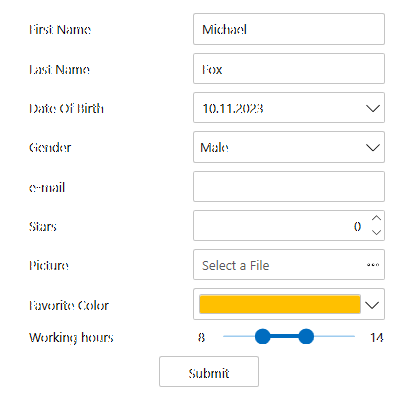
The ComponentOne WPF Input library includes several advanced editors for capturing special input including C1NumericBox, C1MaskedTextBox, C1MultiSelect, C1ComboBox, C1DropDown, C1RangeSlider, C1FilePicker, C1Rating and C1TagEditor.
Key Features:
Note: Date, time and color input controls are in separate libraries. Learn more at developer.mescius.com/componentone/wpf-ui-controls/custom-input-controls-wpf.
| Product | Versions Compatible and additional computed target framework versions. |
|---|---|
| .NET | net6.0-windows7.0 net6.0-windows7.0 is compatible. net7.0-windows net7.0-windows was computed. net8.0-windows net8.0-windows was computed. net9.0-windows net9.0-windows was computed. net10.0-windows net10.0-windows was computed. |
Showing the top 5 NuGet packages that depend on C1.WPF.Input:
| Package | Downloads |
|---|---|
|
C1.WPF.Menu
ComponentOne Menu for WPF. |
|
|
C1.WPF.TabControl
Easily organize and navigate content with ComponentOne TabControl™ for WPF. |
|
|
C1.WPF.Docking
Upgrade your static interface to a multi-tabbed docking interface with ComponentOne DockControl™ for WPF. Inspired by the docking system in Microsoft Visual Studio®, DockControl delivers customizable workspaces to your users, complete with resizing, persisting, and auto-hiding capabilities. |
|
|
C1.WPF.DateTimeEditors
The DateTimePicker control provides a single, intuitive UI for selecting date and time values. The TimeEditor control provides a simple masked editor for time values only. You can edit your date and time values by using the spin buttons, using the keyboard arrows, or by typing in fields. |
|
|
C1.WPF.TreeView
Though it's similar to the TreeView control available in the box, ComponentOne TreeView for WPF provides more powerful features like autosearch, drag-and-drop, and hierarchical templates. |
This package is not used by any popular GitHub repositories.
| Version | Downloads | Last Updated |
|---|---|---|
| 10.0.20261.38 | 312 | 5/29/2026 |
| 10.0.20252.1321 | 330 | 3/20/2026 |
| 10.0.20252.1308 | 336 | 2/12/2026 |
| 10.0.20252.1221 | 1,184 | 12/1/2025 |
| 9.0.20251.1133 | 760 | 9/18/2025 |
| 9.0.20251.1102 | 507 | 7/11/2025 |
| 9.0.20251.1069 | 1,092 | 5/16/2025 |
| 8.0.20242.1051 | 834 | 3/3/2025 |
| 8.0.20242.1032 | 285 | 2/26/2025 |
| 8.0.20242.1005 | 598 | 12/27/2024 |
| 8.0.20242.966 | 690 | 11/12/2024 |
| 8.0.20241.921 | 740 | 9/3/2024 |
| 8.0.20241.854 | 540 | 7/8/2024 |
| 8.0.20241.795 | 1,299 | 5/29/2024 |
| 8.0.20233.731 | 7,254 | 3/12/2024 |
| 8.0.20233.702 | 486 | 1/19/2024 |
| 8.0.20233.681 | 625 | 11/29/2023 |
| 8.0.20233.668 | 1,373 | 11/8/2023 |
| 7.0.20233.662 | 483 | 11/10/2023 |
| 6.0.20232.624 | 667 | 9/11/2023 |