VOOZH about

URL: https://www.nuget.org/packages/C1.Xaml.WPF.Olap.Cn/

⇱ NuGet Gallery | C1.Xaml.WPF.Olap.Cn 4.6.20252.920


👁 Image
C1.Xaml.WPF.Olap.Cn 4.6.20252.920

dotnet add package C1.Xaml.WPF.Olap.Cn --version 4.6.20252.920
 
 
NuGet\Install-Package C1.Xaml.WPF.Olap.Cn -Version 4.6.20252.920
 
 
This command is intended to be used within the Package Manager Console in Visual Studio, as it uses the NuGet module's version of Install-Package.
<PackageReference Include="C1.Xaml.WPF.Olap.Cn" Version="4.6.20252.920" />
 
 
For projects that support PackageReference, copy this XML node into the project file to reference the package.
<PackageVersion Include="C1.Xaml.WPF.Olap.Cn" Version="4.6.20252.920" />
 
Directory.Packages.props
<PackageReference Include="C1.Xaml.WPF.Olap.Cn" />
 
Project file
For projects that support Central Package Management (CPM), copy this XML node into the solution Directory.Packages.props file to version the package.
paket add C1.Xaml.WPF.Olap.Cn --version 4.6.20252.920
 
 
The NuGet Team does not provide support for this client. Please contact its maintainers for support.
#r "nuget: C1.Xaml.WPF.Olap.Cn, 4.6.20252.920"
 
 
#r directive can be used in F# Interactive and Polyglot Notebooks. Copy this into the interactive tool or source code of the script to reference the package.
#:package C1.Xaml.WPF.Olap.Cn@4.6.20252.920
 
 
#:package directive can be used in C# file-based apps starting in .NET 10 preview 4. Copy this into a .cs file before any lines of code to reference the package.
#addin nuget:?package=C1.Xaml.WPF.Olap.Cn&version=4.6.20252.920
 
Install as a Cake Addin
#tool nuget:?package=C1.Xaml.WPF.Olap.Cn&version=4.6.20252.920
 
Install as a Cake Tool
The NuGet Team does not provide support for this client. Please contact its maintainers for support.

About

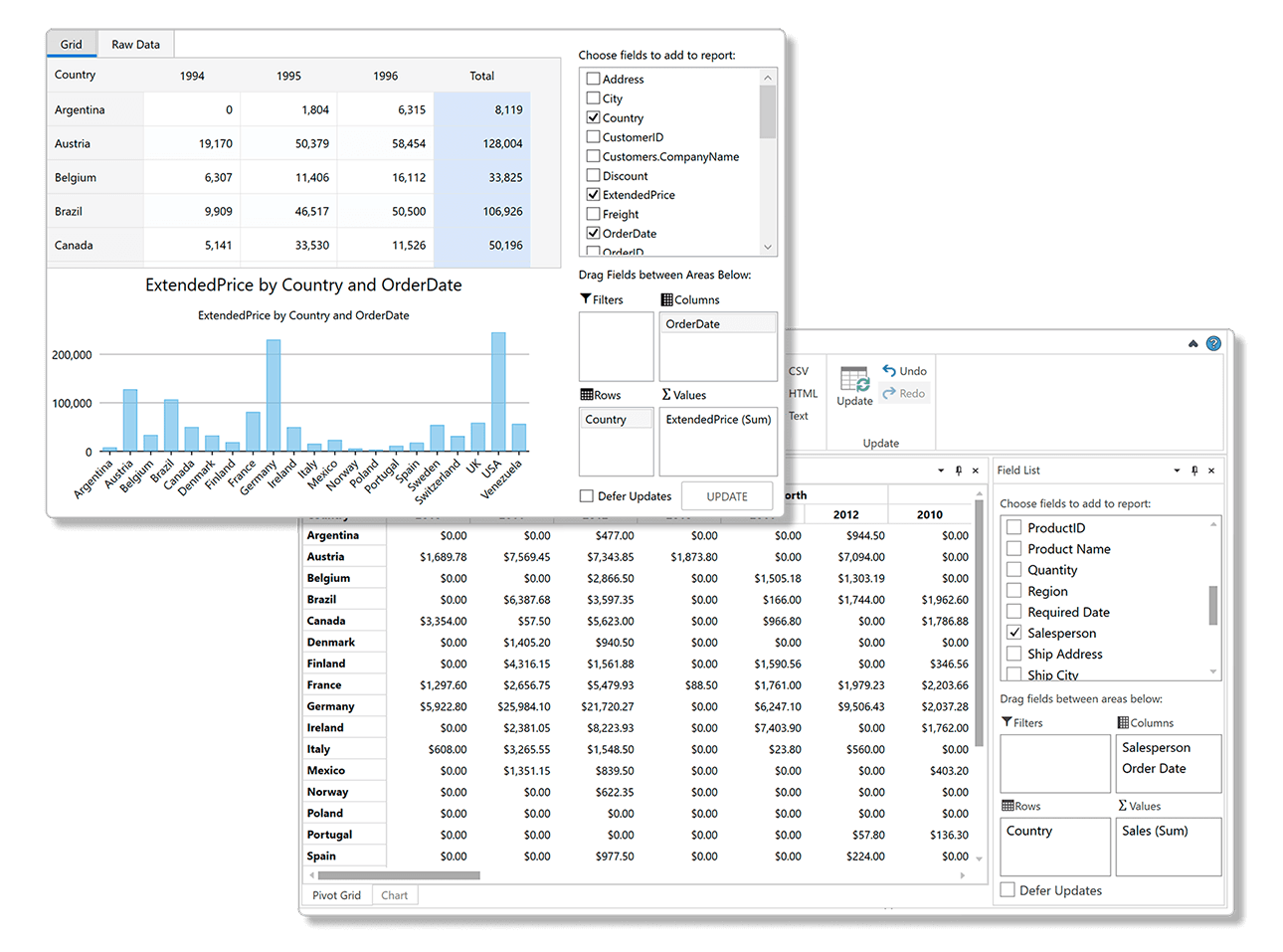
The ComponentOne WPF OLAP control uses pivot grids and charts to deliver in-depth business intelligence (BI) functionality. Aggregate millions of rows of data in your WPF apps to create dynamic pivot tables like Microsoft Excel.

👁 WPF FlexPivot

Key Features:

  • Includes pivot tables, charts and a pivot panel UI that allows users to create dynamic views
  • Dynamically create summarized views by dragging fields into the row, column, and value lists
  • Pull multiple data sources into a single, multi-dimensional pivot table from online or local OLAP cubes
  • Built on a super-charged data engine, FlexPivot can process millions of records in milliseconds
  • The WPF pivotgrid automatically calculates subtotals grand totals for each slice of your data
  • End-users can create conditional formatting rules to highlight values
  • End-users can filter, slice and aggregate the data set dynamically with no coding required
  • Convey the pivot table view in a chart to discover new insights and trends
  • View the underlying (raw) data for any aggregated cell in the pivot table by double-clicking
  • The pivot table information can be exported to CSV, HTML, text or directly printed from the toolbar
  • Get the same pivot UI across multiple desktop and web platforms: WinForms, WPF, ASP.NET MVC and JavaScript

Learn more at developer.mescius.com/componentone/wpf-ui-controls/flexpivot-pivot-grid-olap-wpf.

Resources

Product Versions Compatible and additional computed target framework versions.
.NET Framework net462 net462 is compatible.  net463 net463 was computed.  net47 net47 was computed.  net471 net471 was computed.  net472 net472 was computed.  net48 net48 was computed.  net481 net481 was computed. 
Compatible target framework(s)
Included target framework(s) (in package)
Learn more about Target Frameworks and .NET Standard.

NuGet packages

This package is not used by any NuGet packages.

GitHub repositories

This package is not used by any popular GitHub repositories.

Version Downloads Last Updated
4.6.20252.920 119 4/3/2026
4.6.20252.916 117 3/25/2026
4.6.20252.904 123 2/12/2026
4.6.20252.901 535 12/1/2025
4.6.20251.889 354 9/18/2025
4.6.20251.884 178 7/11/2025
4.6.20251.878 267 5/16/2025
4.6.20242.872 239 3/3/2025
4.6.20242.866 209 1/9/2025
4.6.20242.860 197 11/25/2024
4.6.20241.855 224 9/3/2024
4.6.20241.846 207 7/8/2024
4.6.20241.841 187 5/29/2024
4.6.20233.829 225 4/1/2024
4.6.20233.823 210 4/1/2024