|
VOOZH | about |
|
VOOZH | about |
dotnet add package CleanCodeJN.GenericApis --version 6.4.2
NuGet\Install-Package CleanCodeJN.GenericApis -Version 6.4.2
<PackageReference Include="CleanCodeJN.GenericApis" Version="6.4.2" />
<PackageVersion Include="CleanCodeJN.GenericApis" Version="6.4.2" />Directory.Packages.props
<PackageReference Include="CleanCodeJN.GenericApis" />Project file
paket add CleanCodeJN.GenericApis --version 6.4.2
#r "nuget: CleanCodeJN.GenericApis, 6.4.2"
#:package CleanCodeJN.GenericApis@6.4.2
#addin nuget:?package=CleanCodeJN.GenericApis&version=6.4.2Install as a Cake Addin
#tool nuget:?package=CleanCodeJN.GenericApis&version=6.4.2Install as a Cake Tool
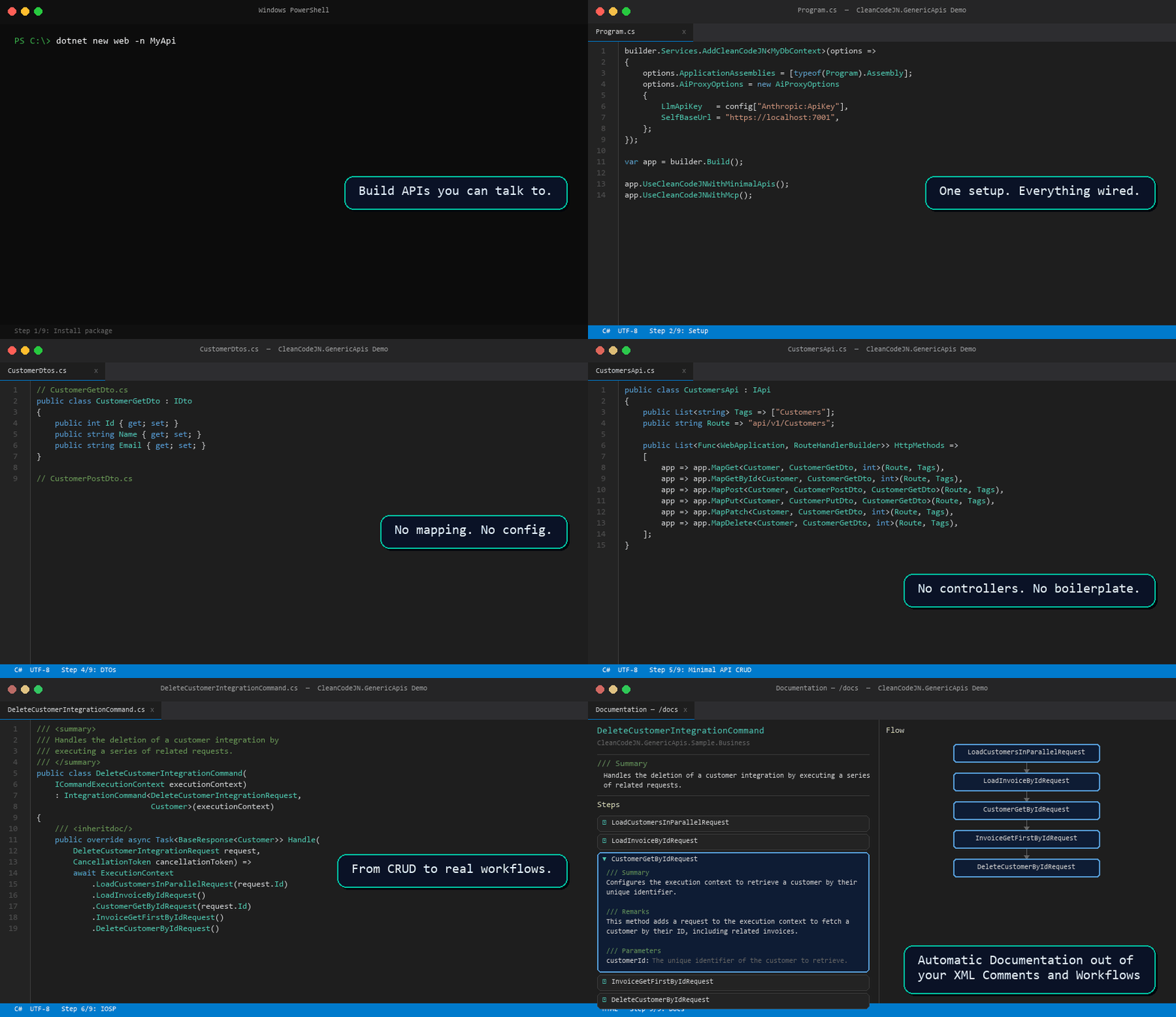
👁 CleanCodeJN.GenericApis Demo
Build production-ready APIs instantly – from Minimal APIs and Controllers to fully integrated GraphQL endpoints and an AI-ready MCP Server with CRUD, filtering, sorting & paging – powered by Mediator, Mapster, EF Core, FluentValidation, and the IOSP architecture pattern.
dotnet add package CleanCodeJN.GenericApis
// Program.cs
builder.Services.AddCleanCodeJN<MyDbContext>(options =>
{
 options.ApplicationAssemblies = // assemblies with your Commands, DTOs, Entities
 [
 typeof(YourBusiness.AssemblyRegistration).Assembly,
 typeof(YourCore.AssemblyRegistration).Assembly,
 ];
 options.ValidatorAssembly = typeof(YourCore.AssemblyRegistration).Assembly;
 options.AddDefaultLoggingBehavior = true; // optional
});

var app = builder.Build();

app.UseCleanCodeJNWithMinimalApis(); // REST: registers all IApi endpoints → /api/...
app.UseCleanCodeJNWithGraphQL(); // GraphQL: auto-schema from entities/DTOs → /graphql
app.UseCleanCodeJNWithMcp(); // MCP Server: every endpoint = AI tool → /mcp
app.UseCleanCodeJNWithDocumentation(); // IOSP command docs from XML comments → /docs
app.UseCleanCodeJNWithAiChat(); // AI chat with your API based on MCP server → /ai
app.MapControllers();

app.Run();
// Entity + DTO (naming convention: <EntityName>GetDto / PostDto / PutDto)
public class Customer : IEntity<int> { public int Id { get; set; } public string Name { get; set; } }
public class CustomerGetDto : IDto { public int Id { get; set; } public string Name { get; set; } }

// Minimal API — full CRUD in ~10 lines
public class CustomersApi : IApi
{
 public List<string> Tags => ["Customers"];
 public string Route => "api/v1/Customers";
 public List<Func<WebApplication, RouteHandlerBuilder>> HttpMethods =>
 [
 app => app.MapGet<Customer, CustomerGetDto, int>(Route, Tags),
 app => app.MapGetById<Customer, CustomerGetDto, int>(Route, Tags),
 app => app.MapPost<Customer, CustomerPostDto, CustomerGetDto>(Route, Tags),
 app => app.MapPut<Customer, CustomerPutDto, CustomerGetDto>(Route, Tags),
 app => app.MapPatch<Customer, CustomerGetDto, int>(Route, Tags),
 app => app.MapDeleteRequest<Customer, CustomerGetDto, int>(Route, Tags, id => new DeleteCustomerRequest { Id = id }),
 ];
}

// IOSP: complex business logic as clean orchestration
public class DeleteCustomerCommand(ICommandExecutionContext ctx)
 : IntegrationCommand<DeleteCustomerRequest, Customer>(ctx)
{
 public override async Task<BaseResponse<Customer>> Handle(DeleteCustomerRequest request, CancellationToken ct) =>
 await ExecutionContext
 .GetCustomerByIdRequest(request.Id)
 .ValidateInvoicesRequest()
 .DeleteCustomerRequest()
 .Execute<Customer>(ct);
}
Program.cs — AI Proxy config (only if using /ai) options.AiProxyOptions = new AiProxyOptions
{
LlmApiKey = configuration["Anthropic:ApiKey"],
SelfBaseUrl = configuration["SelfBaseUrl"],
Model = "claude-sonnet-4-6",
MaxTokens = 4096,
ChatRoute = "/ai/chat", // default
TestRoute = "/ai/test", // default
McpPath = "/mcp", // default — must match McpOptions.Route
EnableTestEndpoint = true, // set false in production
AllowedCorsOrigins = ["*"], // default — restrict in production e.g. ["https://myapp.com"]
CorsPolicyName = "CleanCodeJNChat", // default — change if it conflicts with existing policies
DisableCertificateValidation = false, // set true only in local dev
};
| Block | What you write | What you get |
|---|---|---|
| Entity | class Customer : IEntity<int> |
EF Core + Repository + GraphQL type |
| DTO | class CustomerGetDto : IDto |
Auto-mapped, Swagger schema, MCP output schema |
| IApi | class CustomersApi : IApi |
REST endpoints + MCP tools + GraphQL queries |
// Entity
public class Customer : IEntity<int>
{
 public int Id { get; set; }
 public string Name { get; set; }
}

// DTO (naming convention: <EntityName>GetDto / PostDto / PutDto)
public class CustomerGetDto : IDto
{
 public int Id { get; set; }
 public string Name { get; set; }
}

// Minimal API — all CRUD in ~10 lines
public class CustomersApi : IApi
{
 public List<string> Tags => ["Customers"];
 public string Route => "api/v1/Customers";

 public List<Func<WebApplication, RouteHandlerBuilder>> HttpMethods =>
 [
 app => app.MapGet<Customer, CustomerGetDto, int>(Route, Tags),
 app => app.MapGetById<Customer, CustomerGetDto, int>(Route, Tags),
 app => app.MapPost<Customer, CustomerPostDto, CustomerGetDto>(Route, Tags),
 app => app.MapPut<Customer, CustomerPutDto, CustomerGetDto>(Route, Tags),
 app => app.MapPatch<Customer, CustomerGetDto, int>(Route, Tags),
 app => app.MapDeleteRequest<Customer, CustomerGetDto, int>(Route, Tags, id => new DeleteCustomerRequest { Id = id }),
 ];
}
Use* call activates| Call | Activates | Default route |
|---|---|---|
UseCleanCodeJNWithMinimalApis() |
All IApi REST endpoints |
/api + /swagger |
UseCleanCodeJNWithGraphQL() |
Auto-generated GraphQL schema | /graphql (configurable) |
UseCleanCodeJNWithMcp() |
MCP Server (AI-callable tools) | /mcp (configurable via McpOptions.Route) |
UseCleanCodeJNWithDocumentation() |
Automatic documentation from XML comments | /docs + /api/docs (configurable via route parameter) |
UseCleanCodeJNWithAiChat() |
AI chat SSE endpoint + optional test endpoint | /ai/chat + /ai/test (configurable via AiProxyOptions) |
/ai Blazor page: chat with your API in natural language/docsIntegration Operation Segregation Principle — split your handlers into: Operations → real logic (DB, external APIs, …) Integrations → pure orchestration of other handlers, no logic of their own
builder.Services.AddCleanCodeJN<MyDbContext>(options => {});
builder.Services.AddCleanCodeJN<MyDbContext>(options =>
{
 // Assemblies containing your Commands, DTOs and Entities
 options.ApplicationAssemblies = [ typeof(YourAssembly).Assembly ];

 // Assembly with FluentValidation AbstractValidators
 options.ValidatorAssembly = typeof(YourAssembly).Assembly;

 // Use distributed memory cache (default: true)
 options.UseDistributedMemoryCache = true;

 // Enable built-in MediatR logging behavior
 options.AddDefaultLoggingBehavior = true;

 // Register custom open/closed MediatR pipeline behaviors
 options.OpenBehaviors = [ typeof(MyBehavior<,>) ];
 options.ClosedBehaviors = [ typeof(MySpecificBehavior) ];

 // GraphQL auto-wiring
 options.GraphQLOptions = new GraphQLOptions { Get = true, Create = true, Update = true, Delete = true };

 // AI Proxy (for /ai chat page)
 options.AiProxyOptions = new AiProxyOptions
 {
 LlmApiKey = "sk-ant-...",
 SelfBaseUrl = "https://localhost:7001",
 CorsPolicyName = "CleanCodeJNChat", // default
 DisableCertificateValidation = false, // set true only in local dev
 };

 // Assemblies scanned for custom Mapster IRegister mapping profiles
 options.MapsterMappingAssemblies = [ typeof(YourAssembly).Assembly ];

 // Override DTO suffix and GraphQL prefix naming conventions
 options.NamingConventions = new CleanCodeNamingConventions
 {
 GetDtoSuffix = "GetDto", // default
 PostDtoSuffix = "PostDto", // default
 PutDtoSuffix = "PutDto", // default
 GraphQLCreatePrefix = "create", // default → createCustomer
 GraphQLUpdatePrefix = "update", // default → updateCustomer
 GraphQLDeletePrefix = "delete", // default → deleteCustomer
 };
});
app.UseCleanCodeJNWithMinimalApis();
app.UseCleanCodeJNWithGraphQL();
app.UseCleanCodeJNWithDocumentation("/mydocs"); // default: /docs
// add <GenerateDocumentationFile>true</GenerateDocumentationFile> to your .csproj file
One line of code turns your entire API into a Model Context Protocol (MCP) Server — discoverable and executable by any AI assistant that supports the standard MCP Streamable HTTP transport (Claude, Cursor, Continue, and more).
app.UseCleanCodeJNWithMcp();
Use the optional delegate to configure the endpoint:
app.UseCleanCodeJNWithMcp(options =>
{
 // change the endpoint route (default: /mcp)
 // also update AiProxyOptions.McpPath to the same value when using AI chat
 options.Route = "/tools";

 // exclude all DELETE tools so AI assistants cannot delete data
 options.ExcludeTools = name => name.StartsWith("delete_");

 // or exclude specific routes
 options.ExcludeTools = name => name.Contains("admin");
});
Tool names follow the pattern {httpMethod}_{route_in_snake_case}, e.g. delete_api_customers_{id}.
This registers a POST /mcp endpoint (route configurable via McpOptions.Route) implementing the MCP Streamable HTTP transport (protocol version 2024-11-05). No custom protocol, no vendor lock-in — any standard MCP client works out of the box.
CRUD tools are generated automatically from your Controllers and Minimal APIs — including full JSON schemas derived from your DTOs:
| Tool | Description |
|---|---|
list_customer |
Retrieve all Customer records |
get_customer_by_id |
Retrieve a single Customer by ID |
create_customer |
Create a new Customer (schema from CustomerPostDto) |
update_customer |
Update an existing Customer (schema from CustomerPutDto) |
delete_customer |
Delete a Customer by ID |
Custom endpoint tools are generated from any Minimal API endpoint annotated with .WithSummary() / .WithDescription():
public List<Func<WebApplication, RouteHandlerBuilder>> HttpMethods =>
[
 // Standard CRUD → auto-discovered, no annotation needed
 app => app.MapGet<Customer, CustomerGetDto, int>(Route, Tags),
 app => app.MapPost<Customer, CustomerPostDto, CustomerGetDto>(Route, Tags),

 // Custom endpoints → annotate to expose as MCP tools
 app => app.MapGetRequest(Route + "/cached", Tags, async ([FromServices] ApiBase api) =>
 await api.Handle<Customer, List<CustomerGetDto>>(new CachedCustomerRequest()))
 .WithSummary("Get cached customers")
 .WithDescription("Returns a cached list of customers. Served from cache if available."),

 app => app.MapDeleteRequest<Customer, CustomerGetDto, int>(Route, Tags, id => new DeleteCustomerIntegrationRequest { Id = id })
 .WithSummary("Delete customer via integration flow")
 .WithDescription("Deletes a customer using the full integration delete workflow."),
];
Add /// <summary> comments to your DTO properties — the MCP server reads them automatically and includes them as description fields in the JSON schema. This tells the AI assistant exactly what each field means, including constraints and examples.
Step 1: Enable XML doc generation in your DTO project's .csproj:
<PropertyGroup>
 <GenerateDocumentationFile>true</GenerateDocumentationFile>
</PropertyGroup>
Step 2: Add XML comments to your DTO properties:
public class CustomerPostDto : IDto
{
 /// <summary>Full name of the customer, e.g. 'Acme Corp'. Maximum 100 characters.</summary>
 public string Name { get; set; }
}

public class CustomerPutDto : IDto
{
 /// <summary>Unique identifier of the customer to update.</summary>
 public int Id { get; set; }

 /// <summary>New full name of the customer, e.g. 'Acme Corp'. Maximum 100 characters.</summary>
 public string Name { get; set; }
}
The MCP tool schema for create_customer will then look like:
{
 "name": "create_customer",
 "inputSchema": {
 "properties": {
 "name": {
 "type": "string",
 "description": "Full name of the customer, e.g. 'Acme Corp'. Maximum 100 characters."
 }
 }
 }
}
This enables AI assistants to ask the right questions when creating or updating records — e.g. "What is the customer's full name?" — before sending the request.
IOSP Command tools are generated from your XML documentation — giving AI assistants insight into your business workflows:
/// <summary>Handles the deletion of a customer including all related data.</summary>
/// <remarks>Executes in parallel: retrieves customer, validates invoices, then deletes.</remarks>
public class DeleteCustomerIntegrationCommand(...) : IntegrationCommand<...> { }
All tool calls go through the standard HTTP pipeline — your authentication and authorization middleware applies automatically.
Claude Desktop (claude_desktop_config.json):
{
 "mcpServers": {
 "my-api": {
 "url": "https://your-api.com/mcp"
 }
 }
}
Cursor (.cursor/mcp.json):
{
 "mcpServers": {
 "my-api": {
 "url": "https://your-api.com/mcp"
 }
 }
}
Once connected, your AI assistant knows your full API surface and can answer "what can you do with customers?" or execute "create a customer named Acme Corp" directly.
builder.Services.AddControllers()
 .AddNewtonsoftJson(); // this is needed for "http patch" only. If you do not need to use patch, you can remove this line

// After Build()
app.MapControllers();
builder.Services.AddCleanCodeJN<MyDbContext>(options =>
{
 options.ApplicationAssemblies =
 [
 typeof(CleanCodeJN.GenericApis.Sample.Business.AssemblyRegistration).Assembly,
 typeof(CleanCodeJN.GenericApis.Sample.Core.AssemblyRegistration).Assembly,
 typeof(CleanCodeJN.GenericApis.Sample.Domain.AssemblyRegistration).Assembly
 ];
 options.ValidatorAssembly = typeof(CleanCodeJN.GenericApis.Sample.Core.AssemblyRegistration).Assembly;

 // Enable GraphQL with all CRUD operations
 options.GraphQLOptions = new GraphQLOptions
 {
 Get = true,
 Create = true,
 Update = true,
 Delete = true,
 AddAuthorizationWithPolicyName = "MyPolicy", // optional for adding authorization policy

 // optional: extend the HotChocolate schema after CleanCodeJN auto-wiring
 ConfigureSchema = schema =>
 {
 schema.AddType<UploadType>();
 schema.AddErrorFilter<MyErrorFilter>();
 }
 };
});

// Optional: Add Authentication and Authorization if needed
builder.Services.AddAuthorization(options =>
{
 options.AddPolicy("MyPolicy", policy =>
 {
 policy.RequireAuthenticatedUser();
 policy.RequireClaim("role", "admin");
 });
});
public class CustomersV1Api : IApi
{
 public List<string> Tags => ["Customers Minimal API"];

 public string Route => $"api/v1/Customers";

 public List<Func<WebApplication, RouteHandlerBuilder>> HttpMethods =>
 [
 app => app.MapGet<Customer, CustomerGetDto, int>(
 Route,
 Tags,
 where: x => x.Name.StartsWith("Customer"),
 includes: [x => x.Invoices],
 select: x => new Customer { Name = x.Name },
 ignoreQueryFilters: true),

 app => app.MapGetPaged<Customer, CustomerGetDto, int>(Route, Tags),

 app => app.MapGetFiltered<Customer, CustomerGetDto, int>(Route, Tags),

 app => app.MapGetById<Customer, CustomerGetDto, int>(Route, Tags),

 app => app.MapPut<Customer, CustomerPutDto, CustomerGetDto>(Route, Tags),

 app => app.MapPost<Customer, CustomerPostDto, CustomerGetDto>(Route, Tags),

 app => app.MapPatch<Customer, CustomerGetDto, int>(Route, Tags),

 // Or use a custom Command with MapDeleteRequest()
 app => app.MapDeleteRequest<Customer, CustomerGetDto, int>(Route, Tags, id => new DeleteCustomerIntegrationRequest { Id = id })
 ];
}
public class CustomersV1Api : IApi
{
 public List<string> Tags => ["Customers Minimal API"];

 public string Route => $"api/v1/Customers";

 public List<Func<WebApplication, RouteHandlerBuilder>> HttpMethods =>
 [
 app => app.MapGet<Customer, CustomerGetDto, int>(Route, Tags, where: x => x.Name.StartsWith("a"), select: x => new Customer { Name = x.Name }),
 ];
}
[Tags("Customers Controller based")]
[Route($"api/v2/[controller]")]

public class CustomersController(IMediator commandBus, ICleanCodeMapper mapper)
 : ApiCrudControllerBase<Customer, CustomerGetDto, CustomerPostDto, CustomerPutDto, int>(commandBus, mapper)
{
}
/// <summary>
/// Customers Controller based
/// </summary>
/// <param name="commandBus">IMediatr instance.</param>
/// <param name="mapper">ICleanCodeMapper instance.</param>
[Tags("Customers Controller based")]
[Route($"api/v2/[controller]")]
public class CustomersController(IMediator commandBus, ICleanCodeMapper mapper)
 : ApiCrudControllerBase<Customer, CustomerGetDto, CustomerPostDto, CustomerPutDto, int>(commandBus, mapper)
{
 /// <summary>
 /// Where clause for the Get method.
 /// </summary>
 public override Expression<Func<Customer, bool>> GetWhere => x => x.Name.StartsWith("Customer");

 /// <summary>
 /// Includes for the Get method.
 /// </summary>
 public override List<Expression<Func<Customer, object>>> GetIncludes => [x => x.Invoices];

 /// <summary>
 /// Select for the Get method.
 /// </summary>
 public override Expression<Func<Customer, Customer>> GetSelect => x => new Customer { Id = x.Id, Name = x.Name };

 /// <summary>
 /// AsNoTracking for the Get method.
 /// </summary>
 public override bool AsNoTracking => true;
}
{
 "Condition" : 0, // 0 = AND; 1 = OR
 "Filters": [
 {
 "Field": "Name",
 "Value": "aac",
 "Type": 0
 },
 {
 "Field": "Id",
 "Value": "3",
 "Type": 1
 }
 ]
}
Which means: Give me all Names which CONTAINS "aac" AND have Id EQUALS 3. So string Types use always CONTAINS and integer types use EQUALS. All filters are combined with ANDs.
public enum FilterTypeEnum
{
 STRING = 0,
 INTEGER = 1,
 DOUBLE = 2,
 INTEGER_NULLABLE = 3,
 DOUBLE_NULLABLE = 4,
 DATETIME = 5,
 DATETIME_NULLABLE = 6,
 GUID = 7,
 GUID_NULLABLE = 8,
}
Just write your AbstractValidators<T>. They will be automatically executed on generic POST and generic PUT actions:
public class CustomerPostDtoValidator : AbstractValidator<CustomerPostDto>
{
 public CustomerPostDtoValidator()
 {
 RuleFor(x => x.Name)
 .NotEmpty()
 .MaximumLength(10);
 }
public class CustomerPutDtoValidator : AbstractValidator<CustomerPutDto>
{
 public CustomerPutDtoValidator()
 {
 RuleFor(x => x.Id)
 .GreaterThan(0);

 RuleFor(x => x.Name)
 .NotEmpty()
 .MaximumLength(10)
 .CreditCard();
 }
}
public class SpecificDeleteRequest : IRequest<BaseResponse<Customer>>
{
 public required int Id { get; init; }
}
public class SpecificDeleteRequest : IRequest<BaseResponse<Customer>>, ICachableRequest
{
 public required int Id { get; init; }

 public bool BypassCache { get; }

 public string CacheKey => "Your Key";

 public TimeSpan? CacheDuration => TimeSpan.FromHours(168);
}
public class SpecificDeleteCommand(IRepository<Customer, int> repository) : IRequestHandler<SpecificDeleteRequest, BaseResponse<Customer>>
{
 public async Task<BaseResponse<Customer>> Handle(SpecificDeleteRequest request, CancellationToken cancellationToken)
 {
 var deletedCustomer = await repository.Delete(request.Id, cancellationToken);

 return await BaseResponse<Customer>.Create(deletedCustomer is not null, deletedCustomer);
 }
}
CleanCodeJN.GenericApis is fully compatible with the standard ASP.NET Core middleware pipeline.
You can easily add custom middlewares for authentication, logging, exception handling, or any other cross-cutting concern — before or after the CleanCodeJN setup.
Custom middlewares should be registered in your Program.cs after the AddCleanCodeJN() call, but before the CleanCodeJN
middlewares such as UseCleanCodeJNWith. Global mediator behaviours for logging or caching can directly be added in the AddCleanCodeJN() options.
There already is a default logging behaviour included, which can be enabled in the options. This behaviour logs the execution and exection time of each command.
var builder = WebApplication.CreateBuilder(args);

// Add CleanCodeJN
builder.Services.AddCleanCodeJN<MyDbContext>(options =>
{
 options.AddDefaultLoggingBehavior = true; // Enables default logging behaviour
 options.OpenBehaviors = [typeof(CustomBehavior<,>)]; // Adds custom behaviour with 2 generic parameters for TRequest, TResponse

 options.ApplicationAssemblies = [typeof(Program).Assembly];
 options.ValidatorAssembly = typeof(Program).Assembly;
});

// Add custom services
builder.Services.AddLogging();
builder.Services.AddAuthentication("Bearer")
 .AddJwtBearer("Bearer", options =>
 {
 options.Authority = "https://your-keycloak-domain/auth/realms/yourrealm";
 options.Audience = "your-api";
 });
builder.Services.AddAuthorization();

var app = builder.Build();

// Add your middlewares in the right order

// Authentication & Authorization
app.UseAuthentication();
app.UseAuthorization();

// Custom Logging Middleware
app.Use(async (context, next) =>
{
 var logger = context.RequestServices.GetRequiredService<ILogger<Program>>();
 logger.LogInformation("➡️ Request: {Method} {Path}", context.Request.Method, context.Request.Path);
 await next();
 logger.LogInformation("⬅️ Response: {StatusCode}", context.Response.StatusCode);
});

// Global Exception Handling
app.Use(async (context, next) =>
{
 try
 {
 await next();
 }
 catch (Exception ex)
 {
 var logger = context.RequestServices.GetRequiredService<ILogger<Program>>();
 logger.LogError(ex, "Unhandled exception occurred");

 context.Response.StatusCode = 500;
 await context.Response.WriteAsJsonAsync(new
 {
 Title = "Unexpected Error",
 Detail = ex.Message
 });
 }
});

// CleanCodeJN Middlewares
app.UseCleanCodeJNWithMinimalApis();
app.UseCleanCodeJNWithGraphQL();
app.UseCleanCodeJNWithMcp();
app.UseCleanCodeJNDocumentation();

// Run
app.Run();
public class YourIntegrationCommand(ICommandExecutionContext executionContext)
 : IntegrationCommand<YourIntegrationRequest, YourDomainObject>(executionContext)
public static ICommandExecutionContext CustomerGetByIdRequest(
 this ICommandExecutionContext executionContext, int customerId)
 => executionContext.WithRequest(
 () => new GetByIdRequest<Customer>
 {
 Id = customerId,
 Includes = [x => x.Invoices, x => x.OtherDependentTable],
 },
 CommandConstants.CustomerGetById);
 executionContext.WithParallelWhenAllRequests(
 [
 () => new GetByIdRequest<Customer, int>
 {
 Id = request.Id,
 },
 () => new GetByIdRequest<Customer, int>
 {
 Id = request.Id,
 },
 ])
 .WithRequest(
 () => new YourSpecificRequest
 {
 Results = executionContext.GetListParallelWhenAll("Parallel Block"),
 })
 .WithRequest(
 () => new GetByIdRequest<Invoice, Guid>
 {
 Id = executionContext.GetParallelWhenAllByIndex<Invoice>("Parallel Block", 1).Id,
 })
 executionContext.IfRequest(() => new GetByIdRequest<Customer, int> { Id = request.Id },
 ifBeforePredicate: () => true,
 ifAfterPredicate: response => response.Succeeded)
 executionContext.IfBreakRequest(() => new GetByIdRequest<Customer, int> { Id = request.Id },
 ifBeforePredicate: () => true,
 ifAfterPredicate: response => response.Succeeded)
public class YourIntegrationCommand(ICommandExecutionContext executionContext)
 : IntegrationCommand<YourIntegrationRequest, Customer>(executionContext)
{
 public override async Task<BaseResponse<Customer>> Handle(YourIntegrationRequest request, CancellationToken cancellationToken) =>
 await ExecutionContext
 .CandidateGetByIdRequest(request.Dto.CandidateId)
 .CustomerGetByIdRequest(request.Dto.CustomerIds)
 .GetOtherStuffRequest(request.Dto.XYZType)
 .PostSomethingRequest(request.Dto)
 .SendMailRequest()
 .Execute<Customer>(cancellationToken);
}
/ai PageThe CleanCodeJN.GenericApis.Chat package provides a ready-made Blazor WebAssembly chat page at /ai. It connects directly to your backend's MCP server and lets users interact with your API through natural language — powered by Claude.
Requires
UseCleanCodeJNWithMcp()on the backend.
dotnet add package CleanCodeJN.GenericApis.Chat # Blazor WASM UI component
Program.cs additionsSet AiProxyOptions inside AddCleanCodeJN and call UseCleanCodeJNWithAiChat() to register the /ai/chat SSE endpoint:
builder.Services.AddCleanCodeJN<MyDbContext>(options =>
{
 options.AiProxyOptions = new AiProxyOptions
 {
 LlmApiKey = configuration["Anthropic:ApiKey"],
 SelfBaseUrl = "https://localhost:7132",
 Model = "claude-sonnet-4-6",
 MaxTokens = 8096,
 ChatRoute = "/ai/chat", // default
 TestRoute = "/ai/test", // default
 McpPath = "/mcp", // default — must match McpOptions.Route
 EnableTestEndpoint = true, // set false in production
 AllowedCorsOrigins = ["*"], // default — restrict in production
 CorsPolicyName = "CleanCodeJNChat", // default
 DisableCertificateValidation = false, // set true only in local dev
 };
});

var app = builder.Build();

app.UseCleanCodeJNWithMcp(); // registers MCP at McpOptions.Route (default: /mcp)
app.UseCleanCodeJNWithAiChat(); // registers ChatRoute (default: /ai/chat) and optionally TestRoute (default: /ai/test)
Program.csusing CleanCodeJN.GenericApis.Chat.Extensions;
builder.Services.AddMudServices();
builder.Services.AddCleanCodeJNWithAiChat(options =>
{
options.BackendUrl = "https://localhost:7132"; // URL of your CleanCodeJN backend
options.Title = "My AI Assistant"; // Title shown in the app bar
options.ShowToolCalls = true; // Show tool call chips in the chat
// options.BearerToken = "your-token"; // Optional: bearer token for auth
});
App.razor — register the /ai route from the library<Router AppAssembly="@typeof(App).Assembly"
AdditionalAssemblies="@(new[] { typeof(CleanCodeJN.GenericApis.Chat.Pages.AiChatPage).Assembly })">
<Found Context="routeData">
<RouteView RouteData="@routeData" DefaultLayout="@typeof(Layout.MainLayout)" />
</Found>
</Router>
Layout/MainLayout.razor — MudBlazor dark theme@inherits LayoutComponentBase
<MudThemeProvider IsDarkMode="true" Theme="_theme" />
<MudPopoverProvider />
<MudDialogProvider />
<MudSnackbarProvider />
@Body
@code {
private readonly MudTheme _theme = new()
{
PaletteDark = new PaletteDark
{
Primary = "#4CAF50",
AppbarBackground = "#0d1b2a",
Background = "#0a1520",
Surface = "#112233",
}
};
}
| Feature | Description |
|---|---|
| Streaming chat | Claude responses stream token by token via SSE |
| Tool sidebar | All MCP tools listed — click to insert into input |
| Tool call chips | Visual indicator when Claude calls a tool and receives a result |
| Markdown rendering | Tables, code blocks, lists rendered with syntax highlighting |
| Dark theme | CleanCodeJN-branded dark UI out of the box |
| Auto-redirect | App opens directly at /ai on start |
CleanCodeJN internally uses an ICleanCodeMapper abstraction backed by Mapster. Entity ⇄ DTO pairs are auto-discovered by naming convention — no manual mapping registration required.
To customize mappings, create a Mapster IRegister profile and add its assembly to MapsterMappingAssemblies. Every IRegister implementation found in those assemblies is applied on top of the auto-discovered mappings.
public class CustomerMappingProfile : IRegister
{
 public void Register(TypeAdapterConfig config)
 {
 config.NewConfig<Customer, CustomerGetDto>()
 .Map(d => d.FullAddress, s => s.Street + ", " + s.City);
 }
}
builder.Services.AddCleanCodeJN<MyDbContext>(options =>
{
 // Assemblies scanned for IRegister mapping profiles
 options.MapsterMappingAssemblies = [ typeof(CustomerMappingProfile).Assembly ];
});
CleanCodeJN registers ICleanCodeMapper in the DI container. Inject it wherever you need object mapping:
public class MyService(ICleanCodeMapper mapper)
{
 public CustomerGetDto Map(Customer customer) => mapper.Map<CustomerGetDto>(customer);
}
By default the AI Chat feature uses Anthropic Claude via AnthropicLlmProvider. If you want to use a different LLM (OpenAI, Azure OpenAI, local models, …) you can replace the provider by implementing ILlmProvider and registering it after AddCleanCodeJN:
// 1. Implement the interface
public class MyOpenAiProvider(IOptions<AiProxyOptions> options) : ILlmProvider
{
 public async IAsyncEnumerable<ChatStreamEvent> StreamAsync(
 ChatRequest request, string bearerToken, CancellationToken cancellationToken)
 {
 // call your preferred LLM here and yield ChatStreamEvent objects
 yield return new ChatStreamEvent("text", Content: "Hello from my custom provider!");
 }
}

// 2. Register it AFTER AddCleanCodeJN — it overrides the default AnthropicLlmProvider
builder.Services.AddCleanCodeJN<MyDbContext>(options =>
{
 options.AiProxyOptions = new AiProxyOptions { SelfBaseUrl = "https://localhost:7001" };
});

builder.Services.AddScoped<ILlmProvider, MyOpenAiProvider>(); // overrides Anthropic default
ChatStreamEvent types your provider should yield:
| Type | Purpose |
|---|---|
"text" |
A text delta to stream to the client (Content field) |
"tool_call" |
Claude/LLM is calling an MCP tool (ToolName, ToolArgs) |
"tool_result" |
Result of the tool call (ToolName, ToolResult) |
"error" |
An error occurred (Content with error message) |
All unhandled exceptions are automatically returned as ProblemDetails (RFC 7807) by the built-in CleanCodeExceptionHandler. It is activated automatically by every UseCleanCodeJN* method — no setup required.
If you need explicit control over the position in the middleware pipeline (e.g. to catch exceptions from your own early middleware), call it manually before the other Use* calls:
var app = builder.Build();

app.UseCleanCodeJNExceptionHandler(); // explicit early placement
app.UseCleanCodeJNWithMinimalApis();
Derive from CleanCodeExceptionHandler and map exception types to appropriate HTTP status codes:
public class MyExceptionHandler : CleanCodeExceptionHandler
{
 public override async ValueTask<bool> TryHandleAsync(
 HttpContext httpContext, Exception exception, CancellationToken ct)
 {
 if (exception is KeyNotFoundException)
 {
 httpContext.Response.StatusCode = 404;
 await httpContext.Response.WriteAsJsonAsync(
 new ProblemDetails { Title = exception.Message, Status = 404 }, ct);
 return true;
 }

 // fall back to default (400 + ProblemDetails with stack trace)
 return await base.TryHandleAsync(httpContext, exception, ct);
 }
}
Register your handler before AddCleanCodeJN — ASP.NET Core tries handlers in registration order, so the first one registered wins:
builder.Services.AddExceptionHandler<MyExceptionHandler>(); // tried first
builder.Services.AddCleanCodeJN<MyDbContext>(...); // CleanCodeExceptionHandler = fallback
By default, CleanCodeJN discovers DTOs and generates GraphQL field names using these conventions:
| Convention | Default | Example |
|---|---|---|
| GET DTO suffix | GetDto |
CustomerGetDto |
| POST DTO suffix | PostDto |
CustomerPostDto |
| PUT DTO suffix | PutDto |
CustomerPutDto |
| GraphQL create prefix | create |
createCustomer |
| GraphQL update prefix | update |
updateCustomer |
| GraphQL delete prefix | delete |
deleteCustomer |
Override any of these via CleanCodeOptions.NamingConventions:
builder.Services.AddCleanCodeJN<MyDbContext>(options =>
{
 options.NamingConventions = new CleanCodeNamingConventions
 {
 GetDtoSuffix = "ReadModel", // CustomerReadModel
 PostDtoSuffix = "CreateDto", // CustomerCreateDto
 PutDtoSuffix = "UpdateDto", // CustomerUpdateDto
 GraphQLCreatePrefix = "add", // addCustomer
 GraphQLUpdatePrefix = "edit", // editCustomer
 GraphQLDeletePrefix = "remove", // removeCustomer
 };
});
Built-in multi-tenancy lets you route requests to tenant-specific handlers and connect each tenant to its own database — with zero boilerplate and full MediatR pipeline support (caching, logging, custom behaviors all run normally).
Program.csIMultiTenantHandlerDbContext to the resolved connection string via TenantContextThe TenantDispatchBehavior runs as the innermost MediatR pipeline behavior. It extracts the tenant name, populates the scoped TenantContext, and routes to the matching handler. If no tenant-specific handler exists the default handler is called as usual.
builder.Services.AddCleanCodeJN<MyDbContext>(options =>
{
 // Read tenant name from a JWT claim (simplest case)
 options.TenantOptions = new TenantOptions
 {
 ClaimName = "tenant_id",
 ConnectionStringResolver = tenantName => configuration.GetConnectionString(tenantName),
 };
});
Need more control? Use the TenantResolver hook — it receives the full HttpContext:
options.TenantOptions = new TenantOptions
{
 // From a request header (e.g. set by an API gateway)
 TenantResolver = ctx => ctx.Request.Headers["X-Tenant-ID"],

 // From a subdomain: enbw.api.company.com → "enbw"
 TenantResolver = ctx => ctx.Request.Host.Host.Split('.')[0],

 // From a route segment: /api/enbw/customers → "enbw"
 TenantResolver = ctx => ctx.GetRouteValue("tenant")?.ToString(),

 // Combined: JWT claim first, header as fallback
 TenantResolver = ctx =>
 ctx.User?.FindFirst("tenant_id")?.Value
 ?? ctx.Request.Headers["X-Tenant-ID"].FirstOrDefault(),

 ConnectionStringResolver = tenantName => configuration.GetConnectionString(tenantName),
};
Add the connection strings to appsettings.json:
{
 "ConnectionStrings": {
 "DefaultConnection": "Server=...;Database=MyApp;",
 "Tenant1": "Server=...;Database=MyApp_Tenant1;",
 "Tenant2": "Server=...;Database=MyApp_Tenant2;"
 }
}
Implement IMultiTenantHandler on any IRequestHandler and return a constant tenant name. The handler is auto-discovered at startup — no registration, no attributes needed.
// Handles DeleteCustomerRequest only when tenant = "Tenant1"
public class Tenant1DeleteCustomerCommand(ICommandExecutionContext ctx)
 : IntegrationCommand<DeleteCustomerRequest, Customer>(ctx), IMultiTenantHandler
{
 public string TenantName => "Tenant1";

 public override async Task<BaseResponse<Customer>> Handle(
 DeleteCustomerRequest request, CancellationToken ct) =>
 await ExecutionContext
 .GetCustomerByIdRequest(request.Id)
 .DeleteCustomerRequest()
 .Execute<Customer>(ct);
}

// Handles DeleteCustomerRequest only when tenant = "Tenant2"
public class Tenant2DeleteCustomerCommand(ICommandExecutionContext ctx)
 : IntegrationCommand<DeleteCustomerRequest, Customer>(ctx), IMultiTenantHandler
{
 public string TenantName => "Tenant2";

 public override async Task<BaseResponse<Customer>> Handle(
 DeleteCustomerRequest request, CancellationToken ct) =>
 await ExecutionContext
 .GetCustomerByIdRequest(request.Id)
 .DeleteCustomerRequest()
 .Execute<Customer>(ct);
}

// Default handler — called for all other tenants (or when TenantOptions is not configured)
public class DeleteCustomerCommand(ICommandExecutionContext ctx)
 : IntegrationCommand<DeleteCustomerRequest, Customer>(ctx)
{
 public override async Task<BaseResponse<Customer>> Handle(
 DeleteCustomerRequest request, CancellationToken ct) =>
 await ExecutionContext
 .GetCustomerByIdRequest(request.Id)
 .DeleteCustomerRequest()
 .Execute<Customer>(ct);
}
Dispatch rules:
| Tenant claim | Handler invoked |
|---|---|
| "Tenant1" | Tenant1DeleteCustomerCommand |
| "Tenant2" | Tenant2DeleteCustomerCommand |
| anything else / no claim | DeleteCustomerCommand (default) |
Inject the scoped TenantContext into your DbContext. It is always populated before the first database operation runs.
public class MyDbContext(IConfiguration configuration, TenantContext tenantContext = null)
 : DbContext, IDataContext
{
 protected override void OnConfiguring(DbContextOptionsBuilder optionsBuilder)
 {
 var connectionString = tenantContext?.ConnectionString // set by TenantDispatchBehavior
 ?? configuration.GetConnectionString("DefaultConnection"); // fallback (no tenant)

 optionsBuilder.UseSqlServer(connectionString);
 }
}
TenantContext is optional (= null) so the DbContext works without multi-tenancy configured at all.
HTTP request → JWT claim "tenant_id" = "Tenant1"
 CachingBehavior (runs as usual)
 LoggingBehavior (runs as usual)
 [your custom behaviors]
 TenantDispatchBehavior
 → TenantContext.TenantName = "Tenant1"
 → TenantContext.ConnectionString = "Server=...Tenant1..."
 → Registry finds Tenant1DeleteCustomerCommand
 → Tenant1DeleteCustomerCommand.Handle()
 → DbContext.OnConfiguring() uses Tenant1 connection string
| Product | Versions Compatible and additional computed target framework versions. |
|---|---|
| .NET | net10.0 net10.0 is compatible. net10.0-android net10.0-android was computed. net10.0-browser net10.0-browser was computed. net10.0-ios net10.0-ios was computed. net10.0-maccatalyst net10.0-maccatalyst was computed. net10.0-macos net10.0-macos was computed. net10.0-tvos net10.0-tvos was computed. net10.0-windows net10.0-windows was computed. |
Showing the top 1 NuGet packages that depend on CleanCodeJN.GenericApis:
| Package | Downloads |
|---|---|
|
CleanCodeJN.GenericApis.ServiceBusConsumer
This CleanCodeJN package for Service Bus simplifies the development of asynchronous microservices by providing a framework that leverages the power of MediatR and IOSP to consume service bus events from topics and execute commands to process these events. |
This package is not used by any popular GitHub repositories.
| Version | Downloads | Last Updated |
|---|---|---|
| 6.4.2 | 99 | 6/10/2026 |
| 6.4.1 | 88 | 6/10/2026 |
| 6.4.0 | 95 | 6/10/2026 |
| 6.3.1 | 959 | 4/22/2026 |
| 6.3.0 | 124 | 4/7/2026 |
| 6.2.6 | 114 | 3/31/2026 |
| 6.2.5 | 116 | 3/27/2026 |
| 6.2.4 | 112 | 3/19/2026 |
| 6.2.3 | 114 | 3/18/2026 |
| 6.2.2 | 102 | 3/18/2026 |
| 6.2.1 | 105 | 3/18/2026 |
| 6.2.0 | 110 | 3/17/2026 |
| 6.1.0 | 104 | 3/17/2026 |
| 6.0.0 | 134 | 3/16/2026 |
| 5.2.4 | 107 | 3/10/2026 |
| 5.2.3 | 111 | 3/10/2026 |
| 5.2.2 | 104 | 3/9/2026 |
| 5.2.1 | 106 | 3/9/2026 |
| 5.2.0 | 107 | 3/9/2026 |
| 5.1.1 | 104 | 3/8/2026 |
Removed the proprietary BananaCakePop.Middleware dependency (ChilliCream License 1.0); the package now depends only on free OSS licenses (MIT / Apache-2.0 / BSD). Previously switched to the free, Apache-2.0-licensed MediatR 12.5.0. No API changes.