|
VOOZH | about |
|
VOOZH | about |
dotnet add package ConsoleMenu-simple --version 2.7.0
NuGet\Install-Package ConsoleMenu-simple -Version 2.7.0
<PackageReference Include="ConsoleMenu-simple" Version="2.7.0" />
<PackageVersion Include="ConsoleMenu-simple" Version="2.7.0" />Directory.Packages.props
<PackageReference Include="ConsoleMenu-simple" />Project file
paket add ConsoleMenu-simple --version 2.7.0
#r "nuget: ConsoleMenu-simple, 2.7.0"
#:package ConsoleMenu-simple@2.7.0
#addin nuget:?package=ConsoleMenu-simple&version=2.7.0Install as a Cake Addin
#tool nuget:?package=ConsoleMenu-simple&version=2.7.0Install as a Cake Tool
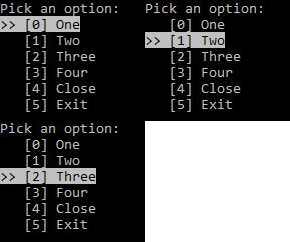
A simple, highly customizable, DOS-like console menu
Nuget package: https://www.nuget.org/packages/ConsoleMenu-simple
 var subMenu = new ConsoleMenu(args, level: 1)
 .Add("Sub_One", () => SomeAction("Sub_One"))
 .Add("Sub_Two", () => SomeAction("Sub_Two"))
 .Add("Sub_Three", () => SomeAction("Sub_Three"))
 .Add("Sub_Four", () => SomeAction("Sub_Four"))
 .Add("Sub_Close", ConsoleMenu.Close)
 .Configure(config =>
 {
 config.Selector = "--> ";
 config.EnableFilter = true;
 config.Title = "Submenu";
 config.EnableBreadcrumb = true;
 config.WriteBreadcrumbAction = titles => Console.WriteLine(string.Join(" / ", titles));
 });

 var menu = new ConsoleMenu(args, level: 0)
 .Add("One", () => SomeAction("One"))
 .Add("Two", () => SomeAction("Two"))
 .Add("Three", () => SomeAction("Three"))
 .Add("Sub", subMenu.Show)
 .Add("Change me", (thisMenu) => thisMenu.CurrentItem.Name = "I am changed!")
 .Add("Close", ConsoleMenu.Close)
 .Add("Action then Close", (thisMenu) => { SomeAction("Close"); thisMenu.CloseMenu(); })
 .Add("Exit", () => Environment.Exit(0))
 .Configure(config =>
 {
 config.Selector = "--> ";
 config.EnableFilter = true;
 config.Title = "Main menu";
 config.EnableWriteTitle = true;
 config.EnableBreadcrumb = true;
 });

 menu.Show();
To do this, use public ConsoleMenu(string[] args, int level) constructor during initialization.
Use double quotes for item names and digits for item numbers. Here are some examples:
--menu-select=0.1 //run first at level 0 and second at level 1
--menu-select="Sub.Sub_One.'Close...'" //run "Sub" at level 0 and "Sub_One" at level 1, and "Close..." at level 2
--menu-select="Sub.2" //run item "Sub" at level 0, and then run third item at level 1
You can also define configuration via .Configure() method. The default config looks like:
 public class MenuConfig
 {
 public ConsoleColor SelectedItemBackgroundColor = Console.ForegroundColor;
 public ConsoleColor SelectedItemForegroundColor = Console.BackgroundColor;
 public ConsoleColor ItemBackgroundColor = Console.BackgroundColor;
 public ConsoleColor ItemForegroundColor = Console.ForegroundColor;
 public Encoding InputEncoding = Console.InputEncoding;
 public Encoding OutputEncoding = Console.OutputEncoding;
 public Action WriteHeaderAction = () => Console.WriteLine("Pick an option:");
 public Action<MenuItem> WriteItemAction = item => Console.Write("[{0}] {1}", item.Index, item.Name);
 public string Selector = ">> ";
 public string FilterPrompt = "Filter: ";
 public bool ClearConsole = true;
 public bool EnableFilter = false;
 public string ArgsPreselectedItemsKey = "--menu-select=";
 public char ArgsPreselectedItemsValueSeparator = '.';
 public bool EnableWriteTitle = false;
 public string Title = "My menu";
 public Action<string> WriteTitleAction = title => Console.WriteLine(title);
 public bool EnableBreadcrumb = false;
 public Action<IReadOnlyList<string>> WriteBreadcrumbAction = titles => Console.WriteLine(string.Join(" > ", titles));
 public bool EnableAlphabet = false;
 }
Example:
 new ConsoleMenu()
 .Add("One", () => SomeAction("One"))
 .Add("Two", () => SomeAction("Two"))
 .Add("Close", ConsoleMenu.Close)
 .Configure(config => { config.Selector = "--> "; })
 .Show();
Framework compatible with .NET Standard 1.3 (.NET Core 1.0, .NET Framework 4.6, Mono 4.6) or higher.
| Product | Versions Compatible and additional computed target framework versions. |
|---|---|
| .NET | net5.0 net5.0 was computed. net5.0-windows net5.0-windows was computed. net6.0 net6.0 is compatible. net6.0-android net6.0-android was computed. net6.0-ios net6.0-ios was computed. net6.0-maccatalyst net6.0-maccatalyst was computed. net6.0-macos net6.0-macos was computed. net6.0-tvos net6.0-tvos was computed. net6.0-windows net6.0-windows was computed. net7.0 net7.0 was computed. net7.0-android net7.0-android was computed. net7.0-ios net7.0-ios was computed. net7.0-maccatalyst net7.0-maccatalyst was computed. net7.0-macos net7.0-macos was computed. net7.0-tvos net7.0-tvos was computed. net7.0-windows net7.0-windows was computed. net8.0 net8.0 was computed. net8.0-android net8.0-android was computed. net8.0-browser net8.0-browser was computed. net8.0-ios net8.0-ios was computed. net8.0-maccatalyst net8.0-maccatalyst was computed. net8.0-macos net8.0-macos was computed. net8.0-tvos net8.0-tvos was computed. net8.0-windows net8.0-windows was computed. net9.0 net9.0 was computed. net9.0-android net9.0-android was computed. net9.0-browser net9.0-browser was computed. net9.0-ios net9.0-ios was computed. net9.0-maccatalyst net9.0-maccatalyst was computed. net9.0-macos net9.0-macos was computed. net9.0-tvos net9.0-tvos was computed. net9.0-windows net9.0-windows was computed. net10.0 net10.0 was computed. net10.0-android net10.0-android was computed. net10.0-browser net10.0-browser was computed. net10.0-ios net10.0-ios was computed. net10.0-maccatalyst net10.0-maccatalyst was computed. net10.0-macos net10.0-macos was computed. net10.0-tvos net10.0-tvos was computed. net10.0-windows net10.0-windows was computed. |
| .NET Core | netcoreapp1.0 netcoreapp1.0 was computed. netcoreapp1.1 netcoreapp1.1 was computed. netcoreapp2.0 netcoreapp2.0 was computed. netcoreapp2.1 netcoreapp2.1 was computed. netcoreapp2.2 netcoreapp2.2 was computed. netcoreapp3.0 netcoreapp3.0 was computed. netcoreapp3.1 netcoreapp3.1 was computed. |
| .NET Standard | netstandard1.3 netstandard1.3 is compatible. netstandard1.4 netstandard1.4 was computed. netstandard1.5 netstandard1.5 was computed. netstandard1.6 netstandard1.6 was computed. netstandard2.0 netstandard2.0 was computed. netstandard2.1 netstandard2.1 was computed. |
| .NET Framework | net46 net46 was computed. net461 net461 was computed. net462 net462 was computed. net463 net463 was computed. net47 net47 was computed. net471 net471 was computed. net472 net472 was computed. net48 net48 was computed. net481 net481 was computed. |
| MonoAndroid | monoandroid monoandroid was computed. |
| MonoMac | monomac monomac was computed. |
| MonoTouch | monotouch monotouch was computed. |
| Tizen | tizen30 tizen30 was computed. tizen40 tizen40 was computed. tizen60 tizen60 was computed. |
| Universal Windows Platform | uap uap was computed. uap10.0 uap10.0 was computed. |
| Xamarin.iOS | xamarinios xamarinios was computed. |
| Xamarin.Mac | xamarinmac xamarinmac was computed. |
| Xamarin.TVOS | xamarintvos xamarintvos was computed. |
| Xamarin.WatchOS | xamarinwatchos xamarinwatchos was computed. |
Showing the top 3 NuGet packages that depend on ConsoleMenu-simple:
| Package | Downloads |
|---|---|
|
Anixe.QualityTools
Additional tools for testing software |
|
|
slacker_HostedConsole
Package Description |
|
|
Dorbit.Framework
Package Description |
Showing the top 2 popular GitHub repositories that depend on ConsoleMenu-simple:
| Repository | Stars |
|---|---|
|
mattpannella/pupdate
Pupdate - A thing for updating your Analogue Pocket
|
|
|
RetroDriven/Pocket_Updater
Windows GUI Application to Update Cores for the Analogue Pocket
|
| Version | Downloads | Last Updated |
|---|---|---|
| 2.7.0 | 208,475 | 4/14/2024 |
| 2.6.1 | 52,861 | 9/2/2023 |
| 2.6.0 | 52,168 | 2/17/2023 |
| 2.4.3 | 49,042 | 3/3/2022 |
| 2.4.2 | 4,409 | 1/9/2022 |
| 2.4.1 | 7,324 | 10/20/2021 |
| 2.4.0 | 54,820 | 9/2/2019 |
| 2.3.1 | 893 | 8/26/2019 |
| 2.3.0 | 832 | 8/26/2019 |
| 2.2.1 | 4,491 | 11/22/2018 |
| 2.2.0 | 2,121 | 11/20/2018 |
| 2.1.4 | 1,054 | 11/15/2018 |
| 2.1.3 | 1,115 | 11/12/2018 |
| 2.1.2 | 1,204 | 11/7/2018 |
| 2.1.1 | 2,113 | 5/28/2018 |
| 2.1.0 | 1,616 | 5/28/2018 |
| 2.0.0 | 1,416 | 5/15/2018 |
| 1.0.0 | 1,774 | 5/12/2018 |
- Added support for up to 36 menu items (#21)
- Added support to change the encoding (#23)