|
VOOZH | about |
|
VOOZH | about |
dotnet add package DocX --version 5.2.0
NuGet\Install-Package DocX -Version 5.2.0
<PackageReference Include="DocX" Version="5.2.0" />
<PackageVersion Include="DocX" Version="5.2.0" />Directory.Packages.props
<PackageReference Include="DocX" />Project file
paket add DocX --version 5.2.0
#r "nuget: DocX, 5.2.0"
#:package DocX@5.2.0
#addin nuget:?package=DocX&version=5.2.0Install as a Cake Addin
#tool nuget:?package=DocX&version=5.2.0Install as a Cake Tool
Product Page | Support | Documentation | Getting Started
Xceed DocX is a .NET library that allows C#, F#, and VB.NET developers to manipulate Microsoft Word files in an easy and intuitive manner. Xceed DocX is fast, lightweight, and self-sufficient without dependencies on third-party software such as Microsoft Word or Office suites.
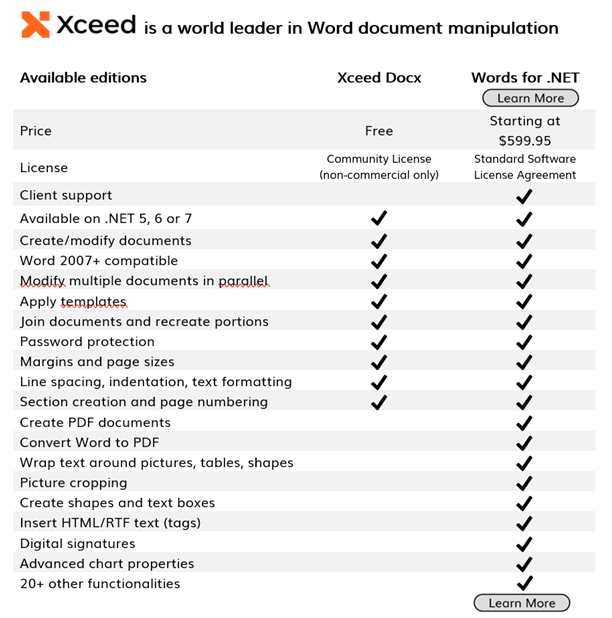
Xceed DocX for .NET is for open source and non-commercial use only, and it is provided under the Xceed Software, Inc. Community License.
Are you creating a commercial application? You may want to consider Xceed Words for .NET, which provides additional functionalities, enterprise support, and regular updates.
Let's jump right in! To get started, you will first need to set the LicenseKey property, which will unlock the product. Looking for your trial key? You will find it in "C:\Xceed Trial Keys". We safely put them there after you installed the product from NuGet.
// Create a new document
DocX document = DocX.Create("SampleDocument.docx");

// Add a title to the document
document.InsertParagraph("Sample Document Title").FontSize(18).Bold().Alignment = Alignment.center;

// Add a paragraph with some text
document.InsertParagraph("This is a sample paragraph.").FontSize(12).Alignment = Alignment.left;

// Add a table with some data
Table table = document.AddTable(3, 2);
table.Design = TableDesign.ColorfulList;
table.Alignment = Alignment.center;
table.AutoFit = AutoFit.Contents;

// Add headers to the table
table.Rows[0].Cells[0].Paragraphs[0].Append("Name").Bold();
table.Rows[0].Cells[1].Paragraphs[0].Append("Age").Bold();

// Add data to the table
table.Rows[1].Cells[0].Paragraphs[0].Append("John Doe");
table.Rows[1].Cells[1].Paragraphs[0].Append("30");
table.Rows[2].Cells[0].Paragraphs[0].Append("Jane Smith");
table.Rows[2].Cells[1].Paragraphs[0].Append("25");

document.InsertTable(table);

// Save the document
document.Save();
| Product | Versions Compatible and additional computed target framework versions. |
|---|---|
| .NET | net5.0 net5.0 is compatible. net5.0-windows net5.0-windows was computed. net6.0 net6.0 was computed. net6.0-android net6.0-android was computed. net6.0-ios net6.0-ios was computed. net6.0-maccatalyst net6.0-maccatalyst was computed. net6.0-macos net6.0-macos was computed. net6.0-tvos net6.0-tvos was computed. net6.0-windows net6.0-windows was computed. net7.0 net7.0 was computed. net7.0-android net7.0-android was computed. net7.0-ios net7.0-ios was computed. net7.0-maccatalyst net7.0-maccatalyst was computed. net7.0-macos net7.0-macos was computed. net7.0-tvos net7.0-tvos was computed. net7.0-windows net7.0-windows was computed. net8.0 net8.0 was computed. net8.0-android net8.0-android was computed. net8.0-browser net8.0-browser was computed. net8.0-ios net8.0-ios was computed. net8.0-maccatalyst net8.0-maccatalyst was computed. net8.0-macos net8.0-macos was computed. net8.0-tvos net8.0-tvos was computed. net8.0-windows net8.0-windows was computed. net9.0 net9.0 was computed. net9.0-android net9.0-android was computed. net9.0-browser net9.0-browser was computed. net9.0-ios net9.0-ios was computed. net9.0-maccatalyst net9.0-maccatalyst was computed. net9.0-macos net9.0-macos was computed. net9.0-tvos net9.0-tvos was computed. net9.0-windows net9.0-windows was computed. net10.0 net10.0 was computed. net10.0-android net10.0-android was computed. net10.0-browser net10.0-browser was computed. net10.0-ios net10.0-ios was computed. net10.0-maccatalyst net10.0-maccatalyst was computed. net10.0-macos net10.0-macos was computed. net10.0-tvos net10.0-tvos was computed. net10.0-windows net10.0-windows was computed. |
| .NET Framework | net40 net40 is compatible. net403 net403 was computed. net45 net45 was computed. net451 net451 was computed. net452 net452 was computed. net46 net46 was computed. net461 net461 was computed. net462 net462 was computed. net463 net463 was computed. net47 net47 was computed. net471 net471 was computed. net472 net472 was computed. net48 net48 was computed. net481 net481 was computed. |
Showing the top 5 NuGet packages that depend on DocX:
| Package | Downloads |
|---|---|
|
MessageParser.NET
MessageParser.Net Is Simple Message Parser For More Info And Example Please Visit https://github.com/AlirezaP/MessageParser.NET |
|
|
Base.Automation
Set of base classes for functional testing automation with Selenium WebDriver. |
|
|
Templ.NET
C# .docx report generator. Uses a template and strongly-typed model |
|
|
Bnsights.Tools.Word
Bnsights.Tools.Word is Helper DLL for manipulating Microsoft Word documents in Bnsights DMCC. It is a prat of Bnsights Business Solutions Framework (BBSF). |
|
|
CAD.Documents
Word to PDF with replace text |
Showing the top 2 popular GitHub repositories that depend on DocX:
| Repository | Stars |
|---|---|
|
AndroidCoderPeng/CodeGenerator
软著代码生成器,基于.net framework框架,采用WPF方案,仅支持Windows桌面平台
|
|
|
microsoft/2LCS
Lifecycle Services Companion App for administrators
|
| Version | Downloads | Last Updated |
|---|---|---|
| 5.2.0 | 1,886 | 6/11/2026 |
| 5.0.0 | 157,899 | 9/9/2025 |
| 4.0.25105.5786 | 290,247 | 3/10/2025 |
| 4.0.25103.5744 | 8,939 | 2/3/2025 |
| 3.0.1 | 342,588 | 7/5/2024 |
| 3.0.0 | 271,888 | 1/22/2024 |
| 2.5.0 | 318,211 | 8/11/2023 |
| 2.4.1 | 8,823 | 8/10/2023 |
| 2.4.0 | 234,845 | 11/28/2022 |
| 2.3.0 | 106,166 | 9/15/2022 |
| 2.2.0 | 73,902 | 6/1/2022 |
| 2.1.0 | 69,363 | 3/22/2022 |
| 2.0.0 | 81,761 | 12/2/2021 |
| 1.8.0 | 201,994 | 5/18/2021 |
| 1.7.1 | 161,425 | 9/22/2020 |
| 1.7.0 | 82,515 | 6/29/2020 |
| 1.6.0 | 210,235 | 1/30/2020 |
v5.2.0 provides 6 bug fixes and improvements. Released June 11, 2026.