|
VOOZH | about |
|
VOOZH | about |
dotnet add package Dumpify --version 0.7.0
NuGet\Install-Package Dumpify -Version 0.7.0
<PackageReference Include="Dumpify" Version="0.7.0" />
<PackageVersion Include="Dumpify" Version="0.7.0" />Directory.Packages.props
<PackageReference Include="Dumpify" />Project file
paket add Dumpify --version 0.7.0
#r "nuget: Dumpify, 0.7.0"
#:package Dumpify@0.7.0
#addin nuget:?package=Dumpify&version=0.7.0Install as a Cake Addin
#tool nuget:?package=Dumpify&version=0.7.0Install as a Cake Tool
Improve productivity and debuggability by adding .Dump() extension methods to Console Applications.
Dump any object in a structured and colorful way into the Console, Trace, Debug events or your own custom output.
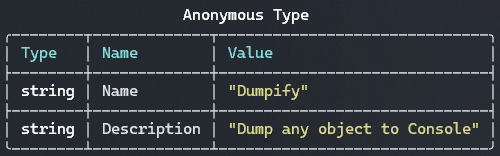
new { Name = "Dumpify", Description = "Dump any object to Console" }.Dump();
var moaid = new Person { FirstName = "Moaid", LastName = "Hathot", Profession = Profession.Software };
var haneeni = new Person { FirstName = "Haneeni", LastName = "Shibli", Profession = Profession.Health };

moaid.Spouse = haneeni;
haneeni.Spouse = moaid;

moaid.Dump();
//You can define max depth as well, e.g `moaid.Dump(maxDepth: 2)`
var arr = new[] { 1, 2, 3, 4 }.Dump();
var arr2d = new int[,] { {1, 2}, {3, 4} }.Dump();
new Dictionary<string, string>
{
 ["Moaid"] = "Hathot",
 ["Haneeni"] = "Shibli",
 ["Eren"] = "Yeager",
 ["Mikasa"] = "Ackerman",
}.Dump();
var largeArray = Enumerable.Range(1, 1000).ToArray();

// Show first 10 items
largeArray.Dump(truncationConfig: new TruncationConfig { MaxCollectionCount = 10 });
// Output: 1, 2, 3, 4, 5, 6, 7, 8, 9, 10, [... 990 more]

// Show head and tail
largeArray.Dump(truncationConfig: new TruncationConfig
{
 MaxCollectionCount = 10,
 Mode = TruncationMode.HeadAndTail
});
public class AdditionValue
{
 private readonly int _a;
 private readonly int _b;

 public AdditionValue(int a, int b)
 {
 _a = a;
 _b = b;
 }

 private int Value => _a + _b;
}


new AdditionValue(1, 2).Dump(members: new MembersConfig { IncludeFields = true, IncludeNonPublicMembers = true });
public class Person
{
 public string Name { get; set; }

 [JsonIgnore]
 public string SensitiveData { get; set; }
}

new Person()
{
 Name = "Moaid",
 SensitiveData = "We don't want this to show up"
}.Dump(members: new MembersConfig { MemberFilter = member => !member.Info.CustomAttributes.Any(a => a.AttributeType == typeof(JsonIgnoreAttribute)) });
//globally
DumpConfig.Default.TableConfig.ShowMemberTypes = true;
DumpConfig.Default.TableConfig.ShowRowSeparators = true;

new { Name = "Dumpify", Description = "Dump any object to Console" }.Dump();

//or Per dump
new { Name = "Dumpify", Description = "Dump any object to Console" }.Dump(tableConfig: new TableConfig { ShowRowSeparators = true, ShowMemberTypes = true });
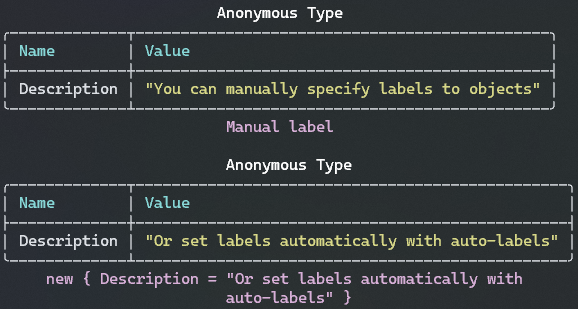
new { Description = "You can manually specify labels to objects" }.Dump("Manual label");

//Set auto-label globally for all dumps if a custom label wasn't provider
DumpConfig.Default.UseAutoLabels = true;
new { Description = "Or set labels automatically with auto-labels" }.Dump();
var package = new { Name = "Dumpify", Description = "Dump any object to Console" };
package.Dump(colors: ColorConfig.NoColors);
package.Dump(colors: new ColorConfig { PropertyValueColor = new DumpColor(Color.RoyalBlue)});
var moaid = new Person { FirstName = "Moaid", LastName = "Hathot", Profession = Profession.Software };
var haneeni = new Person { FirstName = "Haneeni", LastName = "Shibli", Profession = Profession.Health };
moaid.Spouse = haneeni;
haneeni.Spouse = moaid;

moaid.Dump(typeNames: new TypeNamingConfig { ShowTypeNames = false }, tableConfig: new TableConfig { ShowTableHeaders = false });
var package = new { Name = "Dumpify", Description = "Dump any object to Console" };
package.Dump(); //Similar to `package.DumpConsole()` and `package.Dump(output: Outputs.Console))`
package.DumpDebug(); //Dump to Visual Studio's Debug source
package.DumpTrace(); //Dump to Trace
var text = package.DumpText(); //The table in a text format

using var writer = new StringWriter();
package.Dump(output: new DumpOutput(writer)); //Custom output
DumpConfig.Default.TypeNamingConfig.UseAliases = true;
DumpConfig.Default.TypeNamingConfig.ShowTypeNames = false;
DumpConfig.Default.ColorConfig.TypeNameColor = Color.Gold;
DumpConfig.Default.MaxDepth = 3;
//Much more...
| Product | Versions Compatible and additional computed target framework versions. |
|---|---|
| .NET | net5.0 net5.0 was computed. net5.0-windows net5.0-windows was computed. net6.0 net6.0 is compatible. net6.0-android net6.0-android was computed. net6.0-ios net6.0-ios was computed. net6.0-maccatalyst net6.0-maccatalyst was computed. net6.0-macos net6.0-macos was computed. net6.0-tvos net6.0-tvos was computed. net6.0-windows net6.0-windows was computed. net7.0 net7.0 was computed. net7.0-android net7.0-android was computed. net7.0-ios net7.0-ios was computed. net7.0-maccatalyst net7.0-maccatalyst was computed. net7.0-macos net7.0-macos was computed. net7.0-tvos net7.0-tvos was computed. net7.0-windows net7.0-windows was computed. net8.0 net8.0 was computed. net8.0-android net8.0-android was computed. net8.0-browser net8.0-browser was computed. net8.0-ios net8.0-ios was computed. net8.0-maccatalyst net8.0-maccatalyst was computed. net8.0-macos net8.0-macos was computed. net8.0-tvos net8.0-tvos was computed. net8.0-windows net8.0-windows was computed. net9.0 net9.0 was computed. net9.0-android net9.0-android was computed. net9.0-browser net9.0-browser was computed. net9.0-ios net9.0-ios was computed. net9.0-maccatalyst net9.0-maccatalyst was computed. net9.0-macos net9.0-macos was computed. net9.0-tvos net9.0-tvos was computed. net9.0-windows net9.0-windows was computed. net10.0 net10.0 is compatible. net10.0-android net10.0-android was computed. net10.0-browser net10.0-browser was computed. net10.0-ios net10.0-ios was computed. net10.0-maccatalyst net10.0-maccatalyst was computed. net10.0-macos net10.0-macos was computed. net10.0-tvos net10.0-tvos was computed. net10.0-windows net10.0-windows was computed. |
| .NET Core | netcoreapp2.0 netcoreapp2.0 was computed. netcoreapp2.1 netcoreapp2.1 was computed. netcoreapp2.2 netcoreapp2.2 was computed. netcoreapp3.0 netcoreapp3.0 was computed. netcoreapp3.1 netcoreapp3.1 was computed. |
| .NET Standard | netstandard2.0 netstandard2.0 is compatible. netstandard2.1 netstandard2.1 is compatible. |
| .NET Framework | net461 net461 was computed. net462 net462 was computed. net463 net463 was computed. net47 net47 was computed. net471 net471 was computed. net472 net472 was computed. net48 net48 was computed. net481 net481 was computed. |
| MonoAndroid | monoandroid monoandroid was computed. |
| MonoMac | monomac monomac was computed. |
| MonoTouch | monotouch monotouch was computed. |
| Tizen | tizen40 tizen40 was computed. tizen60 tizen60 was computed. |
| Xamarin.iOS | xamarinios xamarinios was computed. |
| Xamarin.Mac | xamarinmac xamarinmac was computed. |
| Xamarin.TVOS | xamarintvos xamarintvos was computed. |
| Xamarin.WatchOS | xamarinwatchos xamarinwatchos was computed. |
Showing the top 5 NuGet packages that depend on Dumpify:
| Package | Downloads |
|---|---|
|
rna.Base.Extensions
Number, String, Enum, Expression Extensions and Object Property Filters |
|
|
EluciusFTW.SpectreCoff
A thin, opinionated wrapper around Spectre.Console in FSharp. |
|
|
PowerFx.NET.Interactive
This is a Kernel extension for Polyglot Notebooks that helps you to run Power Fx code |
|
|
FluentConsole.Templates
提供「现代化的控制台应用的开发体验」脚手架,能像 Web 应用那样很优雅地整合各种组件,包括依赖注入、配置、日志等功能。 |
|
|
ProduceSelf.Base
沧海的频道基础工具类库(不在支持NET6.0) |
Showing the top 2 popular GitHub repositories that depend on Dumpify:
| Repository | Stars |
|---|---|
|
Deali-Axy/StarBlog
☀StarBlog 是一个基于 .NET Core 开发的现代博客系统,支持 Markdown 文章导入,遵循 RESTful 接口规范。前端基于 Vue + ElementUI 开发,可作为 .NET Core 入门学习项目,同时配套了一系列开发笔记,记录了从零开始构建这个博客系统的全过程,可以帮助学习理解 .Net Core 项目的开发流程。
|
|
|
markjprice/cs14net10
Repository for the Packt Publishing book titled "C# 14 and .NET 10 - Modern Cross-Platform Development Fundamentals" by Mark J. Price
|
| Version | Downloads | Last Updated |
|---|---|---|
| 0.7.1-beta.1 | 416 | 3/7/2026 |
| 0.7.0 | 38,321 | 2/22/2026 |
| 0.6.6 | 435,720 | 5/5/2024 |
| 0.6.5 | 110,042 | 2/17/2024 |
| 0.6.4 | 8,267 | 12/30/2023 |
| 0.6.3 | 11,985 | 12/4/2023 |
| 0.6.2 | 405 | 12/4/2023 |
| 0.6.1 | 7,913 | 11/25/2023 |
| 0.6.0 | 53,131 | 7/17/2023 |
| 0.5.4 | 36,677 | 5/17/2023 |
| 0.5.3 | 766 | 5/8/2023 |
| 0.5.2 | 825 | 4/15/2023 |
| 0.5.1 | 515 | 4/14/2023 |
| 0.5.0 | 509 | 4/14/2023 |
| 0.4.1 | 591 | 4/7/2023 |
| 0.4.0 | 517 | 4/6/2023 |
| 0.3.0 | 529 | 4/3/2023 |
| 0.2.0 | 435 | 4/3/2023 |
| 0.1.0 | 941 | 3/29/2023 |