|
VOOZH | about |
|
VOOZH | about |
dotnet add package Ibex.PDF.Creator --version 6.11.4.4
NuGet\Install-Package Ibex.PDF.Creator -Version 6.11.4.4
<PackageReference Include="Ibex.PDF.Creator" Version="6.11.4.4" />
<PackageVersion Include="Ibex.PDF.Creator" Version="6.11.4.4" />Directory.Packages.props
<PackageReference Include="Ibex.PDF.Creator" />Project file
paket add Ibex.PDF.Creator --version 6.11.4.4
#r "nuget: Ibex.PDF.Creator, 6.11.4.4"
#:package Ibex.PDF.Creator@6.11.4.4
#addin nuget:?package=Ibex.PDF.Creator&version=6.11.4.4Install as a Cake Addin
#tool nuget:?package=Ibex.PDF.Creator&version=6.11.4.4Install as a Cake Tool
Ibex is a scalable standards-compliant PDF creation component for .Net.
See https://www.xmlpdf.com for more information.
Ibex helps you quickly create complex documents providing complete control over page layout and content. Ibex supports a wide range of layout functionality including page headers and footers, multi-column pages, page numbering, cross-referencing, footnotes, index creation and much more.
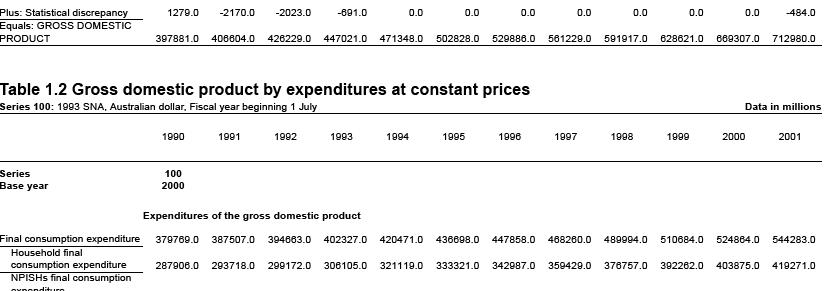
Ibex supports complex table layouts like this:
including cells which span multiple rows and columns, aligning data on decimal points regardless of font size, conditional headers and footers (for saying "continued on next page"), conditional borders at page breaks and lots more.
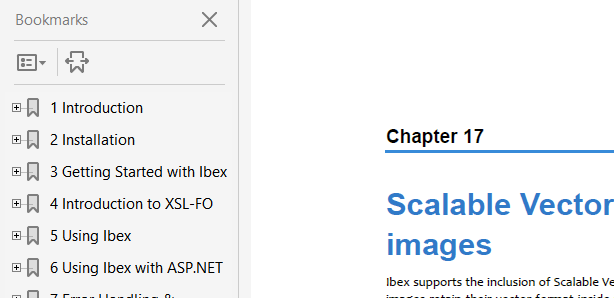
Bookmarks can be automatically generated using XSLT, including clickable page numbers which link to the correct page in the document:
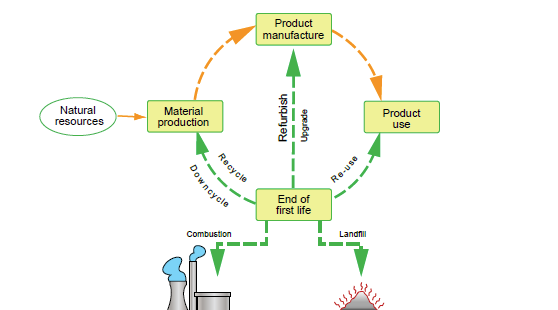
Ibex supports SVG images including transparency, linear and radial gradients, and SVG images which contain other bitmap images:
This example shows how to call Ibex from a C# program and create a PDF file from XML and XSL files.
In this example we use an XML file containing the data we want to get into the PDF file, and and XSL stylesheet which transforms the XML into the FO syntax which Ibex understands. The XML file
The XML used in this example contains text held in one or more paragraph elements. It looks like this:
<?xml version="1.0" encoding="UTF-8"?>
<text>
 <para>hello world</para>
</text>
An XSL stylesheet is used to transform the XML into XSL-FO syntax. Using a stylesheet means that when the data changes (in the XML file) we do not have to make any changes to the C# program or the XSL stylesheet. If we add new elements to the XML which we want to appear in the PDF file, then we will need to change the XSL stylesheet, but we won't have to change the C# program. And changing the XSL is simple because we don't need to recompile it and can just use a text editor to maintain it.
The XSL used in this example looks like this:
<?xml version="1.0" encoding="utf-8"?>
<xsl:stylesheet version="1.0"
 xmlns:xsl="http://www.w3.org/1999/XSL/Transform"
 xmlns="http://www.w3.org/1999/XSL/Format"
 xmlns:ibex="http://www.xmlpdf.com/2003/ibex/Format">

 <xsl:strip-space elements="*"/>

 <xsl:template match="text">

 <fo:root>

 <fo:layout-master-set>
 <fo:simple-page-master master-name="page-layout">
 <fo:region-body margin="2.5cm" region-name="body" background-color="#dddddd"/>
 </fo:simple-page-master>
 </fo:layout-master-set>

 <fo:page-sequence master-reference="page-layout">
 <fo:flow flow-name="body">
 <xsl:apply-templates select="para"/>
 </fo:flow>
 </fo:page-sequence>

 </fo:root>

 </xsl:template>

 <xsl:template match="para">
 <fo:block>
 <xsl:apply-templates select="text()"/>
 </fo:block>
 </xsl:template>

</xsl:stylesheet>
Basically what this XSL does it output the <fo:root> element of the FO file, which contains the fo:layout-master-set defining the page structure, and then output each <para> element from the XML inside an FO block element.
The C# program used in this example is:
using ibex4;

public class HelloWorld {
 static void Main( string[] args ) {
 if( args.Length < 3 ) {
 Console.WriteLine( "usage:hello xml-file xsl-file pdf-file" );
 return;
 }

 FileStream xml = new FileStream( args[0], FileMode.Open, FileAccess.Read );
 FileStream xsl = new FileStream( args[1], FileMode.Open, FileAccess.Read );
 FileStream pdf = new FileStream( args[2], FileMode.Create, FileAccess.Write );

 FODocument doc = new FODocument();

 doc.generate( xml, xsl, pdf );
 }
}
What this program does is:
The program can be compiled from the command line, linking Ibex like this:
Create a new project class, for example, "hello"
dotnet new console --name hello
cd hello
dotnet add package Ibex.PDF.Creator
edit the Program.cs file created when the project was created and replace its contents with this:
using ibex4;

public class HelloWorld {
 static void Main( string[] args ) {
 if( args.Length < 3 ) {
 Console.WriteLine( "usage:hello xml-file xsl-file pdf-file" );
 return;
 }

 FileStream xml = new FileStream( args[0], FileMode.Open, FileAccess.Read );
 FileStream xsl = new FileStream( args[1], FileMode.Open, FileAccess.Read );
 FileStream pdf = new FileStream( args[2], FileMode.Create, FileAccess.Write );

 FODocument doc = new FODocument();

 doc.generate( xml, xsl, pdf );
 }
}
build the project
dotnet build
This creates the program hello.exe. To run it we pass the names of the XML, XSL and PDF files on the command line like this:
dotnet run hello.xml hello.xsl hello-world.pdf
This will create the file hello.pdf containing the data from hello-world.xml.
See https://www.xmlpdf.com for more information.
| Product | Versions Compatible and additional computed target framework versions. |
|---|---|
| .NET | net6.0 net6.0 is compatible. net6.0-android net6.0-android was computed. net6.0-ios net6.0-ios was computed. net6.0-maccatalyst net6.0-maccatalyst was computed. net6.0-macos net6.0-macos was computed. net6.0-tvos net6.0-tvos was computed. net6.0-windows net6.0-windows was computed. net7.0 net7.0 was computed. net7.0-android net7.0-android was computed. net7.0-ios net7.0-ios was computed. net7.0-maccatalyst net7.0-maccatalyst was computed. net7.0-macos net7.0-macos was computed. net7.0-tvos net7.0-tvos was computed. net7.0-windows net7.0-windows was computed. net8.0 net8.0 is compatible. net8.0-android net8.0-android was computed. net8.0-browser net8.0-browser was computed. net8.0-ios net8.0-ios was computed. net8.0-maccatalyst net8.0-maccatalyst was computed. net8.0-macos net8.0-macos was computed. net8.0-tvos net8.0-tvos was computed. net8.0-windows net8.0-windows was computed. net9.0 net9.0 is compatible. net9.0-android net9.0-android was computed. net9.0-browser net9.0-browser was computed. net9.0-ios net9.0-ios was computed. net9.0-maccatalyst net9.0-maccatalyst was computed. net9.0-macos net9.0-macos was computed. net9.0-tvos net9.0-tvos was computed. net9.0-windows net9.0-windows was computed. net10.0 net10.0 is compatible. net10.0-android net10.0-android was computed. net10.0-browser net10.0-browser was computed. net10.0-ios net10.0-ios was computed. net10.0-maccatalyst net10.0-maccatalyst was computed. net10.0-macos net10.0-macos was computed. net10.0-tvos net10.0-tvos was computed. net10.0-windows net10.0-windows was computed. |
| .NET Framework | net48 net48 is compatible. net481 net481 was computed. |
This package is not used by any NuGet packages.
This package is not used by any popular GitHub repositories.
| Version | Downloads | Last Updated |
|---|---|---|
| 6.11.5.1-beta | 29 | 6/18/2026 |
| 6.11.4.4 | 1,902 | 4/23/2026 |
| 6.11.4.3-beta | 127 | 4/19/2026 |
| 6.11.4.2-beta | 110 | 4/14/2026 |
| 6.11.4.1 | 665 | 4/3/2026 |
| 6.11.3.2-beta | 113 | 4/2/2026 |
| 6.11.3.1 | 147 | 3/30/2026 |
| 6.11.2.4-beta | 103 | 3/28/2026 |
| 6.11.2.3-beta | 117 | 3/10/2026 |
| 6.11.2.2 | 1,032 | 3/5/2026 |
| 6.11.2.1-beta | 111 | 2/24/2026 |
| 6.11.1.8 | 510 | 2/13/2026 |
| 6.11.1.7-beta | 120 | 2/3/2026 |
| 6.11.1.6-beta | 121 | 1/26/2026 |
| 6.11.1.5 | 7,613 | 1/12/2026 |
| 6.11.1.4-beta | 121 | 1/12/2026 |
| 6.11.1.3-beta | 117 | 12/30/2025 |
| 6.11.1.2 | 968 | 11/27/2025 |
| 6.11.1.1 | 425 | 11/15/2025 |
| 6.10.4.18-beta | 306 | 11/11/2025 |