|
VOOZH | about |
|
VOOZH | about |
dotnet add package ImagePlayground.BarCode --version 2.0.2
NuGet\Install-Package ImagePlayground.BarCode -Version 2.0.2
<PackageReference Include="ImagePlayground.BarCode" Version="2.0.2" />
<PackageVersion Include="ImagePlayground.BarCode" Version="2.0.2" />Directory.Packages.props
<PackageReference Include="ImagePlayground.BarCode" />Project file
paket add ImagePlayground.BarCode --version 2.0.2
#r "nuget: ImagePlayground.BarCode, 2.0.2"
#:package ImagePlayground.BarCode@2.0.2
#addin nuget:?package=ImagePlayground.BarCode&version=2.0.2Install as a Cake Addin
#tool nuget:?package=ImagePlayground.BarCode&version=2.0.2Install as a Cake Tool
👁 .NET tests
👁 Codecov
👁 License
👁 PowerShell tests
👁 Gallery
👁 Gallery Preview
👁 PowerShell Gallery downloads
👁 Top language
👁 Code size
👁 Downloads
👁 Twitter
👁 Blog
👁 LinkedIn
👁 Discord
ImagePlayground is a C# library and a PowerShell module that allows you to play with images in different ways.
It allows to create QR codes, BAR codes, Charts and do image manipulation.
It provides ability to read QR codes and BAR codes.
It provides ability to manipulate images by adding text, resizing, cropping, rotating, blurring, sharpening, etc.
It provides way to add watermark to images - either by text or by image.
This module works on PowerShell 5.1 and PowerShell 7+. It runs on Windows, Linux and macOS with full chart support on every platform.
Currently the module has a problem when running in VSCode PowerShell extension when on PowerShell 5.1 (other versions work fine!) It works fine when running in PowerShell 5.1 console, or ISE (shrug!).
-FilePath accept the path from the pipeline.Add-ImageText - Adds text to an image at the provided coordinates and writes the updated image to disk.Add-ImageTextBox - Adds wrapped text to an image within a box.Add-ImageWatermark - Adds a watermark image to another image.Compare-Image - Compares two images and optionally saves a difference mask.ConvertFrom-ImageBase64 - Converts a Base64 encoded string into an image file.ConvertTo-Image - Converts an image to a different format.ConvertTo-ImageBase64 - Converts an image file into a Base64 encoded string.Get-Image - Loads an image from disk.Get-ImageBarCode - Reads barcode information from an image file.Get-ImageExif - Gets EXIF metadata from an image.Get-ImageQRCode - Reads QR code information from an image file.Merge-Image - Merges two images and saves the result.New-ImageAvatar - Creates a rounded avatar image.New-ImageBarCode - Creates a barcode image.New-ImageChart - Creates an image chart from definitions.New-ImageChartAnnotation - Creates chart annotation data item.New-ImageChartBar - Creates bar chart data item.New-ImageChartBarOptions - Creates bar chart options.New-ImageChartHeatmap - Creates heatmap chart data item.New-ImageChartHistogram - Creates histogram chart data item.New-ImageChartLine - Creates line chart data item.New-ImageChartPie - Creates pie chart data item.New-ImageChartPolar - Creates polar chart data item.New-ImageChartRadial - Creates radial gauge chart data item.New-ImageChartScatter - Creates scatter chart data item.New-ImageCrop - Creates a cropped version of an image using rectangular, circular or polygonal areas.New-ImageGif - Creates an animated GIF from existing images.New-ImageGrid - Creates a simple grid-based image.New-ImageIcon - Creates an icon file from an image.New-ImageQRCode - Generates a QR code image.New-ImageQRCodeBezahlCode - Generates a BezahlCode QR for German payments.New-ImageQRCodeBitcoin - Generates a QR code for Bitcoin-like payments.New-ImageQRCodeGeoLocation - Generates a QR code with geolocation data.New-ImageQRCodeGirocode - Generates a Girocode QR code.New-ImageQRCodeMonero - Generates a QR code for a Monero transaction.New-ImageQRCodeOtp - Generates a QR code for one-time-password configuration.New-ImageQRCodePhoneNumber - Generates a QR code for dialling a phone number.New-ImageQRCodeShadowSocks - Generates a QR code for a Shadowsocks configuration.New-ImageQRCodeSkypeCall - Generates a QR code initiating a Skype call.New-ImageQRCodeSlovenianUpnQr - Generates a Slovenian UPN QR payment code.New-ImageQRCodeSms - Generates a QR code containing an SMS message.New-ImageQRCodeSwiss - Generates a Swiss QR payment code.New-ImageQRCodeWiFi - Creates a WiFi QR code image.New-ImageQRContact - Generates a QR code image containing the provided contact details.New-ImageThumbnail - Creates thumbnails for all images in a directory.Clear-ImageThumbnailCache - Removes cached thumbnails.Remove-ImageExif - Removes EXIF metadata from an image.Resize-Image - Resizes an image.Save-Image - Saves an image to disk.Set-ImageExif - Sets an EXIF tag value in an image.Install-Module ImagePlayground -Force -Verbose
The generated cmdlet help lives in . These examples focus on end-to-end scenarios you are likely to automate first.
$wifiPath = Join-Path -Path $PSScriptRoot -ChildPath 'Output\OfficeWiFi.png'

New-ImageQRCodeWiFi -SSID 'Evotec-Office' -Password 'StrongerPassword!2026' -FilePath $wifiPath

$decoded = Get-ImageQRCode -FilePath $wifiPath
$decoded | Format-List Status, Type, Message
New-ImageQRCodeOtp -Secret 'JBSWY3DPEHPK3PXP' -AccountName 'ops@evotec.pl' -Issuer 'Evotec' -Algorithm SHA1 -Digits 6 -FilePath "$PSScriptRoot\Output\Otp.png"
New-ImageQRCodeGirocode -Name 'Evotec Sp. z o.o.' -IBAN 'DE23100000001234567890' -BIC 'MARKDEF1100' -Amount 149.99 -Purpose 'Invoice 2026-041' -RemittanceInformation 'Consulting services' -FilePath "$PSScriptRoot\Output\Invoice-Girocode.png"
$definitions = @(
 New-ImageChartLine -Name 'CPU' -Value 31,42,58,67,53 -Color LimeGreen -Marker FilledCircle -Smooth
 New-ImageChartLine -Name 'Memory' -Value 48,51,55,57,60 -Color DeepSkyBlue -Marker FilledSquare
)

$annotations = @(
 New-ImageChartAnnotation -X 4 -Y 67 -Text 'Peak CPU' -Arrow
)

New-ImageChart -Definition $definitions -Annotation $annotations -Theme Dark -ShowGrid -XTitle 'Sample' -YTitle 'Usage %' -FilePath "$PSScriptRoot\Output\SystemUsage.png"
$exifPath = "$PSScriptRoot\Output\PhotoWithExif.jpg"

Set-ImageExif -FilePath "$PSScriptRoot\Samples\PrzemyslawKlysAndKulkozaurr.jpg" -ExifTag ([SixLabors.ImageSharp.Metadata.Profiles.Exif.ExifTag]::Copyright) -Value 'Copyright (c) Evotec 2026' -FilePathOutput $exifPath

Get-ImageExif -FilePath $exifPath -Translate | Format-List Copyright*
Creating basic QR Code
New-ImageQRCode -Content 'https://evotec.xyz' -FilePath "$PSScriptRoot\Samples\QRCode.png"
Creating QR codes and reading them back is as easy as:
New-ImageQRContact -FilePath "$PSScriptRoot\Samples\QRCodeContact.png" -outputType VCard4 -Firstname "Przemek" -Lastname "Klys" -MobilePhone "+48 500 000 000"

$Message = Get-ImageQRCode -FilePath "$PSScriptRoot\Samples\QRCodeContact.png"
$Message | Format-List *

New-ImageQRCodeWiFi -SSID 'Evotec' -Password 'EvotecPassword' -FilePath "$PSScriptRoot\Samples\QRCodeWiFi.png"

$Message = Get-ImageQRCode -FilePath "$PSScriptRoot\Samples\QRCodeWiFi.png"
$Message | Format-List *

New-ImageQRCode -Content 'https://evotec.xyz' -FilePath "$PSScriptRoot\Samples\QRCode.png"

$Message = Get-ImageQRCode -FilePath "$PSScriptRoot\Samples\QRCode.png"
$Message | Format-List *
Use -XTitle and -YTitle on New-ImageChart to specify axis titles.
New-ImageChart {
 New-ImageChartBar -Value 5 -Label "C#"
 New-ImageChartBar -Value 12 -Label "C++"
 New-ImageChartBar -Value 10 -Label "PowerShell"
} -Show -FilePath $PSScriptRoot\Samples\ChartsBar1.png
New-ImageChart {
 New-ImageChartPie -Name "C#" -Value 5
 New-ImageChartPie -Name "C++" -Value 12
 New-ImageChartPie -Name "PowerShell" -Value 10
} -Show -FilePath $PSScriptRoot\Output\ChartsPie1.png -Width 500 -Height 500
New-ImageChart {
 New-ImageChartLine -Value 5, 10, 12, 18, 10, 13 -Name "C#" -Marker FilledCircle -Smooth
 New-ImageChartLine -Value 10,15,30,40,50,60 -Name "C++" -Marker FilledSquare
 New-ImageChartLine -Value 10,5,12,18,30,60 -Name "PowerShell" -Marker OpenCircle
} -Show -FilePath $PSScriptRoot\Output\ChartsLine1.png
New-ImageChart {
 New-ImageChartScatter -Name "First" -X 1,2,3 -Y 4,5,6
 New-ImageChartScatter -Name "Second" -X 1,2,3 -Y 3,2,1
} -Show -FilePath $PSScriptRoot\Output\ChartsScatter.png -Width 500 -Height 500
New-ImageChart {
 New-ImageChartPolar -Name "Series1" -Angle 0,1.57 -Value 1,2
 New-ImageChartPolar -Name "Series2" -Angle 0.5,2.2 -Value 2,1.5
} -Show -FilePath $PSScriptRoot\Output\ChartsPolar.png -Width 500 -Height 500
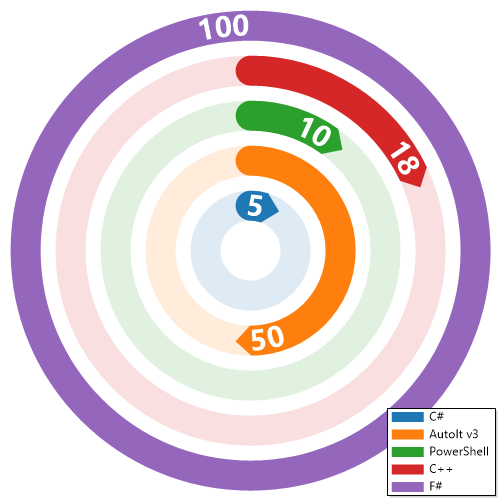
New-ImageChart {
 New-ImageChartRadial -Name "C#" -Value 5
 New-ImageChartRadial -Name "AutoIt v3" -Value 50
 New-ImageChartRadial -Name "PowerShell" -Value 10
 New-ImageChartRadial -Name "C++" -Value 18
 New-ImageChartRadial -Name "F#" -Value 100
} -Show -FilePath $PSScriptRoot\Samples\ChartsRadial.png -Width 500 -Height 500
$matrix = [double[,]]::new(2,2)
$matrix[0,0] = 1
$matrix[0,1] = 2
$matrix[1,0] = 3
$matrix[1,1] = 4
New-ImageChart {
 New-ImageChartHeatmap -Name 'Heat' -Matrix $matrix
} -Show -FilePath $PSScriptRoot\Output\ChartsHeatmap.png -Width 500 -Height 500
New-ImageChart {
 New-ImageChartHistogram -Name 'Data' -Values 1,2,3,3,4,5 -BinSize 2
} -Show -FilePath $PSScriptRoot\Output\ChartsHistogram.png -Width 500 -Height 500
New-ImageChart -ChartsDefinition {
 New-ImageChartLine -Name 'Sample' -Value 1,3,2,5 -Marker FilledCircle
} -AnnotationsDefinition {
 New-ImageChartAnnotation -X 3 -Y 5 -Text 'Peak' -Arrow
} -Show -FilePath $PSScriptRoot\Samples\ChartsAnnotated.png -Width 500 -Height 300
Get-ImageBarCode -FilePath $PSScriptRoot\Samples\BarcodeEAN13.png
Get-ImageBarCode -FilePath $PSScriptRoot\Samples\BarcodeEAN7.png
Supported values: Code128, Code93, Code39, KixCode, UPCE, UPCA, EAN, DataMatrix, PDF417
New-ImageBarCode -Type DataMatrix -Value 'DataMatrixExample' -FilePath $PSScriptRoot\Samples\DataMatrix.png
New-ImageBarCode -Type Code128 -Value '1234567890' -FilePath $PSScriptRoot\Samples\BarcodeCode128.png
New-ImageBarCode -Type PDF417 -Value 'Pdf417Example' -FilePath $PSScriptRoot\Samples\Pdf417.png
BarCode.Generate(BarCode.BarcodeTypes.DataMatrix, "DataMatrixExample", "DataMatrix.png");
BarCode.Generate(BarCode.BarcodeTypes.Code128, "1234567890", "BarcodeCode128.png");
BarCode.Generate(BarCode.BarcodeTypes.PDF417, "Pdf417Example", "Pdf417.png");
var result = BarCode.Read("DataMatrix.png");
Console.WriteLine(result.Message);
Image processing exposes several methods. It allows to resize, crop, rotate, grayscale, blur, sharpen and more. You can use all available methods as shown below:
AdaptiveThreshold Method void AdaptiveThreshold()
AddImage Method void AddImage(string filePath, int x, int y, float opacity), void AddImage(SixLabors.ImageSharp.Image image, int x, int y, float opacity), void AddImage(SixLabors.ImageSharp.Image image, SixLabors.ImageSharp.Point location, float opacity)
AddText Method void AddText(float x, float y, string text, SixLabors.ImageSharp.Color color, float fontSize = 16, string fontFamilyName = "Arial")
AutoOrient Method void AutoOrient()
BackgroundColor Method void BackgroundColor(SixLabors.ImageSharp.Color color)
BlackWhite Method void BlackWhite()
BokehBlur Method void BokehBlur()
BoxBlur Method void BoxBlur()
Brightness Method void Brightness(float amount)
Contrast Method void Contrast(float amount)
Crop Method void Crop(SixLabors.ImageSharp.Rectangle rectangle)
Filter Method void Filter(SixLabors.ImageSharp.ColorMatrix colorMatrix)
Flip Method void Flip(SixLabors.ImageSharp.Processing.FlipMode flipMode)
GaussianBlur Method void GaussianBlur(System.Nullable[float] sigma)
GaussianSharpen Method void GaussianSharpen(System.Nullable[float] sigma)
GetTextSize Method SixLabors.Fonts.FontRectangle GetTextSize(string text, float fontSize, string fontFamilyName)
Grayscale Method void Grayscale(SixLabors.ImageSharp.Processing.GrayscaleMode grayscaleMode = SixLabors.ImageSharp.Processing.GrayscaleMode.Bt709)
Hue Method void Hue(float degrees)
OilPaint Method void OilPaint(), void OilPaint(int levels, int brushSize)
Pixelate Method void Pixelate(), void Pixelate(int size)
Polaroid Method void Polaroid()
Resize Method void Resize(System.Nullable[int] width, System.Nullable[int] height, bool keepAspectRatio = True), void Resize(int percentage)
Rotate Method void Rotate(SixLabors.ImageSharp.Processing.RotateMode rotateMode), void Rotate(float degrees)
RotateFlip Method void RotateFlip(SixLabors.ImageSharp.Processing.RotateMode rotateMode, SixLabors.ImageSharp.Processing.FlipMode flipMode)
Saturate Method void Saturate(float amount)
Watermark Method void Watermark(string text, float x, float y, SixLabors.ImageSharp.Color color, float fontSize = 16, string fontFamilyName = "Arial", float padding = 18), void Watermark(string text, ImagePlayground.Image+WatermarkPlacement placement, SixLabors.ImageSharp.Color color, float fontSize = 16, string fontFamilyName = "Arial", fl…
WatermarkImage Method void WatermarkImage(string filePath, ImagePlayground.Image+WatermarkPlacement placement, float opacity = 1, float padding = 18, int rotate = 0, SixLabors.ImageSharp.Processing.FlipMode flipMode = SixLabors.ImageSharp.Processing.FlipMode.None, int watermarkPercentage = 20)
WatermarkImageTiled Method void WatermarkImageTiled(string filePath, int spacing, float opacity = 1, int rotate = 0, SixLabors.ImageSharp.Processing.FlipMode flipMode = SixLabors.ImageSharp.Processing.FlipMode.None, int watermarkPercentage = 20)
ConvertTo-Image -FilePath $PSScriptRoot\Samples\LogoEvotec.png -OutputPath $PSScriptRoot\Output\LogoEvotec.jpg
Resize-Image -FilePath $PSScriptRoot\Samples\LogoEvotec.png -OutputPath $PSScriptRoot\Output\LogoEvotecResize.png -Width 100 -Height 100

Resize-Image -FilePath $PSScriptRoot\Samples\LogoEvotec.png -OutputPath $PSScriptRoot\Output\LogoEvotecResizeMaintainAspectRatio.png -Width 300

Resize-Image -FilePath $PSScriptRoot\Samples\LogoEvotec.png -OutputPath $PSScriptRoot\Output\LogoEvotecResizePercent.png -Percentage 200
$Image = Get-Image -FilePath $PSScriptRoot\Samples\LogoEvotec.png
$Image.BlackWhite()
$Image.BackgroundColor("Red")
Save-Image -Image $Image -Open -FilePath $PSScriptRoot\Output\LogoEvotecChanged.png -Quality 80

# Save Pixalate
$Image = Get-Image -FilePath $PSScriptRoot\Samples\PrzemyslawKlysAndKulkozaurr.jpg
$Image.Pixelate(30)
Save-Image -Image $Image -Open -FilePath $PSScriptRoot\Output\PrzemyslawKlysAndKulkozaurrPixelate.jpg -Quality 80

# Save as Polaroid
$Image = Get-Image -FilePath $PSScriptRoot\Samples\PrzemyslawKlysAndKulkozaurr.jpg
$Image.Polaroid()
Save-Image -Image $Image -Open -FilePath $PSScriptRoot\Output\PrzemyslawKlysAndKulkozaurrPolaroid.jpg -Quality 80

# Add watermark
$Image = Get-Image -FilePath $PSScriptRoot\Samples\PrzemyslawKlysAndKulkozaurr.jpg
$Image.WatermarkImage("$PSScriptRoot\Samples\LogoEvotec.png",[ImagePlayground.Image+WatermarkPlacement]::Middle, 0.5, 0.5)
# Add watermark with rotation 90 degrees
$Image.WatermarkImage("$PSScriptRoot\Samples\LogoEvotec.png",[ImagePlayground.Image+WatermarkPlacement]::TopLeft, 1, 18, 90)
# Tile watermark across the image with spacing 100
$Image.WatermarkImageTiled("$PSScriptRoot\Samples\LogoEvotec.png", 100)
# Use cmdlet for a quick overlay
Add-ImageWatermark -FilePath $PSScriptRoot\Samples\PrzemyslawKlysAndKulkozaurr.jpg -OutputPath $PSScriptRoot\Output\Watermark.png -WatermarkPath $PSScriptRoot\Samples\LogoEvotec.png
Add-ImageWatermark -FilePath $PSScriptRoot\Samples\PrzemyslawKlysAndKulkozaurr.jpg -OutputPath $PSScriptRoot\Output\WatermarkTiled.png -WatermarkPath $PSScriptRoot\Samples\LogoEvotec.png -Spacing 100

# Resize 200% in the same image
$Image.Resize(200)
# Rotate 30 degrees in the same image
$Image.Rotate(30)
Save-Image -Image $Image -Open -FilePath $PSScriptRoot\Output\PrzemyslawKlysAndKulkozaurrWatermark.jpg
# Add watermark
$Image = Get-Image -FilePath $PSScriptRoot\Samples\PrzemyslawKlysAndKulkozaurr.jpg
# void WatermarkImage(string filePath, ImagePlayground.Image+WatermarkPlacement placement, float opacity = 1, float padding = 18, int rotate = 0, SixLabors.ImageSharp.Processing.FlipMode flipMode = SixLabors.ImageSharp.Processing.FlipMode.None, int watermarkPercentage = 20)
$Image.WatermarkImage("$PSScriptRoot\Samples\LogoEvotec.png", [ImagePlayground.Image+WatermarkPlacement]::Middle, 0.5, 0.5)
# Add watermark with rotation 90 degrees
$Image.WatermarkImage("$PSScriptRoot\Samples\LogoEvotec.png", [ImagePlayground.Image+WatermarkPlacement]::TopLeft, 1, 18, 90)
# Tile watermark across the image with spacing 100
$Image.WatermarkImageTiled("$PSScriptRoot\Samples\LogoEvotec.png", 100)
# Add watermark with text
# There are 2 methods to add watermark with text
#void Watermark(string text, float x, float y, SixLabors.ImageSharp.Color color, float fontSize = 16, string fontFamilyName = "Arial", float padding = 18)
#void Watermark(string text, ImagePlayground.Image+WatermarkPlacement placement, SixLabors.ImageSharp.Color color, float fontSize = 16, string fontFamilyName = "Arial", float padding = 18)
$Image.Watermark("Evotec", [ImagePlayground.Image+WatermarkPlacement]::TopRight, [SixLabors.ImageSharp.Color]::Blue, 50, "Calibri")

Save-Image -Image $Image -Open -FilePath $PSScriptRoot\Output\PrzemyslawKlysAndKulkozaurrWatermarkWithText.jpg -Quality 80
$Image = Get-Image -FilePath $PSScriptRoot\Samples\PrzemyslawKlysAndKulkozaurr.jpg
$Image.AddText(50,50,'Add-Text example',[SixLabors.ImageSharp.Color]::Red,32)
$Image.AddTextBox(50,100,'Add-TextBox wraps this very long line of text inside a specified width to show the difference.',400,[SixLabors.ImageSharp.Color]::Blue,32)
Save-Image -Image $Image -FilePath $PSScriptRoot\Output\TextAndTextBox.jpg
$Image = Get-Image -FilePath $PSScriptRoot\Samples\PrzemyslawKlysAndKulkozaurr.jpg
$Image.AddText(10,10,'Top-left text',[SixLabors.ImageSharp.Color]::Green,24)
$Image.AddTextBox(10,40,'Add-TextBox with narrow width wraps quickly for comparison.',150,[SixLabors.ImageSharp.Color]::Orange,24)
Save-Image -Image $Image -FilePath $PSScriptRoot\Output\TextAndTextBox2.jpg
$Image = Get-Image -FilePath "C:\Users\przemyslaw.klys\Downloads\IMG_4644.jpeg"
$Image.Width
$Image.Height
$Image.Metadata
$Image.Metadata.ExifProfile | Format-List
$Image.Metadata.ExifProfile.Values | Format-Table
$Image.Metadata.IccProfile.Header | Format-Table
$Image.Metadata.IccProfile.Entries | Format-Table
Get-ImageExif -FilePath "C:\Users\przemyslaw.klys\Downloads\IMG_4644.jpeg" -Translate | Format-List Datetime*, GPS*

$setImageExifSplat = @{
 FilePath = "C:\Users\przemyslaw.klys\Downloads\IMG_4644.jpeg"
 ExifTag = ([SixLabors.ImageSharp.Metadata.Profiles.Exif.ExifTag]::DateTimeOriginal)
 Value = ([DateTime]::Now).ToString("yyyy:MM:dd HH:mm:ss")
 FilePathOutput = "$PSScriptRoot\Output\IMG_4644.jpeg"
}

Set-ImageExif @setImageExifSplat

Get-ImageExif -FilePath $PSScriptRoot\Output\IMG_4644.jpeg -Translate | Format-List Datetime*, GPS*
Get-ImageExif -FilePath "C:\Users\przemyslaw.klys\Downloads\IMG_4644.jpeg" | Format-Table

$removeImageExifSplat = @{
 FilePath = "C:\Users\przemyslaw.klys\Downloads\IMG_4644.jpeg"
 ExifTag = [SixLabors.ImageSharp.Metadata.Profiles.Exif.ExifTag]::GPSLatitude, [SixLabors.ImageSharp.Metadata.Profiles.Exif.ExifTag]::GPSLongitude
 FilePathOutput = "$PSScriptRoot\Output\IMG_46441.jpeg"
}
Remove-ImageExif @removeImageExifSplat

$removeImageExifSplat = @{
 FilePath = "C:\Users\przemyslaw.klys\Downloads\IMG_4644.jpeg"
 All = $true
 FilePathOutput = "$PSScriptRoot\Output\IMG_46442.jpeg"
}
Remove-ImageExif @removeImageExifSplat

Get-ImageExif -FilePath $PSScriptRoot\Output\IMG_46441.jpeg | Format-Table
Get-ImageExif -FilePath $PSScriptRoot\Output\IMG_46442.jpeg | Format-Table
If any of the libraries above prove insufficient, we can add more libraries to the list or replace with those
| Product | Versions Compatible and additional computed target framework versions. |
|---|---|
| .NET | net5.0 net5.0 was computed. net5.0-windows net5.0-windows was computed. net6.0 net6.0 was computed. net6.0-android net6.0-android was computed. net6.0-ios net6.0-ios was computed. net6.0-maccatalyst net6.0-maccatalyst was computed. net6.0-macos net6.0-macos was computed. net6.0-tvos net6.0-tvos was computed. net6.0-windows net6.0-windows was computed. net7.0 net7.0 was computed. net7.0-android net7.0-android was computed. net7.0-ios net7.0-ios was computed. net7.0-maccatalyst net7.0-maccatalyst was computed. net7.0-macos net7.0-macos was computed. net7.0-tvos net7.0-tvos was computed. net7.0-windows net7.0-windows was computed. net8.0 net8.0 is compatible. net8.0-android net8.0-android was computed. net8.0-browser net8.0-browser was computed. net8.0-ios net8.0-ios was computed. net8.0-maccatalyst net8.0-maccatalyst was computed. net8.0-macos net8.0-macos was computed. net8.0-tvos net8.0-tvos was computed. net8.0-windows net8.0-windows was computed. net9.0 net9.0 was computed. net9.0-android net9.0-android was computed. net9.0-browser net9.0-browser was computed. net9.0-ios net9.0-ios was computed. net9.0-maccatalyst net9.0-maccatalyst was computed. net9.0-macos net9.0-macos was computed. net9.0-tvos net9.0-tvos was computed. net9.0-windows net9.0-windows was computed. net10.0 net10.0 is compatible. net10.0-android net10.0-android was computed. net10.0-browser net10.0-browser was computed. net10.0-ios net10.0-ios was computed. net10.0-maccatalyst net10.0-maccatalyst was computed. net10.0-macos net10.0-macos was computed. net10.0-tvos net10.0-tvos was computed. net10.0-windows net10.0-windows was computed. |
| .NET Core | netcoreapp2.0 netcoreapp2.0 was computed. netcoreapp2.1 netcoreapp2.1 was computed. netcoreapp2.2 netcoreapp2.2 was computed. netcoreapp3.0 netcoreapp3.0 was computed. netcoreapp3.1 netcoreapp3.1 was computed. |
| .NET Standard | netstandard2.0 netstandard2.0 is compatible. netstandard2.1 netstandard2.1 was computed. |
| .NET Framework | net461 net461 was computed. net462 net462 was computed. net463 net463 was computed. net47 net47 was computed. net471 net471 was computed. net472 net472 is compatible. net48 net48 was computed. net481 net481 was computed. |
| MonoAndroid | monoandroid monoandroid was computed. |
| MonoMac | monomac monomac was computed. |
| MonoTouch | monotouch monotouch was computed. |
| Tizen | tizen40 tizen40 was computed. tizen60 tizen60 was computed. |
| Xamarin.iOS | xamarinios xamarinios was computed. |
| Xamarin.Mac | xamarinmac xamarinmac was computed. |
| Xamarin.TVOS | xamarintvos xamarintvos was computed. |
| Xamarin.WatchOS | xamarinwatchos xamarinwatchos was computed. |
Showing the top 1 NuGet packages that depend on ImagePlayground.BarCode:
| Package | Downloads |
|---|---|
|
ImagePlayground
Image processing, QR code generation, barcode generation, chart rendering, EXIF metadata, and image comparison APIs for .NET. |
This package is not used by any popular GitHub repositories.