|
VOOZH | about |
|
VOOZH | about |
dotnet add package NanoByte.StructureEditor --version 2.0.0
NuGet\Install-Package NanoByte.StructureEditor -Version 2.0.0
<PackageReference Include="NanoByte.StructureEditor" Version="2.0.0" />
<PackageVersion Include="NanoByte.StructureEditor" Version="2.0.0" />Directory.Packages.props
<PackageReference Include="NanoByte.StructureEditor" />Project file
paket add NanoByte.StructureEditor --version 2.0.0
#r "nuget: NanoByte.StructureEditor, 2.0.0"
#:package NanoByte.StructureEditor@2.0.0
#addin nuget:?package=NanoByte.StructureEditor&version=2.0.0Install as a Cake Addin
#tool nuget:?package=NanoByte.StructureEditor&version=2.0.0Install as a Cake Tool
👁 Build
👁 NuGet
👁 API documentation
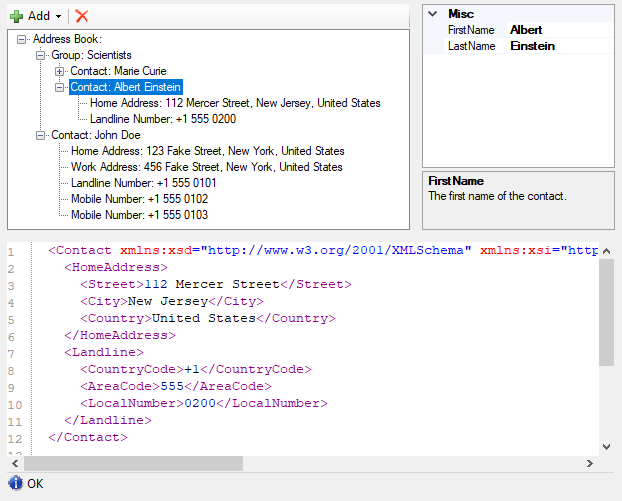
NanoByte Structure Editor is a WinForms library that helps you build split-screen editors for your data structures, consisting of:
PropertyGrid or custom) andThis allows you to create an IDE-like experience for your users when editing complex domain specific languages, configuration files, etc..
Add a reference to the NanoByte.StructureEditor.WinForms NuGet package to your project. It is available for .NET Framework 4.5+ and .NET 8.0+.
Create an instance of StructureEditor<T> and add it to your Form:
var editor = new StructureEditor<MyData>();
Controls.Add(editor);
Alternatively, you may want to derive your own class from StructureEditor<T>. This will allow you to use the graphical WinForms designer in Visual Studio (which does not support generic types) to place the Editor on your Form.
public class MyDataEditor : StructureEditor<MyData>
{}
You need to "describe" your data structure to the Editor. You can do this directly after instantiating the editor or in the constructor of your derived class.
DescribeRoot() and then use the fluent API provided as a return value to describe the properties on your main data type.Describe<TContainer>() to describe the properties on a data type TContainer exposed by another property. You can use multiple calls with different type parameters to describe arbitrarily deep hierarchies.The fluent API provides the following methods:
.AddProperty() describes a single-value non-polymorphic property..AddPolymorphicProperty() describes a single-value polymorphic property. After calling it you chain .AddElement() calls for each specific type the property can hold..AddList() describes a non-polymorphic list..AddPolymorphicList() describes a polymorphic list. After calling it you need to chain .AddElement() calls for each specific type of element the list can hold.There are numerous overloads for each of these methods, e.g., allowing you to specify a custom editor control for a data type or to keep the auto-generated one.
editor.DescribeRoot("Address Book")
 .AddList("Group", x => x.Groups);
editor.Describe<IContactContainer>()
 .AddList("Contact", x => x.Contacts);
editor.Describe<Contact>()
 .AddProperty("Home Address", x => PropertyPointer.ForNullable(() => x.HomeAddress))
 .AddProperty("Work Address", x => PropertyPointer.ForNullable(() => x.WorkAddress))
 .AddPolymorphicList(x => x.PhoneNumbers)
 .AddElement("Landline Number", () => new LandlineNumber())
 .AddElement("Mobile Number", () => new MobileNumber());
Use the Open() method to load an XML file into the editor:
editor.Open(CommandManager<AddressBook>.Load(path));
Use the Save() method on the CommandManager property to save the editor's content as an XML file:
editor.CommandManager.Save(path);
Take a look a the for a more complete setup, including undo/redo functionality.
The source code is in , config for building the API documentation is in and generated build artifacts are placed in artifacts/. The source code does not contain version numbers. Instead the version is determined during CI using GitVersion.
To build install Visual Studio 2026 v18.0 or newer and run .\build.ps1.
We welcome contributions to this project such as bug reports, recommendations and pull requests.
This repository contains an EditorConfig file. Please make sure to use an editor that supports it to ensure consistent code style, file encoding, etc.. For full tooling support for all style and naming conventions consider using JetBrains' ReSharper or Rider products.
| Product | Versions Compatible and additional computed target framework versions. |
|---|---|
| .NET | net8.0 net8.0 is compatible. net8.0-android net8.0-android was computed. net8.0-browser net8.0-browser was computed. net8.0-ios net8.0-ios was computed. net8.0-maccatalyst net8.0-maccatalyst was computed. net8.0-macos net8.0-macos was computed. net8.0-tvos net8.0-tvos was computed. net8.0-windows net8.0-windows was computed. net9.0 net9.0 is compatible. net9.0-android net9.0-android was computed. net9.0-browser net9.0-browser was computed. net9.0-ios net9.0-ios was computed. net9.0-maccatalyst net9.0-maccatalyst was computed. net9.0-macos net9.0-macos was computed. net9.0-tvos net9.0-tvos was computed. net9.0-windows net9.0-windows was computed. net10.0 net10.0 is compatible. net10.0-android net10.0-android was computed. net10.0-browser net10.0-browser was computed. net10.0-ios net10.0-ios was computed. net10.0-maccatalyst net10.0-maccatalyst was computed. net10.0-macos net10.0-macos was computed. net10.0-tvos net10.0-tvos was computed. net10.0-windows net10.0-windows was computed. |
| .NET Framework | net45 net45 is compatible. net451 net451 was computed. net452 net452 was computed. net46 net46 was computed. net461 net461 was computed. net462 net462 was computed. net463 net463 was computed. net47 net47 was computed. net471 net471 was computed. net472 net472 was computed. net48 net48 was computed. net481 net481 was computed. |
Showing the top 1 NuGet packages that depend on NanoByte.StructureEditor:
| Package | Downloads |
|---|---|
|
NanoByte.StructureEditor.WinForms
WinForms controls for building split-screen editors for data structures |
This package is not used by any popular GitHub repositories.
| Version | Downloads | Last Updated |
|---|---|---|
| 2.0.0 | 80 | 6/16/2026 |
| 1.0.10 | 426 | 5/20/2026 |
| 1.0.9 | 124 | 5/17/2026 |
| 1.0.8 | 126 | 5/17/2026 |
| 1.0.7 | 180 | 5/11/2026 |
| 1.0.6 | 815 | 2/16/2026 |
| 1.0.5 | 382 | 1/31/2026 |
| 1.0.4 | 146 | 12/30/2025 |
| 1.0.3 | 174 | 12/20/2025 |
| 1.0.2 | 986 | 9/8/2025 |
| 1.0.1 | 341 | 8/4/2025 |
| 1.0.0 | 359 | 7/20/2025 |
| 0.9.5 | 236 | 7/7/2025 |
| 0.9.4 | 277 | 5/6/2025 |
| 0.9.3 | 231 | 3/29/2025 |
| 0.9.2 | 219 | 3/29/2025 |
| 0.9.1 | 259 | 12/7/2024 |
| 0.9.0 | 254 | 11/23/2024 |
| 0.8.3 | 241 | 10/28/2024 |
| 0.8.2 | 457 | 3/10/2024 |