|
VOOZH | about |
|
VOOZH | about |
dotnet add package PrettyLogging.Console --version 1.0.3
NuGet\Install-Package PrettyLogging.Console -Version 1.0.3
<PackageReference Include="PrettyLogging.Console" Version="1.0.3" />
<PackageVersion Include="PrettyLogging.Console" Version="1.0.3" />Directory.Packages.props
<PackageReference Include="PrettyLogging.Console" />Project file
paket add PrettyLogging.Console --version 1.0.3
#r "nuget: PrettyLogging.Console, 1.0.3"
#:package PrettyLogging.Console@1.0.3
#addin nuget:?package=PrettyLogging.Console&version=1.0.3Install as a Cake Addin
#tool nuget:?package=PrettyLogging.Console&version=1.0.3Install as a Cake Tool
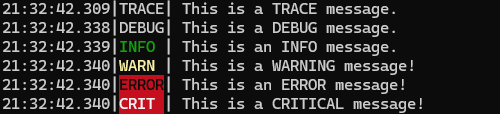
Enhance the readability of Microsoft.Extensions.Logging output!
Starting with version 1.0.1, line breaks in single-line logs are now preserved by default.
If you enjoy this project, please give it a ⭐️ to help others discover it!
Have suggestions or found a bug? Open an issue and share your feedback!
Install the NuGet package:
Add the package to your project by running:
dotnet add package PrettyLogging.Console
Stay up-to-date with floating versions (optional):
Use a floating version to always get the latest updates:
<PackageReference Include="PrettyLogging.Console" Version="[1.*-*, 2.0)" />
For an example, see UsePrettyLogging.Console.csproj.
Set up Pretty Logging in your app:
Add the PrettyIt() method to your logger configuration:
builder.Logging.PrettyIt();
Customize the output (optional):
Tailor the log output to your needs by adjusting options like log level visibility, timestamp inclusion, log format (single-line or multi-line), color behavior, and more. See for details.
Enjoy cleaner logs:
Console application:
Before:
info: Program[0]
 Hello Pretty Logging
info: Program[0]
 This is a warning!
After:
16:28:30.200|INFO |Hello Pretty Logging
16:28:30.206|WARN |This is a warning!
WebAPI:
Before:
info: Microsoft.Hosting.Lifetime[14]
 Now listening on: http://localhost:5140
info: Microsoft.Hosting.Lifetime[0]
 Application started. Press Ctrl+C to shut down.
info: Microsoft.Hosting.Lifetime[0]
 Hosting environment: Development
info: Microsoft.Hosting.Lifetime[0]
 Content root path: C:\AIR\PrettyLogging\examples\UsePrettyLogging.WebAPI
info: Microsoft.AspNetCore.Hosting.Diagnostics[1]
 Request starting HTTP/1.1 GET http://localhost:5140/ - - -
info: Microsoft.AspNetCore.Routing.EndpointMiddleware[0]
 Executing endpoint 'HTTP: GET /'
info: Microsoft.AspNetCore.Routing.EndpointMiddleware[1]
 Executed endpoint 'HTTP: GET /'
info: Microsoft.AspNetCore.Hosting.Diagnostics[2]
 Request finished HTTP/1.1 GET http://localhost:5140/ - 200 - text/plain;+charset=utf-8 36.5664ms
After:
17:56:08.734|INFO |Now listening on: http://localhost:5140
17:56:08.740|INFO |Application started. Press Ctrl+C to shut down.
17:56:08.740|INFO |Hosting environment: Development
17:56:08.740|INFO |Content root path: C:\AIR\PrettyLogging\examples\UsePrettyLogging.WebAPI
17:56:18.280|INFO |Request starting HTTP/1.1 GET http://localhost:5140/ - - -
17:56:18.316|INFO |Executing endpoint 'HTTP: GET /'
17:56:18.319|INFO |Executed endpoint 'HTTP: GET /'
17:56:18.327|INFO |Request finished HTTP/1.1 GET http://localhost:5140/ - 200 - text/plain;+charset=utf-8 41.9690ms
| Product | Versions Compatible and additional computed target framework versions. |
|---|---|
| .NET | net5.0 net5.0 was computed. net5.0-windows net5.0-windows was computed. net6.0 net6.0 was computed. net6.0-android net6.0-android was computed. net6.0-ios net6.0-ios was computed. net6.0-maccatalyst net6.0-maccatalyst was computed. net6.0-macos net6.0-macos was computed. net6.0-tvos net6.0-tvos was computed. net6.0-windows net6.0-windows was computed. net7.0 net7.0 was computed. net7.0-android net7.0-android was computed. net7.0-ios net7.0-ios was computed. net7.0-maccatalyst net7.0-maccatalyst was computed. net7.0-macos net7.0-macos was computed. net7.0-tvos net7.0-tvos was computed. net7.0-windows net7.0-windows was computed. net8.0 net8.0 is compatible. net8.0-android net8.0-android was computed. net8.0-browser net8.0-browser was computed. net8.0-ios net8.0-ios was computed. net8.0-maccatalyst net8.0-maccatalyst was computed. net8.0-macos net8.0-macos was computed. net8.0-tvos net8.0-tvos was computed. net8.0-windows net8.0-windows was computed. net9.0 net9.0 is compatible. net9.0-android net9.0-android was computed. net9.0-browser net9.0-browser was computed. net9.0-ios net9.0-ios was computed. net9.0-maccatalyst net9.0-maccatalyst was computed. net9.0-macos net9.0-macos was computed. net9.0-tvos net9.0-tvos was computed. net9.0-windows net9.0-windows was computed. net10.0 net10.0 was computed. net10.0-android net10.0-android was computed. net10.0-browser net10.0-browser was computed. net10.0-ios net10.0-ios was computed. net10.0-maccatalyst net10.0-maccatalyst was computed. net10.0-macos net10.0-macos was computed. net10.0-tvos net10.0-tvos was computed. net10.0-windows net10.0-windows was computed. |
| .NET Core | netcoreapp2.0 netcoreapp2.0 was computed. netcoreapp2.1 netcoreapp2.1 was computed. netcoreapp2.2 netcoreapp2.2 was computed. netcoreapp3.0 netcoreapp3.0 was computed. netcoreapp3.1 netcoreapp3.1 was computed. |
| .NET Standard | netstandard2.0 netstandard2.0 is compatible. netstandard2.1 netstandard2.1 was computed. |
| .NET Framework | net461 net461 was computed. net462 net462 is compatible. net463 net463 was computed. net47 net47 was computed. net471 net471 was computed. net472 net472 was computed. net48 net48 was computed. net481 net481 was computed. |
| MonoAndroid | monoandroid monoandroid was computed. |
| MonoMac | monomac monomac was computed. |
| MonoTouch | monotouch monotouch was computed. |
| Tizen | tizen40 tizen40 was computed. tizen60 tizen60 was computed. |
| Xamarin.iOS | xamarinios xamarinios was computed. |
| Xamarin.Mac | xamarinmac xamarinmac was computed. |
| Xamarin.TVOS | xamarintvos xamarintvos was computed. |
| Xamarin.WatchOS | xamarinwatchos xamarinwatchos was computed. |
Showing the top 1 NuGet packages that depend on PrettyLogging.Console:
| Package | Downloads |
|---|---|
|
IoTSharp
Open-source IoT Platform - Device management, data collection, processing and visualization. |
Showing the top 1 popular GitHub repositories that depend on PrettyLogging.Console:
| Repository | Stars |
|---|---|
|
IoTSharp/IoTSharp
IoTSharp is an open-source IoT platform for data collection, processing, visualization, and device management.
|
| Version | Downloads | Last Updated | |
|---|---|---|---|
| 1.0.3 | 46,589 | 3/27/2025 | |
| 1.0.2 | 638 | 3/24/2025 | |
| 1.0.1 | 272 | 3/14/2025 | |
| 1.0.0 | 32,050 | 2/11/2025 | 1.0.0 is deprecated because it is no longer maintained. |