|
VOOZH | about |
|
VOOZH | about |
dotnet add package ScikitLearn --version 1.1.0
NuGet\Install-Package ScikitLearn -Version 1.1.0
<PackageReference Include="ScikitLearn" Version="1.1.0" />
<PackageVersion Include="ScikitLearn" Version="1.1.0" />Directory.Packages.props
<PackageReference Include="ScikitLearn" />Project file
paket add ScikitLearn --version 1.1.0
#r "nuget: ScikitLearn, 1.1.0"
#:package ScikitLearn@1.1.0
#addin nuget:?package=ScikitLearn&version=1.1.0Install as a Cake Addin
#tool nuget:?package=ScikitLearn&version=1.1.0Install as a Cake Tool
👁 alternate text is missing from this package README image
👁 alternate text is missing from this package README image
C# bindings for Scikit-Learn, focused on bringing Machine Learning to the C# environment. This library provides easy access to machine learning models, results, parameters and datasets.
Powered by Numpy.Bare and generated based on Scikit-Learn’s documentation, implementing most of the classes and methods.
Set the path to your python311.dll file as follows:
Runtime.PythonDLL = "your_path_to_python311.dll";
Replace "your_path_to_python311.dll" with the actual path where python311.dll is located on your system. This setting allows Sklearn.NET to use your existing Python installation directly.
If you prefer to install Python locally, you’ll need to first install Python.Included Nuget v3.11.6. Then, add the following code to your program’s startup to install and configure the local Python installation:
using Python.Included;
using Python.Runtime;
using Numpy;
using ScikitLearn;
internal class Program
{
 // Define an asynchronous method to install numpy and scikit-learn; this may take a few minutes the first time.
 // Once installed, startup will be almost immediate. You can also copy the installation to a fixed location
 // for multiple projects to find it instantly
 private static async Task InitializeInstallerAsync()
 {
 Installer.InstallPath = Path.GetFullPath("."); // Specify the path for the local installation

 await Installer.SetupPython();
 await Installer.TryInstallPip();
 await Installer.PipInstallModule("numpy");
 await Installer.PipInstallModule("scikit-learn");
 }

 // Run this task in your application’s constructor or at the start of your code,
 // just ensure it runs before calling np or sklearn
 public static void Main(string[] args)
 {
 Task.Run(InitializeInstallerAsync).Wait();

 // Your code here
 }
}
Replicating the DBSCAN example:
var X = np.array(new int[,] {
 { 1, 2 }, { 2, 2 }, { 2, 3 },
 { 8, 7 }, { 8,8 }, { 25, 25 } });

var clustering = new sklearn.cluster.DBSCAN(eps: 3, min_samples: 2).fit(X);
Console.WriteLine(clustering.labels_);
Output
[ 0 0 0 1 1 -1]
my_model.labels_ScikitLearn typically uses ndarray(int64), which is equivalent to long[] in C# rather than int[]. To convert labels_ to a C# array format, use:
long[] labels = my_model.labels_.GetData<long>();
For desktop applications, be sure to call PythonEngine.Shutdown() when closing the application to prevent it from continuing in the background.
Each static class has a self field of type PyObject, from which you can create class instances or call omitted methods.
When creating objects, you will receive an instance of PyObject. If you are sure of the type, each class has a static method Encapsulate(PyObject pyObject), which allows you to access the class's attributes and methods.
PyObject obj = sklearn.cluster.self.InvokeMethod("DBSCAN", your_custom_args);

var model = sklearn.cluster.DBSCAN.Encapsule(obj);
model.fit(...);
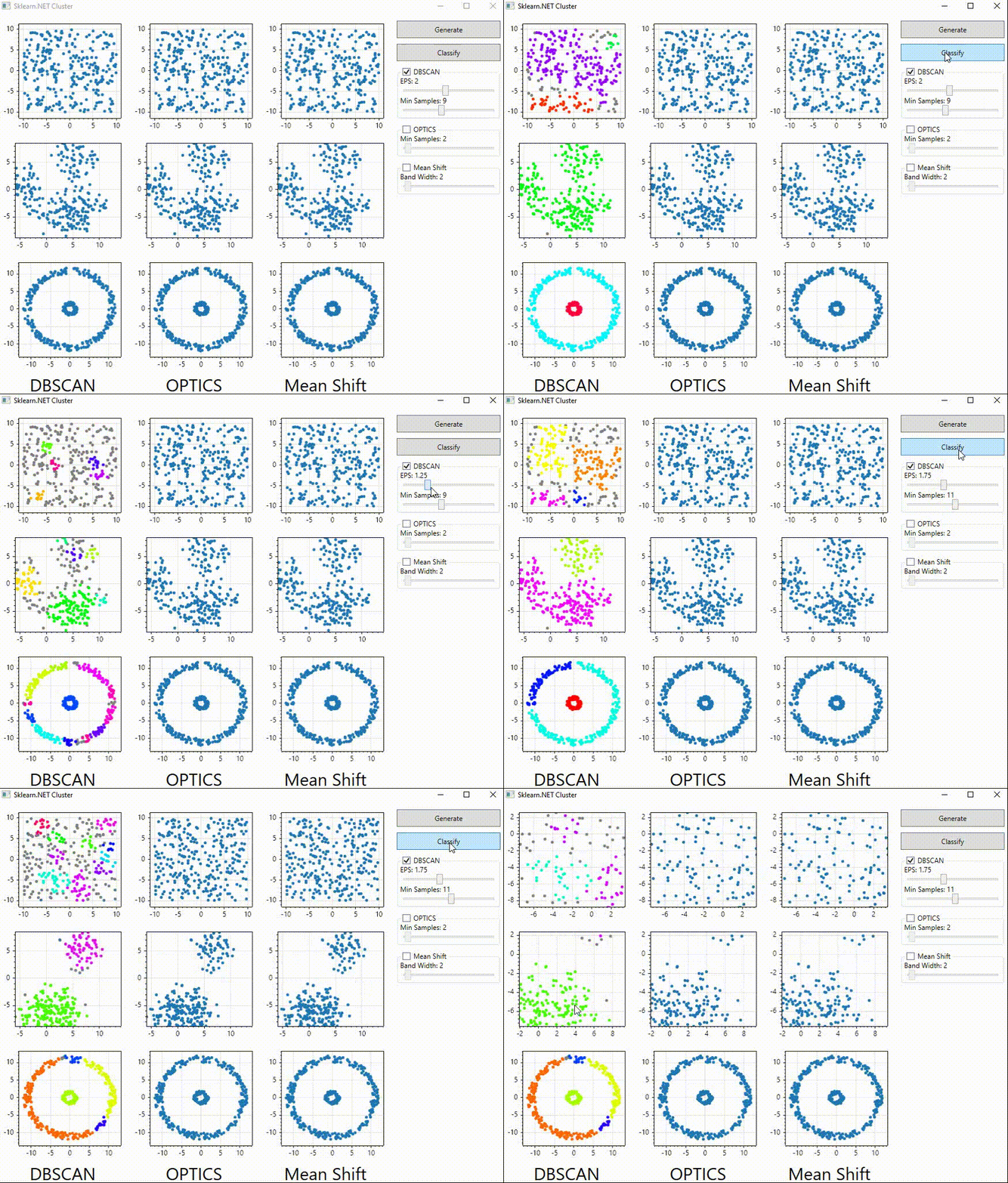
This project originated from the need to use classification algorithms within the UI benefits offered by C#, such as WinForms and WPF, for developing complex applications. Here’s a small example of an application that interactively compares different clustering types: DBSCAN, OPTICS, and Mean Shift using the ScottPlot graphics library.
👁 alternate text is missing from this package README image
This project is just starting, so some parts may still lack full implementation or proper error handling. However, I’ll be adding tests to verify return types and improve typing accuracy.
| Product | Versions Compatible and additional computed target framework versions. |
|---|---|
| .NET | net8.0 net8.0 is compatible. net8.0-android net8.0-android was computed. net8.0-browser net8.0-browser was computed. net8.0-ios net8.0-ios was computed. net8.0-maccatalyst net8.0-maccatalyst was computed. net8.0-macos net8.0-macos was computed. net8.0-tvos net8.0-tvos was computed. net8.0-windows net8.0-windows was computed. net9.0 net9.0 was computed. net9.0-android net9.0-android was computed. net9.0-browser net9.0-browser was computed. net9.0-ios net9.0-ios was computed. net9.0-maccatalyst net9.0-maccatalyst was computed. net9.0-macos net9.0-macos was computed. net9.0-tvos net9.0-tvos was computed. net9.0-windows net9.0-windows was computed. net10.0 net10.0 was computed. net10.0-android net10.0-android was computed. net10.0-browser net10.0-browser was computed. net10.0-ios net10.0-ios was computed. net10.0-maccatalyst net10.0-maccatalyst was computed. net10.0-macos net10.0-macos was computed. net10.0-tvos net10.0-tvos was computed. net10.0-windows net10.0-windows was computed. |
This package is not used by any NuGet packages.
This package is not used by any popular GitHub repositories.