|
VOOZH | about |
|
VOOZH | about |
dotnet add package Serilog.Sinks.Seq --version 9.1.0
NuGet\Install-Package Serilog.Sinks.Seq -Version 9.1.0
<PackageReference Include="Serilog.Sinks.Seq" Version="9.1.0" />
<PackageVersion Include="Serilog.Sinks.Seq" Version="9.1.0" />Directory.Packages.props
<PackageReference Include="Serilog.Sinks.Seq" />Project file
paket add Serilog.Sinks.Seq --version 9.1.0
#r "nuget: Serilog.Sinks.Seq, 9.1.0"
#:package Serilog.Sinks.Seq@9.1.0
#addin nuget:?package=Serilog.Sinks.Seq&version=9.1.0Install as a Cake Addin
#tool nuget:?package=Serilog.Sinks.Seq&version=9.1.0Install as a Cake Tool
A Serilog sink that writes events to the Seq structured log server. Supports all modern .NET platforms.
If you would like to see timing and dependency information in Seq, SerilogTracing is a Serilog extension that can send both logs and traces through this sink.
Install Serilog.Sinks.Seq into your .NET project:
dotnet add package Serilog.Sinks.Seq
Point the logger to Seq:
Log.Logger = new LoggerConfiguration()
 .WriteTo.Seq("http://localhost:5341")
 .CreateLogger();
And use the Serilog logging methods to associate named properties with log events:
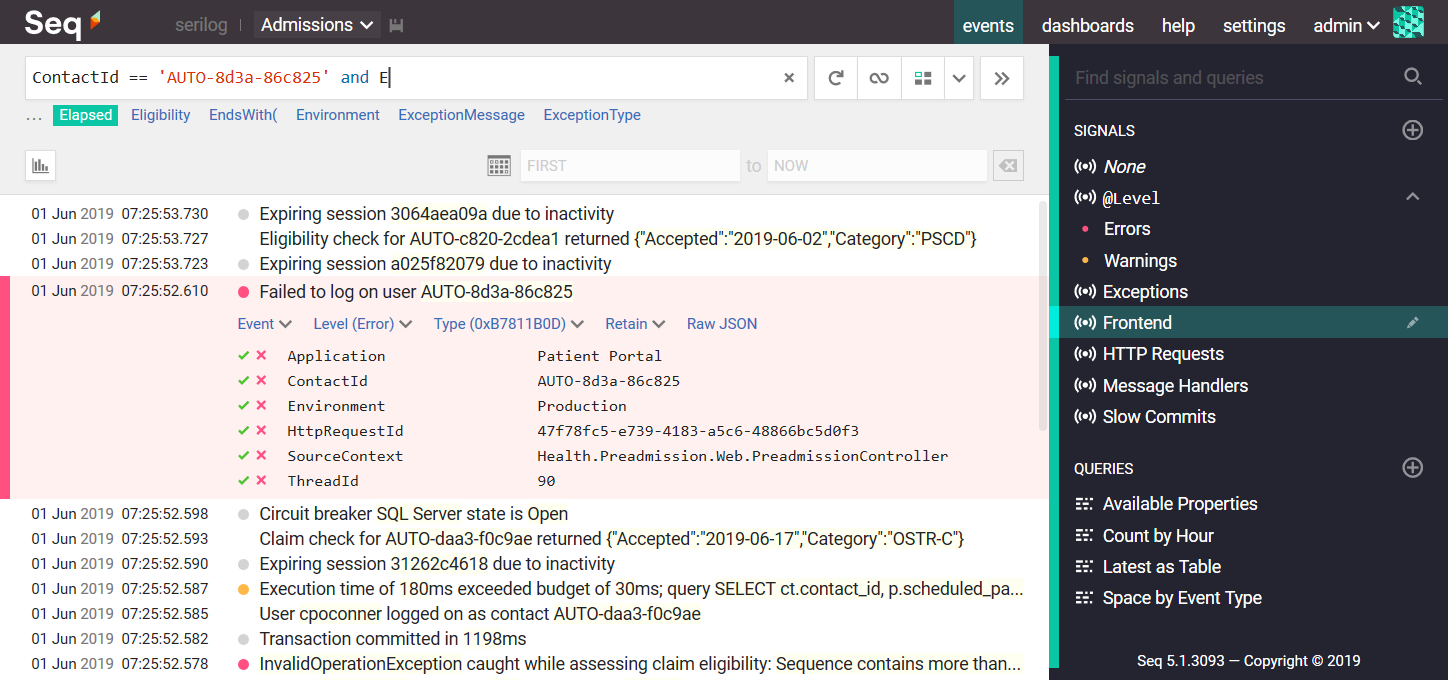
Log.Error("Failed to log on user {ContactId}", contactId);
Then query log event properties like ContactId from the browser:
When the application shuts down, ensure any buffered events are propertly flushed to Seq by disposing the logger or calling Log.CloseAndFlush():
await Log.CloseAndFlushAsync();
The sink can take advantage of Seq's API keys to authenticate clients and dynamically attach properties to events at the server-side. To use an API key, specify it in the apiKey parameter of WriteTo.Seq().
<appSettings> configurationTo adjust the Seq server URL at deployment time, it's often convenient to configure it using XML <appSettings>, in the App.config or Web.config file.
Before Serilog can be configured using XML, the Serilog.Settings.AppSettings package must be installed and enabled using the LoggerConfiguration:
Log.Logger = new LoggerConfiguration()
 .ReadFrom.AppSettings()
 .CreateLogger();
When XML is used for configuration, it's not necessary to include the WriteTo.Seq() method. It is important however that the Serilog.Sinks.Seq.dll assembly is present alongside the app's binaries.
The settings typically included are:
<configuration>
 <appSettings>
 <add key="serilog:using:Seq" value="Serilog.Sinks.Seq" />
 <add key="serilog:write-to:Seq.serverUrl" value="http://localhost:5341" />
 <add key="serilog:write-to:Seq.apiKey" value="[optional API key here]" />
Serilog's XML configuration has several other capabilities that are described on the Serilog wiki.
appsettings.json configurationTo use the Seq sink with Microsoft.Extensions.Configuration, for example with ASP.NET Core or .NET Core, use the Serilog.Settings.Configuration package. First install that package if you have not already done so:
dotnet add package Serilog.Settings.Configuration
Instead of configuring the Seq sink directly in code, call ReadFrom.Configuration():
var configuration = new ConfigurationBuilder()
 .AddJsonFile("appsettings.json")
 .Build();

await using var logger = new LoggerConfiguration()
 .ReadFrom.Configuration(configuration)
 .CreateLogger();
In your appsettings.json file, under the Serilog node, :
{
 "Serilog": {
 "WriteTo": [
 { "Name": "Seq", "Args": { "serverUrl": "http://localhost:5341" } }
 ]
 }
}
See the XML <appSettings> example above for a discussion of available Args options.
The Seq sink can dynamically adjust the logging level up or down based on the level associated with an API key in Seq. To use this feature, create a LoggingLevelSwitch to control the MinimumLevel, and pass this in the controlLevelSwitch parameter of WriteTo.Seq():
var levelSwitch = new LoggingLevelSwitch();

Log.Logger = new LoggerConfiguration()
 .MinimumLevel.ControlledBy(levelSwitch)
 .WriteTo.Seq("http://localhost:5341",
 apiKey: "yeEZyL3SMcxEKUijBjN",
 controlLevelSwitch: levelSwitch)
 .CreateLogger();
The equivalent configuration in XML (Serilog 2.6+) is:
<configuration>
 <appSettings>

 <add key="serilog:level-switch:$controlSwitch" value="Information" />

 <add key="serilog:minimum-level:controlled-by" value="$controlSwitch" />
 <add key="serilog:using:Seq" value="Serilog.Sinks.Seq" />
 <add key="serilog:write-to:Seq.serverUrl" value="http://localhost:5341" />
 <add key="serilog:write-to:Seq.apiKey" value="yeEZyL3SMcxEKUijBjN" />

 <add key="serilog:write-to:Seq.controlLevelSwitch" value="$controlSwitch" />
The equivalent configuration in JSON is:
{
 "Serilog":
 {
 "LevelSwitches": { "$controlSwitch": "Information" },
 "MinimumLevel": { "ControlledBy": "$controlSwitch" },
 "WriteTo":
 [{
 "Name": "Seq",
 "Args":
 {
 "serverUrl": "http://localhost:5341",
 "apiKey": "yeEZyL3SMcxEKUijBjN",
 "controlLevelSwitch": "$controlSwitch"
 }
 }]
 }
}
For further information see the Seq documentation.
Nothing showed up, what can I do?
If events don't appear in Seq after pressing the refresh button in the filter bar, either your application was unable to contact the Seq server, or else the Seq server rejected the log events for some reason.
The Seq server may reject incoming events if they're missing a required API key, if the payload is corrupted somehow, or if the log events are too large to accept.
Server-side issues are diagnosed using the Seq Ingestion Log, which shows the details of any problems detected on the server side. The ingestion log is linked from the Settings > Diagnostics page in the Seq user interface.
If there's no information in the ingestion log, the application was probably unable to reach the server because of network configuration or connectivity issues. These are reported to the application through Serilog's SelfLog.
Add the following line after the logger is configured to print any error information to the console:
Serilog.Debugging.SelfLog.Enable(Console.Error);
If the console is not available, you can pass a delegate into SelfLog.Enable() that will be called with each error message:
Serilog.Debugging.SelfLog.Enable(message => {
 // Do something with `message`
});
SelfLog as described above to check for connectivity problems and other issues on the client side.Log.CloseAndFlush(), or disposes the root Logger, before it exits - otherwise, buffered events may be lost.| Product | Versions Compatible and additional computed target framework versions. |
|---|---|
| .NET | net5.0 net5.0 was computed. net5.0-windows net5.0-windows was computed. net6.0 net6.0 is compatible. net6.0-android net6.0-android was computed. net6.0-ios net6.0-ios was computed. net6.0-maccatalyst net6.0-maccatalyst was computed. net6.0-macos net6.0-macos was computed. net6.0-tvos net6.0-tvos was computed. net6.0-windows net6.0-windows was computed. net7.0 net7.0 was computed. net7.0-android net7.0-android was computed. net7.0-ios net7.0-ios was computed. net7.0-maccatalyst net7.0-maccatalyst was computed. net7.0-macos net7.0-macos was computed. net7.0-tvos net7.0-tvos was computed. net7.0-windows net7.0-windows was computed. net8.0 net8.0 was computed. net8.0-android net8.0-android was computed. net8.0-browser net8.0-browser was computed. net8.0-ios net8.0-ios was computed. net8.0-maccatalyst net8.0-maccatalyst was computed. net8.0-macos net8.0-macos was computed. net8.0-tvos net8.0-tvos was computed. net8.0-windows net8.0-windows was computed. net9.0 net9.0 was computed. net9.0-android net9.0-android was computed. net9.0-browser net9.0-browser was computed. net9.0-ios net9.0-ios was computed. net9.0-maccatalyst net9.0-maccatalyst was computed. net9.0-macos net9.0-macos was computed. net9.0-tvos net9.0-tvos was computed. net9.0-windows net9.0-windows was computed. net10.0 net10.0 is compatible. net10.0-android net10.0-android was computed. net10.0-browser net10.0-browser was computed. net10.0-ios net10.0-ios was computed. net10.0-maccatalyst net10.0-maccatalyst was computed. net10.0-macos net10.0-macos was computed. net10.0-tvos net10.0-tvos was computed. net10.0-windows net10.0-windows was computed. |
| .NET Core | netcoreapp2.0 netcoreapp2.0 was computed. netcoreapp2.1 netcoreapp2.1 was computed. netcoreapp2.2 netcoreapp2.2 was computed. netcoreapp3.0 netcoreapp3.0 was computed. netcoreapp3.1 netcoreapp3.1 was computed. |
| .NET Standard | netstandard2.0 netstandard2.0 is compatible. netstandard2.1 netstandard2.1 was computed. |
| .NET Framework | net461 net461 was computed. net462 net462 was computed. net463 net463 was computed. net47 net47 was computed. net471 net471 was computed. net472 net472 was computed. net48 net48 was computed. net481 net481 was computed. |
| MonoAndroid | monoandroid monoandroid was computed. |
| MonoMac | monomac monomac was computed. |
| MonoTouch | monotouch monotouch was computed. |
| Tizen | tizen40 tizen40 was computed. tizen60 tizen60 was computed. |
| Xamarin.iOS | xamarinios xamarinios was computed. |
| Xamarin.Mac | xamarinmac xamarinmac was computed. |
| Xamarin.TVOS | xamarintvos xamarintvos was computed. |
| Xamarin.WatchOS | xamarinwatchos xamarinwatchos was computed. |
Showing the top 5 NuGet packages that depend on Serilog.Sinks.Seq:
| Package | Downloads |
|---|---|
|
Takenet.Iris.Common
Iris common data types package |
|
|
EtAlii.xTechnology.Diagnostics
A package that contains generic abstractions for debugging and logging purposes. |
|
|
Hopex.ApplicationServer.SiteModule
Hopex Application site module |
|
|
Convey.Logging
Convey.Logging |
|
|
EtAlii.xTechnology.Diagnostics.Serilog
A package that contains a logging implementation that uses the Serilog logging system. |
Showing the top 20 popular GitHub repositories that depend on Serilog.Sinks.Seq:
| Repository | Stars |
|---|---|
|
kurrent-io/KurrentDB
KurrentDB is a database that's engineered for modern software applications and event-driven architectures. Its event-native design simplifies data modeling and preserves data integrity while the integrated streaming engine solves distributed messaging challenges and ensures data consistency.
|
|
|
anjoy8/Blog.Core
💖 ASP.NET Core 8.0 全家桶教程,前后端分离后端接口,vue教程姊妹篇,官方文档:
|
|
|
dotnet/tye
Tye is a tool that makes developing, testing, and deploying microservices and distributed applications easier. Project Tye includes a local orchestrator to make developing microservices easier and the ability to deploy microservices to Kubernetes with minimal configuration.
|
|
|
dotnetcore/Util
Util是一个.Net平台下的应用框架,旨在提升中小团队的开发能力,由工具类、分层架构基类、Ui组件,配套代码生成模板,权限等组成。
|
|
|
skoruba/IdentityServer4.Admin
The administration for the IdentityServer4 and Asp.Net Core Identity
|
|
|
ChangemakerStudios/Papercut-SMTP
Papercut SMTP -- The Simple Desktop Email Server
|
|
|
intel/acat
Assistive Context-Aware Toolkit (ACAT)
|
|
|
vietnam-devs/coolstore-microservices
A full-stack .NET microservices build on Dapr and Tye
|
|
|
AppMetrics/AppMetrics
App Metrics is an open-source and cross-platform .NET library used to record and report metrics within an application.
|
|
|
asynkron/protoactor-dotnet
Proto Actor - Ultra fast distributed actors for Go, C# and Java/Kotlin
|
|
|
dotnet-architecture/eShopOnDapr
A sample .NET distributed application based on eShopOnContainers, powered by Dapr.
|
|
|
desenvolvedor-io/dev-store
A microservices e-commerce reference application built with ASP.NET 9
|
|
|
mehdihadeli/food-delivery-microservices
🍔 A practical and cloud-native food delivery microservices, built with .Net Aspire, .Net 9, MassTransit, Domain-Driven Design, CQRS, Vertical Slice Architecture, Event-Driven Architecture, and the latest technologies.
|
|
|
CodeMazeBlog/CodeMazeGuides
The main repository for all the Code Maze guides
|
|
|
Mimetis/Dotmim.Sync
A brand new database synchronization framework, multi platform, multi databases, developed on top of .Net Standard 2.0. https://dotmimsync.readthedocs.io/
|
|
|
snatch-dev/Convey
A simple recipe for .NET Core microservices.
|
|
|
bing-framework/Bing.NetCore
Bing是基于 .net core 3.1 的框架,旨在提升团队的开发输出能力,由常用公共操作类(工具类、帮助类)、分层架构基类,第三方组件封装,第三方业务接口封装等组成。
|
|
|
davidfowl/Micronetes
Micronetes is a local orchestrator inspired by kubernetes that makes developing and testing microservices and distributed applications easier.
|
|
|
Aguafrommars/TheIdServer
OpenID/Connect, OAuth2, WS-Federation and SAML 2.0 server based on Duende IdentityServer and ITFoxtec Identity SAML 2.0 with its admin UI
|
|
|
hamed-shirbandi/TaskoMask
Task management system based on .NET 8 with Microservices, DDD, CQRS, Event Sourcing and Testing Concepts
|
| Version | Downloads | Last Updated |
|---|---|---|
| 9.1.0 | 501,652 | 5/14/2026 |
| 9.1.0-dev-02312 | 129 | 5/14/2026 |
| 9.1.0-dev-02311 | 116 | 5/14/2026 |
| 9.0.0 | 17,743,834 | 12/20/2024 |
| 9.0.0-dev-02307 | 122 | 5/13/2026 |
| 9.0.0-dev-02304 | 346 | 12/20/2024 |
| 9.0.0-dev-02303 | 345 | 12/20/2024 |
| 9.0.0-dev-02301 | 13,776 | 12/2/2024 |
| 9.0.0-dev-00310 | 41,526 | 7/21/2024 |
| 8.0.1-dev-00309 | 1,105 | 7/21/2024 |
| 8.0.0 | 17,328,340 | 6/4/2024 |
| 8.0.0-dev-00305 | 992 | 6/3/2024 |
| 8.0.0-dev-00302 | 702 | 5/29/2024 |
| 8.0.0-dev-00299 | 4,414 | 5/8/2024 |
| 8.0.0-dev-00297 | 360 | 5/8/2024 |
| 8.0.0-dev-00295 | 752 | 5/7/2024 |
| 7.0.1 | 2,724,682 | 5/3/2024 |
| 7.0.1-dev-00291 | 332 | 5/3/2024 |
| 7.0.1-dev-00288 | 7,586 | 5/1/2024 |
| 7.0.1-dev-00286 | 24,660 | 4/1/2024 |