|
VOOZH | about |
|
VOOZH | about |
dotnet add package Smith --version 0.2.5
NuGet\Install-Package Smith -Version 0.2.5
<PackageReference Include="Smith" Version="0.2.5" />
<PackageVersion Include="Smith" Version="0.2.5" />Directory.Packages.props
<PackageReference Include="Smith" />Project file
paket add Smith --version 0.2.5
#r "nuget: Smith, 0.2.5"
#:package Smith@0.2.5
#addin nuget:?package=Smith&version=0.2.5Install as a Cake Addin
#tool nuget:?package=Smith&version=0.2.5Install as a Cake Tool
Run AI-powered C# files using Microsoft.Extensions.AI and Devlooped.Extensions.AI
Example leveraging Grok:
#:package Smith@0.*

// Sample X.AI client usage with .NET
var messages = new Chat()
{
 { "system", "You are a highly intelligent AI assistant." },
 { "user", "What is 101*3?" },
};

IChatClient grok = new GrokClient(Throw.IfNullOrEmpty(Env.Get("XAI_API_KEY")))
 .GetChatClient("grok-3-mini")
 .AsIChatClient();

var options = new GrokChatOptions
{
 ReasoningEffort = ReasoningEffort.High, // or ReasoningEffort.Low
 Search = GrokSearch.Auto, // or GrokSearch.On/GrokSearch.Off
};

var response = await grok.GetResponseAsync(messages, options);

AnsiConsole.MarkupLine($":robot: {response.Text}");
The most useful namespaces and dependencies for developing Microsoft.Extensions.AI-powered applications are automatically referenced and imported when using this package.
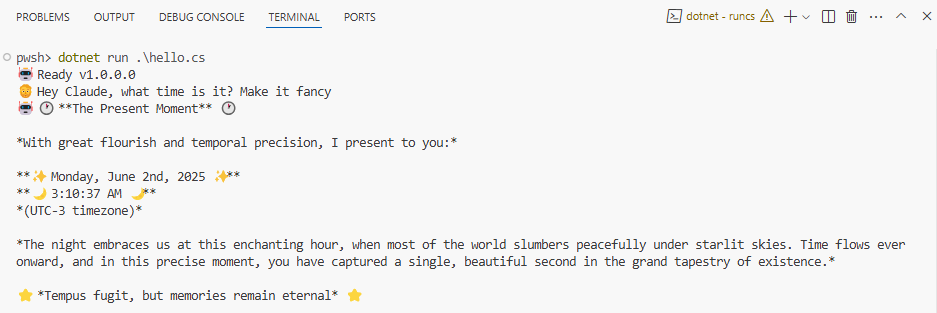
Example using Claude:
👁 alternate text is missing from this package README image
#:package Smith@0.*

var client = new Anthropic.AnthropicClient(Throw.
 Env.Get("Claude:Key") ?? throw new InvalidOperationException("Missing Claude:Key configuration."),
 services.GetRequiredService<IHttpClientFactory>().CreateClient("ai")))
 .UseLogging()
 .UseFunctionInvocation();

var builder = App.CreateBuilder(args);
builder.Services.AddChatClient(new );

var app = builder.Build();

var history = new List<ChatMessage> { new ChatMessage(ChatRole.System, Prompts.System) };
var chat = app.Services.GetRequiredService<IChatClient>();

var options = new ChatOptions
{
 ModelId = "claude-sonnet-4-20250514",
 MaxOutputTokens = 1000,
 Temperature = 0.7f,
 Tools = [AIFunctionFactory.Create(() => DateTime.Now, "get_datetime", "Gets the current date and time on the user's local machine.")]
};

AnsiConsole.MarkupLine($":robot: Ready v{ThisAssembly.Info.Version}");
AnsiConsole.Markup($":person_beard: ");
while (true)
{
 var input = Console.ReadLine()?.Trim();
 if (string.IsNullOrEmpty(input))
 continue;

 history.Add(new ChatMessage(ChatRole.User, input));

 try
 {
 var response = await AnsiConsole.Status().StartAsync(":robot: Thinking...",
 ctx => chat.GetResponseAsync(input, options));

 history.AddRange(response.Messages);
 // Try rendering as formatted markup
 try
 {
 if (response.Text is { Length: > 0 })
 AnsiConsole.MarkupLine($":robot: {response.Text}");
 }
 catch (Exception)
 {
 // Fallback to escaped markup text if rendering fails
 AnsiConsole.MarkupInterpolated($":robot: {response.Text}");
 }

 AnsiConsole.WriteLine();
 AnsiConsole.Markup($":person_beard: ");
 }
 catch (Exception e)
 {
 AnsiConsole.WriteException(e);
 }
}

static class Prompts
{
 public const string System =
 """
 Your responses will be rendered using Spectre.Console.AnsiConsole.Write(new Markup(string text))).
 This means that you can use rich text formatting, colors, and styles in your responses, but you must
 ensure that the text is valid markup syntax.
 """;
}
The Env class provides access to the following variables/configuration automatically:
.env files: in local and parent directories~/.env file: in the user's home directory (%userprofile%\.env on Windows)👁 Clarius Org
👁 MFB Technologies, Inc.
👁 Torutek
👁 DRIVE.NET, Inc.
👁 Keith Pickford
👁 Thomas Bolon
👁 Kori Francis
👁 Toni Wenzel
👁 Uno Platform
👁 Reuben Swartz
👁 Jacob Foshee
👁 alternate text is missing from this package README image
👁 Eric Johnson
👁 David JENNI
👁 Jonathan
👁 Charley Wu
👁 Ken Bonny
👁 Simon Cropp
👁 agileworks-eu
👁 Zheyu Shen
👁 Vezel
👁 ChilliCream
👁 4OTC
👁 Vincent Limo
👁 Jordan S. Jones
👁 domischell
👁 Justin Wendlandt
👁 Adrian Alonso
👁 Michael Hagedorn
👁 Alex Rønne Petersen
| Product | Versions Compatible and additional computed target framework versions. |
|---|---|
| .NET | net10.0 net10.0 is compatible. net10.0-android net10.0-android was computed. net10.0-browser net10.0-browser was computed. net10.0-ios net10.0-ios was computed. net10.0-maccatalyst net10.0-maccatalyst was computed. net10.0-macos net10.0-macos was computed. net10.0-tvos net10.0-tvos was computed. net10.0-windows net10.0-windows was computed. |
This package is not used by any NuGet packages.
This package is not used by any popular GitHub repositories.