|
VOOZH | about |
|
VOOZH | about |
dotnet add package UXDivers.Popups.Maui --version 0.9.4
NuGet\Install-Package UXDivers.Popups.Maui -Version 0.9.4
<PackageReference Include="UXDivers.Popups.Maui" Version="0.9.4" />
<PackageVersion Include="UXDivers.Popups.Maui" Version="0.9.4" />Directory.Packages.props
<PackageReference Include="UXDivers.Popups.Maui" />Project file
paket add UXDivers.Popups.Maui --version 0.9.4
#r "nuget: UXDivers.Popups.Maui, 0.9.4"
#:package UXDivers.Popups.Maui@0.9.4
#addin nuget:?package=UXDivers.Popups.Maui&version=0.9.4Install as a Cake Addin
#tool nuget:?package=UXDivers.Popups.Maui&version=0.9.4Install as a Cake Tool
Follow these steps to start using the library in your project:
dotnet add package UXDivers.Popups.Maui
Call the UseUXDiversPopups extension method in your MauiProgram.cs:
using UXDivers.Popups.Maui.Controls;

public static class MauiProgram
{
 public static MauiApp CreateMauiApp()
 {
 var builder = MauiApp.CreateBuilder();
 builder
 .UseMauiApp<App>()
 .UseUXDiversPopups(); // 👈 Add this line

 return builder.Build();
 }
}
Android Back Button: By default, pressing the Android back button closes the topmost popup. To disable this behavior, pass
closePopupOnBackAndroid: falsetoUseUXDiversPopups(). See for details.
Add the DarkTheme and PopupStyles resource dictionaries to your App.xaml:
<Application xmlns="http://schemas.microsoft.com/dotnet/2021/maui"
 xmlns:x="http://schemas.microsoft.com/winfx/2009/xaml"
 xmlns:uxd="clr-namespace:UXDivers.Popups.Maui.Controls;assembly=UXDivers.Popups.Maui"
 x:Class="YourApp.App">
 <Application.Resources>
 <ResourceDictionary>
 <ResourceDictionary.MergedDictionaries>
 <uxd:DarkTheme />
 <uxd:PopupStyles />
 </ResourceDictionary.MergedDictionaries>
 </ResourceDictionary>
 </Application.Resources>
</Application>
Override these resource keys in your App.xaml to customize the popups:
| Resource Key | Description |
|---|---|
IconsFontFamily |
The name of the icons font family |
AppFontFamily |
The name of the main font family |
AppSemiBoldFamily |
The name of the semi-bold font family |
UXDPopupsCloseIconButton |
The glyph for close icons in popups |
UXDPopupsCheckCircleIconButton |
The glyph for circled check icons in popups |
<Application.Resources>
<ResourceDictionary>
<ResourceDictionary.MergedDictionaries>
<uxd:DarkTheme />
<uxd:PopupStyles />
</ResourceDictionary.MergedDictionaries>
<x:String x:Key="IconsFontFamily">MaterialIcons</x:String>
<x:String x:Key="AppFontFamily">OpenSans-Regular</x:String>
<x:String x:Key="AppSemiBoldFamily">OpenSans-SemiBold</x:String>
<x:String x:Key="UXDPopupsCloseIconButton"></x:String>
<x:String x:Key="UXDPopupsCheckCircleIconButton"></x:String>
</ResourceDictionary>
</Application.Resources>
Create an instance of a popup and show it using the IPopupService:
using UXDivers.Popups.Maui.Controls;

public async void OnShowPopupClicked()
{
 var popup = new Toast()
 {
 Title = "Update Success"
 };

 await IPopupService.Current.PushAsync(popup);
}
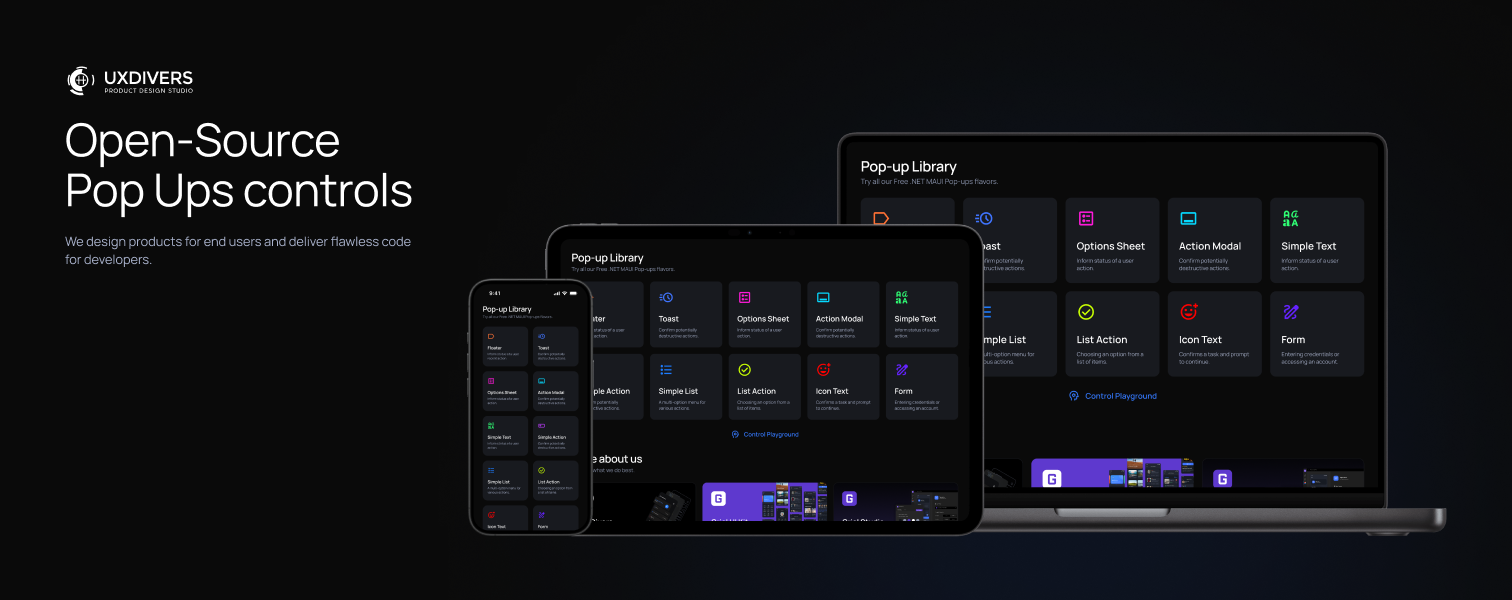
| Popup | Description |
|---|---|
Toast |
Brief notification with icon and title |
SimpleTextPopup |
Informational popup with title and text |
SimpleActionPopup |
Confirmation dialog with two buttons |
IconTextPopup |
Prominent icon with title, text, and action |
FloaterPopup |
Floating alert with icon and message |
ActionModalPopup |
Modal with close button and action area |
ListActionPopup |
Scrollable list with action button |
OptionSheetPopup |
Bottom sheet with selectable options |
FormPopup |
User input form returning results |
Create your own popup by extending PopupPage:
<?xml version="1.0" encoding="utf-8" ?>
<uxd:PopupPage
 xmlns="http://schemas.microsoft.com/dotnet/2021/maui"
 xmlns:x="http://schemas.microsoft.com/winfx/2009/xaml"
 xmlns:uxd="clr-namespace:UXDivers.Popups.Maui;assembly=UXDivers.Popups.Maui"
 x:Class="YourNamespace.MyCustomPopup"
 BackgroundColor="{DynamicResource PopupBackdropColor}"
 AppearingAnimation="{uxd:FadeInPopupAnimation Duration=300}"
 DisappearingAnimation="{uxd:FadeOutPopupAnimation Duration=300}"
 CloseWhenBackgroundIsClicked="True"
 >
 <Border
 VerticalOptions="Center"
 HorizontalOptions="Center"
 BackgroundColor="{DynamicResource PopupBorderColor}"
 Stroke="{DynamicResource PopupBorderColor}"
 StrokeThickness="1">
 <Border.StrokeShape>
 <RoundRectangle CornerRadius="16" />
 </Border.StrokeShape>

 <VerticalStackLayout Padding="24" Spacing="16">
 <Label
 Text="Welcome!"
 FontSize="24"
 HorizontalOptions="Center"
 TextColor="{DynamicResource TextColor}"
 />

 <Label
 Text="This is your custom popup!"
 HorizontalOptions="Center"
 TextColor="{DynamicResource TextColor}" />
 </VerticalStackLayout>
 </Border>
</uxd:PopupPage>
using UXDivers.Popups.Maui;

namespace YourApp.Popups;

public partial class MyCustomPopup : PopupPage
{
 public MyCustomPopup()
 {
 InitializeComponent();
 }

 private async void OnCloseClicked(object sender, EventArgs e)
 {
 await IPopupService.Current.PopAsync(this);
 }
}
For detailed documentation on advanced features, explore these resources:
| Topic | Description |
|---|---|
| Core popup classes, lifecycle, and customization | |
| Create your own popups with custom styling | |
| All 9 pre-built popup controls explained | |
| How to show, close, and pass data to popups | |
| Register popups and ViewModels with DI | |
| ViewModel integration and patterns | |
| Animation system and customization | |
| Complete reference for all public types and methods |
| Control | Docs Link |
|---|---|
| Toast | |
| FloaterPopup | |
| SimpleTextPopup | |
| SimpleActionPopup | |
| IconTextPopup | |
| ActionModalPopup | |
| ListActionPopup | |
| OptionSheetPopup | |
| FormPopup |
This project is licensed under the Apache License 2.0 - see the file for details.
Made with ❤️ by UXDivers
| Product | Versions Compatible and additional computed target framework versions. |
|---|---|
| .NET | net9.0 net9.0 is compatible. net9.0-android net9.0-android was computed. net9.0-android35.0 net9.0-android35.0 is compatible. net9.0-browser net9.0-browser was computed. net9.0-ios net9.0-ios was computed. net9.0-ios18.0 net9.0-ios18.0 is compatible. net9.0-maccatalyst net9.0-maccatalyst was computed. net9.0-maccatalyst18.0 net9.0-maccatalyst18.0 is compatible. net9.0-macos net9.0-macos was computed. net9.0-tvos net9.0-tvos was computed. net9.0-windows net9.0-windows was computed. net9.0-windows10.0.19041 net9.0-windows10.0.19041 is compatible. net10.0 net10.0 is compatible. net10.0-android net10.0-android was computed. net10.0-android36.0 net10.0-android36.0 is compatible. net10.0-browser net10.0-browser was computed. net10.0-ios net10.0-ios was computed. net10.0-ios26.0 net10.0-ios26.0 is compatible. net10.0-maccatalyst net10.0-maccatalyst was computed. net10.0-maccatalyst26.0 net10.0-maccatalyst26.0 is compatible. net10.0-macos net10.0-macos was computed. net10.0-tvos net10.0-tvos was computed. net10.0-windows net10.0-windows was computed. net10.0-windows10.0.19041 net10.0-windows10.0.19041 is compatible. |
Showing the top 1 NuGet packages that depend on UXDivers.Popups.Maui:
| Package | Downloads |
|---|---|
|
Shiny.Maui.Shell.UxDiversDialogs
Shiny MAUI Shell - Make .NET MAUI shell a pleasant experience |
This package is not used by any popular GitHub repositories.