|
VOOZH | about |
|
VOOZH | about |
dotnet add package Umbraco.Community.SecretManager --version 1.0.0-beta6
NuGet\Install-Package Umbraco.Community.SecretManager -Version 1.0.0-beta6
<PackageReference Include="Umbraco.Community.SecretManager" Version="1.0.0-beta6" />
<PackageVersion Include="Umbraco.Community.SecretManager" Version="1.0.0-beta6" />Directory.Packages.props
<PackageReference Include="Umbraco.Community.SecretManager" />Project file
paket add Umbraco.Community.SecretManager --version 1.0.0-beta6
#r "nuget: Umbraco.Community.SecretManager, 1.0.0-beta6"
#:package Umbraco.Community.SecretManager@1.0.0-beta6
#addin nuget:?package=Umbraco.Community.SecretManager&version=1.0.0-beta6&prereleaseInstall as a Cake Addin
#tool nuget:?package=Umbraco.Community.SecretManager&version=1.0.0-beta6&prereleaseInstall as a Cake Tool
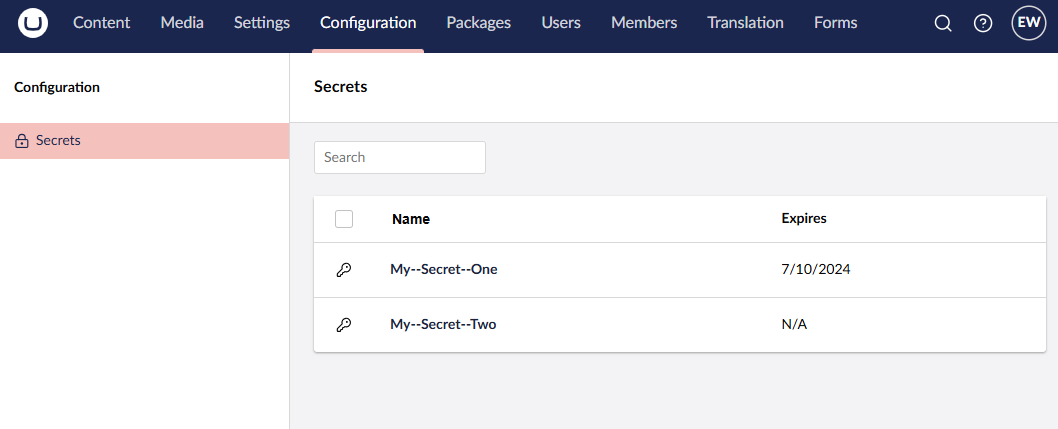
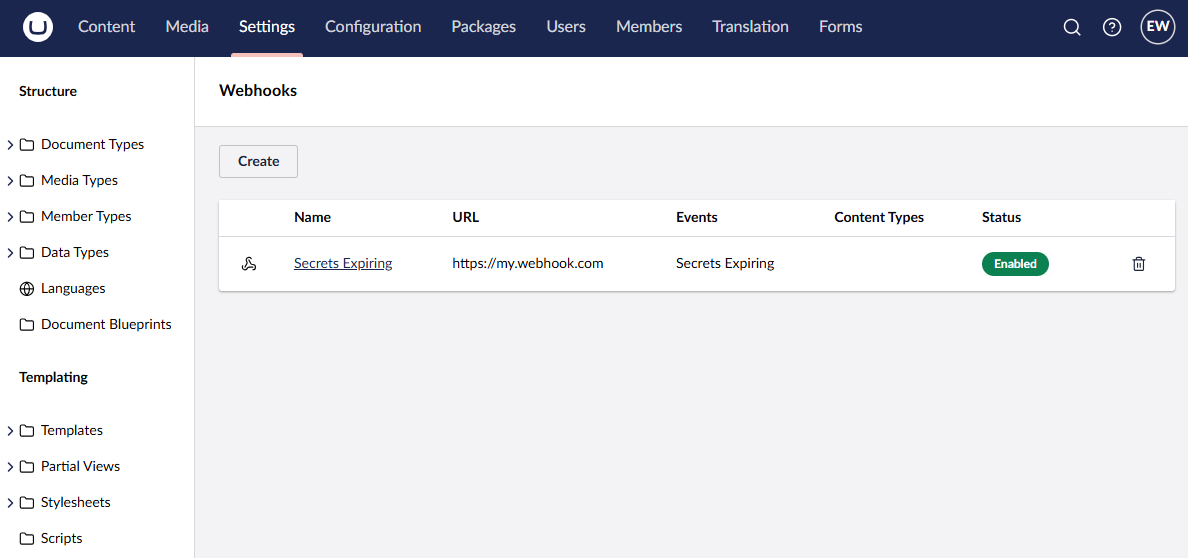
A lightweight and flexible Azure Key Vault Secret Manager for Umbraco CMS. Receive notifications when secrets are about to expire, send alerts via webhooks, and display an overview of all secrets directly in the Umbraco backoffice.
Set up your Azure Key Vault endpoint in appsettings.json:
{
 "KeyVault": {
 "Endpoint": "https://your-keyvault-name.vault.azure.net/"
 }
}
In your Program.cs, configure the SecretClient to connect to Azure Key Vault:
using Azure.Identity;
using Azure.Security.KeyVault.Secrets;

var keyVaultEndpoint = builder.Configuration["KeyVault:Endpoint"];
var credential = builder.Environment.IsDevelopment()
 ? new AzureCliCredential()
 : new DefaultAzureCredential();

var secretClient = new SecretClient(new Uri(keyVaultEndpoint), credential);
Add the SecretManager services to your Umbraco builder:
builder.CreateUmbracoBuilder()
 .AddBackOffice()
 .AddWebsite()
 .AddComposers()
 .ConfigureSecretManager(secretClient)
 .Build();
To display an overview of all secrets in the Umbraco backoffice, install the UI package and register it:
dotnet add package Umbraco.Community.SecretManager.UIBuilder
Then add the following to your configuration:
builder.CreateUmbracoBuilder()
 .AddBackOffice()
 .AddWebsite()
 .AddComposers()
 .ConfigureSecretManager(secretClient)
 .ConfigureSecretManagerUI()
 .Build();
The dashboard shows secret details including Name, Expiration Date, Created On, Recovery Level, and Tags.
Configure the recurring expiry check job in appsettings.json:
{
 "SecretManager": {
 "Recurring": {
 "Period": "1.00:00:00",
 "FirstRun": "0 8 * * *",
 "WarnBefore": "7.00:00:00"
 },
 "UIBuilder": {
 "DateTimeFormat": "MMMM d, yyyy",
 "Culture": "en-US"
 }
 }
}
| Option | Description | Default |
|---|---|---|
Period |
How often to check for expiring secrets | 1 day |
FirstRun |
Cron expression for scheduling the first job run (e.g., 0 8 * * * runs daily at 8 AM) |
Default delay |
WarnBefore |
Time before expiration to trigger alerts | 7 days |
Configure webhooks in the Umbraco backoffice to receive notifications when secrets are about to expire.
Create custom payload formats for different webhook endpoints (e.g., Microsoft Teams via Power Automate):
using Umbraco.Cms.Core.Models;
using Umbraco.Community.SecretManager.Notifications;
using Umbraco.Community.SecretManager.Webhooks;

public class TeamsSecretsExpiringProvider : WebhookPayloadProviderBase<KeyVaultSecretsExpiringNotification>
{
 protected override bool CanHandle(Uri endpoint, string eventAlias,
 KeyVaultSecretsExpiringNotification notification, IWebhook webhook)
 {
 // Matches Power Automate webhook endpoints for Teams integration
 return endpoint.Host.EndsWith("environment.api.powerplatform.com");
 }

 protected override object BuildPayload(KeyVaultSecretsExpiringNotification notification,
 Uri endpoint, string eventAlias, IWebhook webhook)
 {
 return new
 {
 type = "message",
 attachments = new[] {
 new {
 contentType = "application/vnd.microsoft.card.adaptive",
 content = new {
 type = "AdaptiveCard",
 version = "1.4",
 body = notification.Secrets.Select(s => new {
 type = "TextBlock",
 text = $"{s.Name} expires: {s.ExpiresOn?.UtcDateTime:yyyy-MM-dd}"
 }).ToArray()
 }
 }
 }
 };
 }
}
Register the custom provider:
builder.WithCollectionBuilder<WebhookPayloadProviderCollectionBuilder>()
 .Add<TeamsSecretsExpiringProvider>();
| Product | Versions Compatible and additional computed target framework versions. |
|---|---|
| .NET | net10.0 net10.0 is compatible. net10.0-android net10.0-android was computed. net10.0-browser net10.0-browser was computed. net10.0-ios net10.0-ios was computed. net10.0-maccatalyst net10.0-maccatalyst was computed. net10.0-macos net10.0-macos was computed. net10.0-tvos net10.0-tvos was computed. net10.0-windows net10.0-windows was computed. |
This package is not used by any NuGet packages.
This package is not used by any popular GitHub repositories.
| Version | Downloads | Last Updated |
|---|---|---|
| 1.0.0-beta6 | 185 | 2/4/2026 |
| 1.0.0-beta5 | 251 | 10/21/2025 |
| 1.0.0-beta4 | 163 | 10/20/2025 |
| 1.0.0-beta3 | 168 | 10/16/2025 |
| 1.0.0-beta2 | 188 | 10/15/2025 |
| 1.0.0-beta1 | 116 | 10/11/2025 |