
Opera One
Experience evolved tabs, faster AI, and modular design updates. Download the Opera One browser with the latest R3 updates.
See more
Evolved Tabs
Evolved Tabs
Evolved Tabs
Evolved Tabs
By organizing tabs into separate groups, Tab Islands has become integral to the daily browsing of millions. This R3 update implements highly-requested customization options for even more intuitive tab grouping and seamless browsing.
Name your tab islands
Give each tab island its own name for thematic tab grouping and a cleaner workflow.
Choose handle colors
Easily assign colors to your tab island handles to identify your tab groups at a glance.
Advancing AI
Advancing AI
Advancing AI
Advancing AI
Opera One has upgraded its AI with a faster engine and better models. These advancements deliver higher-quality answers in less time, with a refined and easy-to-use UI, completely free.
Opera AI in right-side panel
Interact with Opera AI on the right while using sidebar apps on the left, and discover integrated AI options when highlighting content.
Faster responses, better models
Opera One’s agentic-based 2.0 engine processes your questions and commands in multiple iterations for improved, and speedy, responses.
AI page context
Opera AI understands the context of your browsing, including entire tab islands. This optional context-awareness delivers more precise answers.
Modular design features
Modular design
Modular design features
Modular design features
Opera’s handy sidebar keeps your favorite apps and Google services one click away. Plus, the much-loved Split Screen feature has had a versatility overhaul with exciting new options.
Opera’s dynamic Sidebar
Conveniently access your apps in one click in a sidebar that can autohide. Swap between workspaces, pop out your Music Player, and stay connected through your favorite messengers and social media apps.
Sidebar Google Services
Google Calendar and Gmail are now available in your sidebar, letting you work, play and browse without juggling apps. Just click the three-dots at the bottom of your sidebar to add them.
Read more
Split your screen horizontally or vertically, with up to four pages. Joined pages are now streamlined with one address bar and one tab for reduced clutter.
Read more
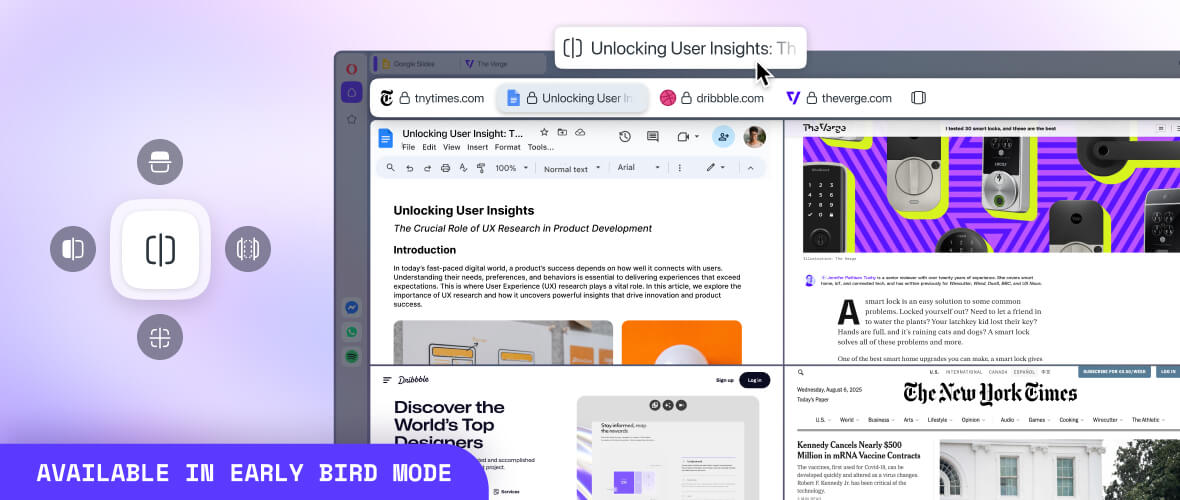
👁 More Split Screen options
Immersive themes
Themes
Immersive themes
Immersive themes
Opera Themes let you completely change the look, sound, and feel of your browser and boost your mood. Preview themes below.
Select a theme to preview:


Opera One
Experience evolved tabs, faster AI, and modular design with the latest updates in the new version of Opera One.