VOOZH about

URL: https://www.roboform.com/

⇱ RoboForm Password Manager | Best Password Manager for 2026


Next generation
password manager

Leading the way in password management technology, security, and innovation

Try Business
No credit card required
Try Premium

Simplify your online experience

Stay secure and save time with our seamless password manager and form filling solution

NEW FEATURE

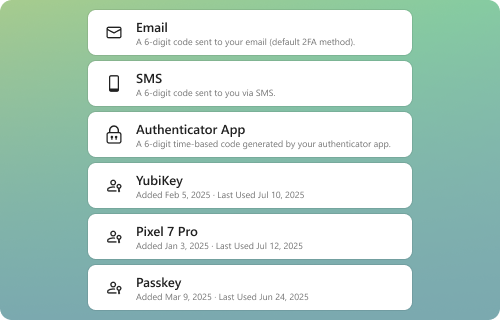
Advanced Two-Factor Authentication (2FA)

Secure your RoboForm account with multiple 2FA options including passkeys, trusted devices, and hardware security keys β€” in addition to traditional email, SMS, and authenticator apps.

NEW FEATURE

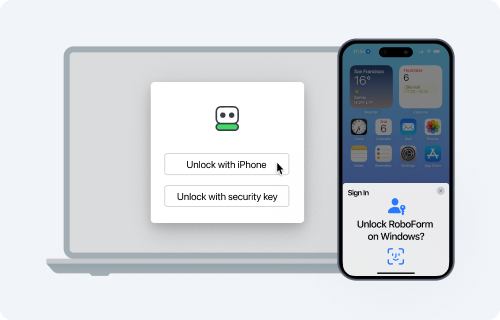
Passwordless Unlock

Unlock RoboForm using a passkey securely stored on your local or remote device β€” verified by your face, fingerprint, or device PIN for quick and secure access.

SECURITY

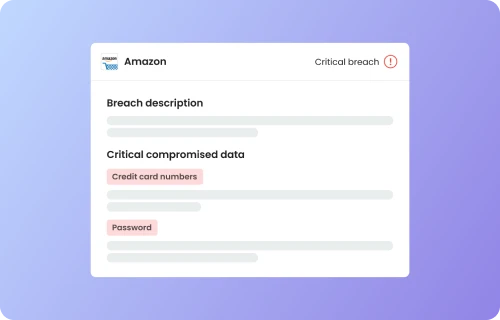
Data Breach Monitoring

RoboForm’s Data Breach Monitoring scans up to five email addresses for breaches and alerts you if your data is exposed. If a breach is found, RoboForm suggests ways to secure your accounts.

An option for everyone

Unlock unparalleled value with every license option

  • Free
    Unlimited passwords on a single device
    $0
    • Best-in-class 1 click login
    • Password generator
    • Secure cloud backup
    • Best-in-class form filling
    • Compromised password scan
    • Built-in TOTP authenticator
    • Passwordless Unlock
    • Advanced 2FA
  • Premium
    SAVE 25%
    Premium features, unlimited devices
    $2.49
    $1.87 /mo Billed annually
    New users: $22.40 for the first year
    Then renews at $29.88/yr
    Buy Premium
    30-day money-back guarantee
    • Everything in Free
    • Access on all devices
    • Web access
    • Secure Shared Folders
    • Emergency Access
    • Data Breach Monitoring
    • Local only mode
    • Priority 24/7 Support
  • Family
    SAVE 25%
    5 Premium accounts for you and your family
    $3.98
    $2.98 /mo Billed annually
    New users: $35.80 for the first year
    Then renews at $47.75/yr
    Buy Family
    30-day money-back guarantee
    • 5 Premium accounts
    • Unified billing
    • Access on all devices
    • Web access
    • Secure Shared Folders
    • Emergency Access
    • Data Breach Monitoring
    • Local only mode
    • Priority 24/7 Support
  • Business
    One paid plan, all featuresβ€”no sneaky upgrades
    • Separate personal and work vaults for each employee
    • Centralized management via admin center
    • Secure password sharing
    • Single sign-on (SSO) integration
    • SCIM provisioning
    • Custom security policies
    • Role-based access control
    • Dedicated account manager
    • Granular sharing controls
    • Dark web monitoring and alerts
    • Detailed activity logs
    • Comprehensive reports and audit
    • Priority 24/7 support
    • Help center with onboarding and troubleshooting tutorials

Real user ratings and reviews

Take a look at what our customers have to say

πŸ‘ RoboForm Apple AppStore
Apple AppStore
πŸ‘ Stars
4.7 Rating
43.2K Reviews
πŸ‘ RoboForm Google Play
Google Play
πŸ‘ Stars
4.6 Rating
32.7K Reviews
πŸ‘ RoboForm Chrome Store
Chrome Store
πŸ‘ Stars
4.5 Rating
3.6K Reviews
πŸ‘ RoboForm Edge Store
Edge Store
πŸ‘ Stars
4.6 Rating
657 Reviews

Frequently asked questions

What is a password manager?
A password manager is an application that securely stores and manages the passwords for your online accounts. It creates a secure vault where passwords are encrypted and accessible only to you. The tool typically includes a password generator for creating strong, unique passwords, and offers features like auto-filling login credentials on websites and applications. Advanced versions include additional security measures like two-factor authentication, dark web monitoring, and the ability to securely share passwords with trusted contacts. A password manager ensures that you maintain strong, varied passwords for all your accounts while needing to remember only one master password.
Is RoboForm secure?
Absolutely. Only you can access your data. Your passwords are encrypted with your own secret keyβ€”the RoboForm Master Password which you create. We use AES256 bit encryption with PBKDF2 SHA256. Our system architecture is zero-knowledge. This means that all encryption/decryption happens on your local device and ensures that your Master Password is never transmitted to our server.

Find out more about RoboForm security.
Why is it better to use a password manager and not my browser (Chrome, Keychain, etc)?
RoboForm differentiates itself from standard browser-based password managers by offering comprehensive features. It is compatible across various devices and browsers, including incognito/private modes. Users can enjoy one-click logins to multiple accounts and robust password monitoring for weak, duplicate, or compromised passwords. RoboForm facilitates secure password sharing with friends and family, and provides Emergency Access for trusted contacts. Additionally, RoboForm includes a built-in TOTP authenticator app, can log into Windows applications, and is capable of saving and filling any online form, enhancing both security and convenience.
Can RoboForm see my passwords?
No. RoboForm is designed on a zero-knowledge infrastructure where the Master Password, known only to you, encrypts the data. This encryption process occurs exclusively on your device, not on RoboForm's servers. As a result, RoboForm does not have access to the Master Password or the ability to access your encrypted data, ensuring a high level of privacy and security.
Is RoboForm easy to set up and use?
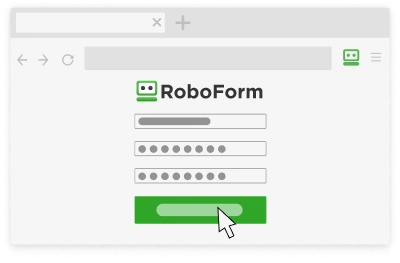
Absolutely. RoboForm demonstrates that convenience and security can go hand-in-hand. By automating the password management and login processes, it not only simplifies the user experience but also enhances security. Unlike traditional, less secure methods, RoboForm ensures that each login is both swift and protected by strong, unique passwords. In addition, setting up RoboForm takes just minutes.
Can I import my existing passwords into RoboForm?
You certainly can! We offer the ability to import from every browser and major password manager, or from a CSV.
Our website uses cookies to ensure you get the best experience on our website. Review our Privacy Policy.
Got it
Next Stop: Firefox Add-ons Store
Step 1:

Add RoboForm Extension

πŸ‘ Showing how to add RoboForm Password Manager extension into browser
Step 2:

Sign up or Log in

πŸ‘ Showing how to log in or sign up for RoboForm password manager
Step 3:

Enjoy RoboForm!

πŸ‘ Showing RoboForm password manager extension working
Pin or enable your RoboForm extension.
Pin the extension
πŸ‘ Showing RoboForm password manager extension working
or
Enable
πŸ‘ Enable RoboForm Password manager Chrome Extension