
A converter designed by video editors.
The professional compression tool accessible to all.

More than 3,215,667 downloads!
Screenshots

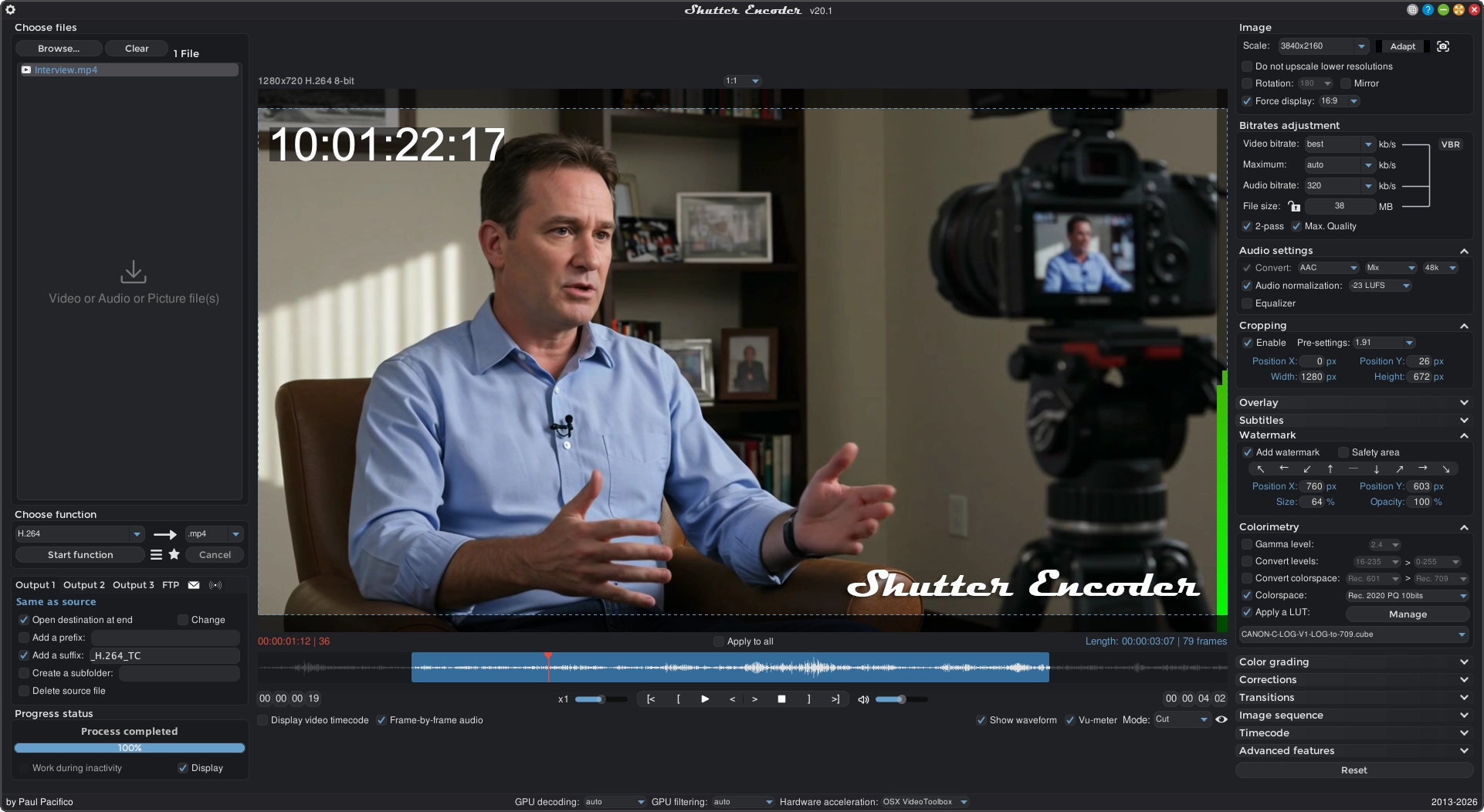
A Simple and Complete Interface
Shutter Encoder is one of the best video converter software, it handles images and audio too!
It has been designed by video editors in order to be as accessible and efficient as possible.
Shutter Encoder makes use of FFmpeg to handle its encoding, allowing support for almost every codec you’ve ever heard of, and many more you haven’t.
Don’t just take our word for it though, Avid themselves recommend Shutter Encoder as part of your Media Composer and ProTools ingesting workflow!

Total Control over Encoding
Shutter Encoder has a panel containing a large number of settings.
This includes access to powerful FFmpeg capabilities like duplicate frame detection, framerate interpolation, analytical tools, and deinterlacing with a number of filters available.
You don’t need to be an expert in encoding to use Shutter Encoder, but if you are, you’re going to appreciate the power it gives you!

Trim and Cut your Videos
You have the ability to choose exactly which part of your video gets included in the output file through an intuitive trimming interface.
You’ll be able to see exactly where those cuts will take place with the built-in video player.
With some codecs, you’ll able to do this losslessy and extremely quickly thanks to the innovative “Cut without re-encoding” feature.

Fine-Tune your Image
Shutter encoder includes a powerful image adjustement tab, allowing you to adjust colours, apply LUTs, and convert color spaces right in the application.
This feature even supports raw image formats like .nef, .cr2 but also .psd, .pdf, .png, .jpg and more!

Powerful Cropping Support
By using the “Image cropping” section you will have the possibility to quickly and easily crop your images as well as your videos.
You can define your frame precisely by writing directly your values in pixels or simply select a preset.

Generate and Burn-in Clip Information
Shutter Encoder allows you to burn clip names, text, and timecode into your video, perfect for rough cuts and drafts!
No timecode? No problem, Shutter can generate one for you!
You can even specify a timecode offset so it doesn’t have to start from 0!

Subtitle Embedding and Burn-In
Shutter encoder can be used to embed closed captions and burn-in open captions in only a few clicks.
Whether you’ve created them in the built-in editor, or imported your own .srt, .vtt, or .ass subtitles created elsewhere, there’s a way to get it done with Shutter Encoder!

Add your Logos and Watermarks
Shutter Encoder allows you to add any image or video you want as an overlay on your footage, you can even adjust the opacity, size, and position directly in the application!

Built-In Subtitle Editor
Unique to free video converter software, Shutter Encoder includes a powerful built-in subtitle editor.
Subtitle editors will appreciate the waveform display and innovative shortcuts to make the process as quick and easy as possible!

Automatic Cut Detection
Shutter Encoder has a powerful cut-detection tool that you can use to split an existing video based on where cuts occur.
You can even create an .edl file to import on most major non-linear editing package to produce an editable sequence.
A great way to get a head-start on touching up old videos or working on old projects where you don’t have the files anymore!

Download Web Content
Shutter Encoder also has the ability to download video directly at the highest possible quality from popular video streaming sites.
Just paste the URL, and within minutes you’ll have a copy of the file!

A Render Queue to Stop Waiting
There will come a time when we want to release different formats with different files.
This queue accessible from this icon👁 queue render icon
next to the “Start function” button will make your happiness.


Save and Share your Settings
Have you set up the encoding settings just how you like them?
Shutter Encoder lets you save your settings to a preset file just by hitting cmd+s/ctrl+s.
You can even share those preset files with other users!

Built-in FTP Server Support
You can configure it to upload your converted files directly to FTP server automatically on completion.
You can even have it e-mail you a summary of the conversion. It will be sent to the different servers automatically.
So if you’ve left it running at the studio overnight, you’ll have that extra piece-of-mind it’s finished its tasks when you get home!

Complete File Information
Shutter Encoder will tell you everything you need to know about your files.
Simply right/option click the files in your queue and you can see a full summary of their specifications so you can make informed decisions on how best to configure Shutter Encoder to handle your footage!

Powerful File Renaming
Shutter Encoder gives you the ability to customise your output filenames.
You can add prefixes and suffixes, automatically incrementing index numbers, and replace existing text with whatever you want!
Supported Hardware




List of Functions
– AI tools:
Audio separation, Audio transcription, Translate text, Colorize, Blur faces, Background remover
– Without conversion:
Cut without re-encoding, Replace audio, Rewrap, Conform, Merge, Extract, Subtitling, Video inserts
– Sound conversions:
WAV, AIFF, FLAC, ALAC, MP3, AAC, AC3, OPUS, Vorbis, Dolby Digital Plus, Dolby TrueHD
– Editing codecs:
DNxHD, DNxHR, Apple ProRes, QT Animation, GoPro CineForm, Uncompressed
– Output codecs:
H.264, H.265, H.266, VP8, VP9, AV1
– Broadcast codecs:
XDCAM HD422, XDCAM HD 35, AVC-Intra 100, XAVC, XAVC Long GOP, HAP
– Old codecs:
Theora, MPEG-2, MJPEG, Xvid, DV, WMV, MPEG-1
– Archiving codec:
FFV1
– Images creation:
JPEG, JPEG XL, Image
– Burn & Rip:
DVD, Blu-ray, DVD RIP
– Analysis:
Loudness & True Peak, Audio normalization, Cut detection, Black detection, Media offline detection, VMAF, FrameMD5
– Download:
Web video
Downloads
Current version: 20.2
157.65 MB - 1,883,509 downloads
185.07 MB - 524,195 downloads
170.93 MB - 324,870 downloads
167.78 MB - 330,213 downloads
173.27 MB - 85,895 downloads
186.40 MB - 66,985 downloads
Presets parameters:
(drop file to My functions from this icon👁 icon presets
)





Optimize film editing and post-production workflows
EditingTools.io is a collection of web-based generators, scripts and converters designed for various post-production purposes. Optimized for workflows with Adobe Premiere Pro, Avid Media Composer, DaVinci Resolve and Apple Final Cut Pro X.
Thanks
I would like to thank the donors who, through their gesture, encourage me to improve Shutter Encoder every day.
Translators:
| Roberto Boriotti | 🇮🇹 |
| Kandi Valle | 🇪🇸 |
| Jacob Werkman | 🇳🇱 |
| Léo Saramago | 🇧🇷 |
| Aygün Yerdeniz | 🇹🇷 |
| 大眼仔~旭 | 🇨🇳 |
| Martin Srebotnjak | 🇸🇮 |
| Александр Ласка | 🇷🇺 🇺🇦 |
| Đặng Thành Đạt | 🇻🇳 |
| RobertLajka.pl | 🇵🇱 |
| Åke Engelbrektson | 🇸🇪 |
| Martin Chvátal | 🇨🇿 |
| jefemex01 | 🇻🇦 |
| 배상영(Thomas B) | 🇰🇷 |
| greatsoftwarecompany | 🇷🇴 🇮🇩 |
| Klaus Juhantalo | 🇫🇮 |




Contact
If you have any questions, post them on reddit: 👁 reddit icon

Donate to Paul Pacifico: 👁 donate
👁 patreon icon
👁 Image
👁 Image




Bitcoin : 👁 bitcoin icon
bc1qyd3yvlmww4yhsw9k8pyzyms8wttd55m2704f7k

Ethereum : 👁 ethereum icon
0xd7f445a7e669106E9C2E279AD524154d5f4B9676


