
How to Build AI-Citable Documentation for ChatGPT, Perplexity, and Claude

Share this article
- Premium Results
- Publish articles on SitePoint
- Daily curated jobs
- Learning Paths
- Discounts to dev tools
7 Day Free Trial. Cancel Anytime.
When a developer asks Perplexity something like, "How do I upload a file with a progress bar using the Stripe API?", it doesn't just show a list of links. It actually reads documentation pages, pulls useful lines, code examples, and API details, then builds an answer from them. If your docs aren't easy for AI tools to understand, it doesn't matter how good your product is. It simply won't be cited.
This is becoming more common very quickly. Developers are now discovering tools through LLM-powered interfaces like ChatGPT, Perplexity, Claude, and GitHub Copilot, along with AI features built directly into code editors and IDEs.
These systems don't browse websites the same way people do. They scan text, understand structure, and combine information into direct answers. The docs that get referenced most are usually the ones written in a clear, structured, machine-friendly way while still being helpful for humans.
This article explains the technical and content decisions that can help your documentation get cited by AI tools instead of being skipped.
Key Takeaways
- Start with the main answer first. AI tools often read only the first part of a section. If the useful information appears too late, your docs may never get referenced.
- Make every paragraph and code example understandable on its own. AI systems split content into smaller chunks, so each section should still make sense even without the surrounding context.
- Use semantic HTML and structured data. Clear headings, structured data like
TechArticleschema, and updateddateModifiedfields help AI models understand and trust your content more easily. - Add an
llms.txtfile to your domain root. This is a simple Markdown file placed at your website's root that helps AI tools quickly find your most important documentation pages. - Check how AI tools use your docs. Ask ChatGPT, Perplexity, and Claude the questions your documentation should answer. Then see which pages get cited, whether the answers are accurate, and which sections are being used.
To understand why these practices matter, it helps to first understand how AI systems actually read and retrieve documentation.
What "AI Citability" Actually Means
AI citability is not just another version of SEO.
Traditional SEO is mainly about ranking signals like backlinks, keyword usage, and title tags. AI citability focuses on something else entirely: understanding. Can an AI model read your content and easily pull out a clear, complete answer? And can it confidently connect that answer back to your page so it feels safe citing it?
LLMs process documentation in a few different ways:
- Retrieval-Augmented Generation (RAG): The AI searches for relevant text sections, pulls them into context, and uses them to generate an answer.
- Crawl-based indexing: Tools like Perplexity scan and index websites so they can search through them later.
- Direct browsing or tool usage: Some AI agents can open URLs and read pages in real time when needed.
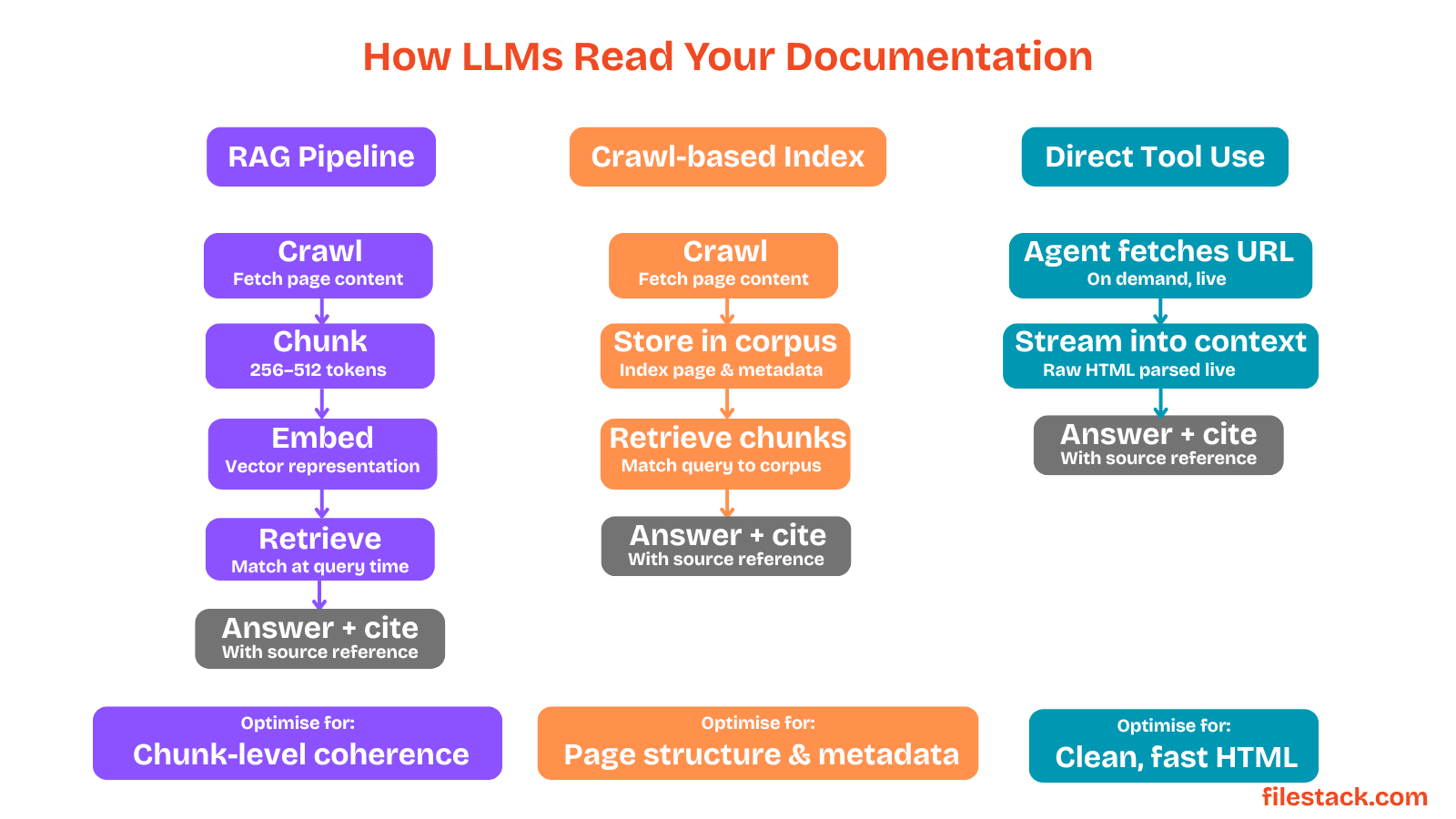
In every case, your documentation gets broken into smaller chunks before the AI uses it. That means the content that performs best is content that's clear, well-structured, and understandable even at the paragraph level.
Once you understand how LLMs process documentation, the importance of clean structure becomes much clearer.
Semantic HTML: The Foundation
Most documentation websites already use HTML, but the way that HTML is written matters a lot for AI systems.
Semantic HTML means using elements based on their actual purpose, like <article>, <section>, <nav>, and proper heading tags instead of using generic <div> elements everywhere.
This makes documentation much easier for LLMs to understand and organise. Clear structure helps AI models identify titles, sections, code examples, navigation, and important content more accurately.
Use the Right Elements
An <h2> tag clearly tells both browsers and AI systems, "This is a section heading." But something like <div class="heading"> doesn't carry the same meaning.
LLMs have learned from huge amounts of web content that headings are strong clues about what a section is discussing. Because of that, they often pay extra attention to heading text when understanding a page.
Using semantic elements like <article>, <section>, <nav>, and <main> also helps AI models understand the layout and structure of your documentation. It gives them a clearer map of the page, making it easier to find and interpret important information.
<!-- Prefer this -->
<article>
 <h1>Uploading Files with the API</h1>
 <section>
 <h2>Request Format</h2>
 <p>The upload endpoint accepts multipart/form-data requests...</p>
 </section>
</article>
<!-- Over this -->
<div class="content-wrapper">
 <div class="title">Uploading Files with the API</div>
 <div class="section">
 <div class="subheading">Request Format</div>
 <p>The upload endpoint accepts multipart/form-data requests...</p>
 </div>
</div>
A human visitor might not notice any difference between semantic HTML and generic HTML because the page can look exactly the same visually. But for an LLM reading the raw HTML behind the page, the difference is huge.
Keep Paragraphs Self-contained
LLMs usually read content in small chunks, often around 256–512 tokens at a time. Because of that, they may not see the paragraphs before or after the one they extract.
So if a paragraph starts with something like "As mentioned above…" and depends on earlier context, the AI may not understand it at all once that paragraph is separated from the rest of the page.
That's why each paragraph should make sense on its own. For example, if you're explaining an error code, mention the actual error code directly in that paragraph instead of expecting the reader or AI model to look earlier on the page for context.
Title and Meta Tags Still Matter
The <title> tag and <meta name="description"> are important because AI systems and search crawlers often read them first to understand what a page is about.
A vague title like "File Upload — Docs" doesn't give much useful information. But a more descriptive title like "Resumable File Uploads: Chunked Upload API Reference" clearly explains the topic and context of the page.
The more specific and meaningful your metadata is, the easier it is for LLMs to understand, categorise, and confidently reference your content.
Good HTML structure helps AI systems navigate your content, but structured metadata adds another layer of understanding.
Structured Data Beyond the Basics
Most developers know that schema.org markup can add structured metadata to a webpage. But many don't realise how useful that metadata has become for AI systems.
AI-powered tools use structured data to better understand what a page contains, who created it, when it was updated, and what type of content it is. This helps models interpret pages more accurately and trust the information they extract from them.
TechArticle and APIReference Schemas
For documentation websites, the most useful schema types are TechArticle and the less commonly used APIReference.
Not every AI system fully supports them yet, but tools like Perplexity already use schema markup to better understand what kind of page they're reading. This helps improve citation accuracy and reduces confusion between blog posts, API docs, tutorials, and other content types.
{
 "@context": "https://schema.org",
 "@type": "TechArticle",
 "headline": "Resumable File Uploads: Chunked Upload API Reference",
 "description": "How to upload large files in chunks using the Files API, including retry logic and progress tracking.",
 "author": {
 "@type": "Organisation",
 "name": "YourCompany"
 },
 "dateModified": "2025-04-01"
}
One especially important field is dateModified.
LLMs and AI search systems often prefer newer and recently updated sources. Tools like Perplexity even highlight freshness signals directly in their interface. That means keeping the dateModified field accurate is more than just good metadata practice; it helps AI models trust that your content is current and reliable enough to cite.
HowTo Schema for Procedural Content
If a section of your documentation walks through steps like "how to authenticate," "how to handle errors," "how to retry a failed upload", the HowTo schema can make that information much easier for AI systems to understand.
Instead of forcing the model to extract steps from long paragraphs, HowTo gives it a clear, structured list of actions. This improves the chances that your instructions will be accurately understood and cited.
{
 "@type": "HowTo",
 "name": "Upload a file in chunks",
 "step": [
 {
 "@type": "HowToStep",
 "name": "Initialise the upload",
 "text": "POST to /v1/uploads/create with the file metadata to receive an upload_id."
 },
 {
 "@type": "HowToStep",
 "name": "Upload each chunk",
 "text": "PUT each chunk to /v1/uploads/{upload_id}/parts with a Content-Range header."
 }
 ]
}
Structured step-by-step data like this is easier for LLMs to parse, summarise, and reference than instructions hidden inside large blocks of text.
Structure and metadata matter, but for developer documentation, code examples are often the most valuable content of all.
Code Blocks with Context
Code examples are often the most valuable part of developer documentation for AI systems. When someone asks a question like "How do I send an authenticated request using the Resend API?", the model is more likely to use a clear code sample than long text explanations.
The issue is that many code snippets lose their meaning when AI systems split documentation into smaller chunks. For example:
response = client.emails.send({"to": "user@example.com", "subject": "Hello"})This snippet doesn't explain what client is, where it comes from, or what the code is trying to do.
Adding comments and setup information makes the snippet much more understandable:
# Send a transactional email using the Resend Python SDK
# Requires: pip install resend; set RESEND_API_KEY in your environment
import resend
resend.api_key = os.environ["RESEND_API_KEY"]
client = resend.Emails
response = client.send({
 "from": "onboarding@yourdomain.com",
 "to": "user@example.com",
 "subject": "Welcome",
 "html": "<p>Thanks for signing up.</p>"
})
Now this block is self-contained. An AI model can read just this block, understand what it does, and confidently use it when answering a developer's question.
Language Labels and Filename Hints
Most documentation platforms support fenced code blocks with language labels like Python, bash, curl, or JavaScript. You should always use them.
These labels help AI systems understand what kind of code they're reading, making it easier to match the snippet to developer questions.
If the code belongs to a specific file, adding the filename as a comment also gives extra context:
# app/tasks/email_sender.pyAvoid Magic Variables
A common mistake in documentation is using variables from earlier examples without redefining them in the current snippet.
Variables like `upload_id`, `session`, or `token` may make sense to a human reading the full page, but an AI model might only see that one isolated code block.
Instead, use descriptive placeholder values or define variables directly in the example so the snippet can stand on its own.
# Bad example:
# This code doesn't explain where upload_id or token came from.
response = upload_chunk(upload_id, chunk_data, token)
# Better example:
# This snippet is self-contained and easier for both developers and AI models to understand.
upload_id = "upl_123456789"
api_token = "your_api_token"
response = upload_chunk(
 upload_id=upload_id,
 chunk_data=chunk_data,
 token=api_token
)
Optimising individual code snippets is important, but discoverability at the site level matters too.
The llms.txt File
In late 2024, developers started adopting a new convention designed to help AI systems navigate documentation websites more efficiently: the llms.txt file.
This file is placed at the root of a domain, like https://yourdomain.com/llms.txt. Its purpose is simple: give LLMs a clean, curated list of your most important documentation pages instead of making them crawl your entire site blindly.
The format is usually written in simple Markdown with a short description of the product followed by categorised links.
For example:
# YourProduct Documentation
> YourProduct is a file upload API for web and mobile applications.
## Core Reference
- [Authentication](https://docs.yourproduct.com/auth): API keys, OAuth tokens, and token scopes.
- [File Uploads](https://docs.yourproduct.com/uploads): Single and multipart upload endpoints.
- [Webhooks](https://docs.yourproduct.com/webhooks): Event delivery, retry logic, and signature verification.
## Guides
- [Resumable Uploads](https://docs.yourproduct.com/guides/resumable): Handling large files and interrupted transfers.
- [Error Handling](https://docs.yourproduct.com/guides/errors): Status codes, retry strategies, and logging.
Companies like Anthropic and Clerk have already adopted this format in their developer documentation.
The goal is to help AI agents quickly discover the most useful pages without relying entirely on sitemap crawling or random page discovery.
There's also a related format called llms-full.txt. Instead of linking to pages, it contains the full documentation content in one large Markdown file. This can work well for smaller projects, but for larger documentation sites, it quickly becomes difficult to maintain. In most cases, a focused llms.txt file with curated links is the cleaner and more scalable approach.
Helping AI systems find your documentation is only part of the challenge. The content also needs to surface answers quickly once retrieved.
Answer-First Paragraph Structure
This is where documentation style has the biggest impact on AI citability, and it's also the change that many documentation teams struggle with the most.
Most developer docs follow a familiar pattern: they start by explaining the background: what a feature is, why it exists, and when you should use it. Only later do they show the actual API endpoint, parameter, or code example the developer came for.
The problem is that LLMs often don't read the entire section. In many RAG-based systems, pages are split into smaller chunks, and the model may only receive the first 200–300 words. If the real answer appears too late, it may never be retrieved.
The solution is simple: start with the answer first.
Before:
File uploads in YourProduct use a multipart process that was designed to support large files without memory pressure on the server. This approach is inspired by S3's multipart upload API and has been refined over several versions. To use it, you'll need to first authenticate...
After:
To upload a file, POST to /v1/uploads with your file as multipart/form-data. Include your API key in the Authorization header. The response returns a file_id you can attach to other API objects.
The second version works much better for AI systems because the answer is immediate and self-contained. A model can extract that paragraph and directly use it to answer a developer's question.
This doesn't mean removing explanations or simplifying your docs too much. Background information is still valuable, but it just works better after the direct answer instead of before it.
These principles are already being used successfully by some of the most widely cited developer documentation sites.
Comparing Well-Structured Documentation in the Wild
Some documentation websites are consistently cited well by LLMs, and looking at them reveals some clear patterns.
Stripe is one of the best examples. Their API documentation usually starts with a short explanation of what an endpoint does, followed immediately by the endpoint URL, parameters, and structured request details. Code examples are included in multiple languages and contain enough context to work on their own. Their docs are also highly modular; each endpoint has its own page instead of being buried inside one huge document. This makes it easier for AI systems to extract useful, self-contained chunks.
Clerk has also optimised its documentation structure well. They adopted llms.txt and use answer-first writing in many guides. For example, their "Sign in with Google" guide starts with the exact configuration steps developers need instead of a long explanation of OAuth history.
Resend keeps its API docs extremely focused: endpoint details, parameters, request examples, and responses. There's very little unnecessary text. That high signal-to-noise ratio makes the content easier for AI systems to extract and cite accurately.
Filestack follows a similar approach. Their SDK documentation clearly explains method signatures, parameters, and working code examples with enough context to stand alone. Their upload guides often begin with a complete runnable example instead of a long conceptual introduction, which works especially well for AI-generated answers to questions like "How do I implement file upload with progress tracking?"
The common pattern across all these documentation sites is consistency. Each page works as a self-contained resource, each section starts with the direct answer, and code examples include enough context to be understood independently.
Once you understand what strong AI-friendly documentation looks like, the next step is testing how your own content performs.
Testing Your Documentation's Citability
You can evaluate your documentation's AI citability without any specialised tools.
The Direct Query Test
Start with real questions developers would actually ask, such as: "How do I cancel an upload in progress using the YourProduct API?", then ask the same question in tools like ChatGPT, Perplexity, and Claude.
If your documentation is properly structured and easy for AI systems to understand, your pages should appear in the answers. If they don't appear or if the AI quotes your content incorrectly, that usually points to a problem with how the documentation is written or organised.
It's also important to notice which parts of your page get cited.
For example, if the question is about a specific API parameter but the AI only references your introductory paragraphs, that's a sign your documentation isn't optimised for chunk-level retrieval. The useful answer may be buried too deeply or lack enough standalone context.
The Extract Test
Another simple way to test AI citability is to check whether the answer appears early enough in your content.
Take the first 200 words of a documentation section and paste them into an LLM with a prompt like: "Based only on this text, answer: [question]"
If the model can't answer the question correctly, that usually means the important information appears too late in the section.
In that case, restructure the content so the direct answer appears earlier. Background explanations and extra details can still follow, but the key information should be visible immediately.
The Self-contained Paragraph Test
A useful way to review documentation is to treat every paragraph like it might be read completely on its own.
Read a paragraph aloud and ask yourself:
- Does this paragraph make sense without the rest of the page?
- Does it clearly answer a question or explain something useful?
- Or does it depend on earlier sections for context?
If a paragraph relies too heavily on surrounding content, an AI system may struggle to use it correctly once the page gets split into smaller chunks. The more self-contained each paragraph is, the easier it becomes for LLMs to understand, extract, and cite accurately.
Monitor Citation Patterns
Tools like Perplexity's API, BrightEdge's AI citation tracking, and even simple manual monitoring across AI chat interfaces can help you understand when and how your documentation is being referenced.
If AI systems are citing your docs but getting details wrong, that usually means the original content is unclear or ambiguous.
If your documentation isn't being cited at all for topics you should rank strongly for, the problem is often related to structure, discoverability, or indexing. The content may be buried too deep, lack a clear context, or be difficult for AI systems to parse and retrieve.
All of these small improvements add up to a documentation experience that works better for both humans and AI systems.
And as AI-assisted development becomes more common, that clarity will only become more important.
Putting It Together
AI-friendly documentation is not a separate type of documentation. It's simply the result of writing clearly and structuring information well, while understanding that one of your readers may now be an AI model helping a developer late at night.
The good news is that the improvements are practical and manageable:
- Use semantic HTML with a clear heading structure.
- Write self-contained paragraphs that start with the direct answer.
- Add schema markup and keep
dateModifiedaccurate. - Include comments and context in code examples.
- Create an
llms.txtfile at your domain root. - Test your docs by asking tools like ChatGPT and Perplexity real developer questions.
None of these practices hurt readability for humans. In fact, they usually make documentation better overall.
A page that an LLM can understand easily is also a page that a tired developer can quickly scan, understand, and use without frustration.
And ultimately, that's the real goal, no matter who's reading the documentation.
SitePoint Sponsors
Sponsored posts are provided by our content partners. Thank you for supporting the partners who make SitePoint possible.
- Premium Results
- Publish articles on SitePoint
- Daily curated jobs
- Learning Paths
- Discounts to dev tools
7 Day Free Trial. Cancel Anytime.