
- TL;DR:
- Get Your Environment Right First
- What You're Actually Building
- Step 1: Apply Governance Policies Before You Touch the Cleanroom
- Step 2: Provider Creates the Cleanroom
- Step 3: Consumer Accepts and Registers Their Assets
- Step 4: Write the Cleanroom Notebook
- What Actually Goes Wrong in Production
- Token alignment will cost you more time than everything else combined
- Delta Sharing credentials expire silently
- Cleanroom compute bills the provider
- Result review step becomes a bottleneck faster than you expect
- What's Worth Building Out From Here
- The Thing I Still Haven't Solved
- How Cleanrooms Compare to Other Approaches
- Conclusion
- TL;DR:
- Get Your Environment Right First
- What You're Actually Building
- Step 1: Apply Governance Policies Before You Touch the Cleanroom
- Step 2: Provider Creates the Cleanroom
- Step 3: Consumer Accepts and Registers Their Assets
- Step 4: Write the Cleanroom Notebook
- What Actually Goes Wrong in Production
- Token alignment will cost you more time than everything else combined
- Delta Sharing credentials expire silently
- Cleanroom compute bills the provider
- Result review step becomes a bottleneck faster than you expect
- What's Worth Building Out From Here
- The Thing I Still Haven't Solved
- How Cleanrooms Compare to Other Approaches
- Conclusion
How to Build Privacy-Safe Cross-Organizational Data Joins with Databricks Cleanrooms
Share this article

- Premium Results
- Publish articles on SitePoint
- Daily curated jobs
- Learning Paths
- Discounts to dev tools
7 Day Free Trial. Cancel Anytime.
TL;DR:
Databricks Cleanrooms let two organizations run analytics on combined sensitive datasets without either side's raw data ever moving. This tutorial walks through the full setup: Unity Catalog governance policies, provider and consumer configuration, writing a privacy-safe notebook join, and the production pitfalls that documentation never covers. The example uses financial transaction data but the pattern applies to any regulated cross-organizational collaboration.
There's a question I still can't answer cleanly: when a partnership ends and lawyers get involved, is an audit trail that lives inside Databricks actually sufficient? I've been thinking about it for two years. I'll come back to it at the end. It's the reason I started taking notes on all of this in the first place.
In 2022 we needed to join our transaction signals with a partner bank's chargeback data. The first suggestion in the room was a shared S3 bucket. I didn't push back hard enough and we got thirty minutes into scoping it before someone's calendar invite for a legal review landed in everyone's inbox. That call was forty minutes of silence, broken up by our counsel saying "you did what" at least twice. I remember staring at my screen trying to look busy while the silence stretched out. Somewhere in the middle of it someone dropped a link to Databricks Cleanrooms in the chat. Nobody in the room had used one in production. I said I'd figure it out. That was optimistic.
This post is what I wish had existed then. The example uses financial transaction data, but the pattern works anywhere two organizations have complementary datasets and a real reason not to just hand them over. Healthcare, adtech, logistics, whatever applies to you.
Get Your Environment Right First
Unity Catalog is the thing that kills timelines. Most teams discover mid-project that their workspace is on the Standard plan and Unity Catalog isn't enabled. This happened to us on a Wednesday. The partner call was Friday; it was not a good Wednesday.
Check this before anything else, on both sides, before writing a single line of code:
- Databricks Runtime 13 . 3 LTS or above on both workspaces. Minimum version where the Python SDK is bundled and Cleanrooms features are fully supported. Earlier versions fail in ways that produce confusing errors and a long Slack thread nobody wants.
- Unity Catalog enabled on both metastores. Requires Databricks Premium or above. If you're not sure, you're probably not on it.
- Databricks-to-Databricks Delta Sharing turned on in both workspace settings.
- Python 3 . 10 or above on any local machine running SDK setup scripts.
- databricks-sdk installed: pip install databricks-sdk
- A service principal on each side with appropriate permissions on their data assets.
- A signed data processing agreement between both organizations covering permitted use, output ownership, and what happens when the partnership ends.
That last one. I keep putting it at the bottom of lists and it keeps being the most important thing on them. Six months into one engagement, someone left one of the organizations. Nobody had written down who owned the output tables. Three weeks of back-and-forth between legal teams followed, all of it preventable with a single clause drafted before any code was written. Sort it out first.
What You're Actually Building
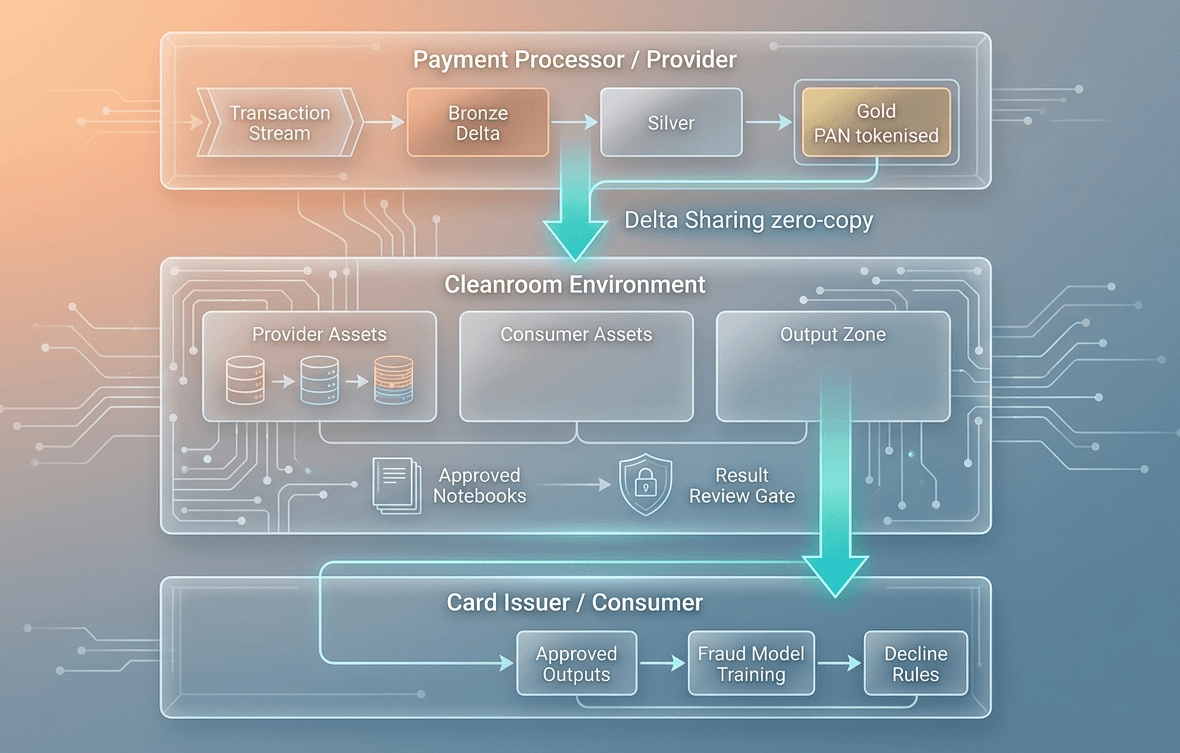
A Databricks Cleanroom is a shared, isolated compute environment where two parties run analytics against combined datasets without either side being able to directly view, export, or reverse-engineer the other's raw data.
The part that took me the longest to internalize, and I read the docs twice before it clicked, was Delta Sharing. It is not a sync. Nothing moves. When a provider shares a table into a Cleanroom, the consumer's compute reads directly from the provider's object storage via short-lived signed credential URLs. Your data stays where it is. That is the sentence your legal team needs. Practice saying it out loud before the next meeting.
Most writeups hand-wave past how Delta Sharing actually works and it frustrates me, because the mechanism is what makes the privacy guarantee credible. It's not a policy sitting on top of a data copy. There is no copy. The compute comes to the data.
Unity Catalog sits on top of that and handles governance: column-level masking so raw card numbers never appear in shared compute, row-level access policies so only eligible records are shared, and identity federation between both organizations' service principals. The Cleanroom environment handles isolation. Notebooks run in a sandboxed cluster, results go through a review step before export, and every query and policy change gets logged to an immutable audit trail.
Step 1: Apply Governance Policies Before You Touch the Cleanroom
Apply Unity Catalog governance policies directly to the underlying table before registering anything with the Cleanroom. These enforce automatically in any downstream compute, including inside the Cleanroom. Define them once and they follow the data everywhere.
The most common mistake here is hardcoding the shared salt in the notebook and committing it to version control. Use Databricks Secrets. Replace ${SHARED_SALT} below with a pre-shared secret stored there, not inline.
-- Row-level policy: only records flagged for consortium sharing are visible
-- Replace 'partner_data_agreements' with your own access-control table
CREATE ROW ACCESS POLICY fraud_catalog . security . consortium_row_filter
AS (sharing_consent_flag STRING, data_residency_region STRING)
RETURN
sharing_consent_flag = 'CONSORTIUM_ELIGIBLE'
AND data_residency_region IN (
SELECT allowed_region
FROM fraud_catalog . security . partner_data_agreements
WHERE partner_principal = current_user()
);
ALTER TABLE fraud_catalog . signal_features . transaction_signals_gold
ADD ROW ACCESS POLICY fraud_catalog . security . consortium_row_filter
ON (sharing_consent_flag, data_residency_region);
-- Column mask: replace raw card numbers with a deterministic HMAC token
-- Both parties agree on the salt so join tokens match across orgs
-- Replace current_user() with your SHARED_SALT secret in production
CREATE MASKING POLICY fraud_catalog . security . mask_pan
AS (card_number STRING)
RETURN
CASE
WHEN is_account_group_member('cleanroom_fraud_analyst') THEN
SHA2(CONCAT(card_number, current_user()), 256)
ELSE NULL
END;
ALTER TABLE fraud_catalog . signal_features . transaction_signals_gold
ALTER COLUMN card_number
SET MASKING POLICY fraud_catalog . security . mask_pan ;
Step 2: Provider Creates the Cleanroom
The provider is the party sharing data in. Run this from the provider's workspace.
One thing that isn't prominently documented: the Cleanroom name is case-sensitive. data_collaboration_cleanroom and Data_Collaboration_Cleanroom are different things and the failure is silent. Write the name down before you start and don't deviate from it.
from databricks . sdk import WorkspaceClient
from databricks . sdk . service . sharing import (
CleanRoom, CleanRoomAsset, CleanRoomAssetTable, CleanRoomCollaborator
)
Use Databricks Secrets for auth. Never hardcode tokens.
w = WorkspaceClient(
host='https: // adb-xxxx . azuredatabricks . net', # your provider workspace URL
token=DATABRICKS_TOKEN # dbutils . secret . get(scope=" … ", key=" … ")
)
Create the Cleanroom
cleanroom = w . clean_rooms . create(name='data_collaboration_cleanroom')
print(f'Cleanroom created: {cleanroom . name}')
Invite the consumer org
consumer_metastore_id is found in their Unity Catalog metastore settings
w . clean_rooms . update(
name='data_collaboration_cleanroom',
clean_room=CleanRoom(
collaborators=[CleanRoomCollaborator(
global_metastore_id='consumer_metastore_id', # replace with actual ID
invite_recipient_email='dataplatform@consumer-org . example . com'
)]
)
)
Register provider table
Row and column policies from Step 1 enforce automatically here
w .clean_rooms . update(
name='data_collaboration_cleanroom',
clean_room=CleanRoom(
local_assets=[CleanRoomAsset(
name='transaction_signals',
asset_type='TABLE',
table=CleanRoomAssetTable(
name='fraud_catalog . signal_features . transaction_signals_gold'
)
)]
)
)
print ('Provider assets registered.')
Step 3: Consumer Accepts and Registers Their Assets
The consumer runs this from their own workspace after receiving the invitation. The Cleanroom name must match exactly what the provider used in Step 2. Case-sensitive, same note applies.
Something worth saying here that I didn't fully appreciate when we were on the consumer side of an early engagement: you cannot inspect the provider's raw table definition from inside the Cleanroom. You are trusting that their policies in Step 1 are sufficient. Confirm with your own legal and governance teams before running this. That is not a formality you can skip on a deadline.
from databricks . sdk import WorkspaceClient
from databricks . sdk . service . sharing import CleanRoom, CleanRoomAsset, CleanRoomAssetTable
Run this from the consumer's Databricks workspace
w_consumer = WorkspaceClient(
host='https: // adb-yyyy . azuredatabricks . net', # consumer workspace URL
token=CONSUMER_TOKEN # dbutils . secrets . get(scope=" … ", key=" … ")
)
Accept the invitation and register the consumer's own table
Consumer's own Unity Catalog policies remain active inside the Cleanroom
w_consumer . clean_rooms . update(
name='data_collaboration_cleanroom', # must match provider's name exactly
clean_room=CleanRoom(
local_assets=[CleanRoomAsset(
name='account_behavior',
asset_type='TABLE',
table=CleanRoomAssetTable(
name='consumer_catalog . risk_features . account_behavior_gold'
)
)]
)
)
print('Consumer assets registered. Cleanroom ready.')
Both parties' Unity Catalog policies stay active inside the Cleanroom. Neither side sees the other's raw records.
Step 4: Write the Cleanroom Notebook
Cleanroom Notebooks run in an isolated cluster with access to both parties' shared assets. They cannot write raw data out or download locally. All output passes through a review step before either party can export it.
Inside the Cleanroom, assets are accessible under cleanroom_catalog . provider . <asset_name> and cleanroom_catalog . consumer . <asset_name>. This namespace is created automatically when both parties register their assets. You don't create it manually.
from pyspark.sql import SparkSession
from pyspark . sql import functions as F
spark = SparkSession . builder . getOrCreate()
Provider data: card number arrives as an HMAC token from the masking policy
The raw card number is never visible inside the Cleanroom
txn_signals = spark . table('cleanroom_catalog . provider . transaction_signals')
Consumer data: account-level behavioral features
account_behavior = spark . table('cleanroom_catalog . consumer . account_behavior')
Privacy-safe join on the pre-agreed HMAC token
Both parties independently generate the same token from their own records
joined = txn_signals.alias('t') . join(
account_behavior . alias('a'),
on=F . col('t . card_token') == F . col('a . card_token'),
how='inner'
)
combined_features = joined . select(
F . col('t . merchant_category_code'),
F . col('t . txn_count_1h'),
F . col('t . txn_amount_band'),
F . col('t . cross_border_flag'),
F . col('t . network_velocity_score'),
F . col('a . account_age_band'),
F . col('a . chargeback_rate_90d'),
F . col('a . prior_fraud_flag'),
F . col('t . confirmed_fraud_flag') . alias('target')
)
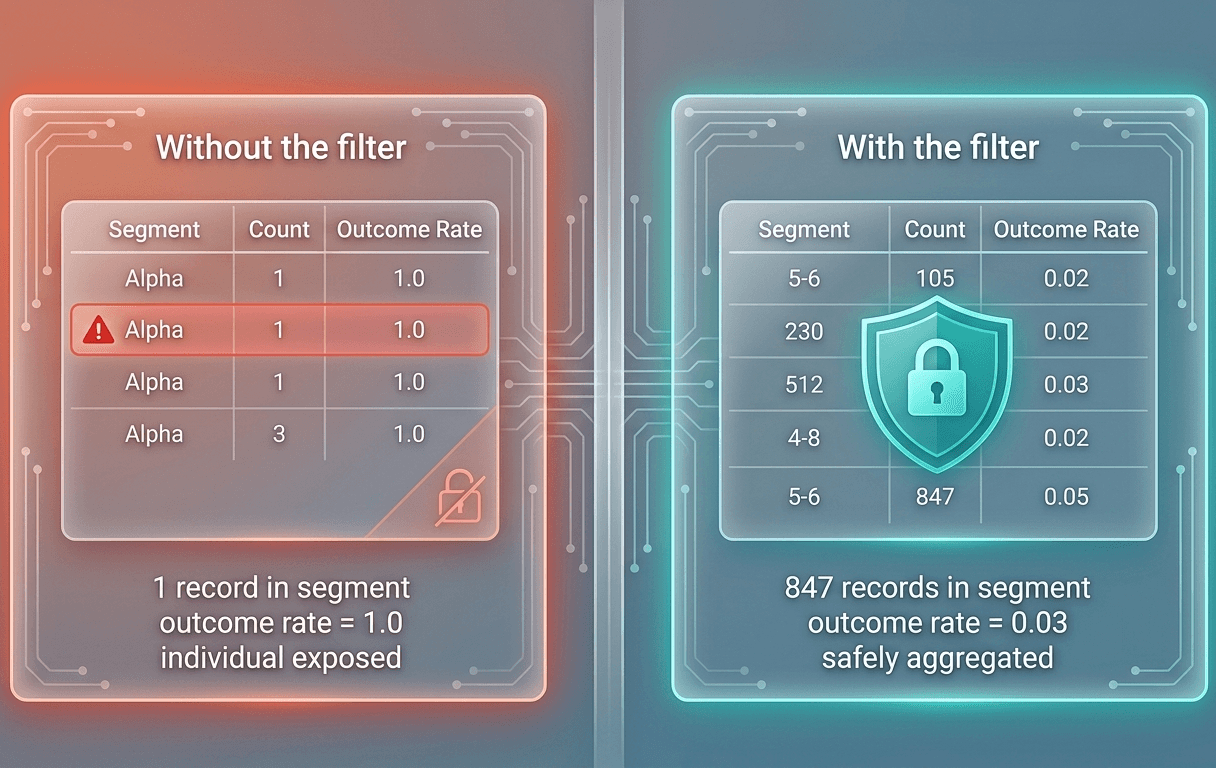
Aggregate guard: segments with fewer than 100 records are dropped
Do not remove this filter
segment_stats = combined_features . groupBy(
'merchant_category_code', 'account_age_band', 'cross_border_flag'
).agg(
F . count('*') . alias('record_count'),
F . avg('target') . alias('outcome_rate'),
F . avg('txn_count_1h') . alias('avg_velocity_1h'),
F . avg('chargeback_rate_90d') . alias('avg_chargeback_rate')
) . filter(F . col('record_count') >= 100)
Write to the output zone for result review
segment_stats . write . format('delta') . mode('overwrite') . saveAsTable(
'cleanroom_catalog . outputs . collaboration_segment_signals'
)
print(f'Segments written: {segment_stats . count()}')
print('Awaiting result review approval from both parties before export.')
That . filter(F . col('record_count') >= 100) is the most important line in this notebook. In an early test run we removed it to see what the output looked like with small segments included. A few segments had a single record. The outcome rate for those segments was not aggregated or anonymized. It was just that individual's outcome sitting in a column called outcome_rate. We caught it before it left the environment. Put this filter in every Cleanroom notebook you write and do not let a code review pass without checking for it.
What Actually Goes Wrong in Production
Token alignment will cost you more time than everything else combined
Both organizations have to produce identical join tokens from their own records. We spent three days on this once. Three days. The issue was trailing whitespace on one side that nobody noticed because it doesn't show up when you print the value. Zero match rate, no error, just silence and a blank join output and two engineers staring at each other. The fix took forty seconds once we found it. It was a . strip() call on both sides before hashing. That was it
Before writing any Cleanroom notebook, define a shared token generation spec and validate it against a jointly agreed test vector file. At least one sample per card type, one edge case with leading zeros. It takes an hour, and saves days.
Delta Sharing credentials expire silently
The failure mode is an opaque 403 during notebook execution. Set up automated rotation with alerting that fires at least seven days before expiry. Without it, you will find out about expired credentials at the worst possible moment, because that is when you find out about everything.
Cleanroom compute bills the provider
Set auto-termination to 30 minutes on every Cleanroom cluster you create. Without it, someone will forget to stop the cluster after a long run. Everyone forgets eventually. The bill conversation is worse than the bill.
**Result review step becomes a bottleneck faster than you expect **
Manual review works fine for a proof of concept. It breaks down around week three when you're refreshing signals every few hours and the reviewer has seventeen other things happening. Build an automated review pipeline that validates outputs against a pre-approved schema: column names, data types, aggregation level, minimum cohort size. Auto-approve compliant results. Reserve manual review for new notebooks and schema changes only. We didn't build this early enough and had to explain to a partner why outputs from Tuesday hadn't been released by Thursday. It was a bad Thursday.
What's Worth Building Out From Here
The revocation pipeline is the piece most teams push down the backlog until something forces it up. When a data subject opts out or a partner agreement gets suspended, those records need to be excluded from Cleanroom compute immediately, not at the next scheduled refresh. A Structured Streaming job listening to a revocation event topic and merging updates into your Gold table handles this well. Unity Catalog's row filter checks the consent flag at query time, so the exclusion takes effect on the next notebook run with no Cleanroom reconfiguration needed. The reason teams deprioritize this is that it feels theoretical until it isn't. Build it before it stops feeling theoretical.
Differential privacy is worth understanding, but the calibration part is harder than most writeups let on. For segments involving rare event types or small sub-populations, calibrated noise adds a guarantee that cohort size alone can't provide. Google's pipeline_dp library integrates with PySpark for this. The harder problem is getting alignment on an epsilon value that means something to a non-technical stakeholder. We spent two weeks on it and landed somewhere I'm not fully confident in, partly because once a number was on the table nobody wanted to be the person who pushed back on it. It's a people problem wearing a math costume. Worth doing, but go in honest about that part.
If your organization operates under any of the following regulations, here is how the Cleanroom architecture maps directly to the key requirements:
| Regulatory Requirement | Cleanroom Control | Implementation |
| PCI-DSS: No PAN outside secure boundary | Zero-copy sharing + column masking | Raw PANs never leave provider storage; only HMAC tokens are shared |
| GLBA: Safeguard non-public personal info | Column-level masking (UC) | All direct identifiers masked before any shared compute runs |
| GLBA: Data minimisation | Row-level access policy | Only consortium-eligible records shared; minimal column set |
| CCPA: Purpose limitation | Cleanroom policy + approved notebooks | Compute restricted to fraud detection use; no other purpose permitted |
| CCPA: Right to opt-out | Row filter + revocation pipeline | Opt-out removes card from sharing within one processing cycle |
| SOX / Internal audit | System audit logs (immutable) | All queries, exports, and policy changes logged with actor, time, params |
The Thing I Still Haven't Solved
Audit portability. When a partner relationship ends, both sides need a complete record of what was computed, approved, and exported. Right now that trail lives inside Databricks. Whether it holds up when a partnership dissolves and lawyers are involved, I genuinely don't know.
The obvious answer is exporting audit logs to neutral third-party storage. The problem is that "neutral third-party" is harder to define than it sounds. I've watched two organizations spend longer arguing about where logs should live than it took to build the Cleanroom. Neither side trusted the other's suggested solution and they weren't wrong not to.
I've been sitting with this for two years and haven't landed anywhere satisfying. If you've solved it in production, I actually want to hear from you.
How Cleanrooms Compare to Other Approaches
If you're evaluating whether Databricks Cleanrooms are the right fit for your use case, here's how they stack up against the alternatives:
| Approach | Data Movement | PII Risk | ML Use Case Support | Operational Complexity | Regulatory Fit |
| Databricks Cleanrooms | Zero (Delta Sharing) | Low (UC policies) | Strong (full Spark) | Medium | Strong (audit trail) |
| AWS Clean Rooms | Zero (S3) | Low (policy engine) | Limited (SQL only) | Low-Med | Strong |
| Google Analytics Hub | Minimal | Low | Limited | Low | Moderate |
| Third-party fraud bureau | Full copy | High (new custodian) | Unrestricted (risk) | Very High | Depends on legal |
| Federated Learning | None (gradients only) | Very Low | ML only (no SQL joins) | Very High | Emerging |
| Synthetic data generation | Full copy (synthetic) | Medium | Good (training only) | High | Moderate |
A few honest caveats this table doesn't capture. Databricks Cleanrooms require the Premium plan, which carries a meaningful cost premium over Standard. For AWS-native teams already invested in the S3 ecosystem, AWS Clean Rooms is a genuinely strong alternative and operationally simpler to stand up. Vendor lock-in is also a real consideration: your Cleanroom notebooks, Unity Catalog policies, and Delta Sharing configuration are Databricks-specific and don't port cleanly to another platform. If your organization is not already committed to the Databricks ecosystem, factor that in before starting.
Conclusion
Databricks Cleanrooms solve a problem most teams work around badly. The technical setup is straightforward once your environment is right. The parts that actually cost time are the token alignment spec you agree on before writing any code, the cohort size guard you put in every notebook, and the revocation pipeline you build before it stops feeling theoretical. Get those three right and the rest follows. </asset_name></asset_name>
- Premium Results
- Publish articles on SitePoint
- Daily curated jobs
- Learning Paths
- Discounts to dev tools
7 Day Free Trial. Cancel Anytime.