|
VOOZH | about |
|
VOOZH | about |
Next-Gen App & Browser Testing Cloud
Trusted by 2 Mn+ QAs & Devs to accelerate their release cycles
A test case is a documented set of conditions for validating a specific feature or functionality of a software application. It outlines the preconditions, postconditions and processes needed to verify the functionality of software applications.
Test case development is an important part of the Software Testing Life Cycle (STLC). It focuses on writing test cases that explain what to test, how to test it, and what the expected result is. This makes sure the software works as expected and meets the requirements outlined in the Software Requirement Specification (SRS).
Overview
A test case is a set of conditions or actions used to verify a particular feature or functionality of a software application. It includes inputs, execution steps, expected results, and actual results to determine if the software behaves as intended.
Importance of Writing Test Cases
Test cases provide a clear framework to verify software functionality and catch defects early. They help maintain consistency in testing, whether it is manual or automated testing. An effective test case improves communication among team members and ensures better software quality.
Steps to Write Test Cases
Here are the steps to write test cases:
A test case is the set of actions executed on a software application as part of the testing process to validate its features and functionalities. In other words, it is a detailed description of a specific test that helps to execute a test successfully.
It includes:
As part of the STLC, test cases help validate that software meets the functional and business requirements and support early detection of bugs, reducing the cost and impact of issues found later in the development process.
Benefits:
Note: Generate test cases with AI-native Test Manager. Try TestMu AI Now!
The process of writing a testing case involves many different steps, each of which is important to ensure the software quality.
Pro Tip: You can also use test case templates that provide a framework for capturing all necessary information about a test scenario. Using templates not only speeds up the process of writing test cases but also improves clarity and makes it easier for teams to review test cases, run them and document test results more effectively.
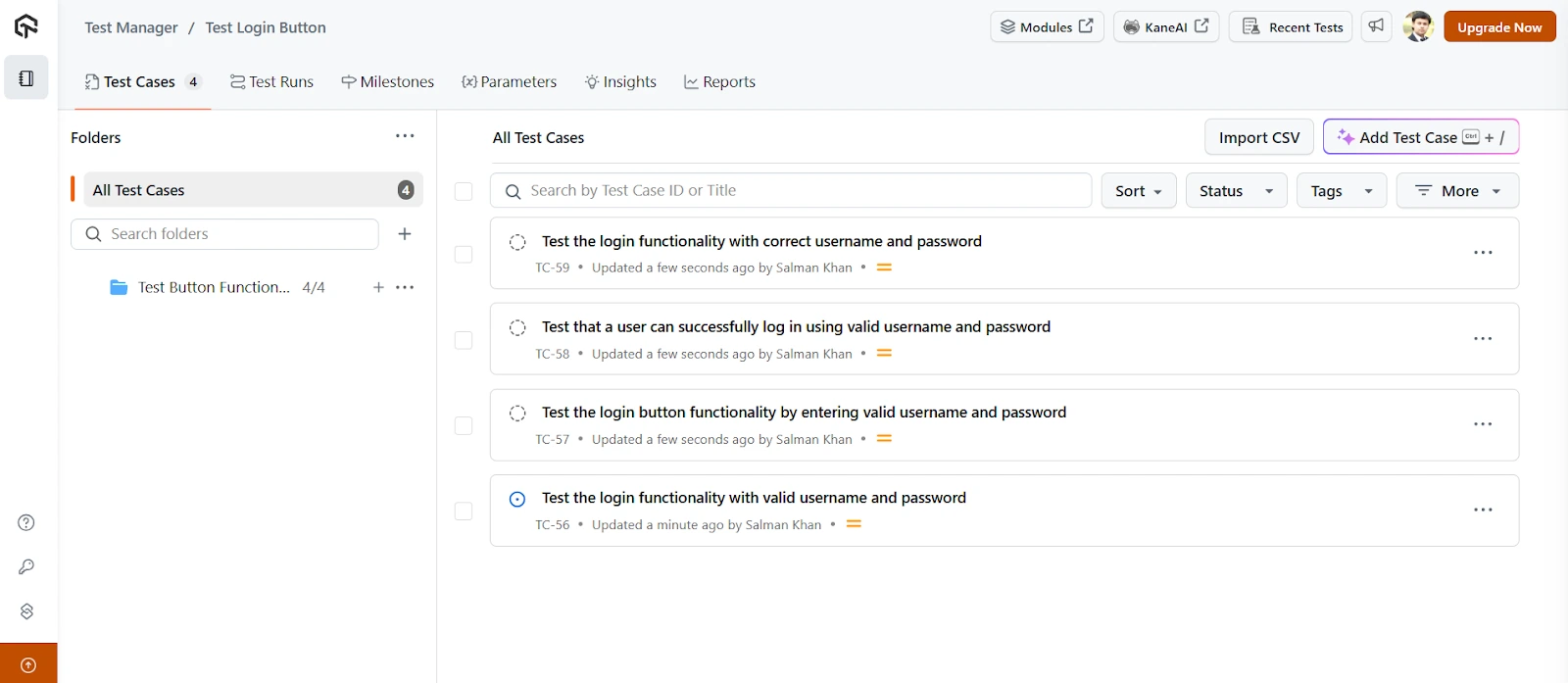
TestMu AI is an AI-native test management platform that streamlines test creation, management, execution, and reporting in one unified platform. It allows you to write test cases manually or generate them effortlessly using AI, simplifying and accelerating your testing process.
👁 AI-native test management platformFeatures:
To get started, check out the TestMu AI Test Manager guide.
In addition, TestMu AI Test Management lets you effortlessly generate tests from your created test cases using KaneAI.
KaneAI is a GenAI-native QA Agent-as-a-Service platform that enables test creation, evolution, and debugging through natural language. With this, you can convert test cases into executable test scripts, eliminating the need for writing test scripts and accelerating your overall testing process.
In software testing, understanding the different types of test cases is essential for selecting the right one that aligns with the objectives of the testing process and the nature of the software being tested.
To ensure your test cases are effective, it is important to follow certain best practices to write clear, efficient, and reusable test cases that save time and improve the quality of testing.
Test case, test scenario, test suite, and test script are all important terms used in software testing. While they are closely related, each has a different role.
Let’s look at how a test case differs from the others:
| Parameter | Test Case | Test Scenario | Test Suite | Test Script |
|---|---|---|---|---|
| Definition | Detailed set of steps, inputs, and expected results based on a scenario. | High-level functionality or feature to be tested. | A collection of related test cases grouped together. | A set of instructions written in a programming language that executes the test steps. |
| Focus | What and how to test. | What to test. | Organized test execution. | Actual test execution. |
| Example | Steps to test login with valid credentials. | Verify login functionality. | A suite including login, logout, and password reset tests. | Selenium with Java code to automate the login functionality. |
Writing effective test cases is a fundamental part of the software testing process. It not only helps ensure that the software application behaves as expected but also makes it easier to identify defects early.
A good test case provides clarity to all stakeholders and supports better collaboration among team members. To write effective test cases, it's important to maintain a consistent format, clearly define test objectives, include detailed steps with expected outcomes, and account for both positive and negative scenarios.
Furthermore, you can generate test cases with AI to expedite the test case creation process.
What Is a Test Case? Revisiting the Software Test Case Concept: https://www.researchgate.net/publication/221045985
Author
Nazneen Ahmad is a freelance Technical Content SEO Writer with over 6 years of experience in crafting high ranking content on software testing, web development, and medical case studies. She has written 60+ technical blogs, including 50+ top-ranking articles focused on software testing and web development. Certified in Automation Basic and Advanced Training - XO 10, she blends subject knowledge with SEO strategies to create user focused, authoritative content. Over time, she has shifted from quick, keyword-heavy drafts to producing content that prioritizes user intent, readability, and topical authority to deliver lasting value.
Open in ChatGPT
👁 Open in Claude IconOpen in Claude
👁 Open in Perplexity IconOpen in Perplexity
👁 Open in Grok IconOpen in Grok
👁 Open in Gemini AI IconOpen in Gemini AI
3000+ Browsers. One Platform.
See exactly how your site performs everywhere.
Try it free👁 ImageWrite Tests in Plain English with KaneAI
Create, debug, and evolve tests using natural language.
Try for free👁 ImageDid you find this page helpful?
More Related Blogs
TestMu AI forEnterprise
Get access to solutions built on Enterprise
grade security, privacy, & compliance