|
VOOZH | about |
|
VOOZH | about |
Next-Gen App & Browser Testing Cloud
Trusted by 2 Mn+ QAs & Devs to accelerate their release cycles
OVERVIEW
Test tools are software or hardware designed to test a system or application. Various Test tools are available for different types of testing, including unit testing, integration testing, and more. Some test tools are intended for developers during the development process, while others are designed for quality assurance teams or end users.
In addition to automating testing tasks, test tools can produce test data, monitor system performance, and report on test results.
Nowadays, organizations require not just high-quality software applications but also timely releases to ensure better results and gain potential customers. The key to this is premium-quality products developed at high speed.For this, they can use various Test tools currently available to build products that are unmatched in the market.
A Test tool is a product that supports one or more test activities, including test planning, requirements gathering, building, running tests, logging defects, and test analysis. Using test management or a Computer Aided Software Engineering (CASE) tool, you can identify the input fields, including the range of valid values.
The Test tool will identify all the fields and assist you in getting started with the test design, but it won't complete the task for you as more verification may be required. A test coverage tool could also come with another test design tool. For instance, a coverage tool can determine the route to cover the untested branches if a set of current tests has already decided which components have been covered.
Software testers, developers, and QA engineers utilize software Test tools to ensure that software applications work as intended and seem as expected. Throughout the software development lifecycle (SDLC), the Test tool tests everything from individual code units to entire software systems.
Organizations may ensure that the software application they produce complies with specifications and requirements, offers a superior user experience, and is mainly free of flaws and errors by using efficient software testing techniques.
Software testing tools are advantageous for QA teams, testers, and developers. It makes tests more accurate, increases the amount of tested code, speeds up testing cycles, and provides early feedback to developers, all of which contribute to the delivery of applications of higher quality.
While Test tools can be considered advantageous; they also have some limitations. Following are some limitations:.
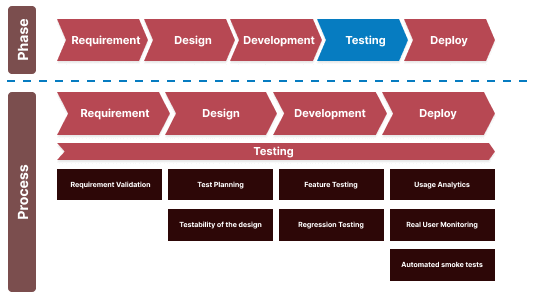
QA engineers adhere to well-established software testing life cycle phases to ensure the application functions as planned. The flowchart below will help you understand where the Test tool fits in the software development life cycle.
👁 Unit Testing To Acceptance TestingTools for managing various functional and non-functional tests are available in the market. These tests check whether an application has all the features and requirements outlined in the project requirements. The non-functional testing assesses the software's performance, usability, dependability, security, and other elements to identify how well the software runs and what kind of user experience it provides.
Today's development teams use several popular software testing technologies. Test management systems control several facets of the testing protocol by monitoring activities, analyzing data, managing test cases, running automated tests, and organizing and monitoring manual testing.
Take a glance below to understand which type of Test tool can cover which module during the testing process.
Consequently, assuming you've followed along, we may conclude to implement a Test tool successfully. It makes more sense to use it first for automating advanced test cases before you finish the regression ones.
However, there are two queries now surface:
When a new test automation project launches, the investment is more than the return. It would probably take longer to implement the functionality of the user narrative than it would build all the infrastructure required to make the initial tests function.
Therefore, experts advise starting with test suites that confirm the system's fundamental functionality and key features. You can construct and stabilize the infrastructure of the application's key features with the aid of this suite.
Moreover, this is the moment for you to incorporate the automated tests into the CI tools and development procedures. Make sure that all tests pass as you create the suite. Adjust your tests and infrastructure as necessary to accommodate changes to the product.
If a test fails due to an application bug, try to fix it as soon as you can rather than just opening a bug report. Additionally, ensure that the tests execute well on all devices because you'll want to give developers the option to perform the tests on their devices shortly. It would be best if you worked to keep your tests simple to manage and ensure that failures are simple to identify.
Your primary focus should be on the things that add the most value to the company and the customers. The product's ROI is directly affected by locating and eliminating defects in these features.
Are you confused about what Test tool you need to become familiar with? Despite the market's abundance of automation testing solutions, the one you pick should be capable of streamlining your responsibilities and providing you with the necessary break.
Generally, we use the Test tool to test websites or mobile applications. However, on-premise testing has several significant challenges like infrastructure, costs, maintenance, scalability, etc. To eliminate the pain point of on-premise testing, a viable solution is to leverage cloud-based Test tools like TestMu AI.
Serving 2M+ users across 132 countries, TestMu AI is considered one of the fastest cloud-based testing platforms for automated and exploratory testing across 3000+ real browsers, devices, and operating systems. It has a simple onboarding process, making your web and app testing painless. TestMu AI supports the best test automation frameworks like Selenium, Cypress, Playwright, Puppeteer, Appium, Espresso, and XCUITest.
You can subscribe to the TestMu AI YouTube Channel and stay updated with the latest tutorials around Selenium testing, Cypress testing, End-to-end testing, and more.
The following features distinguish TestMu AI from the crowd -
After going through the Test tool in detail, let’s explore how to increase the efficiency of the Test tool. There are several methods of doing the same, and a few of them are discussed below.
"Continuous Integration" is a word that most developers are familiar with. Continuous Integration automatically produces and tests the code before each check-in. The modification checking occurs if everything checks out.
The process that generates the code and executes the tests is usually carried out on one or more dedicated build servers rather than on the developer's computer. It gives the process centralized control and frees up the developer's computer to perform other tasks while it runs.
Continuous integration answers the issues of who, when, and how to run tests. It does not address the issues of who, when, and how to write tests.
This method ensures that testers and automation developers are involved as early as possible, allowing them to significantly impact the product's quality. Furthermore, using the procedure from the start of the project indicates that the tests cover all of the defined functionality.
Upgrade tests are significantly more challenging if installation tests seem difficult. The test matrix for upgrading tests above installation tests has two additional dimensions:
When asked what customers hope to gain from test automation, the most typical response is a reduced time to test the software before it is made available.
On the one hand, while this is a significant objective, test automation can help you with a lot more things than just this. It typically takes quite a while to reduce the number of manual test cycles. On the other hand, you might observe the other advantages earlier.
Hope by now you have got a good gist of the Test tool for software testing. You can choose the best one that suits your business needs the most.
Author
Sakshi John is an experienced technical content writer with over 5 years of expertise in automation, AI-driven testing, and cross-browser testing. She has contributed to prominent platforms like TestMu AI and worked as a Communications Consultant at the United Nations APCTT. Sakshi holds a Master's degree in International Relations and has authored numerous technical blogs, enhancing her credibility in the software testing industry.
Open in ChatGPT
👁 Open in Claude IconOpen in Claude
👁 Open in Perplexity IconOpen in Perplexity
👁 Open in Grok IconOpen in Grok
👁 Open in Gemini AI IconOpen in Gemini AI
3000+ Browsers. One Platform.
See exactly how your site performs everywhere.
Try it free👁 ImageWrite Tests in Plain English with KaneAI
Create, debug, and evolve tests using natural language.
Try for free👁 ImageDid you find this page helpful?
More Related Blogs
TestMu AI forEnterprise
Get access to solutions built on Enterprise
grade security, privacy, & compliance