|
VOOZH | about |
|
VOOZH | about |
body elementarticle elementsection elementnav elementaside elementh1, h2, h3, h4, h5, and h6
elementshgroup elementheader elementfooter elementaddress elementIntroduction_to_HTML/Document_and_website_structure#HTML_for_structuring_content
Support in all current engines.
body elementSupport in all current engines.
Support in all current engines.
html element.body element's start tag can be omitted
if the element is empty, or if the first thing inside the body element is not
ASCII whitespace or a comment, except if the
first thing inside the body element is a meta, noscript,
link, script, style, or template element.
body element's end tag can be omitted if the
body element is not immediately followed by a comment.onafterprintonbeforeprintonbeforeunloadonhashchangeonlanguagechangeonmessageonmessageerroronofflineononlineonpageswaponpagehideonpagerevealonpageshowonpopstateonrejectionhandledonstorageonunhandledrejectiononunload[=]
: {
[] ();
// also has obsolete members
};
;The body element represents the contents of the document.
In conforming documents, there is only one body element. The document.body IDL attribute provides scripts with easy access to
a document's body element.
Some DOM operations (for example, parts of the drag and drop model)
are defined in terms of "the body element". This refers to a particular element in
the DOM, as per the definition of the term, and not any arbitrary body element.
The body element exposes as event handler content attributes a number
of the event handlers of the Window object. It also mirrors their
event handler IDL attributes.
The event handlers of the Window object named by the
Window-reflecting body element event handler set, exposed on the
body element, replace the generic event handlers with the same names
normally supported by HTML elements.
Thus, for example, a bubbling error event
dispatched on a child of the body element of a Document would first
trigger the onerror event handler content
attributes of that element, then that of the root html element, and only
then would it trigger the onerror event handler content attribute on the
body element. This is because the event would bubble from the target, to the
body, to the html, to the Document, to the
Window, and the event handler on the
body is watching the Window not the body. A regular event
listener attached to the body using addEventListener(),
however, would be run when the event bubbled through the body and not when it reaches
the Window object.
This page updates an indicator to show whether or not the user is online:
 Online or offline?

  updateonline
 documentgetElementByIdtextContent
 online


 You are:  (Unknown)
article elementSupport in all current engines.
HTMLElement.The article element represents a complete, or self-contained,
composition in a document, page, application, or site and that is, in principle, independently
distributable or reusable, e.g. in syndication. This could be a forum post, a magazine or
newspaper article, a blog entry, a user-submitted comment, an interactive widget or gadget, or any
other independent item of content.
When article elements are nested, the inner article elements
represent articles that are in principle related to the contents of the outer article. For
instance, a blog entry on a site that accepts user-submitted comments could represent the comments
as article elements nested within the article element for the blog
entry.
Author information associated with an article element (q.v. the
address element) does not apply to nested article elements.
When used specifically with content to be redistributed in syndication, the
article element is similar in purpose to the entry element in
Atom. [ATOM]
The schema.org microdata vocabulary can be used to provide the publication date
for an article element, using one of the CreativeWork subtypes.
When the main content of the page (i.e. excluding footers, headers, navigation blocks, and
sidebars) is all one single self-contained composition, that content may be marked with an
article, but it is technically redundant in that case (since it's self-evident that
the page is a single composition, as it is a single document).
This example shows a blog post using the article element, with some schema.org
annotations:
  The Very First Rule of Life
   3 days ago


 If there's a microphone anywhere near you, assume it's hot and
 sending whatever you're saying to the world. Seriously.
 ...

   Show comments...
Here is that same blog post, but showing some of the comments:
  The Very First Rule of Life
   3 days ago


 If there's a microphone anywhere near you, assume it's hot and
 sending whatever you're saying to the world. Seriously.
 ...

 Comments


 Posted by:
  George Washington

   15 minutes ago

 Yeah! Especially when talking about your lobbyist friends!


 Posted by:
  George Hammond

   5 minutes ago

 Hey, you have the same first name as me.
Notice the use of footer to give the information for each comment (such as who
wrote it and when): the footer element can appear at the start of its
section when appropriate, such as in this case. (Using header in this case wouldn't
be wrong either; it's mostly a matter of authoring preference.)
In this example, article elements are used to host widgets on a portal page. The
widgets are implemented as customized built-in
elements in order to get specific styling and scripted behavior.
eHome Portal


 Stocks

    Stock  Value  Delta


 News
section elementSupport in all current engines.
HTMLElement.The section element represents a generic section of a document or
application. A section, in this context, is a thematic grouping of content, typically with a
heading.
Examples of sections would be chapters, the various tabbed pages in a tabbed dialog box, or the numbered sections of a thesis. A web site's home page could be split into sections for an introduction, news items, and contact information.
Authors are encouraged to use the article element instead of the
section element when it would make sense to syndicate the contents of the
element.
The section element is not a generic
container element. When an element is needed only for styling purposes or as a convenience for
scripting, authors are encouraged to use the div element instead. A general rule is
that the section element is appropriate only if the element's contents would be
listed explicitly in the document's outline.
In the following example, we see an article (part of a larger web page) about apples, containing two short sections.
 Apples
 Tasty, delicious fruit!

 The apple is the pomaceous fruit of the apple tree.

 Red Delicious
 These bright red apples are the most common found in many
 supermarkets.


 Granny Smith
 These juicy, green apples make a great filling for
 apple pies.
Here is a graduation programme with two sections, one for the list of people graduating, and one for the description of the ceremony. (The markup in this example features an uncommon style sometimes used to minimize the amount of inter-element whitespace.)
 Graduation Ceremony Summer 2022


 Graduation


 Ceremony

 Opening Procession

 Speech by Valedictorian

 Speech by Class President

 Presentation of Diplomas

 Closing Speech by Headmaster


 Graduates


 Molly Carpenter

 Anastasia Luccio

 Ebenezar McCoy

 Karrin Murphy

 Thomas Raith

 Susan Rodriguez
In this example, a book author has marked up some sections as chapters and some as appendices, and uses CSS to style the headers in these two classes of section differently.
 My Book
 A sample with not much content

 Published by Dummy Publicorp Ltd.


 My First Chapter
 This is the first of my chapters. It doesn't say much.
 But it has two paragraphs!


 It Continues: The Second Chapter
 Bla dee bla, dee bla dee bla. Boom.


 Chapter Three: A Further Example
 It's not like a battle between brightness and earthtones would go
 unnoticed.
 But it might ruin my story.


 Appendix A: Overview of Examples
 These are demonstrations.


 Appendix B: Some Closing Remarks
 Hopefully this long example shows that you can style
 sections, so long as they are used to indicate actual sections.
nav elementSupport in all current engines.
HTMLElement.The nav element represents a section of a page that links to other
pages or to parts within the page: a section with navigation links.
Not all groups of links on a page need to be in a nav element —
the element is primarily intended for sections that consist of major navigation blocks. In
particular, it is common for footers to have a short list of links to various pages of a site,
such as the terms of service, the home page, and a copyright page. The footer element
alone is sufficient for such cases; while a nav element can be used in such cases, it
is usually unnecessary.
User agents (such as screen readers) that are targeted at users who can benefit from navigation information being omitted in the initial rendering, or who can benefit from navigation information being immediately available, can use this element as a way to determine what content on the page to initially skip or provide on request (or both).
In the following example, there are two nav elements, one for primary navigation
around the site, and one for secondary navigation around the page itself.
 The Wiki Center Of Exampland


  Home
  Current Events
 ...more...


 Demos in Exampland
 Written by A. N. Other.


  Public demonstrations
  Demolitions
 ...more...


 Public demonstrations
 ...more...


 Demolitions
 ...more...

 ...more...


  Edit |  Delete |  Rename


 © copyright 1998 Exampland Emperor
In the following example, the page has several places where links are present, but only one of those places is considered a navigation section.
 Wake up sheeple!
  News -
  Blog -
  Forums
 Last Modified:  2009-04-01

 Navigation

  Index of all articles
  Things sheeple need to wake up for today
  Sheeple we have managed to wake


  My Day at the Beach


 Today I went to the beach and had a lot of fun.
 ...more content...


 Posted   Thursday.


 ...more blog posts...


 Copyright ©
  2010
  The Example Company

  About -
  Privacy Policy -
  Contact Us
You can also see microdata annotations in the above example that use the schema.org vocabulary to provide the publication date and other metadata about the blog post.
A nav element doesn't have to contain a list, it can contain other kinds of
content as well. In this navigation block, links are provided in prose:
 Navigation
 You are on my home page. To the north lies  my
 blog, from whence the sounds of battle can be heard. To the east
 you can see a large mountain, upon which many
 school papers are littered. Far up thus mountain
 you can spy a little figure who appears to be me, desperately
 scribbling a  thesis.
 To the west are several exits. One fun-looking exit is labeled
 "games". Another more
 boring-looking exit is labeled
 ISP™.
 To the south lies a dark and dank  contacts
 page. Cobwebs cover its disused entrance, and at one point you
 see a rat run quickly out of the page.
In this example, nav is used in an email application, to let the user switch
folders:
 Folders

    Inbox
    Sent
    Drafts
    Trash
    Customers
aside elementSupport in all current engines.
HTMLElement.The aside element represents a section of a page that consists of
content that is tangentially related to the content around the aside element, and
which could be considered separate from that content. Such sections are often represented as
sidebars in printed typography.
The element can be used for typographical effects like pull quotes or sidebars, for
advertising, for groups of nav elements, and for other content that is considered
separate from the main content of the page.
It's not appropriate to use the aside element just for
parentheticals, since those are part of the main flow of the document.
The following example shows how an aside is used to mark up background material on Switzerland in a much longer news story on Europe.
 Switzerland
 Switzerland, a land-locked country in the middle of geographic
 Europe, has not joined the geopolitical European Union, though it is
 a signatory to a number of European treaties.
The following example shows how an aside is used to mark up a pull quote in a longer article.
...

He later joined a large company, continuing on the same work.
I love my job. People ask me what I do for fun when I'm not at
work. But I'm paid to do my hobby, so I never know what to
answer. Some people wonder what they would do if they didn't have to
work... but I know what I would do, because I was unemployed for a
year, and I filled that time doing exactly what I do now.


 People ask me what I do for fun when I'm not at work. But I'm
 paid to do my hobby, so I never know what to answer.


Of course his work — or should that be hobby? —
isn't his only passion. He also enjoys other pleasures.

...
The following extract shows how aside can be used for blogrolls and other side
content on a blog:
 My wonderful blog
 My tagline


 My blogroll

  Example Blog


 Archives

  My last post
  My first post


 Twitter Feed

 I'm on vacation, writing my blog.


 I'm going to go on vacation soon.


 My last post
 This is my last post.

   Permalink


 My first post
 This is my first post.


 Posting
 While I'm thinking about it, I wanted to say something about
 posting. Posting is fun!


   Permalink


  Archives -
  About me -
  Copyright
h1, h2, h3, h4, h5, and h6
elementsSupport in all current engines.
Support in all current engines.
Support in all current engines.
Support in all current engines.
Support in all current engines.
Support in all current engines.
Support in all current engines.
hgroup element.[=]
: {
[] ();
// also has obsolete members
};These elements represent headings for their sections.
The semantics and meaning of these elements are defined in the section on headings and outlines.
These elements have a heading level given by the number in their name. The
heading level corresponds to the levels of nested sections. The h1
element is for a top-level section, h2 for a subsection, h3 for a
sub-subsection, and so on.
As far as their respective document outlines (their heading and section structures) are concerned, these two snippets are semantically equivalent:
Let's call it a draw(ing surface)
Diving in
Simple shapes
Canvas coordinates
Canvas coordinates diagram
Paths
 Let's call it a draw(ing surface)

 Diving in


 Simple shapes


 Canvas coordinates

 Canvas coordinates diagram


 Paths
Authors might prefer the former style for its terseness, or the latter style for its additional styling hooks. Which is best is purely an issue of preferred authoring style.
hgroup elementSupport in all current engines.
p elements, followed by one h1, h2,
h3, h4, h5, or h6 element, followed by zero
or more p elements, optionally intermixed with script-supporting
elements.HTMLElement.The hgroup element represents a heading and related content. The
element may be used to group an h1–h6 element with one or more
p elements containing content representing a subheading, alternative title, or
tagline.
Here are some examples of valid headings contained within an hgroup element.
 The reality dysfunction
 Space is not the only void
 Dr. Strangelove
 Or: How I Learned to Stop Worrying and Love the Bomb
header elementSupport in all current engines.
header or footer element
descendants.HTMLElement.The header element represents a group of introductory or navigational
aids.
A header element is intended to usually contain a heading
(an h1–h6 element or an hgroup element), but this is
not required. The header element can also be used to wrap a section's table of
contents, a search form, or any relevant logos.
Here are some sample headers. This first one is for a game:
 Welcome to...
 Voidwars!
The following snippet shows how the element can be used to mark up a specification's header:
 Fullscreen API
 Living Standard — Last Updated 19 October 2015


 Participate:
  GitHub whatwg/fullscreen
 Commits:
  GitHub whatwg/fullscreen/commits
The header element is not sectioning content; it doesn't
introduce a new section.
In this example, the page has a page heading given by the h1 element, and two
subsections whose headings are given by h2 elements. The content after the
header element is still part of the last subsection started in the
header element, because the header element doesn't take part in the
outline algorithm.
 Little Green Guys With Guns


  Games
  Forum
  Download


 Important News

 To play today's games you will need to update your client.
 Games

 You have three active games:

...footer elementSupport in all current engines.
header or footer element
descendants.HTMLElement.The footer element represents a footer for its nearest ancestor
sectioning content element, or for the body element if there is no such
ancestor. A footer typically contains information about its section such as who wrote it, links
to related documents, copyright data, and the like.
When the footer element contains entire sections, they represent appendices, indices, long colophons, verbose license
agreements, and other such content.
Contact information for the author or editor of a section belongs in an
address element, possibly itself inside a footer. Bylines and other
information that could be suitable for both a header or a footer can be
placed in either (or neither). The primary purpose of these elements is merely to help the author
write self-explanatory markup that is easy to maintain and style; they are not intended to impose
specific structures on authors.
Footers don't necessarily have to appear at the end of a section, though they usually do.
When there is no ancestor sectioning content element, then it applies to the whole page.
The footer element is not itself sectioning content; it
doesn't introduce a new section.
Here is a page with two footers, one at the top and one at the bottom, with the same content:
  Back to index...

 Lorem ipsum
 The ipsum of all lorems

 A dolor sit amet, consectetur adipisicing elit, sed do eiusmod
 tempor incididunt ut labore et dolore magna aliqua. Ut enim ad minim
 veniam, quis nostrud exercitation ullamco laboris nisi ut aliquip ex
 ea commodo consequat. Duis aute irure dolor in reprehenderit in
 voluptate velit esse cillum dolore eu fugiat nulla
 pariatur. Excepteur sint occaecat cupidatat non proident, sunt in
 culpa qui officia deserunt mollit anim id est laborum.
  Back to index...
Here is an example which shows the footer element being used both for a site-wide
footer and for a section footer.
The Ramblings of a Scientist

The Ramblings of a Scientist

 Episode 15

  Download video.


 Published  on 2009/10/21 at 6:26pm


 My Favorite Trains
 I love my trains. My favorite train of all time is a Köf.
 It is fun to see them pull some coal cars because they look so
 dwarfed in comparison.

 Published  on 2009/09/15 at 2:54pm


  Credits —
  Terms of Service —
  Blog Index

 Copyright © 2009 Gordon Freeman
Some site designs have what is sometimes referred to as "fat footers" — footers that contain a lot of material, including images, links to other articles, links to pages for sending feedback, special offers... in some ways, a whole "front page" in the footer.
This fragment shows the bottom of a page on a site with a "fat footer":
...


 Articles
    Go to the gym with
 our somersaults class! Our teacher Jim takes you through the paces
 in this two-part article.  Part
 1 ·  Part 2
   Tired of walking on the edge of
 a clif? Our guest writer Lara shows you how to bumble
 your way through the bars.  Read
 more...
   The chips are down, now all
 that's left is a potato. What can you do with it?
 Read more...


   About us...
   Send feedback!
   Sitemap


 Copyright © 2015 The Snacker —
  Terms of Service
address elementSupport in all current engines.
header, footer, or
address element descendants.HTMLElement.The address element represents the contact information for its
nearest article or body element ancestor. If that is the body
element, then the contact information applies to the document as a whole.
For example, a page at the W3C web site related to HTML might include the following contact information:
  Dave Raggett,
  Arnaud Le Hors,
 contact persons for the  W3C HTML Activity
The address element must not be used to represent arbitrary addresses (e.g. postal
addresses), unless those addresses are in fact the relevant contact information. (The
p element is the appropriate element for marking up postal addresses in general.)
The address element must not contain information other than contact
information.
For example, the following is non-conforming use of the
address element:
Last Modified: 1999/12/24 23:37:50Typically, the address element would be included along with other information in a
footer element.
The contact information for a node node is a collection of
address elements defined by the first applicable entry from the following list:
article elementbody elementThe contact information consists of all the address elements that have node as an ancestor and do not have another body or
article element ancestor that is a descendant of node.
article elementbody elementThe contact information of node is the same as the contact information of
the nearest article or body element ancestor, whichever is
nearest.
The contact information of node is the same as the contact information of
the body element of the Document.
There is no contact information for node.
User agents may expose the contact information of a node to the user, or use it for other purposes, such as indexing sections based on the sections' contact information.
In this example the footer contains contact information and a copyright notice.
 For more details, contact
  John Smith.

 © copyright 2038 Example Corp.
h1–h6 elements have a heading level, which is
given by getting the element's computed
heading level.
These elements represent headings. The lower a heading's heading level is, the fewer ancestor sections the heading has.
The outline is all headings in a document, in tree order.
The outline should be used for generating document outlines, for example when generating tables of contents. When creating an interactive table of contents, entries should jump the user to the relevant heading.
If a document has one or more headings, at least a single heading within the outline should have a heading level of 1.
Each heading following another heading lead in the outline must have a heading level that is less than, equal to, or 1 greater than lead's heading level.
The following example is non-conforming:
 Apples
 Apples are fruit.

 Taste
 They taste lovely.
It could be written as follows and then it would be conforming:
 Apples
 Apples are fruit.

 Taste
 They taste lovely.
The headingoffset
content attribute allows authors to offset heading levels for descendants.
If the headingoffset attribute is specified, it must
have a value that is a valid non-negative integer between 0 and 8, inclusive.
The headingreset
content attribute is a boolean attribute. It allows authors to prevent a heading
offset computation from traversing beyond the element with the attribute.
To get an element's computed heading level, given an element element:
Let level be 0.
If element's local name is h1, then set
level to 1.
If element's local name is h2, then set
level to 2.
If element's local name is h3, then set
level to 3.
If element's local name is h4, then set
level to 4.
If element's local name is h5, then set
level to 5.
If element's local name is h6, then set
level to 6.
Assert: level is not 0.
Increment level by the result of getting an element's computed heading offset given element.
If level is greater than 9, then return 9.
Return level.
To get an element's computed heading offset, given an element element, perform the following steps. They return a non-negative integer.
Let offset be 0.
Let inclusiveAncestor be element.
While inclusiveAncestor is not null:
Let nextOffset be 0.
If inclusiveAncestor is an HTML element and
has a headingoffset attribute, then parse its value
using the rules for parsing non-negative integers.
If the result of parsing the value is not an error, then set nextOffset to that value.
Increment offset by nextOffset.
If inclusiveAncestor is an HTML element
and has a headingreset attribute, then return
offset.
Set inclusiveAncestor to the parent node of inclusiveAncestor within the flat tree.
Return offset.
This example shows a combination of headingoffset,
headingreset, and aria-level attributes with comments demonstrating the respective
heading levels. This example illustrates the various combinations and is not a best practice
example.
 This is a heading level 1

 This is a heading level 2

 This is a heading level 3

 This is a heading level 1


  This is a heading level 2
The following markup fragment:
 HTML: Living Standard
 Last Updated 12 August 2016

 Some intro to the document.
 Table of contents
  ...
 First section
 Some intro to the first section.
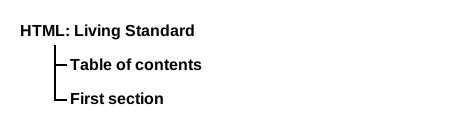
...results in 3 document headings:
<h1>HTML: Living Standard</h1>
<h2>Table of contents</h2>.
<h2>First section</h2>.
A rendered view of the outline might look like:
First, here is a document, which is a book with very short chapters and subsections:
The Tax Book (all in one page)
The Tax Book
Earning money
Earning money is good.
Getting a job
To earn money you typically need a job.
Spending money
Spending is what money is mainly used for.
Cheap things
Buying cheap things often not cost-effective.
Expensive things
The most expensive thing is often not the most cost-effective either.
Investing money
You can lend your money to other people.
Losing money
If you spend money or invest money, sooner or later you will lose money.
Poor judgement
Usually if you lose money it's because you made a mistake.
Its outline could be presented as follows:
A document can contain multiple top-level headings:
Alphabetic Fruit
Apples
Pomaceous.
Bananas
Edible.
Carambola
Star.
The document's outline could be presented as follows:
header elements do not influence the outline of a
document:
We're adopting a child! — Ray's blog
Ray's blog


  Yesterday;
  Last week;
  Last month

 We're adopting a child!

 As of today, Janine and I have signed the papers to become
 the proud parents of baby Diane! We've been looking forward to
 this day for weeks.
The document's outline could be presented as follows:
The following example is conforming, but not encouraged as it has no heading whose heading level is 1:
Alphabetic Fruit

 Apples
 Pomaceous.


 Bananas
 Edible.


 Carambola
 Star.
The document's outline could be presented as follows:
The following example is conforming, but not encouraged as the first heading's heading level is not 1:
Feathers on The Site of Encyclopedic Knowledge
 A plea from our caretakers
 Please, we beg of you, send help! We're stuck in the server room!
Feathers
Epidermal growths.
The document's outline could be presented as follows:
User agents are encouraged to expose page outlines to users to aid in navigation. This is especially true for non-visual media, e.g. screen readers.
For instance, a user agent could map the arrow keys as follows:
This section is non-normative.
| Element | Purpose |
|---|---|
| Example | |
body
| The contents of the document. |
| |
article
| A complete, or self-contained, composition in a document, page, application, or site and that is, in principle, independently distributable or reusable, e.g. in syndication. This could be a forum post, a magazine or newspaper article, a blog entry, a user-submitted comment, an interactive widget or gadget, or any other independent item of content. |
| |
section
| A generic section of a document or application. A section, in this context, is a thematic grouping of content, typically with a heading. |
| |
nav
| A section of a page that links to other pages or to parts within the page: a section with navigation links. |
| |
aside
| A section of a page that consists of
content that is tangentially related to the content around the aside element, and
which could be considered separate from that content. Such sections are often represented as
sidebars in printed typography.
|
| |
h1–h6
| A heading |
| |
hgroup
| A heading and related content. The
element may be used to group an h1–h6 element with one or more
p elements containing content representing a subheading, alternative title, or
tagline.
|
| |
header
| A group of introductory or navigational aids. |
| |
footer
| A footer for its nearest ancestor sectioning content element, or for the body element if there is no such ancestor. A footer typically contains information about its section such as who wrote it, links to related documents, copyright data, and the like. |
|
This section is non-normative.
A section forms part of something else. An article is its own thing.
But how does one know which is which? Mostly the real answer is "it depends on author intent".
For example, one could imagine a book with a "Granny Smith" chapter that just said "These
juicy, green apples make a great filling for apple pies."; that would be a section
because there'd be lots of other chapters on (maybe) other kinds of apples.
On the other hand, one could imagine a tweet or reddit comment or tumblr post or newspaper
classified ad that just said "Granny Smith. These juicy, green apples make a great filling for
apple pies."; it would then be articles because that was the whole thing.
A comment on an article is not part of the article on which it is commenting,
therefore it is its own article.