
The Nintendo Switch 2 is the sort of gadget that starts simple and quietly collects needs around it. Once it becomes part of your daily routine, you start noticing the little annoyances that never show up on the box. Controllers need a home, game cards need better storage, and charging always seems to happen at the least elegant angle possible.
The best 3D prints for a Nintendo Switch 2 are the ones that make the system easier to dock, charge, organize, and carry.
That is where 3D printing earns its keep, not with novelty for novelty’s sake, but with small fixes that make the whole setup easier to live with.
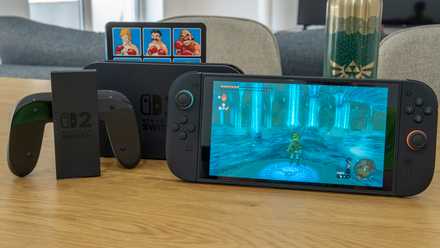
Review: The Switch 2 is the best gaming handheld you can buy, and the ultimate form of Nintendo's vision
The Switch of your dreams
A better dock setup
A cleaner base for everyday gaming
The first thing I would print for a Nintendo Switch 2 setup is a dock stand or organizer. The stock dock works, but it is not always great at managing cables or fitting neatly into a crowded entertainment center. A printed stand can give it a more stable footprint and make the whole area feel less cluttered. That matters more than it sounds when the dock is something you see every day.
Printed dock accessories can be genuinely useful, but they should never crowd the Switch 2 or block airflow around the dock. Heat has to go somewhere, and a design that wraps too tightly around the console or covers vent areas can create problems during longer sessions. It is always smarter to choose a stand or organizer that leaves plenty of open space around the hardware. A good print should make the setup cleaner without turning it into a heat trap.
This is also one of the most practical prints because it can be tailored to the space you actually have. Maybe your setup needs a lower profile, or maybe you want channels that guide the cables toward the back of the shelf. A printed dock base can do that without turning the setup into a pile of adapters and compromises. It feels more intentional, which off-the-shelf accessories do not always manage.
I also like this category because it leaves room for personality without sacrificing function. You can print something plain and tidy, or go with a shape that feels a bit more playful. Either way, the dock stops looking like a loose piece of hardware that landed on the TV stand by accident. It starts to feel like part of a complete setup instead.
Cases for the game and your cards
Small storage that fixes daily frustration
Loose game cards are tiny, easy to misplace, and surprisingly good at disappearing when you want a specific one. A printed game card case solves that problem in the most direct way possible. Instead of letting those cartridges rattle around in a drawer or travel pouch, you give them an actual home. That alone makes the print worthwhile.
One of the nice things about printing your own case is that you can match it to your playing style. Some people only rotate through a few favorites, so a slim case is perfect. Others want room for a bigger collection, especially if the Switch 2 becomes a travel companion. Printing lets you choose the format that fits your habits, rather than settling for whatever a store happens to stock.
These cases are also good examples of why small prints can be so satisfying. They use little material, print quickly, and solve a real problem without much fuss. If one design turns out to be too bulky or too tight, you can just try another. That flexibility is part of the appeal, and it keeps the whole project feeling useful instead of wasteful.
A stand for charging
Better angles while topping it up
A charging stand is the sort of print that sounds boring until you start using one regularly. Handheld systems are great until the battery runs low and the cable ends up bent awkwardly across a desk or nightstand. A printed stand keeps the Switch 2 at a stable angle while it charges, making the whole process feel much less improvised. It is a small change, but one you notice right away.
This becomes even more useful if you like playing in tabletop mode or keeping the console nearby during downtime. A proper stand keeps the screen visible and the device supported, rather than leaning it against whatever happens to be close. It can also help keep the charging port from taking unnecessary strain. That is not glamorous, but it is exactly what practical accessories should do.
I like this kind of print because it doesn’t have to be complicated to be good. A solid base, the right angle, and enough clearance for a cable already get you most of the benefit. You are not trying to reinvent the console; you are just making it more comfortable to use. That is often where 3D printing works best.
A home for controllers
Keeping extra pads off the furniture
Once you add extra controllers to the mix, the Nintendo Switch 2 setup starts spreading out fast. Joy-Cons, a Pro Controller, or any third-party gamepads all need somewhere to land when you are done playing. A printed controller holder keeps them from being scattered across the coffee table or shoved into random corners. It adds order without demanding much space.
This is one of those prints that improves both function and appearance at the same time. Controllers are awkward shapes, so they rarely sit neatly on their own. A stand designed around them makes the whole setup look more organized and easier to manage. It also helps avoid the constant shuffle of moving things around just to clear space.
There is some room for style here, too, which makes the print more fun to choose. You can go minimal and understated, or print something with a little more personality that fits the console’s look. The important part is that the controllers have a proper home when they are not in your hands. That makes the area feel cleaner, and it makes the accessories easier to grab the next time you play.
A travel tray insert
Making portable play much less messy
Travel cases are useful, but many feel as if they were designed around a very generic idea of what someone might carry. A printed Gridfinity insert or tray can make the inside of that case much more organized. Instead of letting a charger, cables, earbuds, and game cards slide around together, you can give each of them a defined place. That turns the case into a tool instead of a padded junk pocket.
This kind of print is especially appealing because it upgrades something you may already own. If the outer shell of your case is fine, but the interior layout is annoying, a printed organizer fixes the real problem. That is a better use of 3D printing than simply replacing an item wholesale. You are adapting the accessory to your needs instead of buying a second version and hoping for better luck.
It also makes packing and unpacking feel quicker and less chaotic. You can glance inside and immediately tell whether you forgot a cable or left a game card behind. That sounds minor, but repeated small annoyances are exactly what good prints are meant to eliminate. The best ones do not scream for attention, they just keep life a little tidier.
Why these prints stay useful
The best 3D prints for a Nintendo Switch 2 are not the flashy ones that get admired for a day and forgotten the week after. They are the ones that make the system easier to dock, charge, organize, and carry without adding more clutter. A better dock setup, a game card case, a charging stand, a controller holder, and a travel tray all solve recurring little problems. That is why they keep earning a place in the setup long after the novelty of printing them wears off.
Find my favorites easily
If there's just too much choice and you want to avoid decision paralysis, these are my go-to options that I recommend to others. Just click the link, download the STL or 3MF, and start printing.
|
Category |
Favorite pick |
Creator |
Download the STL |
|
|---|---|---|---|---|
|
A better dock setup |
|
Nintendo Switch 2 NES style dock face plate/facia |
Dave W/MakerWorld |
|
|
Cases for the game and your cards |
|
V2 Nintendo Switch 2 Arcade Enclosure with Storage |
phoenix3dmodels/MakerWorld |
|
|
A stand for charging |
|
Magnetic Switch 2 Dock Modular Stand |
Somethingrandom/MakerWorld |
Nintendo Switch 2
- 4K Capability
- Yes
- 4K Capabilities
- 4K 60Hz (TV mode only)
- Top Games
- Mario Kart World, Donkey Kong Bananza, The Legend of Zelda: Breath of the Wild — Nintendo Switch 2 Edition
- Power Source
- 60W USB-C power adapter
- What's Included
- 1x Nintendo Switch 2 system, 1x Left Joy-Con 2 (blue), 1x Right Joy-Con 2 (orange), 1x Joy-Con 2 strap (blue), 1x Joy-Con 2 strap (orange), 1x Joy-Con 2 Grip, 1x Nintendo Switch 2 Dock, 1x Ultra High Speed HDMI Cable, 1x power adapter, 1x USB-C power cable
- Brand
- Nintendo
- Screen
- 7.9-inch LCD, 1920x1020, 120Hz with variable refresh rate (VRR), HDR support
- Game support
- Supports Nintendo Switch 2 physical and digital games, as well as most Nintendo Switch physical and digital games
- Storage
- 256GB UFS
- CPU
- Custom Nvidia processor (T239) with 8 Cortex-A78C cores
- Battery
- 5220 mAh (2 to 6.5 hours of play time)
- Connectivity
- Console: Wi-Fi 6, Bluetooth 5.0; Joy-Con 2: Bluetooth 3.0, NFC (only on right Joy-Con 2)
- Bands
- 2.4GHz and 5GHz
- Ports
- Console: 2x USB-C with power delivery; Dock: 1x USB-C AC port, 1x Ethernet, 1x HDMI, 2x USB 2.0 Type-A
- Dimensions
- 10.45x4.5x0.55 (with Joy-Con 2 controllers attached)
- Weight
- Console only: 0.88 pounds; Console with Joy-Con 2: 1.18 pounds
- Audio
- Dual stereo speakers, LinearPCM 5.1 output, HDMI audio output
- RAM
- 12GB LPDDR5
- Charging Time
- 3 hours (in sleep mode)
- Screen Resolution
- 1920x1080
- Graphics
- Custom Nvidia chip (T239) with 1536 CUDA cores