
Summary
- Asus ROG Ally with Z1 Extreme APU is superior to Steam Deck for gaming on the go, especially for Windows games with anti-cheat protection.
- Enjoy high-quality visuals on the 1080p 120Hz display and turn Ally into a mini PC for versatility.
- Popular games like Destiny 2, Fortnite, Rocket League, Starfield, and Horizon Forbidden West run smoothly on the ROG Ally.
The Asus ROG Ally is a great gaming handheld, especially if you opted for the Z1 Extreme APU version, which has a more capable processor that's way more powerful than the Steam Deck. Thanks to it running Windows 11, it can do one thing that the Steam Deck can't. That's playing games that utilize anti-cheat protection, which hasn't been ported to the Linux-based operating system that the Steam Deck uses and likely will never be. The more powerful APU also means that Asus can put a 1080p display with a 120Hz refresh rate into the Ally, which makes for better visuals while playing. You can even turn it into a mini PC by adding a keyboard and mouse, but I still prefer using the built-in controller. Here are some of my favorite games so far.

10 ways to increase battery life on the Asus ROG Ally
From tweaking settings to making power adjustments, here are 10 effective ways to save battery life on your Asus ROG Ally.
5 Destiny 2
I love being a Lightbearer
The Destiny series is one of my favorites, and I've logged over 900 hours in Destiny 2 alone. I love the in-game universe that Bungie has created, the lore that drips from every item, weapon, and location, and the feel of the gun play. I'm invested in the characters, so much so that I don't mind running around the solar system to talk to the next quest giver, and with The Final Shape DLC nearly here, I am looking forward to the conclusion of the story arc that it has taken Bungie the last decade to create.
I don't always want to game at my desk, however, especially after a long day of sitting and writing. I have a Steam Deck, but that gets put aside for Destiny 2 while I'm lounging on the couch, as the anti-cheat system used doesn't work on Linux.
Yes, I have a second handheld gaming console that's mostly used for one game because it doesn't run on my preferred system.
The ROG Ally with the Z1 Extreme APU is also more powerful, and the smoother 120Hz screen is nicer to my eyes, even when the in-game frame rate doesn't get near to that. Now, I can play where I want, when I want, and not be tied to my desk all the time, which is fantastic. I don't play that much player versus player, so the Ally is fine for keeping up with player verus environment (PvE) content and is especially useful if I forget to pick up engrams or bright dust before I log off on the PC. I wish I could buy things from the vendors from the mobile companion app instead, but until then at least I have another option.
-
👁 Placeholder Image
OpenCritic Reviews - Top Critic Avg: 84/100 Critics Rec: 88%

- Released
- August 28, 2017
- ESRB
- T For TEEN for Blood, Language, and Violence
- Developer(s)
- Bungie
- Publisher(s)
- Bungie
- Engine
- Tiger Engine
- Multiplayer
- Online Multiplayer, Online Co-Op
- Cross-Platform Play
- PC, PS4, PS5, Xbox One & Xbox Series X|S



WHERE TO PLAY


Destiny 2 looks gorgeous at any resolution, and the ROG Ally can put out decent frame rates with some tweaking to the settings.
- Genre(s)
- FPS
4 Fortnite
It grew on me
The cartoony visuals of Fortnite never grabbed me back when it first launched. I was a staunch PUBG player, and no other battle royale game could come close. But we all know there are things that the earlier versions of us were wrong about, and Fortnite is definitely one of mine. The sheer cultural force that it's grown into over the years has made me revisit, and the current version is just great fun all around. The only thing that still irritates me is the number of UI elements that clutter the screen, whether you're in menus, loading screens, or playing the game, but that's not enough of a reason not to play.

How to use EmuDeck on the Asus ROG Ally
If you want to emulate titles on the go, then EmuDeck on the Asus ROG Ally is one of the best ways to do that.
I like that there's now a No Build version of the battle royale mode because I still can't get used to the tactics needed for victory in the normal mode. Not that I need to, though, as I've found plenty of other things to occupy my time. LEGO Fortnite is the only survival game that will keep my interest long enough, and Rocket Racing takes everything I love about Rocket League and turns it into a full-on racing experience without having to worry about the pesky inconvenience of scoring goals. The bright cartoony visuals make more sense on a smaller screen as well, allowing me to pick out targets easily. It might not have been made with handheld gaming consoles in mind, but it sure works a treat on them.

-
👁 Placeholder Image
OpenCritic Reviews - Top Critic Avg: 84/100 Critics Rec: 94%
- Released
- September 26, 2017
- ESRB
- T for Teen - Diverse Content: Discretion Advised, In-Game Purchases, Users Interact
- Developer(s)
- Epic Games
- Publisher(s)
- Epic Games






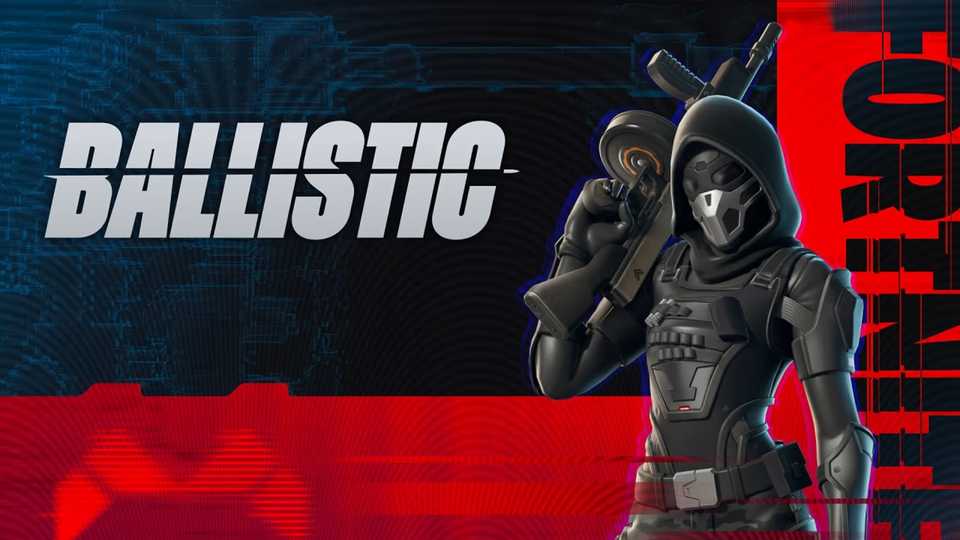



Fortnite is no longer a simple battle royale game, with survival modes, racing modes, rhythm games, and more. The cartoonish graphics are well suited to playing at lower resolutions, although the number of UI elements on the screen at any time does tend to clutter things up.
- Genre(s)
- Survival, Battle Royale, Shooter, Action, Adventure
3 Rocket League
Exploding goals forever
The simplicity of Rocket League lends itself well to playing on handheld gaming consoles, and the fact it's now free to play on the Epic Games Store means you should install it on your ROG Ally straight away. There's something intensely addictive about the mashup of cars and soccer, with the high-octane feel of smaller teams battling it out on the pitch. It's been one of my favorite games since launch and plays surprisingly well on the smaller screen of the Ally.
Matches are short, making it a perfect game to pick up and put back down again during the day, and you can play offline for practice if you're not connected to Wi-Fi. I stopped playing a while back, partly from losing touch with the friends I used to play with, but also because it felt wrong somehow to use my powerful gaming PC to play such a relatively low-power game. Now, I can play it wherever I'm sitting at the time, and it fits well with the limitations of the handheld. It's even fine using my phone as a hotspot for getting in a few matches while I'm out of the house.
Rocket League
Rocket League is what would happen if soccer was invented by the Motor City. It's highly optimized and plays great at any resolution, which is perfect for the 1080p, 120Hz display of the ROG Ally.
2 Starfield
The emptiness of space seems lessened on a small screen
In my opinion, handheld gaming consoles and Bethesda RPGs go hand-in-hand. I love them on the Steam Deck, and they're equally good on the Z1 Extreme-powered ROG Ally. Starfield is the latest RPG to come from the studio, and it's the only new IP that they have released for a long, long time. It plays very similarly to the Fallout and Elder Scrolls franchises, but this time, you're in the vastness of space. Every other Bethesda title has you hoofing it around everywhere, which wouldn't work here, so you get your own spaceship. I haven't really gotten into the rebuilding and customizing part of using that ship, but flying around and fighting space battles is always great fun. I have loved space sims since first playing X-Wing vs Tie Fighter all those years ago, and while the combat isn't as tight, it still scratches my itches nicely.
While the game can look pretty spectacular at higher settings, playing it on a handheld with a lower-power APU means sacrificing the visual quality. I'm okay with that, as my favorite Bethesda game, Fallout 3, is already fairly low-res for everything. I play their games for exploration, the offbeat humor found in scattered objects in far-off locations, and to see how the interplay between the different in-game factions changes as I get closer to the ending. I'm nowhere near the ending in Starfield yet, but I want to know how things tie together, as I do love a mystery.
Starfield
Starfield runs fine on the ROG Ally at higher settings thanks to the lower resolution, it's still worth turning down the visuals for a smoother experience.
1 Horizon Forbidden West
This game is beautiful at any resolution
If you're not familiar with the world created in the Horizon series, it's one of my favorite post-apocalyptic settings to feature in any video game. Without going into too many plot spoilers, you play a woman called Aloy, an outcast who has been raised by a tribe after being found alone in the wilderness as a baby. The world seems like Earth but for one thing - giant robotic dinosaurs. You fight these with primitive weapons: bows, slings, spears, and also some more complicated devices. This is the second game in the series, and you're trying to save the world (again) as a thing called Blight is corrupting the machines and the plants everywhere, which will result in life dying out.
It's a visual masterpiece, from traversing the world on foot or on machines you "override" to tame or by climbing anything that has visible handholds. The splendor of Horizon Forbidden West really deserves a larger OLED display, but it's hard to put down once you start playing, and the ROG Ally allows you to take it with you wherever you go. Reducing the resolution and adding FidelityFX Super Resolution (FSR) into the mix makes for a good balance between visuals and performance, but temper your expectations. Even then, it's going to average above 30FPS but not much higher. That's still very playable, though, especially for someone like me who grew up on Xbox 360 or PlayStation titles that aimed for 30FPS for performance.
Horizon Forbidden West
Horizon Forbidden West is a visual treat, and it's impressive that it runs on handheld gaming consoles at all. For a better time while experiencing Aloy's journey to save the world of the future on the ROG Ally, you'll need to turn textures down to medium and the resolution to 900p.
The Asus ROG Ally is fantastic for on-the-go multiplayer gaming
Handheld gaming consoles like the Asus ROG Ally have one big advantage for me over the Steam Deck, and that's being able to run anti-cheat. Or more specifically, being able to run Windows games that rely on anti-cheat, like my favorite game ever, Destiny 2. Being able to fly around the Sol system any time I want is great, even if I have to turn down settings to do so, and I find myself using the console to tidy up quests at the end of the day or go around vendors to buy things I neglected to pick up in my earlier gaming. I also like being able to easily install games from other storefronts, because not everything about PC gaming needs to run through Steam.

Someone made a dual-screen ROG Ally, because apparently the Nintendo 3DS was too small
Give your Asus ROG Ally its own ally.