
Summary
- SyncThing allows for cloud saves between PC and Steam Deck, especially useful for non-Steam games lacking Steam Cloud support.
- Heroic Games Launcher enables playing Epic Games on Linux, including free games, seamlessly syncing with Steam Deck via Proton.
- Decky Loader offers diverse plugin options for Steam OS on Steam Deck, enhancing customization and user experience with easy installation.
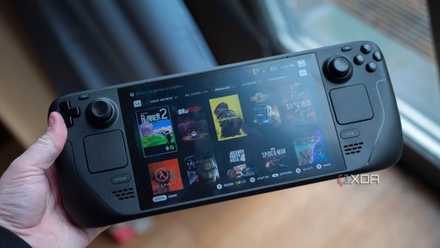
The Steam Deck is a gaming handheld that hands over a lot of control to the user. You can run anything you want on it as you would any Linux-based computer, ranging from helpful utility applications to mods and other things that can improve your gaming experience. These are some of the most essential applications you can get on the Steam Deck, and they're all very easy to install and configure.
1 SyncThing
Sync your non-Steam game save files
SyncThing is a free tool for synchronizing the contents of a folder, similar to Steam Cloud. By default, it operates only over the same network and not via the internet, so it's not technically a cloud solution. However, you can set up your own server to create a personal cloud. Many popular PC games aren't available on Steam and therefore don't benefit from Steam Cloud file syncing. This is especially true for emulators of old console games, which is unfortunate because emulation works wonderfully on the Deck.
While SyncThing will work for cloud saves between your PC and your Steam Deck, you will definitely want to be careful as these kinds of games were not built with cloud saves in mind. It's not a "true" cloud solution as files are shared peer-to-peer, but it's still a great way to make sure your save files are up to date on your devices.

How to sync non-Steam save files with your Steam Deck
Steam Cloud saves don't work for non-Steam games, but there's a way to make your own cloud saves. Here's how.
2 Heroic Games Launcher
For running all those free games from Epic
Heroic Games Launcher is a community-made version of the Epic Games Store that runs natively on Linux. Installing games on the Steam Deck using the Epic Games Launcher or Heroic Games Launcher is similar to any other store or launcher. Once you're signed in, your entire library will be available for installation. However, the usual caveats apply.
If you collected a ton of free games with Epic Games over time, then this is a great way to get playing through that backlog. The games will work perfectly and play through Proton as normal, so we highly recommend giving this a go.

How to install and play games from the Epic Games Store on Steam Deck
In addition to Steam, you can also install the Epic Games Store and play games from there on the Valve Steam Deck. Here's how to do it.
3 Decky Loader
A plugin loader for modding Steam OS
Decky Loader is a plugin manager that integrates with Steam OS, and it can download and install plugins for you that replace or change certain aspects of the OS. One such tool is SteamGridDB, which will install art for non-Steam applications on your Steam Deck. That includes the likes of Heroic Games Launcher or other tools like Spotify or Discord.
It's a pretty easy installation process, and you'll only need to use your Steam Deck in desktop mode to get started with it. Another great plugin is ProtonDB Badges, which will show you the compatibility of games in your library and if they'll work well on your Deck or not.

How to install plugins on Steam Deck using Decky Loader
Decky Loader is popular plugin software for Steam Deck, giving you easy access to plugins that can enhance the SteamOS experience.
4 Spotify
Listen to music while you game
If you want to listen to music while you game on the go, then you can install Spotify on the Steam Deck and add it as a non-Steam game. This will allow it to run in the background while you play actual games on the Steam Deck, and you can listen with your headphones, earphones, or just over the speakers, either.
Note that if you use another service to log in to Spotify (be it Facebook or Google, for example), you'll need to log in to your Spotify account on desktop and change the password on your account. You can then use your login credentials to log in via Spotify instead of using social media. This will not break logging in with social media; it'll just allow you to log in using the normal Spotify flow on your Steam Deck.
The same goes for other platforms like Discord too, which you can install without any issue on the Steam Deck.

How to install Spotify on the Steam Deck and listen to music while you game
If you like to listen to music when you play games, there's an easy way to do it on the Steam Deck.
5 Sunshine and Moonlight
Stream your games from your PC
The Steam Deck can handle many games, but it's noticeably underpowered compared to some of the best alternatives on the market. If you want to play your most intensive games on the Steam Deck, you might consider using Sunshine and Moonlight. Sunshine is a re-implementation of the Nvidia GameStream protocol that allows you to stream games from your GPU to your Steam Deck running Moonlight. It's easy to set up and supports Intel, AMD, and Nvidia GPUs.
While it works best on your home network, you can actually port forward Sunshine to be accessible from outside of your home network. It's a great way to enjoy the games that are too powerful for your Steam Deck in a way that hides the fact it's not actually running on your Deck.
How to install and use Moonlight on Steam Deck
Moonlight is a great way to make more games playable on your Steam Deck, and it only takes a few minutes to set up.
The Steam Deck is incredibly versatile
The Steam Deck is a versatile gaming handheld that gives users significant control, allowing them to run a variety of applications just like any Linux-based computer. From essential utility apps to mods that enhance the gaming experience, these tools are easy to install and configure, making your Steam Deck even more powerful.We highly recommend trying them out, along with the countless more tools and other plugins you can install, too.

Best PC gaming handhelds in 2025
Play your favorite PC games anywhere with these gaming handhelds.