
Summary
- PCIe 5.0 SSDs are fast for large file transfers, but offer minimal improvement in everyday use.
- Cooling for PCIe 5.0 drives is critical due to overheating issues and the need for oversized heatsinks.
- Gaming performance is not significantly improved with PCIe 5.0, with PCIe 4.0 drives being more cost-effective.
PCIe 5.0 SSDs haven't been out for that long, which puts them firmly in early adopter territory. Usually, that's where I would tell enthusiasts to spend their money on the latest and fastest technology, but on this occasion, I'm going to advise patience. On paper, they look great, with up to 14,000MB/s transfer speeds, but that's only part of the story. If you want the latest tech at any cost, by all means, go and pick up one of the best PCIe 5.0 SSDs, I won't stop you. But if all you need is a reliable, fast SSD to run your system and games on, there are many reasons why PCIe 5.0 SSDs aren't worth your time.

PCI Express 5 (PCIe 5.0): Here's everything you need to know about the current-gen standard
PCIe 5.0 is the next big thing in the computing space.
5 They're only faster in one particular scenario
Unless you need to shift a lot of data around, they're no big improvement
When read and write speeds are mentioned in relation to PCIe 5.0 SSDs, the numbers mentioned are for sequential transfers. That's when large files are being transferred, and are almost always the fastest type of transfer. The numbers don't lie. Gen 5 drives are faster at this type of transfer than any other consumer SSD. But, they leave out other important information, because not every task that you do on your computer is of a sequential type.
|
Crucial T705 |
Crucial T700 |
Samsung 990 Pro |
Corsair MP700 Pro SE |
|
|---|---|---|---|---|
|
SEQ1M, Q8T1 |
|
|
|
|
|
SEQ1M, Q1T1 |
|
|
|
|
|
RND4K, Q32T1 |
|
|
|
|
|
RND4K, Q1T1 |
|
|
|
|
Looking at the data for three PCIe 5.0 SSDs (Crucial T700, T705, Corsair MP700 Pro SE) and the PCIe 4.0 Samsung 990 Pro, you start to notice something interesting. When handling random reads or writes, which is the majority of data transfer in everyday computing use, the numbers aren't much different between generations. All four drives perform similarly in these situations, with the PCIe 4.0 SSD even outperforming the newer Gen 5 drives in some cases. Unless you're always transferring large file sizes, you don't need the latest PCIe SSDs.
4 PCIe 5.0 SSDs need a lot of cooling
Oversized heatsinks are a must-have
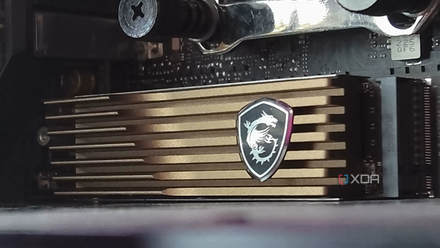
The first few Gen 5 SSDs that made it to market had fairly modest transfer speeds of around 10,000MB/s and even more modest cooling solutions that weren't much different from Gen 4 heatsinks. Once those drives got into the hands of reviewers and enthusiasts, a worrying trend started to appear. The drives were overheating within minutes of sustained data transfer, making them throttle back. Not exactly the situation you want when you're selling speed, and the second wave of PCIe 5.0 drives promised to be even faster.
The solution was to put oversize heatsinks on every PCIe 5.0 SSD, or advise caution and that you'd need a motherboard with existing heatsinks to run the new drives. Some manufacturers made M.2-sized finstacks, like those used on GPUs and CPU air coolers, to provide enough cooling. Others used thick aluminum, or added small fans for active cooling, or sold them with waterblocks for custom liquid cooling use. Others did several of these things at once, showing how much of an issue that thermals are on these speedy SSDs.
The other problem is that often, the PCIe 5.0 M.2 slot or slots on the motherboard were under or next to the PCIe slot used by the primary GPU. That makes things tricky, as space is limited, and some heatsinks are too large to use. Maybe moving the M.2 slots further down the board is an option, but as the PCIe gets faster, it becomes more susceptible to interference, which is part of why the PCIe 5.0 slots are close to the CPU in the first place.
Do I need a heatsink for PCIe 5.0 SSDs?
PCIe 5.0 SSDs require a heatsink for optimal performance, but whether you need to buy a heatsink alongside a PCIe 5.0 drive is something else.
3 PCIe 5.0 SSDs don't offer much in increased gaming performance
Seriously, stick with PCIe 4.0
Often, it's PC gamers who buy cutting-edge technology as soon as it hits the market so that they can play their favorite games at higher resolutions and frame rates. The thing is, PCIe 5.0 isn't needed for gaming workloads. Gen 5 SSDs take around the same time to load games as Gen 4 ones do, and even Gen 3 doesn't slow things down appreciably. Once you've crossed the Rubicon into NVMe storage, the gaming experience doesn't change much between generations. Our favorite SSD for gaming is a PCIe 4.0 model, and that's all you need for gaming.
The most popular gaming handheld, the Steam Deck, is only using a PCIe 3.0 SSD interface, and I can't say I've noticed it load games slowly compared to the other PCIe 4.0-equipped gaming handhelds like the Legion Go or ROG Ally X. Maybe in the future once developers optimize things for the faster speeds in PCIe 5.0 SSDs we'll see an improvement in gaming performance, but it won't happen for a while.

It's 2024 and PCIe 5.0 SSDs are still not worth it for gaming
PCIe 5.0 SSDs hold the key to transformative gaming experiences. If only those promises weren't years away from actually panning out.
2 Gen 5 prices are still too high
You'll pay almost twice as much for PCIe 5.0 drives
Even if PCIe 5.0 SSDs don't overheat, or if they perform similarly to PCIe 4.0 in random reads, or any of the other points here, there is one big reason to avoid them for now. That's the pricing, which has been too high for even the promised benefits of the storage medium. At launch, prices were many times that of a comparable PCIe 4.0 drive, which is maybe fair because not many computers could use the standard, so it was in the early adopter space. It's been nearly two years since then, and Gen 5 drives are still twice the price of Gen 4 drives.
In that time, DDR5 has gone from being several times the price of DDR4, to almost the same price for a similar capacity. That's the normal trajectory for technology, with prices dropping after a while when the process matures and more people want to buy it. Maybe the second part of that sentence is the important thing, as many devices are still not supporting the standard, it just doesn't have the consumer demand for prices to normalize.

Crucial T705 SSD review: The new king of SSDs, but it'll cost a prince's ransom
This PCIe 5.0 SSD promises the fastest speeds around, but does it live up to those claims?
1 Not every device supports them
You'll need a premium motherboard, adding to the overall cost
To achieve the high transfer speeds of PCIe 5.0 SSDs, you need two things: the SSD and a compatible device to use it with. Currently, that means a PC motherboard because no other consumer device uses Gen 5. Handheld gaming consoles use either Gen 3 or Gen 4, and it's unlikely that will change in the next generation of handhelds because of the heat Gen 5 SSDs put out.
The picture for compatibility on PC hardware is also complicated. Intel has supported PCIe 5.0 on its processors since the 12th generation of Intel Core, but Z690 motherboards only had PCIe 5.0 support for the PCIe x16 slot for graphics card use, and no M.2 PCIe 5.0. Z790 had a single Gen 5 M.2 slot on some premium motherboards, but not on the rest. H770 mostly had Gen 5 on the x16 slot, as did B760 chipsets if it had PCIe 5.0 at all. Compatibility on the AMD side of things is slightly better, with X670 chipsets usually having at least one PCIe 5.0 M.2 slot, and several of them on more premium motherboards. B650 chipset motherboards could add PCIe 5.0 to either the x16 slot or one M.2 socket, and it depends on the manufacturer's decision as to which is included.
The point is that, while three generations of Intel processors and one generation of AMD ones support PCIe 5.0 storage, the number of motherboards that could take advantage of the faster SSDs is still small. It's also mostly limited to premium motherboards, unless you're going for AMD, where the mid-range motherboards could support it if you choose wisely.

Best PCIe 5.0 motherboards in 2025
PCIe 5.0 is the latest big standard for computing, and these are the best motherboards that support it.
PCIe 5.0 SSDs are fast, but you probably don't need them
Gen 5 SSDs are still an important milestone, and it's truly impressive seeing them transfer data as fast as the theoretical maximums in the PCIe 5.0 standard. But, they're not faster in all situations, they cost more, get rather warm, and don't offer the higher capacities of PCIe 4.0 drives. With PCIe 6.0 closing on release and PCIe 7.0 being worked on, Gen 5 SSDs might not even stay around long enough to be worth the increased cost.