
The number of generative AI tools has grown significantly, almost to the point of market saturation, with new AI platforms and features appearing everywhere. Every company seems eager to integrate AI in some way, but few tools stand out in both accessibility and capability. Adobe Photoshop’s Firefly AI is a familiar choice for creatives, offering AI features within a widely popular platform. Stable Diffusion, while less well-known compared to names like Midjourney, can be run locally, is highly customizable, and is free, giving creatives unmatched control over their projects.
Photoshop’s Firefly brings convenience and simplicity to generative AI, but when using GUIs like ComfyUI along with Stable Diffusion models, creative freedom can be taken to an entirely different level. For those who value control over every detail of their work, the differences between these tools are pretty significant. ComfyUI’s customization and flexibility come with a steeper learning curve, while Photoshop offers ease of use at the expense of creative control. ComfyUI and Stable Diffusion allow users to go far beyond Photoshop’s capabilities, enabling highly detailed and fully customizable workflows.

5 reasons to switch from Photoshop to an open-source alternative
Ditch Photoshop for open-source freedom
The control gap
ComfyUI has an edge in creative freedom
Photoshop’s AI is designed for simplicity. You provide a prompt, or let the AI decide, and the system generates content. Extending an image is as easy as using the crop tool to expand the canvas, while removing an object requires nothing more than a quick selection and one click. Although you can guide the AI with prompts, much of the outcome is left to its interpretation, limiting the user’s control.
Stable Diffusion takes a fundamentally different approach. Using tools like ComfyUI, users can manipulate nearly every detail of their output. Positive and negative prompts allow for refined control over what to include or avoid in a generation, while word weighting ensures the AI emphasizes specific elements. This flexibility makes Stable Diffusion far more dynamic for creative professionals.
Photoshop relies on a single proprietary model, but Stable Diffusion’s open-weight design has a diversity of fine-tuned checkpoints. Beyond Stability AI’s models, options like Hunyuan-DiT, FLUX, and PONY each have unique strengths, with countless fine-tuned variations developed by the community. This ecosystem gives creators access to specialized tools for almost any style or subject.
ComfyUI’s node-based workflow enables deep customization. Artists can currently combine 1,674 nodes for tasks including image, video, audio, and text manipulation. ControlNets and IPAdapters extend the possibilities, allowing users additional influence with poses, depth maps, line art, and character facial consistency with FaceID. You can even start with a simple sketch, load it into a control net, and use it as the foundation for a fully detailed image.
The capabilities don’t stop there. Inpainting and outpainting refine or extend images, while segmentation models detect and isolate specific elements like faces or objects for detailed editing. LoRAs target hyper-specific adjustments, such as emulating an art style or generating your character in a specific piece of clothing. There are LoRAs for poses, environments, photography styles, anime characters, celebrities, and more.
Once your project is complete, upscale, deblur, restoration, and compression removal models are available on platforms like OpenModelDB. The open framework makes all of this possible. Unlike Photoshop’s tightly controlled ecosystem, all of these open models spark constant innovation. With a growing number of user-developed tools and improvements, Stable Diffusion pushes creative boundaries in ways Adobe’s tools cannot.

Pinokio makes installing ComfyUI a breeze
Pinokio lowers the barrier of entry for beginners
Complex workflows and automation
ComfyUI’s workflows can automate like no other
Photoshop excels at linear, straightforward workflows. Batch editing, object removal, and resizing are quick and efficient. Photoshop shows its limitations when it comes to handling multi-stage or iterative creative processes. For example, manual adjustments or external tools would be required for generating a sequence of images using different characters in various styles, or generating identical images with one object's color changed.
ComfyUI thrives in scenarios like this, enabling users to create multi-layered workflows by combining different nodes, models, and techniques. For example, a workflow could be automating the creation of an image from your sketch, in a specific style, using your character's face in several variations, describing and captioning it, upscaling it, and embedding the workflow in every saved image.
This is something Photoshop is incapable of, and this modularity makes it ideal for large-scale professional projects where consistency and precision matter, and for creatives who think big and care about the details.

How to build basic workflows in ComfyUI
ComfyUI is an incredibly powerful tool for anyone aiming to stay ahead of the AI curve.
Cost and accessibility
Free isn’t always easy
Adobe’s subscription model makes Photoshop a recurring expense. It’s difficult to be a professional creative and work outside of Adobe’s ecosystem, because it really is the standard. I know from experience that these costs really add up over time though.
Adobe is also being sued by the U.S. Federal Trade Commission for making it difficult to cancel subscriptions and imposing hidden “Early Termination Fees.” However, Adobe offers regular updates, a suite of apps that work together, powerful cloud processing, and it is fairly easy to learn with thorough documentation and YouTube tutorials.
ComfyUI and Stable Diffusion are completely free but come with challenges. Not all models, nodes and checkpoints have rights for commercial use. Running it effectively requires a GPU with at least 6GB of VRAM, and downloading models can consume significant storage space.
While learning the basics shouldn’t theoretically be any more difficult than learning Photoshop, there is a very steep learning curve as you get into complex workflows, and you can’t always just search YouTube for help. On the other hand, everything is processed locally, it’s largely not censored, and you don’t have to deal with Adobe’s frequent false positive guideline violation warnings.
Moderation and ethics
Freedom places ethical responsibility on the user
👁 Adobe Photoshop's random guidelines violation warning when using empty generative expand
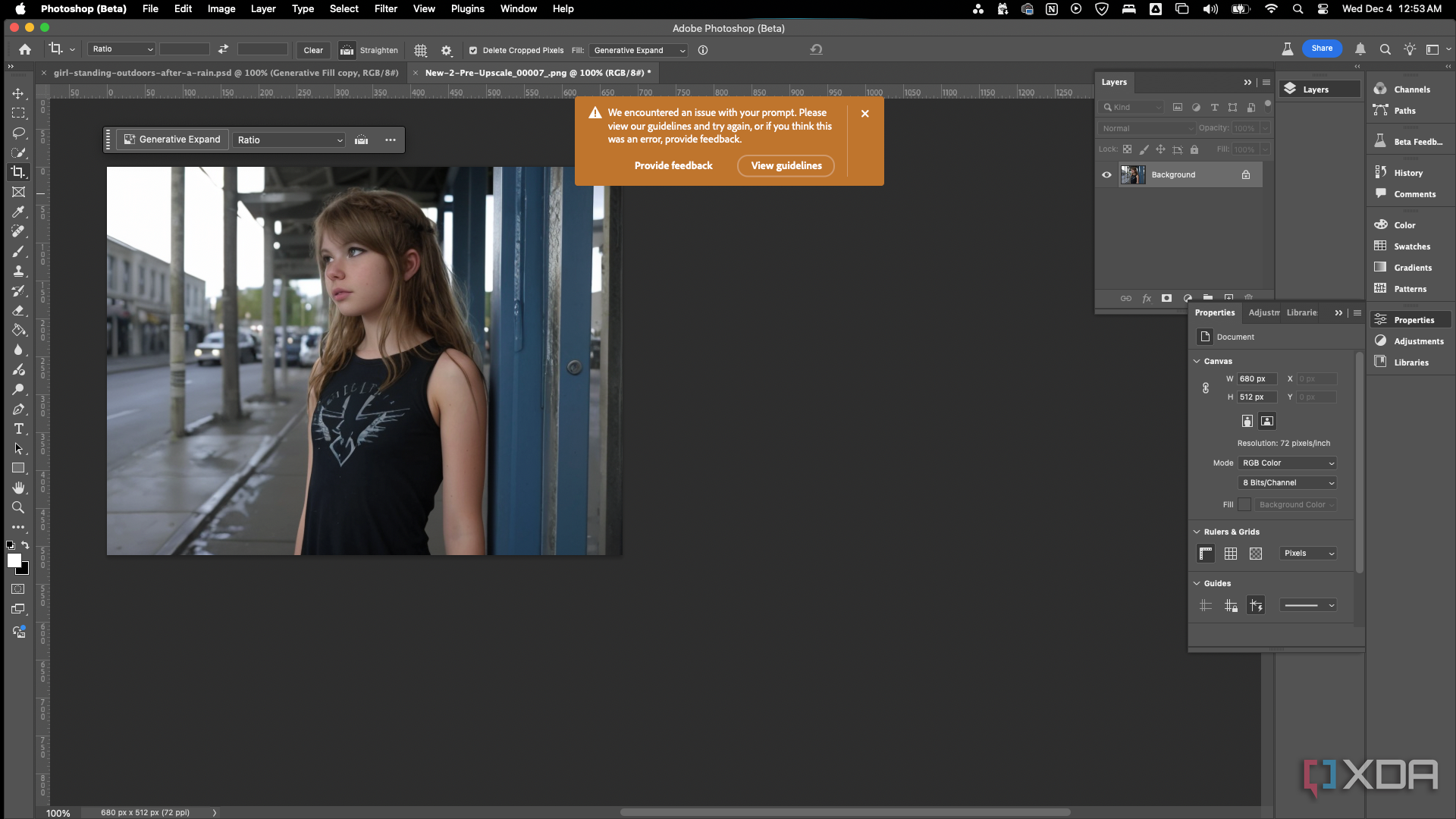
Adobe enforces strict content moderation to prevent misuse, which often has very frustrating limitations. There is a heavy bias against females in images, leading to false positives from their automated system, with no feedback as to what triggered the system.
For example, working on clothing products and fashion design jobs can be difficult, and working on any artwork with gore, classical paintings with nudes, figure drawings, or any NSFW content is near impossible. This heavy-handed approach can stifle creativity and make a product you paid a lot of money for completely useless for some tasks.
Stable Diffusion’s models are mostly uncensored and allow far more freedom. Users can work on a more diverse range of jobs and push creative boundaries without interference. However, this freedom requires ethical responsibility, and that is placed on the user. We know there will always be bad actors, and they will use open models unethically by violating intellectual property laws, producing deep fakes, scamming, fraud, and more.
Whether balancing ethical responsibility with freedom should be decided by a corporation, government, or individual has always been a controversial topic with varying opinions. Adobe has the right to censor their software however they like, but when that censorship severely impairs their software for some tasks, is it being implemented effectively? Should heavy censorship be put in place to address the minority of bad actors, if it restricts freedom and creativity for the rest of us?
Adobe is the industry standard for a reason
Three decades of experience
Photoshop’s tools have earned a great reputation for being intuitive, reliable, and highly effective across countless creative workflows. While its generative AI may not be as advanced as ComfyUI and Stable Diffusion’s capabilities, it’s far from terrible and serves many users well. For quick, simple tasks like removing an object in a single image, Photoshop is hard to beat — it can achieve results in seconds with minimal effort.
Its segmentation tools, like object selection and subject selection, are generally accurate and easy to use. The background removal tool is quick and effective. Adobe’s decades of experience refining Photoshop really show in how smoothly its tools integrate with each other and handle most tasks. It’s good software that I use daily. However, its limitations arise when projects demand complex automation, precise control, or creative freedom beyond its capabilities.
It comes down to what’s needed
Control versus convenience
Photoshop’s Firefly-powered AI is a solid choice for those seeking ease of use and integration with other Adobe products. Collaboration and learning are easy when the software is the industry standard. Adobe continues to roll out updates with new or improved features. However, there’s a point where Photoshop can no longer compete.
ComfyUI and Stable Diffusion demand more from its users, both in hardware and dedication to learning, but reward them with capabilities that surpass Photoshop. Their flexibility, precise level of control, and high-quality outputs have really opened up possibilities that were limited to expensive, proprietary, custom software in the past.
We’re all seeing low-effort, low-quality AI content flooding the market, which obscures a lot of the advanced work being put out there. Artists and other creative professionals need to know that this is an extremely powerful and free tool that shouldn’t be dismissed. If you're really not into trying any new AI, though, there are still plenty of cool things to learn in Photoshop.
