
When we first moved into this house, it was part of an ongoing development, and not every house was occupied (or even built). I wasted no time getting fiber-to-the-home installed and setting up a mesh kit with one node on each floor, thinking that would be perfectly adequate for our needs. And it was, mostly, until we started noticing odd glitches in wireless connectivity in parts of the house.
Now, at that time, more people had moved in, and the number of access points I could see nearby had increased from about a dozen to closer to fifty. Various parts of my smart home kept losing connectivity, including in-wall switches, smart sockets, and the front doorbell, which constantly struggled to stay on the network.
Moving the mesh nodes closer didn't do anything, nor did heat-mapping the access points in the neighborhood to see if interference was the issue. Even hardwiring everything that I could didn't mitigate the issues, and I'd nearly given up before I realized that all the devices with issues were using the 2.4GHz band, and that the number of them on the network had increased as I built out my smart home. They were all fighting for airtime, and that was causing the issues, even with high signal strength.
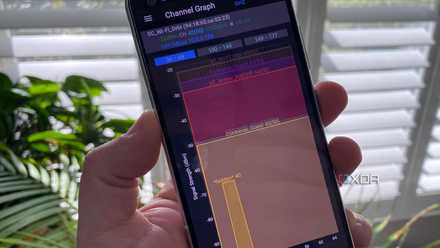
I heatmapped my Wi-Fi to figure out where I went wrong
I mean, maybe I was right, but the chances of that are astronomically small
I couldn't figure out why my Wi-Fi wasn't performing
Of course, I threw money at the problem at first
Having devices suddenly start dropping off your home network is a horrible feeling. It's even worse when some days are fine, others less so, and you can't quite figure it out because you think there's enough bandwidth for your setup. Everything becomes a conspiracy, wondering if the builder bought a consignment of bad smart devices, or whether the walls have something inside that I'd not seen during the building process, or any number of intrusive thoughts.
I thought maybe I was overloading one of the access points, so I hardwired them to the main router and added another access point just in case I was running into device limits. Then I put MAC whitelists on each access point so that only nearby devices would connect to them, but to no avail. I did learn quite a bit about network setup, but things still weren't right.
It wasn't the neighbors causing my Wi-Fi woes
In the apartment block we lived in before, everything interfered with our 2.4 GHz band. The microwaves, the badly maintained central air handlers, baby monitors, cordless telephones, the works. I started wondering if that was happening, so I wandered around the neighborhood with Wi-Fi analyzing apps, to see if the dozens of APs in broadcast range were the cause.
They weren't, at least not as badly as the apartment buildings; the airwaves were cluttered but not completely overwhelming my signals. But that gave me another idea: it was my own 2.4GHz network that was causing the dropouts and slowdowns.
Your mesh Wi-Fi isn't the problem, your backhaul is
Running wires beats running circles around the problem
The problem was everywhere and I didn't realize
You can't spell idiot without IoT
In the end, two things helped me realize the issue. One was that it was overwhelmingly 2.4GHz devices that were having issues. The other was that hardwiring the backhaul between the mesh nodes improved things slightly, but not completely. The problem? The dozens of IoT and smart home devices on my network were all vying for airtime and slowing things down because of the slow transmission speeds they operate at.
It was rush hour traffic, all day every day in the 2.4GHz band, with all the IoT devices that communicate at less than 12Mbps data rates being the primary issue. Sure, they weren't transmitting much data each time, but between broadcast and command packets, it was enough to clog things up, so the higher-bandwidth devices like my video doorbell were the first to glitch out.
It wasn't a signal quality issue at all, but one of simple quantity.
Time for a change in architecture
Unfortunately, the only fix for airtime issues is to spend money. You need to reduce the number of devices on the channel, either by using other connectivity standards like Thread, Zigbee, or Z-Wave, upgrading to devices that support newer standards like Wi-Fi 6E, or implementing some form of network segmentation.
Currently, it's been mitigated by adding more 2.4 GHz SSIDs, so fewer devices are on each one. Thankfully my access points let you make virtual SSIDs, so the issue is contained until I plan what I want to replace things with. It'll probably be Zigbee, then I can use smart switches and smart sockets as routers and repeaters to get a signal across the home. But that'll be expensive and time-consuming, so it's a project for a future day. Except for the darn video doorbell, that's being replaced with a PoE hardwired unit, because nothing else worked.