
You can go in a number of different directions when picking out a new gaming monitor, prioritizing things like refresh rate, color accuracy, resolution, or display type. There are great gaming monitors that emphasize each of these traits, but finding the best of all of them in a single display is tricky. That's why Alienware's new AW2725DF QD-OLED stands out as one of the top gaming monitors you can buy for under $1,000. The display uses Quantom Dot OLED technology, has a 27-inch screen with a 1440p resolution, and features a 360Hz refresh rate.
Finding a 27-inch, QD-OLED gaming monitor with a 1440p resolution and a 240Hz refresh rate isn't that difficult. However, once you start creeping above 240Hz, displays with IPS LCD panels are far more common. But with the Alienware AW2725DF monitor, you get the benefits of QD-OLED — like greater color accuracy — while still getting the 360Hz refresh rate. Plus, for mere mortals like myself, a 360Hz refresh rate and an advertised 0.03 ms response time will be more than enough for elevated gameplay.

Monitors at CES 2024: An exciting OLED showcase and what it taught us about the year ahead in monitors
Beautiful OLEDs and high-refresh rate panels as far as the eyes can see. Yup, that was CES 2024.
Put simply, this Alienware monitor looks stunning and feels incredibly responsive in games. Considering that the display's $900 price point is at or below market competitors, it's easy to see how this monitor could be the best in its class in 2024.
About this review: Dell sent us an Alienware AW2725DF monitor for review. The company did not have input in this article, and did not see its contents before publishing.

Alienware AW2725DF 360Hz QD-OLED
At under $1,000, the price might just be right
- Screen Size
- 27 inches
- Resolution
- 2560 x 1440
- Max. Refresh Rate
- 360Hz
Alienware's AW2725DF gaming monitor brings Quantum Dot OLED technology to a 27-inch, flat display form factor. It pairs impressive color accuracy and great HDR modes with a 360Hz refresh rate for gaming. It includes plenty of ports, but USB ports are mostly Type-A, and the HDMI port is limited to 240Hz.
- Supports 360Hz refresh rate over DisplayPort
- Display quality is excellent with QD-OLED and HDR features
- Solid design and stellar cable management features
- Limited to 240Hz over HDMI
- USB ports are mostly Type-A
- Bezels might be large enough to bother some buyers
Pricing and availability
Dell announced the new Alienware AW2725DF 360Hz QD-OLED monitor at CES 2024, on Jan. 9. The monitor became available for purchase last month for $900 from Dell's website. It comes in a Dark Side of the Moon colorway, which is basically just black. On the back, the monitor features an LED Alienware and "27" logo.
Specs
Alienware AW2725DF 360Hz QD-OLED
- Screen Size
- 27 inches
- Resolution
- 2560 x 1440
- Max. Refresh Rate
- 360Hz
- Response Time
- 0.03ms gray-to-gray response time
- Connectivity
- 2x DisplayPort 1.4, 1x HDMI 2.1, 1x upstream USB 3.2 Gen 1 Type-B, 3x USB 3.2 Gen 1 Type-A, 1x USB 3.2 Gen 1 Type-C
Design
The bezels are a bit chunky on the front, and there are LEDs on the back
From the front, it would be difficult to tell this Alienware monitor apart from any other. However, a quick look at the back reveals a few LEDs by way of the Alienware and "27" logos. These are pretty unnoticeable while you're using the display, outside of a subliminal glow you might spot on the wall behind your monitor. This low-key design allows the Alienware monitor to be used for both work and play if you want a dual-purpose solution. In all, the Alienware AW2725DF monitor has a basic but refined design language.
In all, the Alienware AW2725DF monitor has a basic but refined design language.
Notably, the Alienware AW2725DF features a standard flat display panel. The bigger variant in Alienware's QD-OLED series, the 32-inch AW3225QF gaming monitor, has a curved display by comparison. It seems like Dell thought the smaller 27-inch monitor didn't need a curved display, and I agree. For better viewing angles, the Alienware AW2725DF monitor has height, tilt, swivel, and pivot adjustments available. However, the stand and its hexagon base are quite bulky. You can swap it out for a monitor arm with VESA mount support, though.
Connectivity
The monitor works as a USB hub, but it needs more USB-C
The Alienware AW2725DF monitor offers solid connectivity options, but there are some notable caveats to keep in mind. First, let's talk about the video specifications. You get two DisplayPort ports and one HDMI port for video input, and the included USB-C input does not support DP alt mode. That means you have to stick with either standard DisplayPort or HDMI, but those ports aren't equal. The DisplayPort inputs feature DP 1.4 and will provide the full 1440p and 360Hz that the Alienware AW2725DF supports. However, if you decide to use the HDMI 2.1, you'll be limited to a 240Hz maximum refresh rate.
Essentially, the Alienware AW2725DF will need to be used primarily with a DisplayPort connection for the best performance.
Essentially, the Alienware AW2725DF will need to be used primarily with a DisplayPort connection for the best performance. You can use the included HDMI port for something like a gaming console or streaming stick, but your gaming PC will need to be hooked up with DisplayPort to use 360Hz.

Monoprice 7-in-1 USB-C to Dual DisplayPort docking station review: Well-built hub for those with DP monitors
With two DisplayPort connections, Ethernet, and USB, this hub can make a big difference at your desk or while traveling.
Aside from the video input ports, there is also a USB 3.2 Gen 1 Type-B upstream port available. By connecting the included USB-A to USB-B cable to a computer, three USB-A and one USB-C ports become accessible, making the Alienware AW2725DF function as a USB hub as well. However, I wish it had more USB-C ports, because USB-A accessories are dwindling, even in the PC world. In fact, Dell's own Alienware Pro Wireless Keyboard that I recently reviewed came with a USB-C 2.4GHz dongle. Even better would be to add an upstream USB-C port, perhaps one with DP alt mode that could be used as a video input.
With all these cables, you'll need to use the cable management solutions built into the Alienware AW2725DF monitor. There are routing channels along the back that help feed the cables through the stand, keeping them hidden. The channels are solid, but I could see them getting filled up if you use all the ports available on this monitor.
Display
The perfect pairing of color accuracy and high refresh rates
Finally, we get to the display, which simply looks excellent in a variety of situations. The Alienware AW2725DF monitor looks best while gaming or watching videos, so using regular desktop applications is a bit less impressive. However, thanks to the QD-OLED display technology, the Alienware AW2725DF monitor recreates colors in a more lifelike manner than a typical OLED monitor. As a consequence, QD-OLED monitors don't produce blacks as deep as a standard OLED. You'll notice this immediately if you look closely at the monitor while the display is off, as it will have a slightly purple hue.
One of the Alienware AW2725DF's calling cards is its color accuracy, since it is claimed to support 1.07 billion colors and 99.3% of the DCI-P3 color gamut. In our testing, the monitor nearly matches Dell's own claims, with our unit providing 98% coverage of DCI-P3. The monitor also tested for full coverage of the sRGB, 92% of NTSC, and 94% of AdobeRGB gamuts. These tests were conducted with Smart HDR off, as the monitor ships out-of-the-box. However, the Alienware AW2725DF monitor supports the VESA HDR TrueBlack 400 specification as well.
The monitor won't be as bright as some other options, though. With HDR off, the Alienware AW2725DF monitor recorded a maximum brightness of 214.9 nits, which appears to be at the lower end of the spectrum. You might see the monitor near 250 nits in standard mode, but it certainly isn't the brightest on the market. It was fine in my testing, though, in a well-lit room. When you use HDR, Dell says that you can expect a peak brightness of 1,000 nits. With the HDR Peak 1000 profile, the display meets the VESA HDR TrueBlack 400 specification at around 400 nits.
None of this matters if the Alienware AW2725DF monitor's impressive feature set doesn't elevate your gameplay, but I can safely say that it does.
None of this matters if the Alienware AW2725DF monitor's impressive feature set doesn't elevate your gameplay, but I can safely say that it does. Paired with a high polling rate keyboard and mouse, I was able to take full advantage of the 360Hz refresh rates that the monitor supports. You'll need a great graphics card and the right game to actually experience FPS figures that can make use of the high refresh rate, but it is possible. Even when playing casual first-person shooters or battle-royale-style games, my performance noticeably improved almost immediately after switching to the Alienware AW2725DF.

Alienware Pro Wireless Keyboard review: Checking almost all the boxes for high-level gamers
Alienware worked with professional gamers to design this keyboard, and it shows. There are still a few areas to improve, though.
Should you buy the Alienware AW2725DF gaming monitor?
👁 The Alienware QD-OLED 27 monitor as part of a desk setup.
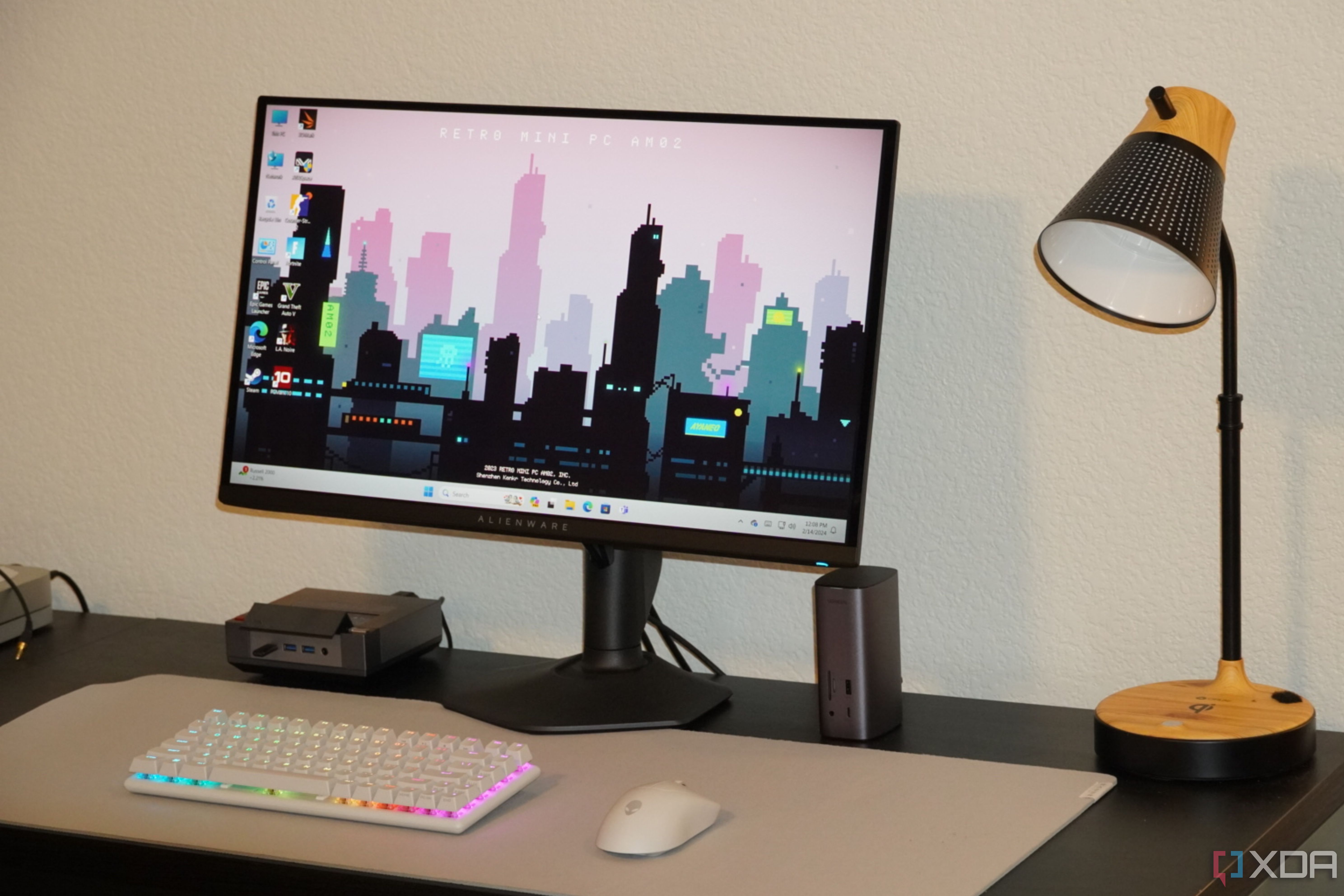
You should buy the Alienware AW2725DF 27-inch QD-OLED if:
- You want a high refresh rate monitor for gaming
- You also want a QD-OLED panel with great color accuracy
- You're looking for an excellent 27-inch gaming monitor for under $1,000
You should NOT buy the Alienware AW2725DF 27-inch QD-OLED if:
- You'd be fine with a non-OLED high refresh rate monitor
- You'd rather have a standard OLED display with deeper blacks
- You're on a budget
If you have around $1,000 to spend on a 27-inch gaming monitor, you'll struggle to find a better one than the Alienware AW2725DF. Gaming monitors with refresh rates beyond 240Hz often ditch OLED in favor of LCD technologies. However, with this Alienware monitor, you get the best of both worlds. There's great color accuracy thanks to the QD-OLED display panel, and excellent responsiveness thanks to the 360Hz refresh rate. That makes the Alienware AW2725DF a good value on its own, but the fact that this monitor actually undercuts the price of competing options is an added bonus.
Alienware AW2725DF 360Hz QD-OLED
At under $1,000, the price might just be right
- Screen Size
- 27 inches
- Resolution
- 2560 x 1440
- Max. Refresh Rate
- 360Hz
- Connectivity
- 2x DisplayPort 1.4, 1x HDMI 2.1, 1x upstream USB 3.2 Gen 1 Type-B, 3x USB 3.2 Gen 1 Type-A, 1x USB 3.2 Gen 1 Type-C
- Response Time
- 0.03ms gray-to-gray response time
Alienware's AW2725DF gaming monitor brings Quantum Dot OLED technology to a 27-inch, flat display form factor. It pairs impressive color accuracy and great HDR modes with a 360Hz refresh rate for gaming. It includes plenty of ports, but USB ports are mostly Type-A, and the HDMI port is limited to 240Hz.