
Dell's lineup of Alienware gaming laptops has been refreshed for 2024, and the changes include full design overhauls and minor spec bumps, depending on the model. The company felt the Alienware m16 R2 was in need of a new design, but decided the m18 R2 only warranted a new chip. For the brand's top-of-the-line 16-inch laptop, the Alienware x16 R2, Dell went with the latter. This year's Alienware x16 R2 revision looks identical to the original x16 from the outside, featuring sharp aesthetics and a white and silver look. On the inside, there a few component upgrades, like a new Intel Core Ultra processor and a supposed Wi-Fi 7 upgrade coming soon.
Of the great gaming laptops I've tested this year, I think the Alienware x16 R2 has the most attractive design. We're used to seeing gaming laptops with boxy, dark-colored housings, so the light colors and curvy chassis on the x16 R2 are a nice change of pace. As far as performance is concerned, the x16 R2 is one of the most powerful 16-inch laptops out there thanks to the Intel Core Ultra 9 and the Nvidia GeForce RTX 4090 configurations. It isn't all perfect, though — the lack of easily-accessible ports on the front or sides of the laptop is a big downside to going with the x16 R2. In fact, there isn't even an Ethernet jack at all. If you can get past those compromises, the Alienware x16 R2 is a great option.
About this review: Dell loaned us an Alienware x16 R2 for the purposes of this review. The company had no input in this article, and did not see its contents before publishing.

Alienware x16 R2
For those who want killer RGB and killer performance
- Operating System
- Windows 11 Home
- CPU
- Up to Intel Core Ultra 9
- GPU
- Up to Nvidia GeForce RTX 4090 Laptop GPU
Alienware's x16 R2 looks like the original x16 on the outside, but packs a few major upgrades on the inside. For starters, this laptop now includes Intel Core Ultra processors, which compliment the Nvidia GeForce RTX 40-series graphics cards. There are more subtle upgrades, too — like Wi-Fi 7 support and a 240Hz display for the base model. On top of that, the Alienware x16 R2 still has a stunning design and a whole lot of RGB lighting.
- Now features Intel Core Ultra 7 155H or Core Ultra 9 185H processors
- Maximum storage is now 8TB, configured in RAID 0
- Base model includes 240Hz for the first time, up from 165Hz
- Cherry MX keyboard option brings mechanical switches to your laptop
- All gaming laptops should have an Ethernet jack (this one doesn't)
- No ports on the left or right side of the laptop
- It isn't the most portable 16-inch laptop from Alienware anymore
- Wi-Fi 7 won't be available until after a software update set for later this year
Pricing and availability
The Alienware x16 R2 was announced at CES 2024, and it's available now from Dell's website. The base-model configuration retails for $2,100 and includes an Intel Core Ultra 7 processor, as well as an Nvidia RTX 4060 graphics card. At the high end, the x16 R2 can be configured with Intel Core Ultra 9 and Nvidia RTX 4090 graphics. Our review unit is equipped with a Core Ultra 9 and an RTX 4080 graphics card, and this configuration sells for $3,200. Keeping with the x16 R2 theme, this gaming laptop is only available in the "Lunar Silver" colorway.
Specs
Alienware x16 R2
- CPU
- Up to Intel Core Ultra 9
- GPU
- Up to Nvidia GeForce RTX 4090 Laptop GPU
- Display (Size, Resolution)
- 16-inch QHD+ (2560 x 1600)
- RAM
- Up to 32GB LPDDR5X 7467MT/s
- Storage
- Up to 8TB
- Battery
- 90Wh
- Ports
- 1x Thunderbolt 4, 1x USB-C 3.2 Gen 2, 2x USB Type-A 3.2 Gen 2, 1x HDMI 2.1, 1x mini-DisplayPort, 3.5mm headphone jack, 1x SD card reader
- Operating System
- Windows 11 Home
- Wi-Fi connectivity
- Wi-Fi 7
- Bluetooth
- Bluetooth 5.4
- Dimensions
- 14.36x11.41x0.73 inches (364.81x289.98x18.57mm)
- Weight
- Starts at 6 lb (2.72 kg)
- Speakers
- Six speaker setup (2x 2W tweeters, 4x 3W woofers)
- Colors
- Lunar Silver
- Price
- Starting at $2,100
Design and ports
It's a breathtaking design, but it isn't the most portable Alienware gaming laptop anymore
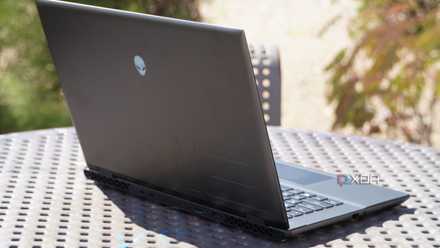
The design of the Alienware x16 R2 isn't new for 2024, but it doesn't have to be. The original Alienware x16 had a striking design that we loved, and it still holds up today. It's thin, measuring under an inch thick. Aside from the exact measurements, the sharp curves along the front and side edges of the laptop make it appear a lot thinner than it actually is. The x16 R2's white and silver colorway also add to this effect, and are a welcome alternative to a gaming laptop market full of identical dark-colored laptops. The Alienware x16 can't overcome weight limitations, and the heaviest configuration weighs six pounds. Still, I carried it in a laptop bag and the heft was manageable, although I absolutely noticed the extra weight.
When we first reviewed the original Alienware x16, it was one of Alienware's more compact and sleek laptops. It's still very sleek, but it isn't the most compact 16-inch laptop from Alienware now that the m16 R2 has been redesigned. Dell removed the thermal shelf from the m16 R2 to make it smaller, while the x16 R2 still has it. This makes a tangible difference in the two gaming laptops' portability, as you can see in the comparisons below:
Of course, the x16 R2's thermal shelf and increased thermal threshold mean that it can house a faster processor and graphics card. People who want the best performance should still go with the x16 R2, but the m16 R2 is now the top Alienware pick for compactness.
The original Alienware x16 had a striking design that we loved, and it still holds up today.
To make the sloping sides of the Alienware x16 R2 possible, there aren't ports anywhere but the back of the laptop. This is actually really annoying in practice, because something as simple as plugging in headphones or a USB cable requires turning around the laptop. There also isn't an Ethernet jack on the x16 R2, and I'd consider this to be essential on a gaming laptop at this price point. Since Dell already includes collapsible Ethernet jacks on its other laptops, I see no good reason why one isn't included here. If you can get past those very real compromises, port selection is solid. There's a Thunderbolt 4 port, a USB-C port, USB-A ports, an HDMI port, a mini DisplayPort, a headphone jack, and a microSD card reader.
Alienware m16 R2 review: A seismic shift in direction
Don't let the name fool you. Dell's new Alienware m16 R2 is a big upgrade over R1, featuring a significant redesign — but there's still work to do.
Keyboard and touchpad
Cherry MX laptop switches are still a game-changer
The white and silver exterior gives way to an all-black interior, and it creates an eye-catching look. The keyboard and touchpad on the Alienware x16 offer a solid mix of form and function, with plenty of RGB. Though it isn't new to the x16 R2 this year, the laptop has the first RGB touchpad I've ever tried. It's certainly not necessary, but it makes your gaming laptop stand out. The touchpad is of decent size for a gaming laptop, and requires just the right amount of force to click.
The keyboard on the x16 R2 is one of those things, and it's the biggest reason I'd recommend getting an Alienware gaming laptop.
At a time when there are other laptops with the same internal components as the Alienware x16 R2, the little things matter now more than ever. The keyboard on the x16 R2 is one of those things, and it's the biggest reason I'd recommend getting an Alienware gaming laptop. My review unit had the optional Cherry MX mechanical keyboard, and it's a must-have upgrade for the x16 R2. The keys are tactile and clicky, have plenty of travel, and feel the exact same no matter where you press them. After you try a mechanical keyboard on a laptop, you won't want to go back.

Alienware m18 R2 review: A premium, beastly laptop for no-compromises gaming
Last year's Alienware m18 was already good, but the m18 R2 and its 14th-gen HX processor and RTX 4090 graphics is excellent.
Display
The base model now includes a 240Hz refresh rate panel
There aren't any new display options for the Alienware x16 R2 compared to its predecessor, but the base display configuration is improved. You now get a display panel capable of 240Hz with any x16 R2 configuration, which is great news for prospective buyers. This is going to be the sweet spot for most gamers, as anything above 240Hz likely won't be perceptible to users. The screen felt snappy and quick during gameplay, which is all that matters. The panel has a resolution of 2560 x 1600 and a 3ms response time, too.
Color accuracy is excellent on this machine as well, with Alienware claiming full coverage of the DCI-P3 gamut. Our testing confirmed 99% coverage of DCI-P3, which is well within the margin of error of our testing hardware. As such, it's safe to say the Alienware x16 R2 display covers 100% of both sRGB and DCI-P3. There is a bit of a dropoff with NTSC and AdobeRGB color spaces, with the display covering 86% and 88%, respectively. However, those are still very respectable numbers, and the Alienware x16 R2 can keep up with the most color-accurate gaming laptops out there.
The display is more than bright enough, especially during indoor use. My unit had a peak brightness of 367 nits, according to our tests, but it actually felt brighter than that in daily use.
Overall, the display on the Alienware x16 R2 gives you all that you'll need in terms of color, resolution, brightness, and refresh rate. Anything more demanding would be too much for the laptop's components to handle, negating the effect. Most games run at the highest settings at frame rates well under 240Hz, so that assuredly won't be an issue.
Performance
Intel Core Ultra is a blessing and a curse
The shift to Intel Core Ultra in Alienware gaming laptops has benefits, but there are undeniable performance implications that come with the move. The new Alienware x16 R2 has an Intel Core Ultra 9 chip, while the outgoing Alienware x16 had an Intel Core i9 13900-HK processor. Instead of using the Core i9 14900-HX or something similar as a successor, Dell pivoted to the Intel Core Ultra platform, and that means the x16 R2 might actually perform worse under some workloads than its predecessor. The Core Ultra 9 has a Neural Processing Unit (NPU) for AI-related tasks, but is less apt to traditional processor-heavy workloads.
The differences between the x16 R2 and the original x16 were immediately visible in our benchmark testing. We ran all the tests below with the laptops set to their performance mode and connected to A/C power. As you can see, how the Alienware x16 R2 performs compared to its peers will largely depend on the type of workload it is under.
|
Alienware x16 R2 (Intel Core Ultra 9 185H, RTX 4080) |
Alienware x16 (Intel Core i9-13900HK, RTX 4080) |
Lenovo Legion Pro 7i Gen 9 (Core i9 14900 HX, Nvidia RTX 4080) |
Alienware m16 R2 (Intel Core Ultra 7 155H, RTX 4070) |
Asus ROG Strix Scar 16 (Core i9 14900 HX, RTX 4090) |
|
|---|---|---|---|---|---|
|
PCMark 10 (AC) |
7,105 |
8,064 |
8,185 |
7,187 |
8,583 |
|
Geekbench 6 (single / multi) |
2,200 / 13,179 |
2,713 / 15,066 |
2,884 / 16,730 |
2,308 / 12,349 |
2,961/ 17,488 |
|
3DMark: Time Spy Extreme |
8,501 |
7,422 |
9,428 |
6,032 |
10,653 |
|
Cinebench 2024 (single / multi / GPU) |
100 / 1,059 / 17,126 |
N/A |
122 / 1,481 / 18,347 |
93 / 853 / 11,056 |
126/ 1,508 / 22,357 |
In the CPU-heavy benchmarks, like PCMark 10 and Geekbench 6, the Alienware x16 R2 and its Intel Core Ultra 9 processor lost out consistently to systems with an Intel Core i9 processor. However, the Core Ultra 9 wasn't too much of a drag on graphics-heavy tests. In 3DMark: Time Spy Extreme, the Alienware x16 R2 beat out the x16 by about a thousand points, despite both systems featuring an RTX 4080 GPU. The differentiating factor there is the Core Ultra 9, so it appears that CPU performs better than a 13th-generation Core i9. Although having a 14th-gen Intel Core i9 processor clearly has an impact on performance across the board, the biggest determinant for performance is still the GPU your system has.
The x16 R2 might actually perform worse under some workloads than its predecessor.
The good news is that the x16 R2's occasional losses in benchmarks don't seem to matter much in real-world gaming. For example, the x16 R2 actually ran Forza Horizon 5 better than the Alienware m18 R2, which has a better CPU and GPU. Aside from actual gameplay, the x16 R2 put up a score of 110 FPS in the Forza Horizon 5 benchmark, whereas the m18 R2 scored 82 FPS. Both were on the "extreme" graphics presets, for what it's worth. Every game we tried, from Fortnite to Grand Theft Auto: V to Forza Motorsport, ran on the highest settings with frame rates touching triple digits.
The Alienware x16 R2 gets hot, and loud. Luckily, you won't notice the problems too much, because the keyboard, touchpad, and palm rests stay cool. But if you accidentally touch the surface of the cooling system above the keyboard, you'll get burned. These aren't new problems for gaming laptops, though. Speaking of issues commonly found on gaming laptops, battery life is poor compared to the average laptop, but good for a gaming one. I got about 4-6 hours doing normal productivity work, but that dwindled to just a few hours while gaming.
Should you buy the Alienware x16 R2?
You should buy the Alienware x16 R2 if:
- You want a sleek and stylish 16-inch gaming laptop with lots of RGB
- You need a powerful laptop with Intel Core Ultra and Nvidia RTX 40-series graphics
- You have over $2,000 to spend on a high-end gaming laptop
You should NOT buy the Alienware x16 R2 if:
- You'd rather go with portability in a gaming laptop, like the Alienware m16 R2
- You would do fine with a cheaper and less powerful gaming laptop
- You need a laptop with more ports, in more locations (especially an Ethernet jack)
This year, Dell added Intel Core Ultra to an already-great gaming laptop in the Alienware x16 R2. Somehow, what should be a fairly minor refresh is overshadowed by the changes Dell made to the Alienware m16 R2. Since the m16 R2 no longer has a bulky thermal shelf, it's one of the smallest 16-inch gaming laptops out there and is definitively the most compact one from Alienware. So, for people who want a compact gaming laptop, the m16 R2 is the way to go this time around. The x16 R2 is still the most powerful 16-inch laptop from Alienware, packing up to an Intel Core Ultra 9 and an Nvidia RTX 4090. In some ways, this adds more separation between the m16 R2 and the x16 R2, since they're now targeting buyers with different needs.
As for whether you should buy it, that depends. The Alienware x16 R2 is right up there with the other high-end, 16-inch gaming laptops we've tried. However, this release is mostly a spec bump, so there's absolutely no reason to upgrade if you have the original Alienware x16. That also rings true if you have any RTX 40-series gaming laptop. But for those in need of an upgrade, the x16 R2 is an excellent choice that brings style and performance.
Alienware x16 R2
For those who want killer RGB and killer performance
- Operating System
- Windows 11 Home
- CPU
- Up to Intel Core Ultra 9
- GPU
- Up to Nvidia GeForce RTX 4090 Laptop GPU
- RAM
- Up to 32GB LPDDR5X 7467MT/s
- Storage
- Up to 8TB
If you're willing to pay a lot for one of the most premium gaming laptops money can buy, the Alienware x16 R2 is a great option. It features an Intel Core Ultra processor, Nvidia RTX 40-series graphics, and an RGB-filled chassis.