
I didn't get the chance to use Android Auto before its dynamic "Coolwalk" multitasking system became a thing a few years ago, but based on my understanding of how multitasking used to work with the in-car infotainment platform, it seems like I didn't miss much.
Coolwalk first appeared in 2022 as a substantial redesign for Android Auto. At the time, Google billed it as a more dynamic take on the in-car phone projection operating system. While I'm not always inclined to agree with a tech giant's marketing department, this is probably the best way to describe how Android Auto multitasking currently works.
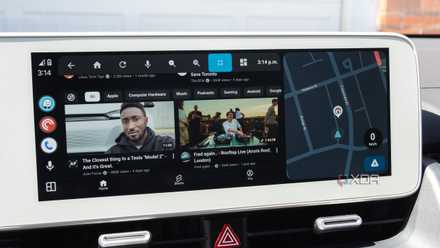
Instead of a dedicated split-screen toggle as in earlier versions of Android Auto, Coolwalk automatically displays multiple apps side by side with minimal user input. In the context of an in-car operating system, this makes a lot of sense — when I'm behind the wheel, I want to concentrate on the road, not drag-and-drop or tap a button to create my own split-app display.
On top of side-by-side multitasking, a third split can appear for key notifications like texts, messages from other apps, or incoming calls, as long as you allow them to appear in Android Auto. In-car multitasking actions like this need to be automatic and optimized for a vehicle's display, and that's exactly what Android Auto does.
Android Auto's Coolwalk multitasking system just makes sense
It's simple, intuitive, and you really don't need to even think about it
For example, with Android Auto's current multitasking system, you can open up Waze (my favorite navigation app), and then pop open Spotify. Waze continues to dominate the screen, as it should, clearly displaying its map and other community-sourced features. At the same time, Spotify occupies part of the display, allowing you to view which song is playing and change tracks. Sometimes I'll jump to PocketCasts to listen to a podcast, which takes over the Spotify portion of the screen, leaving the Waze section in the primary slot. This automatic-tiling system is key to making Android Auto usable at a glance, which in turn keeps me focused on the road and driving more safely.
If I'm in a situation where I need to really concentrate on navigation, I can tap the square in the bottom-left corner to make Waze take over the entire screen, pushing all the other apps I have running off the main screen. The only situation where I find Android Auto multitasking a little frustrating is when navigation apps take over the largest panel, even if I don't want them to. For example, if you're parked and want Spotify to take over the full screen, it can be difficult to make that happen, and I find that tapping the icon in the bottom-left corner doesn't always work. Sometimes I need to close Waze entirely and then open Spotify again for it to take over the screen.
It's also possible to flip the main split-screen screen to the passenger side. To do this, head to Settings on your Android device > Android Auto > Change Layout, then select Media Closer to Driver or Navigation Closer to Driver on your Android device. You can change this setting in Android Auto on your car by going to Settings > Display > Change Layout > Media Closer to Driver or Navigation Closer to Driver. I use this feature to flip media controls to the far side of my Ioniq 5's display, making them easier for the passenger to access and less distracting for me. When I change songs myself, I usually have Spotify on shuffle or use the streaming app's AI DJ, so I use my car's steering-wheel media controls.
CarPlay offers a nearly identical take on in-car app multitasking
Hopefully, Coolwalk doesn't change much when Material Expressive 3 arrives on Android Auto
To be fair to CarPlay, Apple's in-car OS featured a Coolwalk-like interface a few years before Android Auto. The CarPlay Dashboard launched alongside iOS 13 back in 2019, allowing users to view multiple apps at once, including navigation, music controls, calendar information, Siri Suggestions, and more. It basically works identically to Android Auto's multitasking, including automatically and intuitively splitting the screen and shifting apps around in a way that makes sense and that requires very little user input.
Save on Car Tech: Deals on Phone Mounts, Chargers & More
With Google's recently revealed plan to transform Android Auto into a more cohesive platform, including adopting Material 3 Expressive, the tech giant's somewhat cartoony but modern and very clean-looking UI, and better adapting the overall operating system's UI to more unique infotainment system display shapes, like circles and screens with less uniform angles. While I haven't gone hands-on with Google's refreshed Android Auto, I'm interested to see how these changes affect the current Coolwalk multitasking system. Hopefully, it still remains just as useful and responsive as it is now.
3 useful sideloaded Android Auto apps I use almost every day
The open nature of Android Auto is one of its key advantages over CarPlay