
For decades, computing has been restricted to physical devices and operating systems that are completely self-contained. With that being said, computing went through a lot of changes over that time, and Apple has led the charge. It pushed the world toward the graphical user interface with the Macintosh in 1984, and reimagined the smartphone with multi-touch and the iPhone in 2007. What’s the next leap forward for computing? If you ask Apple, it’s the concept of spatial computing, and it starts with Apple Vision Pro in 2024.
Apple might be right in its prediction that spatial computing represents the future. But Apple Vision Pro isn’t a spatial computer. It’s a virtual reality headset — probably the best VR headset to ever exist — designed for the purpose of showing the world what spatial computing can be. In its current form, Vision Pro is more of a proof-of-concept than a product that real people should actually buy, especially at $3,500.

The spatial computing era has begun and the goal is fewer screens, not more
Apple Vision Pro has brought talk of spatial computing mainstream, but people are confused. The future doesn't hold more screens, it holds less.
Apple is known for releasing meager first-generation versions of new product lines, and subsequently improving them greatly over time. The iPad and the Apple Watch are great examples, but the same can be said to a lesser degree about the iPhone. After spending two weeks with Vision Pro, I think the headset may be Apple’s most raw first-generation product to date. There are countless limitations and issues that drag down the Vision Pro experience, and the only killer use case I’ve found for the headset is as a virtual home theater. Unless you have the means or the desire to pay $3,500 for what is clearly an unfinished representation of a lofty goal, you should skip buying Vision Pro.
About this review: I bought Apple Vision Pro for personal use. Apple had no input into this article, and it did not see this article's contents before publishing.
Apple Vision Pro
It's simply not ready for primetime yet
- Resolution (per eye)
- 4K
- Display Type
- Micro‑OLED
- Storage
- 256GB, 512GB, or 1TB
Apple's first "spatial computer" might represent the future of computing, but it isn't the present of computing. While Apple Vision Pro is equipped with impressive hardware, the technology can't meet Apple's vision for the device just yet. The best use case for Vision Pro right now seems to be as a home theater or television, but it's quite pricey for a single-use device. You really shouldn't buy Apple Vision Pro unless you have nearly $4,000 burning a hole in your pocket.
- Connectivity
- Wi‑Fi 6 (802.11ax) and Bluetooth 5.3
- Battery Life
- 2 hours (with tethered battery pack)
- Tracking Technology
- Two high‑resolution main cameras, Six world‑facing tracking cameras, Four eye‑tracking cameras, TrueDepth camera, LiDAR Scanner, Four inertial measurement units (IMUs), Flicker sensor, Ambient light sensor
- Audio
- Audio pods with Spatial Audio with dynamic head tracking
- Weight
- 600–650 g (headset), 353g (battery)
- Refresh rate
- 90Hz, 96Hz, 100Hz
- Processor
- M2, R1 coprocessor
- RAM
- 16GB unified memory
- It's excellent for watching movies, TV, and media
- The eye and hand tracking is nearly perfect
- It was surprisingly comfortable, but your mileage can vary
- I don't think it's a good productivity or work device
- Limited shared experiences make for an isolating device
- Needs better support for external mice and keyboards
- The displays aren't as impressive as their specs would suggest
- Video passthrough is noisy and blurry, very far from lifelike
Pricing and availability
Apple Vision Pro is available for $3,500 and can only be purchased through Apple's own online or retail stores. However, the total cost might be far more than that, especially when you consider that taxes alone can push the Vision Pro's cost closer to $4,000. If you need lens correction, you'll need to pay an extra $150 for Zeiss optical inserts. If you want another battery pack, that'll be an extra $200. Need another light seal to share Vision Pro with a friend or family member? That'll be another $200 as well. The marshmallow-looking official carrying case for Vision Pro costs $200 too.
You probably get the idea. Apple Vision Pro will likely cost more than the already-high $3,500 starting price. That's without considering the storage options available for Vision Pro. The $3,500 base-model headset includes 256GB of storage, but it can be upgraded to 512GB or 1TB. Each tier of storage upgrades will cost an additional $200, so the 1TB model retails for $3,900. While many have criticized Apple for the high price of storage upgrades, they match the cost of upgrades on a Mac, so it kind of makes sense.
Specs
Apple Vision Pro
- Resolution (per eye)
- 4K
- Display Type
- Micro‑OLED
- Storage
- 256GB, 512GB, or 1TB
- Connectivity
- Wi‑Fi 6 (802.11ax) and Bluetooth 5.3
- Battery Life
- 2 hours (with tethered battery pack)
- Tracking Technology
- Two high‑resolution main cameras, Six world‑facing tracking cameras, Four eye‑tracking cameras, TrueDepth camera, LiDAR Scanner, Four inertial measurement units (IMUs), Flicker sensor, Ambient light sensor
- Audio
- Audio pods with Spatial Audio with dynamic head tracking
- Weight
- 600–650 g (headset), 353g (battery)
- Refresh rate
- 90Hz, 96Hz, 100Hz
- Processor
- M2, R1 coprocessor
- RAM
- 16GB unified memory
Hardware
It's absolutely groundbreaking in some areas, and surprisingly limited in others
There's a reason that Apple Vision Pro costs more than a used car, and it's not because the headset is a cash grab. Vision Pro is seriously powerful, and it's more powerful than any other consumer-grade headset on the market. It covers all the bases, with excellent cameras and sensors, processing chips, and displays. Here's the problem: great hardware doesn't always combine to make for a great experience. While Apple Vision Pro is the best VR headset ever, it still suffers from many of the inherent limitations that come with virtual reality in 2024.

Pico 4 VR headset review: The best VR you've never heard of
The Pico 4 VR headset is some of the best VR that you've probably never heard of, and there's a lot to love about it.
The M2 system-on-a-chip and R1 real-time reality processing chip
It starts with the M2 system-on-a-chip, which we've seen in computers like the Mac Mini and MacBook Air in the past. I think it's safe to say that the M2 SoC is the most powerful to ever be included on a mixed-reality headset. However, it's far from the best that Apple has to offer in 2024, as it announced the M3 chipset at the end of last year. Apple's newest batch of silicon features noticeable graphics improvements over the M2 series, and I can't help but wonder what a Vision Pro headset with an M3 chip would look like.

MacBook Air (M2, 15-inch) review: A big-screen Apple laptop for the masses
The 15-inch MacBook Air is, well, a bigger MacBook Air. While it's not as light or as portable of a machine, it's still a great laptop.
It does most of the time, but you will run into times when Vision Pro seems to be overwhelmed.
This wouldn't be a problem if Apple Vision Pro ran flawlessly under the M2 chip's processing threshold. It does most of the time, but you will run into times when Vision Pro seems to be overwhelmed. I experienced fairly frequent app crashes under the version of visionOS that my Vision Pro shipped with, but the latest visionOS 1.0.3 update seems to have stabilized things a bit. I've also seen some social media users report resprings, which cause the entire OS to restart, though I haven't seen those myself.
There's also the R1 spatial coprocessor, which we don't know a lot about. It processes all the inputs from the Vision Pro's cameras and sensors, and we'll detail those next.
One thing all users will notice are the Vision Pro's thermals. There are two small intakes at the bottom of Vision Pro, and two much larger exhaust vents at the top of the headset. The fans aren't loud, especially if you have some sort of audio playing through the Vision Pro's audio pods. However, the fans push out very warm air out of their exhausts, which happens to be right next to your forehead. You will notice the air blowing at the top of your face, and you might also smell that hot air. It's not any different from the feeling or smell of hot air coming out of a laptop — but you probably don't hold your laptop's exhausts right up to your face.
Video passthrough is good, but nowhere close to viewing the real world
Perhaps the area where Apple Vision Pro's hardware is the strongest is in its cameras and sensors. For reference, here's a list of what Vision Pro is working with:
- Two high-resolution main cameras (for passthrough)
- Six tracking cameras on the sides and bottoms (for hand tracking)
- Four internal tracking cameras (for eye tracking)
- LiDAR scanner and TrueDepth camera (for depth perception)
- Four inertial measurement units (IMUs)
- Flicker sensor
- Ambient light sensor

4 most surprising things from the Apple Vision Pro teardown
iFixit has published a teardown of Apple Vision Pro, and there's so much to unpack. Here's what surprised us the most.
It's an insane number of input devices, even for a VR headset. But the Apple Vision Pro's cameras and sensors are the perfect example of how top-of-the-line hardware in 2024 doesn't automatically make for an excellent user experience. It starts with passthrough. Apple's two main cameras capture the world around you, send the input to the R1 coprocessor, which then sends the processed video to the Vision Pro's displays. This all happens in real time, with nearly zero perceptible latency. Apple wants you to believe that with passthrough, you won't be able to distinguish the world inside Vision Pro from the real one.
That just isn't true, and expectations for passthrough need to be mightily tamed. Passthrough is almost always noisy, lacks clarity, and comes with considerable overexposure and underexposure issues. If you're looking at a well-lit room in Apple Vision Pro, it will be much darker compared to real life. By comparison, light sources are massively overexposed, whether we're talking about natural light coming through windows or artificial light coming from fixtures. You'll also notice certain types of light flickering due to how they're recorded by the Vision Pro's camera system.
Passthrough is almost always noisy, lacks clarity, and comes with considerable overexposure and underexposure issues.
Now, it's important to remember that Apple Vision Pro offers the best passthrough quality available in 2024. Other options, like the Meta Quest 3, might feature passthrough video with less noise. However, there are certainly compromises in other areas, like latency, overall distortion, and resolution. Ironically, Apple Vision Pro passthrough works best outdoors. The headset seems to handle consistent natural lighting better than any kind of artificial lighting, or a mix of the two.
But you won't want to do that, because wearing Apple Vision Pro outside is like wearing a clownsuit anywhere but a carnival — people will watch you, laugh at you, or take photos of you. Don't ask me how I know.
But you won't want to do that, because wearing Apple Vision Pro outside is like wearing a clownsuit anywhere but a carnival.
Passthrough is great when you're actually using Apple Vision Pro with a bunch of spatial apps and windows around you. It'll trick your mind into thinking you aren't fully immersed in virtual reality, and this might result in less VR sickness for some. However, the dream of wearing Vision Pro while living life — cooking, eating, doing laundry — is still just a dream.
The displays are 4K per eye, but they suffer from a myriad of issues
The displays in Apple Vision Pro are superb for a virtual reality headset, sporting resolutions of 4K per eye. They're micro-OLED display panels that feature refresh rates of either 90Hz, 96Hz, or 100Hz. They also cover 92% of the DCI-P3 color gamut, and that might be significant here. You'll want a virtual-reality headset built around video passthrough to accurately recreate the world around you with color. The displays are great, but there are plenty of technological limitations that limit their immersiveness.

5 disappointments after a week of using Apple Vision Pro
Vision Pro is a first-generation game changer. That means there are just as many disappointments as there are revolutionary features.
The first one is obvious: Apple Vision Pro has a seriously-small field of view (FOV). Apple isn't publicly disclosing the official FOV for Vision Pro, but the company said it was around 100 degrees in a developer session. The thing is, the actual field of view for Vision Pro will depend on whether you're fitted for a short or long light seal. This is determined by a face scan, and whether you require optical inserts will also factor in. I got a long light seal (23W) and need optical inserts, so my experience with Vision Pro's FOV is one of the worst you can get. Regardless of which light seal you use, Vision Pro will have a smaller FOV than competitors like the Meta Quest 3.
I don't find the massive black borders in my peripheral vision to be distracting, but I am always aware of their presence.
So, the next question is whether the limited FOV is noticeable to the point where it hinders the headset's immersiveness. For me, it absolutely does. I don't find the massive black borders in my peripheral vision to be distracting, but I am always aware of their presence. The small FOV limits how many windows you can see at once, so you'll need to physically turn your head to view two or more large windows.
To me, this is a huge downside, because I can actually see more things at the same time with a physical setup featuring three or more monitors. You're effectively limited in how much virtual space is considered usable. I don't consider anything above my direct line of sight usable, because looking up is borderline painful due to Vision Pro's weight. Considering the FOV limitations, there is even less usable space.
The more distracting properties of the Vision Pro displays are their vignetting, foveated rendering, and internal lens glare. A not-insignificant portion of the area at the border of the left and right displays will have vignetting and distortion, once again limiting the usable FOV. Then, Apple uses a technique called foveated rendering. Vision Pro renders the areas of your FOV that you are looking at with the highest quality, and everything else is blurry. You can notice this while using Vision Pro, and it's clearly visible in the screenshot above. My Mac's extended desktop is displayed crisply, but the Safari window next to it is low-quality.
visionOS
It's more like iPadOS than macOS, and it has a long way to go
visionOS is what iPadOS would be like if you took away the tablet and projected the operating system atop your real-world environment. It's obviously more nuanced than that, but visionOS is far closer to iPadOS than macOS. You navigate visionOS with your eyes, looking at the things you want to control. The objects you're looking at will become accentuated, quite like how cursor support works in iPadOS. Then, to select them or manipulate them, you'll use your hands.

iPadOS 17 review: Playing catch-up with iOS
iPadOS 17 doesn't contribute much to the operating system's unique direction.
visionOS isn't horrible, but it has a long way to go. It suffers from a lot of the same limitations as iOS and iPadOS, such as a lack of window management tools, poor precision control, and a subpar web browsing experience. Apple is touting the number of iPadOS apps that will work on visionOS, but these are far less impressive in practice. First, there are plenty of heavy hitters that aren't supported, such as Netflix and YouTube. Additionally, some of these iPad apps seriously struggle to adapt to visionOS input methods.
We need something like Mission Control or Spaces on visionOS
👁 How to create and use multiple desktops on macOS: 2 desktops visible in the desktop view of mission control
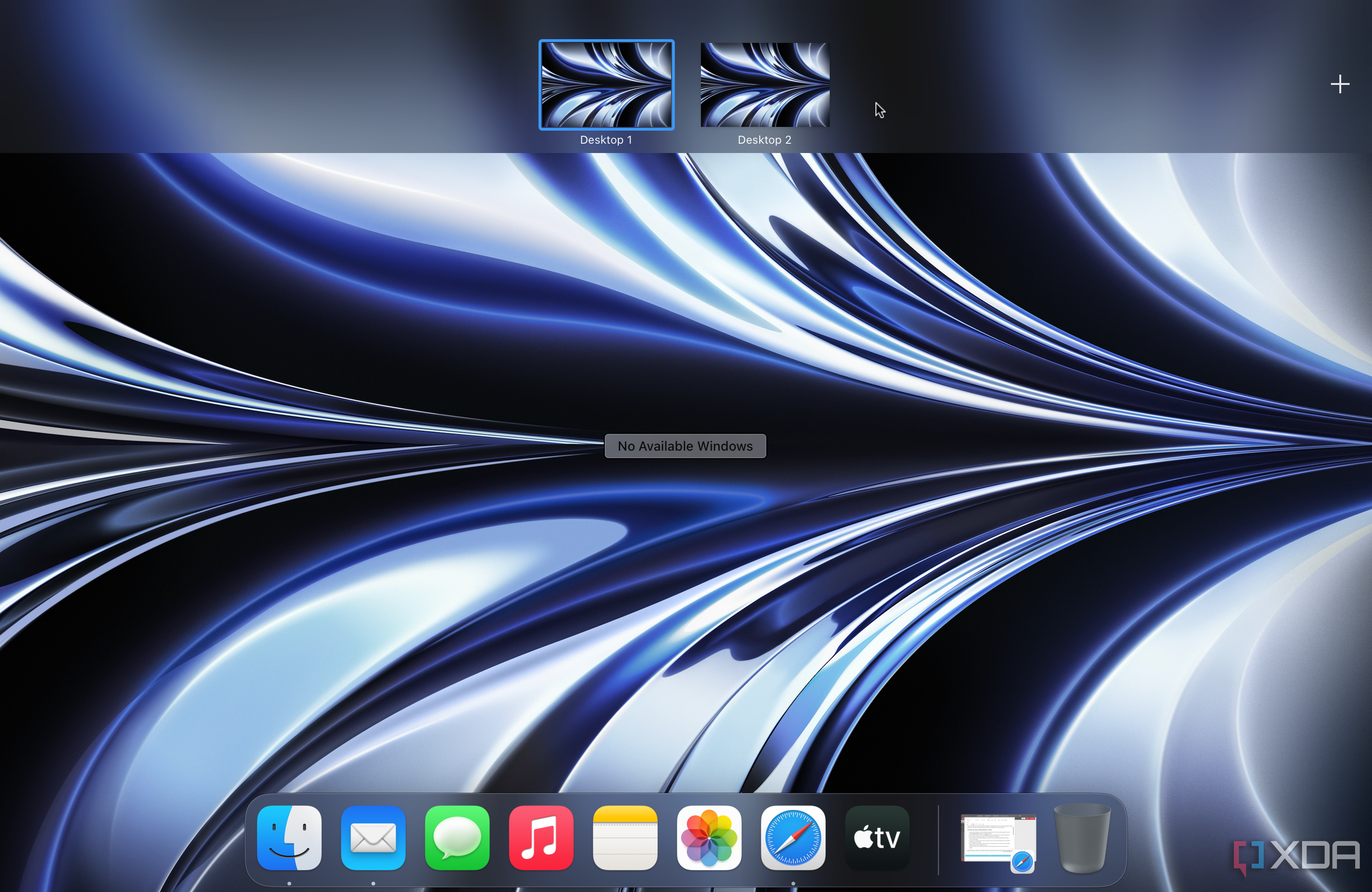
Speaking of window management, it's desperately needed in visionOS. After you've filled up a view, you double-click the Digital Crown to hide everything. The problem is that you can't build a completely new view without destroying the other one. For example, I had a bunch of productivity apps open in a specific arrangement, but wanted to take a break and watch a YouTube video. My options were to either completely close the apps in my productivity view and watch YouTube in full-screen, or try to place the YouTube window on top of the productivity windows.
Neither were good options. I ended up just taking off the headset and turning on my TV, because re-creating a productivity view would've been too much of a hassle. We need something like Mission Control and Spaces, which can house separate views in macOS. Apple Vision Pro will also forget anything you had opened when you restart, so don't disconnect the battery, let it die, or turn it off.

macOS Sonoma review: The most polished Mac experience yet
The latest macOS update introduces handy new features, along with some visual changes.
Hand and eye tracking
It's great for navigating visionOS, but is horrible for precise tasks
Now, let's talk about eye and hand tracking on Apple Vision Pro. It works most of the time, especially when navigating visionOS and doing things like moving windows around. However, there are definitely a few areas where it can be improved. Sometimes it's hard to tell which items Vision Pro thinks you're looking at due to how subtle the hover accentuation can be. In a future visionOS update, Apple should make it clearer which parts of the screen your eyes are hovering over. I've also found that hand tracking can be hit or miss; it either works or it doesn't.
The entire concept of controlling a device with just eyes, hands, and voice might be flawed.
The entire concept of controlling a device with just eyes, hands, and voice might be flawed. As a macOS power user, I'm so familiar with my workflows that I start looking at the next action item on my screen before my hands have completed the current one. Well, in visionOS, that means I frequently make errors. The operating system is controlled by what you are looking at, and you'd be surprised how much you do on your devices without looking exactly at what you're controlling.
A good example is entering your passcode. Do you look at each number when you press the pattern of your passcode, or is it muscle memory? Do you start looking at the third or fourth number in the passcode while you're still pressing the first or second? Are you comfortable enough with your devices that you can enter your code without looking? All of these situations will successfully unlock your smartphone, but would result in errors on Vision Pro.
Mouse and keyboard support needs to get better, right now
This would all be overlooked if you could just use a mouse and keyboard on Vision Pro, but you can't — at least not fully. You can pair any Bluetooth keyboard with Apple Vision Pro, and visionOS cleverly places a preview bar for text right above your real-life keyboard. However, you currently can't disable the visionOS virtual keyboard, meaning it'll pop up right in your face. This is a huge problem with the visionOS experience that Apple could fix right now.
I can't think of a single reason why Vision Pro doesn't support mice other than Apple not wanting it to support them.
Apple's approach to mouse support on Vision Pro can be considered a microcosm of why the company is so often criticized. Magic Trackpads will work with visionOS, but any other kind of Bluetooth mice will not. I can't think of a single reason why Vision Pro doesn't support mice other than Apple not wanting it to support them. You might think that visionOS needs gesture support, but if that was the case, the Magic Mouse and its gesture-supporting top glass would be compatible.
And mouse support is desperately needed in visionOS, because text selection is utterly awful on Vision Pro. I spend at least 10–30 seconds fighting with visionOS to select text with eye and hand tracking, while it takes me mere seconds to do the same in macOS.

4 reasons a trackpad should be part of your desk setup
Trackpads are the preferred input method for laptops, but on the desktop, they're nowhere to be found. Should that change?
Mac virtual monitor support
It's not the productivity game-changer I thought it would be
Mac virtual monitor support in visionOS is both the best and worst way to be productive on Vision Pro. If you're using a MacBook while wearing Vision Pro, looking at its display will bring up a Connect button on top of it. Just tap that button to virtualize your Mac's display in visionOS and black-out your MacBook's inbuilt screen. You get a massive macOS display on Vision Pro — but only one display.
This is disappointing, because using macOS on Vision Pro might be the best way to get actual work done on the headset. I thought that complimenting the single Mac virtual display with native visionOS windows would be an alternative to multiple displays, but I ended up being let down. Due to how limited hand and eye controls are in visionOS, I hated doing most kinds of productivity work with Vision Pro. There were great parts of the experience for sure, but I always ran into something that was so frustrating I wished I had just used my Mac instead.
Figuring out mouse support and multiple Mac virtual display support are the two things that could make the Vision Pro excellent for getting work done, but I don't think it's a great productivity device as it currently stands.
One of the more frustrating bugs I experienced would cause my Mac, Vision Pro, and their peripherals to get out of sync. I have no idea which part of the chain was responsible for the errors, but the only way to fix them was with a full restart.
Spatial video and content consumption
Spatial videos and photos are so stunning, I bought Vision Pro just for them
So, with productivity ruled out for now, the Vision Pro's best use case seems to be as an entertainment device. As it turns out, this is where Apple Vision Pro excels. Spatial Videos and Photos are what convinced me to purchase the headset in the first place. You can remember memories with the help of photos and videos, but you can't really relive them. That changes with Spatial Videos and Photos on Vision Pro. Watching the three-dimensional Spatial Videos, with the help of Spatial Audio, makes you feel like you're being transplanted back in time to a past moment.
Spatial Videos and Photos are what convinced me to purchase the headset in the first place.

iPhone 15 Pro Max review: Apple is slowly winning over this Android diehard
The iPhone 15 Pro Max may not look much different from the iPhone 14 Pro Max, but it brings much improved cameras and ergonomics
You can capture Spatial Videos with Vision Pro, using the onboard stereoscopic 3D camera system. However, you won't want to for a few reasons, and should instead use an iPhone 15 Pro Max. It's a more convenient and higher-quality method for capturing Spatial Videos and Photos. I can't possibly convey what viewing these types of media in visionOS is like, but you should try the Vision Pro demo (it's free) at an Apple Store if you want to experience it.
Apple Vision Pro will undoubtedly be the best TV you own
If there's a part of Vision Pro that feels like a $3,500 experience, it's watching media. Whether you're viewing the aforementioned Spatial Videos and Photos, or just watching typical movies and TV shows, enjoying content is the "killer feature" of Apple Vision Pro. There are some experiences in the Apple TV app and on Disney+ that can be experienced in spatial 3D, and they're stunning. But two-dimensional experiences are incredibly impressive too, because you can scale up videos to massive sizes, filling up your entire FOV with high-quality and immersive content.
If there's a part of Vision Pro that feels like a $3,500 experience, it's watching media.
Whether you're watching a feature film in a pitch-black room, or just watching a basketball game in your passthrough environment, doing so with Vision Pro is a game-changer. My only qualm is that Apple didn't include more environments of places, rather than nature landscapes. You can watch a movie in Yosemite National Park, but you can't do it in a virtual movie theater. Well, in typical Apple fashion, it's important to note that you can do it in a virtual movie theater, but only in the Apple TV app. It seems like a miss, and I hope Apple adds widespread functionality in future updates.

RayNeo Air 2 XR glasses review: Not true AR but entertaining nonetheless
More focused on being a portable wearable screen instead of using true AR
There are plenty of wearable products out there that claim to give you a massive screen on your face, but none of them compare to Apple Vision Pro. I've used some of these devices, like the RayNeo Air 2 glasses, and they're much cheaper than Vision Pro. However, Vision Pro is the first device that made me want to wear it instead of watching something on the TV. Again, there's no description or screen-recording that can convey what it's like. You have to try it to understand it.
Should you buy Apple Vision Pro?
You should buy Apple Vision Pro if:
- You have $3,500 and nothing better to do with it
- You’re willing to pay anything to be an early adopter
- You want Vision Pro as an expensive home theater
You should NOT buy Apple Vision Pro if:
- You want to use Vision Pro as a Mac replacement
- Like most people, $3,500 is well outside what you’re willing to spend
- You’d rather wait for a more polished version years down the road
There are times when using Apple Vision Pro feels literally life-changing, even when doing mundane tasks. The headset’s dominant feature is content consumption, because viewing Spatial Videos and Photos, 3D movies, and even other types of media is a nearly perfect experience. But it’s lacking in the way of productivity, which is an area that I originally thought it would excel in. Due to the limitations that come with video passthrough and display technology in 2024, Vision Pro isn’t something you can wear all day, either.
I didn’t return my Vision Pro headset, and for better or worse, I’m in it for the long haul. There’s a lot that Apple could fix just with software updates, but those aren’t guaranteed. We evaluate products based on how they are now, and Vision Pro isn’t worth $3,500 to most people right now. There are so many better things that you can do with that kind of money than buy a Vision Pro headset. The only people who should buy this thing are those who are so well-off that $3,500 is insignificant, or those so infatuated with being an early adopter that they’re willing to overpay for a glimpse of the future.
Apple Vision Pro
It's simply not ready for primetime yet
- Resolution (per eye)
- 4K
- Display Type
- Micro‑OLED
- Storage
- 256GB, 512GB, or 1TB
- Connectivity
- Wi‑Fi 6 (802.11ax) and Bluetooth 5.3
- Battery Life
- 2 hours (with tethered battery pack)
Apple's first "spatial computer" might represent the future of computing, but it isn't the present of computing. While Apple Vision Pro is equipped with impressive hardware, the technology can't meet Apple's vision for the device just yet. The best use case for Vision Pro right now seems to be as a home theater or television, but it's quite pricey for a single-use device. You really shouldn't buy Apple Vision Pro unless you have nearly $4,000 burning a hole in your pocket.