
Summary
- Removing your PC's case will increase the dust accumulation.
- A cabinet-less PC has a messy appearance due to cable clutter.
- The slight decrease in temps isn't worth putting up with the other issues of a PC without a proper case.
When building a PC, there are a couple of corners you can cut to save some money. For instance, there’s no need to buy the latest PCIe 5.0 NVMe SSDs when you can have a decent experience with their PCIe 3.0 counterparts. And then there are the more wacky ways you can avoid spending money: like ditching the case and using your system in all its cable-riddled glory.
If you’re the owner of a thermally-challenged PC, you might have come to the conclusion that running it without a case will result in better temps. Or perhaps you just want to build a cool-looking open-air test bench. Regardless of your motives, here are a couple of things you should keep in mind before bidding farewell to your PC cabinet.
5 More dust accumulation
You’ll grow tired of cleaning your system every other week
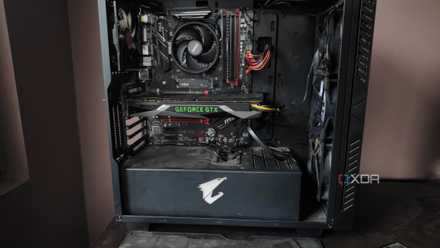
Besides tarnishing your PC’s appearance, dust is one of the biggest threats to its lifespan. That’s why most cabinets include filters around the fan vents to prevent dirt and grime from settling on top of the PC components. Even in the cleanest of living spaces, getting rid of the case will make it easy for dust to accumulate on the fragile internal components.
If you choose to avoid a proper cabinet, you’ll have to get into the habit of cleaning your PC more often. Otherwise, the dust and debris will end up clogging the CPU and GPU fans, leading to poor cooling efficiency and higher temperatures.
How to clean the dust out of your PC tower
Dust buildup is bad for your system, so you should regularly clean your PC tower to keep it free of dirt and grime
4 A PC without a cabinet will look as terrible as you can imagine
Though some open-air systems can appear presentable
Once you slot the processor, GPU, and RAM sticks into your cabinet-less motherboard, the entire setup may not look half bad. But soon, you’ll realize that the cool-looking components require constant power to function – power that’s supplied by a PSU through a variety of cables.
All of a sudden, your system will look like a real mess of wires. Even if you use the minimum number of cables on your modular PSU, you’ll need to plug in the necessary wires into the CPU, graphics card, and motherboard. Routing the cables inside a PC case may not be the most enjoyable task, but ditching the case means you’ll have to constantly look at a rat’s nest with all the cables strewn around.
3 Your HDDs will have a bad time
After all, vibrations are a hard drive’s worst enemy
Unlike SSDs, mechanical hard drives consist of moving parts and need to be mounted securely onto a case to ensure their longevity. That's because, over time, the tremors and vibrations while transferring data may damage the drives.
Whether you’re running a PC without a cabinet or using an open-air case, you’ll need to find a way to secure the HDDs, or risk losing the data when it fails prematurely. Using SSDs, preferably NVMe drives that slot directly into the motherboard, is a decent workaround, though these high-speed drives cost a lot more than their mechanical counterparts.

Best SSDs in 2025
From 2.5-inch SATA drives to more advanced M.2 NVMe drives, these are the best solid-state drives you can buy right now.
2 Zero protection whatsoever
One spill is all it takes to send your machine to PC heaven
Although PC cases aren’t infallible and can be damaged if you’re not careful, they do a pretty good job of safeguarding your rig's precious components. So, getting rid of the cabinet or moving to an open-air setup will expose your system to entirely new threats.
For example, you’ll need to ensure the PC is placed on a non-conductive surface, and keep it out of reach of kids and pets. Also, you’ll have to be extra cautious when you’re near the PC, as accidental spillage can result in your PC meeting an unceremonious end.
1 The slight reduction in system temps isn’t worth the extra risks
An airy case has pretty decent thermals, without any of the caveats
Since cases with terrible airflow can result in higher temps, you might be wondering if opening the side panels - or getting rid of the cabinet - will reduce the thermals on your system. Sure, natural convention will result in better temperatures compared to a cabinet with an unorganized fan layout and solid front panels.
However, there’s no denying that using an airy case with well-optimized airflow will result in comparable temps to an open-air configuration. As someone who ran a gaming PC without a chassis for a few weeks, the extra 5°C difference in ambient temperatures isn’t worth the issues you’ll end up facing with a case-less setup.
That said, open-air setups do have some utility
Although running a PC without a cabinet is a bad idea all-round, there are some situations where you might want to invest in an open-air chassis. If your workload involves testing tons of PC components, it’d make sense to ditch a conventional case, as the disassembly and reassembly process will take extra long on your average PC cabinet. But for the average computing user, a premium case is the best option. Period.