
Batocera is a front-end interface for RetroArch with numerous bundled emulators, allowing almost any device with an open bootloader and compatible CPU to emulate some of the best games ever made. Whether you're a fan of the Sega Genesis (Mega Drive), GameBoy Color, or even the PlayStation 3, Batocera can load up your favorite games on various form factors and screens. You can take the OS in a compact handheld with a small display or set up a mini PC with a big screen in the living room. Whichever is your flavor, you'll need good hardware to handle all the emulating. That's where our selection of the best Batocera devices comes in.

How I turned a mini PC into a gaming console
I recently reviewed the Ayaneo AM02 mini PC, and I turned it into a home gaming console.
6 Raspberry Pi 5
Cheap, cheerful, and DIY-friendly
|
Raspberry Pi 5 |
|
|---|---|
|
CPU |
Broadcom BCM2712 |
|
GPU |
VideoCore VII GPU |
|
RAM |
2GB / 4GB / 8GB LPDDR4X-4267 |
The Raspberry Pi is worth mentioning because this SBC can be installed inside anything or nothing. It's not the most capable platform for handling video game emulation, but you can still enjoy a few system generations before encountering sluggish performance. The Broadcom BCM2712 Arm chip will be good for running emulators up to around the PlayStation and Gamecube era, though your mileage will vary, especially if no active cooling is installed. I'd go for the model with 4GB of RAM to be on the safe side, even though the base Raspberry Pi 5 exceeds the Batocera requirements.
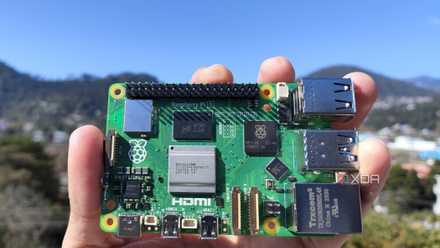
Raspberry Pi 5 review: The holy grail of DIY projects got even better (and rarer)
The Raspberry Pi 5 is one of the most powerful consumer-grade SBCs out there. Sadly, its limited stock means you'll have a hard time finding one.
Raspberry Pi 5
- CPU
- Arm Cortex-A76 (quad-core, 2.4GHz)
- Memory
- Up to 8GB LPDDR4X SDRAM
- Operating System
- Raspberry Pi OS (official)
- Ports
- 2× USB 3.0, 2× USB 2.0, Ethernet, 2x micro HDMI, 2× 4-lane MIPI transceivers, PCIe Gen 2.0 interface, USB-C, 40-pin GPIO header
- GPU
- VideoCore VII
- Starting Price
- $60
The Raspberry Pi is back, and the fifth iteration of the SBC is a lot more capable than the older models. From a new quad-core Arm Cortex-A76 CPU, support for dual monitor setups at 4K 60Hz, and a dedicated power button, there's a lot to love about this palm-sized computer.
5 Ayaneo Retro Mini PC AM02
Go for that retro console look
|
Ayaneo Retro Mini PC AM02 |
|
|---|---|
|
CPU |
AMD Ryzen 7 7840HS |
|
GPU |
AMD Radeon 780M |
|
RAM |
~64GB DDR5-5600 |
XDA Lead Technical Editor Adam Conway loves the Ayaneo Retro Mini PC AM02. So much so that he loaded up Batocera on the device. The AMD Ryzen 7 7840HS is a mighty mobile processor with an excellent integrated Radeon 780M GPU. This combination is perfect for running emulators from multiple generations on the Linux-based OS. The best part? This thing resembles a video game console! It looks the part, plays the part, and will be one centerpiece you're excited to showcase to visitors. Something like the AM02 from Ayaneo is the way to go in creating a retro gaming den.

Ayaneo Retro Mini PC AM02 review: A powerful mini PC with a great design
The Ayaneo Retro Mini PC AM02 is another mini PC from Ayaneo, and it's capable of quite a bit more than the first.
Ayaneo Retro Mini PC AM02
- Brand
- Ayaneo
- Storage
- 1TB
- CPU
- AMD Ryzen 7 7840HS
- Memory
- 32GB
- Operating System
- Windows 11/Barebones
- Ports
- 2x USB-C (one for power), 4x USB-A, 1x DisplayPort, 1x HDMI
The Ayaneo AM02 is a mini PC with powerful hardware, capable of being used as a PC, mini gaming console, or NAS. You can buy it with Windows 11 or barebones to install your own software on it, and it comes with up to 32GB RAM and up to 1TB storage.
4 MSI Cubi NUC 1M
Powerful compact PC for work and play
|
MSI Cubi NUC 1M |
|
|---|---|
|
CPU |
Intel Core 7 150U |
|
GPU |
Intel Iris Xe Graphics G7 |
|
RAM |
~64GB DDR5-5200 |
MSI's Cubi NUC 1M is a powerful mini PC with up to an Intel Core 7 150U processor, 64GB of DDR5-5200 RAM, and Intel Iris X3 Graphics G7. The range-topping Core Ultra 7 comes with a 96-shader GPU. That's ample performance for handling even Xbox 360 and PlayStation 3 games. The system is quiet too since the low-power CPU isn't being pushed too hard outside of later-generation emulators. I've got a Batecora instance running on this exact PC and most of my physical game collection is available with excellent results on the 4K TV.
While it may not be the most affordable way to load up some retro games, you won't be disappointed with the Cubi NUC 1M.

MSI Cubi NUC 1M review: A mini PC with dual 2.5Gb LAN for endless possibilities
You can do so much with this compact system.
MSI Cubi NUC 1M
- CPU
- Intel Core 3 100U, Intel Core 5 120U, Intel Core 7 150U
- Graphics
- Intel Graphics
- Memory
- ~32 GB DDR5 RAM
- Storage
- ~1 TB PCIe 4.0
- Ports
- 2x Thunderbolt 4 USB-C, 4x USB-A 3.2 Gen2, 1x audio combo, 2x HDMI, 2x 2.5 GbE
- Expansion Slots
- 1x 2.5-inch SATA
The MSI Cubi NUC 1M is an Intel-powered compact PC designed for low-power applications such as office PC. It's not the most affordable NUC on the market, nor the most powerful, but it strikes a good balance between the two with plenty of configurations available and solid environmentally friendly software.
3 Steam Deck OLED
Take your retro gaming with you
|
Valve Steam Deck OLED |
|
|---|---|
|
CPU |
AMD (Zen 2) |
|
GPU |
AMD (RDNA 2) |
|
RAM |
16GB LPDDR5-6400 |
Valve created something special for the PC handheld space with the Steam Deck. The OLED version is even better, which makes it the ideal candidate for retro gaming on the go with official Batocera support. Not only do you have the performance to handle PC games, but also everything that came before current-gen consoles. I'm talking PlayStation 3, Xbox 360, PSP, and more. Depending on the emulator and how much power is being drained from the battery, you should be able to keep playing for multiple hours before needing to find a power outlet.

Steam Deck OLED review: More than just a screen upgrade
The Steam Deck OLED dropped by surprise recently, and it's a fantastic handheld that's more than just a screen upgrade.
2
Steam Deck OLED
- Dimensions
- 11.7 x 4.6 x 1.9 inches (298mm x 117mm x 49mm)
- Brand
- Valve
- Weight
- 1.41 pounds (640 grams)
- Chipset
- Custom AMD Zen 2 APU (4 cores/8 threads, up to 3.5GHz boost)
- RAM
- 16GB LPDDR5 6400MT/s
- Storage
- 512GB or 1TB NVMe SSD, microSD card slot
Valve's upgraded Steam Deck features a larger OLED display with HDR support, faster Wi-Fi, and a bigger battery. Plus, this new model is slightly lighter, has slightly faster RAM, and it comes with storage up to 1TB. If you're looking for the ultimate Steam Deck, this is the version for you.
1 An old desktop PC
Re-use hardware collecting dust for the best results
A desktop PC is the absolute best-performing device for running Batocera and emulating games. There's a dedicated graphics card, plenty of RAM, and a powerful multi-core processor and I'm not talking about one of the Intel mobile chips either. Even if your PC is years old, the components inside the system will easily surpass all the requirements for Batocera and run later-generation emulators. And if you're not a fan of the beige tower unit or need the system to fit underneath the big screen, pick up an aftermarket chassis that supports your motherboard and you're good to go without spending a penny more!
What PC specs do you need for Batocera?
Batocera is all about emulation, which makes it incredibly resource-intensive on the CPU. We recommend a processor with numerous cores (6 or more) and high clock speeds. A decent cooling solution should be present to allow the CPU to run at higher speeds for longer. A GPU isn't needed and onboard graphics should be fine for most console generations — you may require a discrete GPU for Xbox 360, PlayStation 3, and above. 8GB or more RAM is sufficient for running Batocera, though like most gaming, the more the merrier, especially if you load up some Steam games.
|
Minimum |
Recommended |
|---|---|
|
1GB of RAM |
2GB of RAM, higher depending on the desired system |
|
Graphics supported by nouveau/mesa |
A supported GTX/RX/HD series graphics card |
|
A 640×480 screen |
At least the resolution of the desired system |
|
A 32-bit x86 processor |
A 64-bit x86_64 processor |
Storage is where things get interesting and this will depend on the console itself. I recommend installing Batocera on a high-capacity SSD so there's ample space for your collection of retro and modern titles. Even the highest-capacity drive will fill up quickly as you load more recent games. Using multiple drives within the same machine running Batocera can prove challenging, especially if you're unfamiliar with Linux commands. A cool way to handle game storage is through a NAS, which can prove useful if you want to run multiple consoles with the same game library.