
In our current age, it is challenging to download a game without installing a specific game launcher alongside it. This is understandable when you consider publishers need to pay 30% or more to list their titles on other platforms like Steam, Xbox, or PlayStation.
But this is becoming increasingly frustrating for gamers who need to manage over a dozen different launchers and storefronts just to play the games they love. This is why you should find a game launcher that lets you manage and organize your entire game collection from one platform.
Of course, you will still need to install some of these launchers to run the game, regardless if you want to or not. But using a universal games launcher where you can store, organize, and customize all your games makes jumping on your PC and starting a game much simpler than endlessly scrolling through different launchers to find a game to play.
6 AMD software
For AMD users
AMD users have a game library already pre-installed on their PC, the AMD software app, formerly known as AMD Radeon. The main purpose of this software is to download and install driver updates for your AMD hardware.
But that's not all you can do. You can also change universal graphics settings with it and optimize games to perform better on your PC. If you use the scan function, it will show you all the games on your hard drive.
5 The Nvidia app
For Nvidia Users
The Nvidia app is a combination of the Nvidia Control Panel and the GeForce Experience app. This app works similarly to the AMD software, except it is obviously exclusive to users who have an Nvidia graphics card.
This app allows you to update your graphics drivers, change color and image settings for your monitor, optimize your game library graphics settings, and view and launch all of your games in one easy-to-access place. In addition to this, you also have access to features like Shadow play, which lets you record and share videos of your gameplay and take screenshots.

Nvidia kills GeForce Experience, releases a far superior Nvidia App out of beta
Say hello to Nvidia's new GeForce GPU app
4 Steam
The grandfather of game launchers
We can’t forget to mention the grandfather of all game launchers, Steam. Steam is one of the most popular game launchers on the PC, and for good reason. Steam lets you launch games from your library and add non-Steam games.
On Steam, you can create collections to sort through all your favorite games manually, or you can use dynamic collections to add games to collections based on filters you set automatically. Use the shelves at the top of your library for easier game access.
In terms of customization, you can change the artwork for the grid image, background (hero), and logo to make your games stand out. You can also add your favorite titles to your profile for your other friends to see.
3 Playnite
A modern third-party launcher
Playnite is a very popular third-party game launcher with a highly dedicated development team. It can scan for games on your PC, organize and optimize all of your game tiles, and even allow you to add emulated games and emulators to your library.
The collection view of your library is a step above other launchers, letting you get a full-screen background of a game with beautiful artwork and all the important information related to the game. You can also import statistics from other game launchers.
Because of the open-source nature of the program, Playnite is highly customizable and offers additional features and add-ons to help you personalize your library the way you want. There are a ton of people who work hard to add the features they want to their collections and often offer them to the community to use for free.
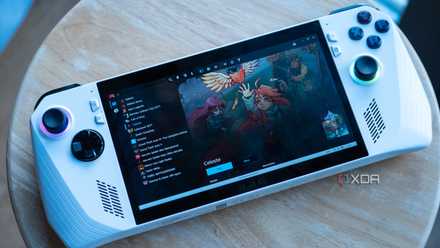
How to setup Playnite on the Asus ROG Ally
If you want a unified front-end for all of your games on the Asus ROG Ally, then Playnite is one of the best to use.
2 LaunchBox
For gamers with a large catalog of retro or emulated games
LaunchBox is one of the older third-party game launchers out there. Developers created it as a retro gaming emulator, but it evolved into a full game launcher, beloved by its community. Although LaunchBox may be missing a few bells and whistles, it has a myriad of features that are extremely useful to users who want to proudly display their game collections.
This launcher lets you link your other game launcher accounts to the app and import all your games, whether or not they are currently installed. It will also import all the relevant information and cover art, which is an added benefit.
The app can be slightly slow at times and is missing some automation quality-of-life features, but where the application shines is adding and being able to launch older games from your library. Whereas most third-party launchers add emulator support to their apps, LaunchBox was specifically designed to house and launch most emulators in a much more convenient way.
1 GOG galaxy
Keep all your favorite games in one place
The original GOG launcher at release was a pretty standard game launcher being tagged onto the GOG store. But when it changed to GOG Galaxy, that all changed. The launcher had numerous features added to it that made it extremely useful for gamers to store, organize, and display their entire game library.
GOG Galaxy lets you import your game libraries from pretty much every other game launcher out there. This also includes your game libraries from consoles like Xbox and PlayStation. Although you can't launch these games, it still adds them and displays all the relevant information.
But that's not all. The application also imports information on your in-game statistics, playtime, artwork, and achievements, the latter being great for achievement hunters who don't want to scroll through multiple launchers to see what they still haven't unlocked.
The app also creates a combined friends list from all your other launchers, which is a lifesaver if you’ve ever had to add a friend to each game launcher manually. GOG Galaxy lets you create custom libraries of your favorite games and has a lot of customization options for games if you want to add a personal touch.
Take back control of your game collection
There is no one-shoe-fits-all game launcher that will have everything you need. And many of these launchers still need to launch the game off of the publisher's original launcher. But they do give you a place where you can easily store all your games and show off your entire collection without opening multiple different applications.