
Is your computer just a tool, or is it an expression of yourself? Just like how people once went to extreme lengths to decorate their journals and diaries, you can do the same with your desktop. Programs like Rainmeter have long offered deeper customization options than you might get by default, but Rainmeter doesn't get the love it once did, and it's down to sporadic, few-and-far-between updates.
If you're looking for options that offer similar functionality, you're in luck. As it turns out, people enjoy customizing their machines, and there are a wealth of different applications that will help you do just that. We're going to focus on the free options, but we do have a list of paid options you might consider at the bottom of the page.
3 Widget Launcher
Easiest for beginners
Widget Launcher is an easy-to-use, straightforward app. You can access standard apps like a calendar, a clock, and an RSS feed by default. There are multiple sections to customize per widget, and a near-unlimited choice of colors thanks to the color wheel. If you want more extensions, you can buy the Pro Extensions for Widget Launcher app for $3.79, but be warned that it has middling reviews.
You can buy multiple skins for Widget Launcher, and if you want to unlock the most customization for the app, you'll have to (or make the skins yourself). All in all, it isn't a bad choice, although there are a few issues we didn't love. The Featured page never loaded correctly, and it was less-than-subtle about pushing paid advertisements at you during use. One big plus to Widget Launcher is that it's not a resource-intensive program; it barely registers.
Widget Launcher
Widget Launcher is a Windows-focused application that makes it easy to customize your desktop to your personal tastes, with tools like hardware meters, calendars, and custom clocks.
2 XMeters
The best minimalistic choice
XMeters takes all the utility of customizable taskbars and distills them into its core elements. When you fire up XMeters, it shows you its progress in the taskbar at the bottom of the screen. You can ask it to track multiple categories, including CPU, network, storage, and memory. You can even customize whether the data is presented as a bar graph, a pie chart, or as text. You can also change the colors of each to make them more visible on your taskbar (the default white color option is hard to see if your taskbar is gray.)
While XMeters doesn't have the same level of customization as something like Rainmeter, if all you want is hardware monitoring, it's a tough choice to beat. It's designed with that use in mind and hardly uses any system resources at all, so you don't have to worry about your hardware monitors skewing performance results if you're tweaking settings in a video game to achieve optimal performance.
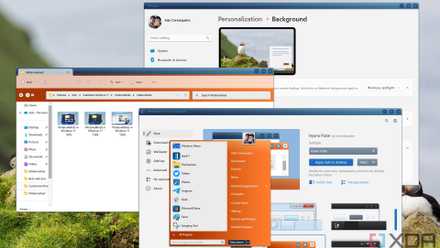
You can make Windows 11 feel like home — here's how to customize it
Windows 11 is a great operating system, but not everyone has to like how it looks out of the box. Here's how you can change
1 Seelen UI
A whole-system makeover
Seelen UI takes the basic look of Windows and turns it on its head. It's a lot like taking a Google Chrome-inspired interface and overlaying it on top of Windows, in that it adjusts the position of most of on-screen items and makes your day-to-day navigation that much easier. For example, you can adjust the volume and other system settings in the top-right corner. The top-right corner lets you easily open your file explorer while displaying any apps you currently have open.
Seelen UI changes everything about your Windows interface, and it can be more than a little disconcerting. While a powerful tool, Seelen UI is a better fit for someone who has already worked with applications like Rainmeter in the past. It isn't the most beginner-friendly; changes take effect almost immediately, with little to no instructions. Setting up the interface is relatively easy, but getting it to work the way you want it to is an exercise in trial and error.
Seelen UI
Seelen UI is a powerful customization tool that gives Windows a more macOS-like appearance, including a toolbar at the bottom of the screen. It's extensive customization options make it a great replacement for apps like Rainmeter. This app is an open-source application that can be downloaded from Github or from the Microsoft Store.
Premium options
If none of these free options strike your fancy, you might want to consider a few paid programs on the market. Right now, XWidgets is one of the best competitors to Rainmeter, with more than 1,600 widgets you can pick from and install to suit your tastes. It's available on its website and on Steam for $3.99, but downloading it from its site triggered security warnings in our antivirus software.
If you're a Mac user, the best option you can find is GeekTool. Both Rainmeter and GeekTool have become less popular in recent years, with fewer updates on either platform. While Rainmeter is still receiving updates, the community's fervor has fallen off a bit. Microsoft has the opportunity to introduce more customization options in the next iteration of Windows.
Unless you have a clear reason not to use Rainmeter, it's still our suggestion. While similar applications serve a similar purpose, none have the history or support base Rainmeter offers.
