
The home network is an important piece of infrastructure in the modern day. It's what allows us all to get online, be it to stream movies on the big screen or doom scroll on the small display. Getting it right isn't terribly difficult. An ISP will provide all the necessary equipment to get up and running, but it'swhen you start to look at making custom changes and improvements that things can get a little tricky. Most ISP setups will support 1GbE, which caters to speeds up to around 100MB/s. That's plenty for just about everyone you'd want to do with the LAN outside the realm of enthusiasts.
10GbE is quickly becoming more accessible as we're seeing motherboards rock the speedy ports, not to mention some network-attached storage (NAS) units can come with a 10GbE connection (or two). Switches with 10GbE ports are slightly rarer, but they can be sourced at reasonable prices, especially compared to years prior. That's what makes it such an alluring upgrade for the home. With that in mind, I set out on a journey to build my own 10GbE network at home. However, after going through the process and experiencing the challenges and limitations, I learned a valuable lesson: 2.5GbE is the smarter, more practical choice.
Thus, I ended up with a hybrid. 2.5GbE forms the main connections for all hard-wired devices, and 10GbE carries the weight between switch nodes. Though 10Gb networking is absolutely overkill for the home, even with multiple people streaming, gaming, and moving larger files, it can make some sense when you have bottlenecks at specific parts of the LAN.
The 10GbE dream
It's not always the best choice
When I first glanced at my home LAN and thought about upgrading it, I had some lofty ambitions. I'm not really one to go above and beyond when it comes to specs and technology in general. I have a standard phone, a few generations behind. I don't have the flashiest of vehicles, nor do I have an RTX 5090 inside my gaming PC. I prefer to play it more conservatively and enjoy as much as possible without spending too much. The same went for our TV replacement, which consisted of an affordable 4K TCL screen.
But when it came to my network, I wanted a good, hefty upgrade. We were on 1Gbps with the ISP-provided router. I had done absolutely nothing to our LAN due to residing within rental properties with very little wiggle room to make notable changes to each property. That was until we finally boarded the property ladder and managed to secure our own home. That's when doing the entire LAN ourselves made more sense, and I wanted to go big. Why not take on 10GbE?
A 10GbE network would provide lightning-fast speeds, enable seamless transfers of large video files, reduce bottlenecks in data flow, and support multiple users simultaneously without lag. What’s not to love about the thought of an ultra-fast, future-proof network? Aside from cost, since we'd have to make sure absolutely everything was compatible with 10Gb network links to make the most of it, there were a few other things that quickly squashed this pipe dream.
2.5GbE is the real home upgrade, not 10GbE vanity bandwidth
Unless market conditions are right for the higher speed, of course
Where it all unravels for the home
I simply didn't need it (and neither do you)
I already had a NAS with an available PCI slot, so in went a 10GbE network interface card (NIC). The same went for my desktop PC. There isn't really a shortage of options at this level, though most will be tailored to enterprise and enthusiasts. Affordable 10GbE switches are available, so long as you know where to look. Once all three were installed and configured, everything was good to go, and 10Gb networking was unlocked. But then, questions were asked.
My NAS wasn't using anywhere near 2.5GbE limits, let alone even coming close to 10GbE. Even my PC found it difficult to max out the connection with an NVMe SSD since transfers were completed almost instantaneously. Throw over a 10GB file to the NAS? That's completed in around 12 seconds. I don't move large files all too often, so that's an extreme use case that would occur occasionally rather than daily. The same went for the NAS. Even with faster hardware, it just wouldn't use anywhere near enough bandwidth.
Now, that's not necessarily a bad thing since having more bandwidth than required ensures you have headroom for adding other things, like IoT devices for a smart home, and IP cameras recording in FHD or above. Even our super-fast fiber broadband capped out at 1Gbps. Then there's the question: should you spend more on something you likely won't fully utilize for some time, if at all? There's also increased waste heat and power draw from these 10GbE upgrades. It just wasn't the right fit.
Switching to a hybrid model
Incorporating 10GbE and 2.5GbE
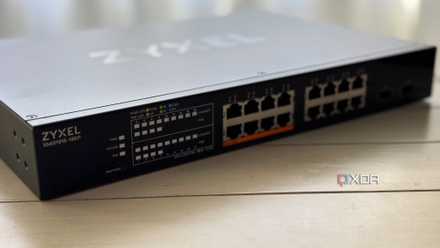
2.5GbE is the sweet spot for most home networks. It's faster than 1Gbps, which may feel slightly limiting with everyone online at once, but it's not overtly expensive nor difficult to implement with more and more hardware natively supporting these speeds. What I initially viewed as some sort of compromise became a large part of the LAN. 2.5GbE would be the link between my switches and wired clients, be it an IP camera or a desktop PC. 10GbE didn't vanish from the map, however.
Though 2.5GbE is more than double the bandwidth of 1Gb networking, it may still prove a bottleneck for trunks between switch nodes. We have three, one in the main house, another in the garage, and a third inside the office. Devices are connected and need to communicate with each other. 2.5GbE should be enough, but it could end up causing strain as more hardware is added, which is why I made the decision to use 10Gb SFP+ fiber links.
It's the perfect mix of practical real speeds with 2.5GbE and impressive bandwidth offered by 10GbE with fiber for good measure. If I didn't have a server, desktop PC, TV, access points, cameras, and other equipment located around the property, we could have likely made do with 2.5GbE for the entire LAN, but our needs differ slightly from those of many homes in that we have clients in different buildings, each requiring a bridge to the primary switch. 10GbE is great here with concentrated traffic flow.

10GbE between my NAS, home server, and PC was an unnecessary upgrade – and I absolutely love it
It may not be for everyone, but I adore my overkill 10 gigabit setup